# Simon Green — sjg.io (full text)
> Full Markdown corpus of every published article on https://sjg.io,
> concatenated for agents and tooling. This is the long companion to
> https://sjg.io/llms.txt (the curated index). Articles appear in reverse
> chronological order; each section carries its canonical URL for citation.
> Views expressed are personal and do not necessarily represent any employer.
# Don't Be One of Them
URL: https://sjg.io/writing/dont-be-one-of-them/
Published: 2026-10-17
Description: Eleven of the twelve pending app updates on my phone tell me nothing about what changed. Your release notes can do better.
Of the 12 pending app updates on my phone right now, 11 have release notes like this.
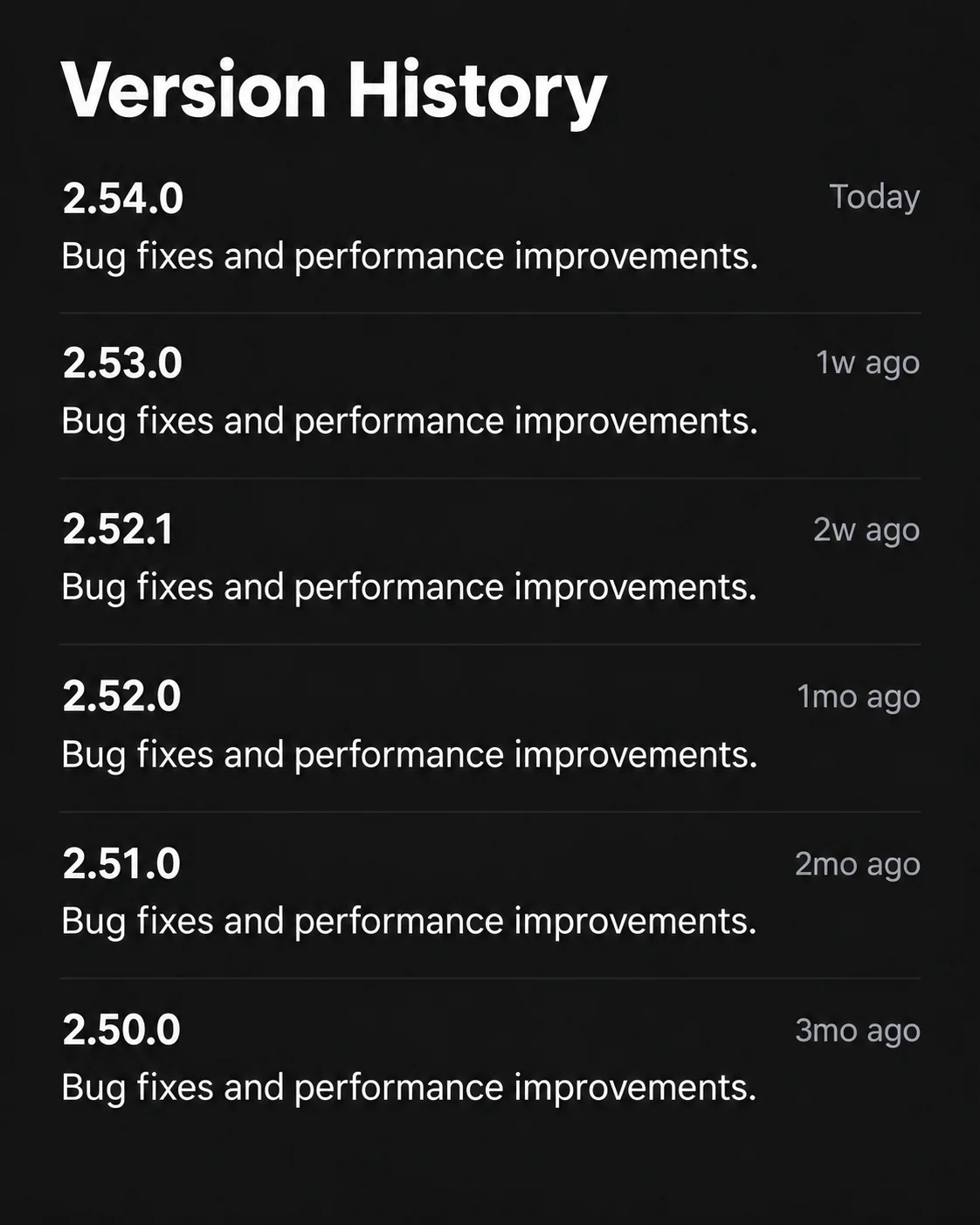
"Bug fixes and small improvements."
Repeated. Every version. For months.
Which bugs? What improvements? Did you fix the thing that's been annoying me, or have you just moved the buttons again?
I'm not asking for your commit history. Give me a couple of sentences about what changed and why I should care.
You did the work. Tell me what you did.
Don't be one of them.
---
# Surely you have ultra-wideband radios on your bins too?
URL: https://sjg.io/writing/binrange-have-you-actually-put-the-bins-out/
Published: 2026-10-03
Description: How I massively over-engineered a trivial problem again because I just can't help myself
Home Assistant already knows which bins (trash cans, for the international readers) are due for collection. It can tell me it's bin night, put the right colours on a dashboard, and send me a reminder. What it can't tell me is whether I've actually done anything about it.
I'm pretty sure most folk would just set a recurring reminder on their phone. As my wife will no doubt tell you, I am not most people. Some would just remember to put the bins out, like a normal person. I'm well aware that I've ridiculously over-engineered this. I'm also so far from normal that six radio-equipped bins seemed like an enjoyable way to spend my evenings ;)
I had an idea a number of years ago to stick cheap Bluetooth tags on my wheelie bins and use an outdoor Bluetooth proxy to work out whether they were nearby. It was frustrating. The batteries drained quickly, the proximity readings wandered about, and the proxy was unreliable in that particular installation. I wanted to know whether a bin had moved. I mostly acquired another thing to fiddle with.
AirTags were what first got me intrigued by ultra-wideband radio, or UWB. Reading more about how it worked brought the bin idea back. Over the last few weeks it's become [BinRange](https://github.com/simonjgreen/BinRange): a fixed radio anchor, six little battery tags, and a Home Assistant setup that combines where the bins have been seen with when they're due. There's a printed enclosure, custom firmware, and wireless updates as well. All of which is a fairly substantial answer to “have you put the bins out?” :D
I leaned heavily on Codex throughout the build. Astra became available part-way through, and I was really curious to see how it would do. What I love about working with AI is how quickly I can take an idea, react to the result, give it some feedback, and have something else to try. There's plenty to write about that in other articles. For now, back to the bins.
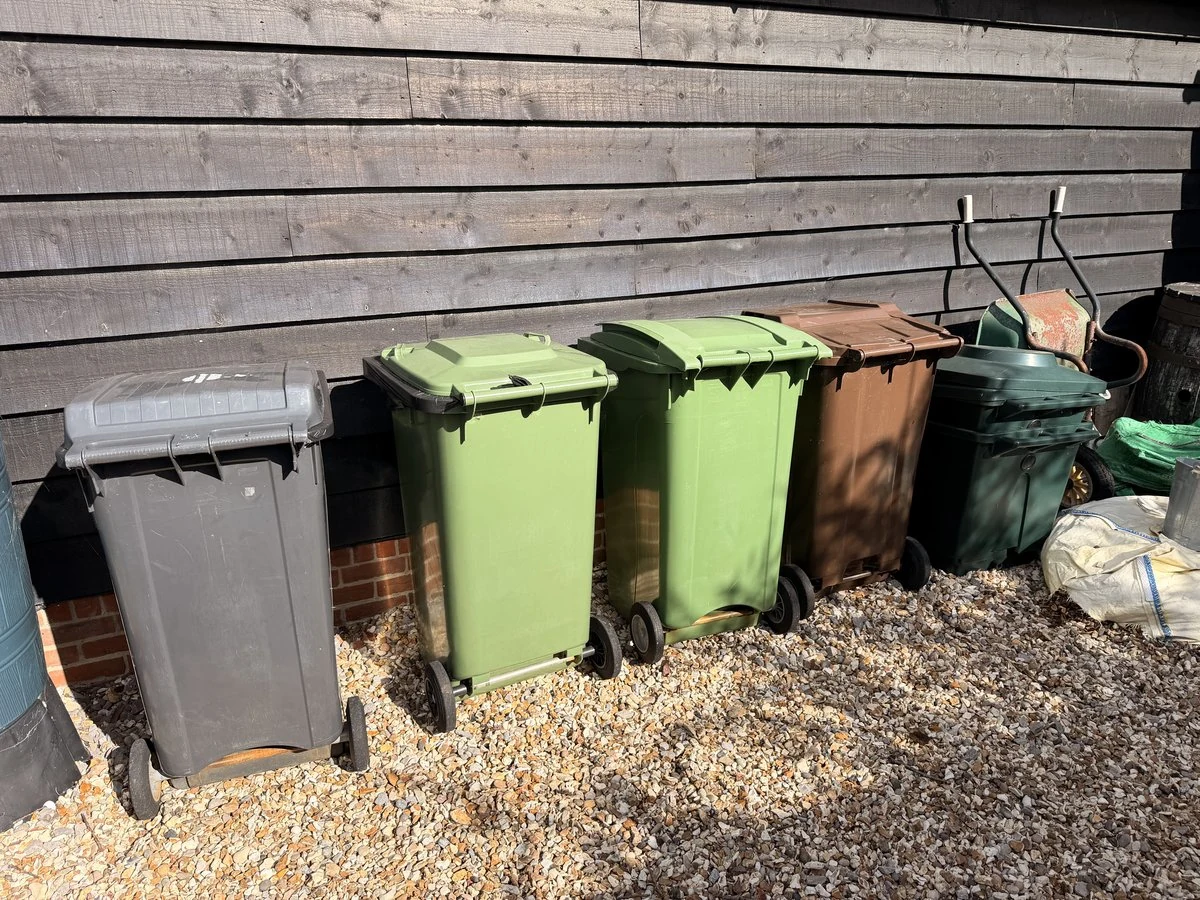
There you go, some bins. Beautiful, right?
## Six bins, several schedules
We have one general waste bin, one food compost bin, one garden waste bin, two recycling bins, and a glass bin. Six bins. At one house. They're not even all on the same collection schedule. I'm grateful that the [Waste Collection Schedule integration](https://github.com/mampfes/hacs_waste_collection_schedule) for Home Assistant scrapes the council's schedules and keeps track of what's due, because keeping that straight is a job in itself.
With the cheap Bluetooth tags, the way to estimate distance was RSSI - received signal strength indication. You measure how strong the received signal is and use that to guess how far away the tag might be. The trouble is that [signal strength](https://www.bluetooth.com/learn-about-bluetooth/key-attributes/range/) depends on far more than distance. Walls, parked cars, reflections, antenna orientation, and differences between the radios and their antennas all affect it. Even battery voltage can affect the [transmit power on some hardware](https://www.ti.com/lit/ds/symlink/cc2541.pdf), depending on how the device is designed. A weaker signal could mean the bin has moved further away, or it could mean something got in the way. It's a very imprecise way to estimate distance, which explained why my original setup was so frustrating.
UWB was interesting because it measures the [time taken by radio signals to travel between devices](https://www.qorvo.com/about/news-events/blogs/ultra-wideband-and-contact-tracing). That gives a distance measurement without having to guess it from signal strength. It still has to get a signal through the surroundings, of course. Choosing a different radio doesn't make parked cars disappear.
I also spent a while detoured into an academic question about how many anchors I'd need to add more dimensions to that awareness. What if I wanted to know the direction as well as the distance from a point? Or the bin's precise location - how many fixed reference points would I need to triangulate it on a 2D plane? Totally not worth it for this job, but tangential thoughts be tangential thoughts.
For the bins, I only needed to know whether each one had moved far enough from its usual storage area to count as Out. One anchor was enough to start testing that. I used a ten-metre boundary: inside is Home, beyond it is Out, when there's a fresh reading. It's specific to my installation, but it meant I could start with one powered board rather than turn the garden into a positioning test range.
## Two boards and a walk outside
The first experiment used two [Makerfabs ESP32-WROVER/DW3000 boards](https://www.makerfabs.com/esp32-uwb-dw3000.html), both powered over USB. Before doing anything clever with Home Assistant, I wanted to see them measure a distance. A local web view let me separate them and watch what happened without needing a USB cable stretched between the two.
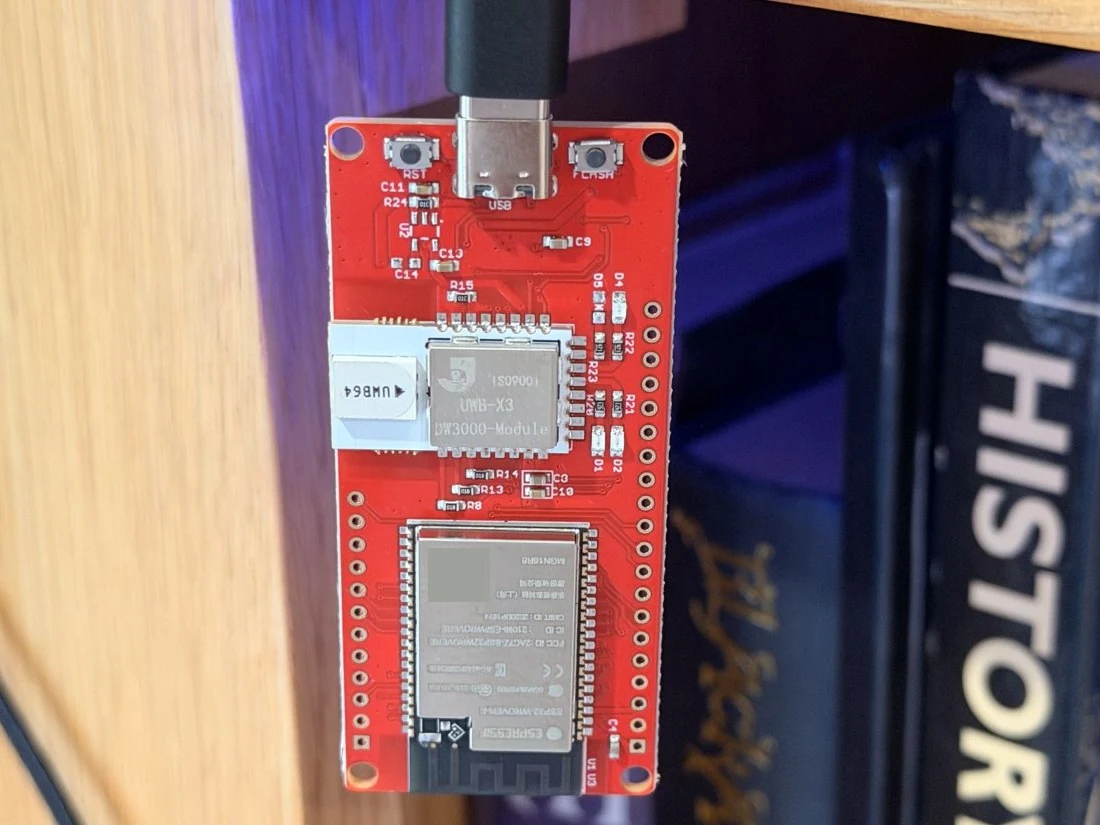
One of the development boards. This is the DW3000 model used in the experiment. [Hardware reference](https://github.com/simonjgreen/BinRange/blob/main/docs/hardware.md).
The antenna orientation made a surprisingly large difference. At about ten metres, changing the boards from flat to upright took the observed success rate from 37% to 100% in that test. A slower radio setting with a longer preamble also worked where the initial fast setting struggled. These were useful discoveries to make before designing anything around the first result.
The first time I calibrated it with a tape measure and watched the reported distance differ from my measurement by less than two centimetres, my mind was utterly blown. Two little boards were exchanging radio signals and agreeing with a tape measure to that degree.
In the later recorded test, a measured gap of 10.1 metres produced an average reading of about 10.09 metres, with a standard deviation of three centimetres. That was encouraging for a project which only needed to recognise a bin leaving a storage area. The under-two-centimetre result was what I saw in that first calibration, rather than a promise of that accuracy for every tag, orientation, or outdoor position.
The outdoor walk was more revealing. Readings were reliable to roughly thirty metres, then intermittent further out. The furthest recorded reading was 37.28 metres, with gaps. A car could block the path completely. Holding a board upright in the open and mounting a little tag beneath a bin rim were clearly going to be different tests.
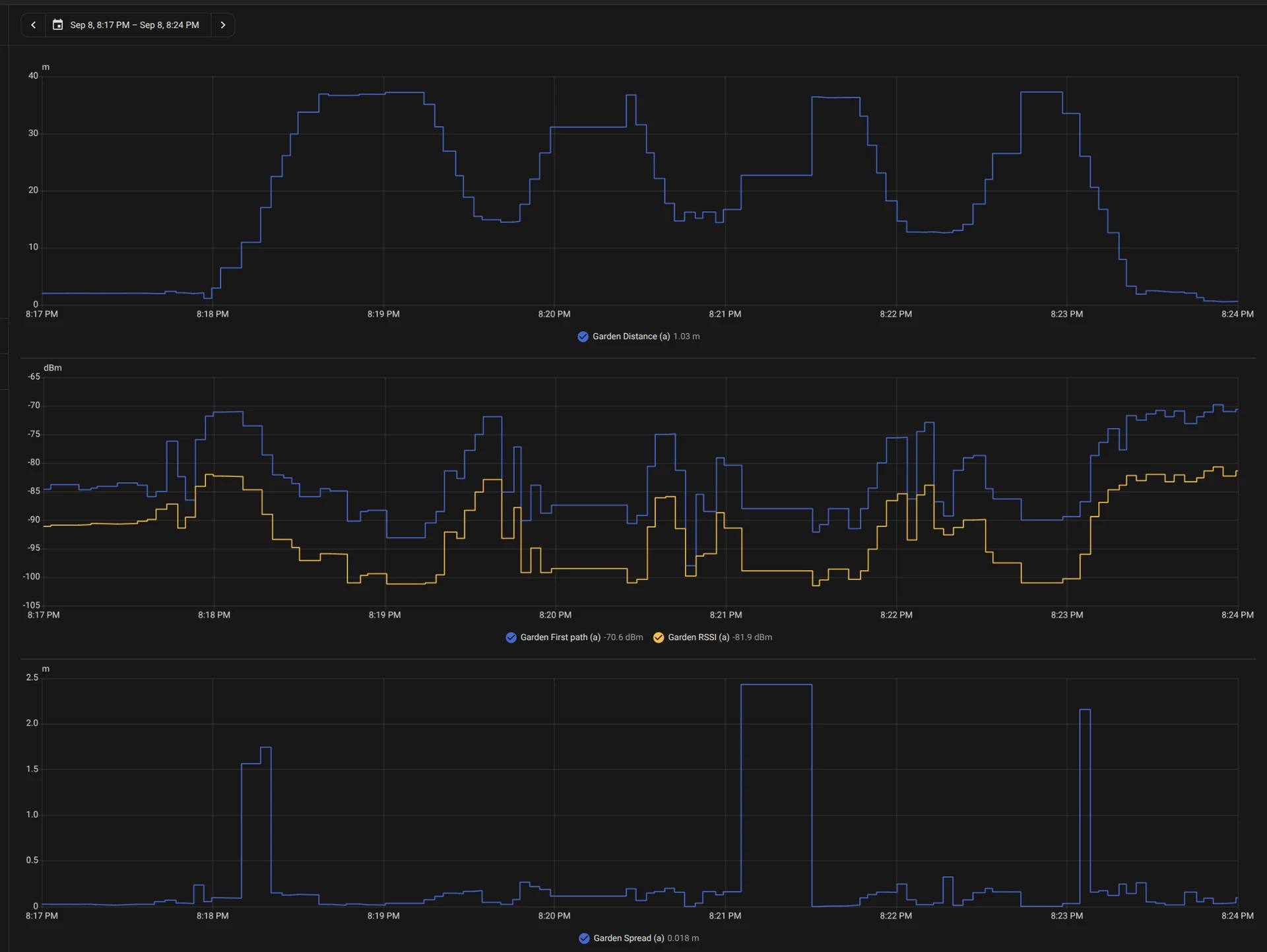
The two-board walk test. It established a useful starting point; it doesn't establish coverage for the installed bins. [Recorded findings](https://github.com/simonjgreen/BinRange/blob/main/docs/findings.md#uwb-link).
The anchor publishes its readings over MQTT, and Home Assistant discovers a separate device for each tag. I considered an ESPHome component, but it wasn't adding much to the arrangement I wanted. There's no extra BinRange server or cloud service, and the radios can keep ranging while Home Assistant or the MQTT connection is unavailable.
## Something small enough to put on a bin
The development boards were useful for proving the link. I didn't want one hanging off every bin, with a battery and an improvised box attached. The bin-side hardware needed to be a small, self-contained puck.
I explored custom tags and commercial ones, with the important question being whether I could run my own firmware and use them with my own anchor. A small UWB tag isn't automatically compatible with another UWB product. The packaged tags I eventually bought were KKM K4Ws, with an nRF52833 processor, a DW3110 radio and a LIS3DH accelerometer. They take removable CR2477 coin cells (which, btw, are some chonky boy coin cells! I've not seen them before, thems fat).
The two Makerfabs boards came to US$123.64 including shipping. Ten sample tags at US$25 each, a programming jig and shipping came to another US$330. Those are what the experiment cost at the time, rather than a current shopping list or the cost of a finished six-bin kit. I suspect I should avoid calculating a payback period.
The supplier said the tags could run my firmware and offered a jig to reach the programming connections. I was far more interested in the hardware they were supplying and knowing that programming access wasn't locked out in some way. None of their existing software features mattered to me. Claims about battery life were meaningless for my use once I was going to be the one deciding when the CPU slept and what woke it up.
I'm pretty familiar with nRF52 devices. I've used them for years, going back to my time at rlab. They make brilliant little [low-power microprocessors](https://devzone.nordicsemi.com/nordic/nordic-blog/b/blog/posts/optimizing-power-on-nrf52-designs), happy to spend most of their lives asleep. If you're clever with your scheduling and interrupts, you can drag these things out for years on a small battery in the right application. That was much more interesting to me than whatever the supplied firmware happened to do.
I used a spare Nesso device as a programming probe for the pogo-pin jig. I started with a development tag, then commissioned the packaged ones one at a time: programme it, establish its identity, pair it, label it, assign it to a bin, and put it back together. There are several identities involved, including the printed label, the chip identity, and the addresses used by the radios.
Side note: the cases the tags were supplied in had seemingly unique serial numbers printed on them, with QR codes containing those serials. Presumably they serve some purpose in the supplier's stock firmware and software. I couldn't find any association with the embedded devices' MAC addresses or similar identifiers, so they were essentially useless to me. Which is a shame really - if they'd been the radio MAC addresses, for example, that would have been useful!
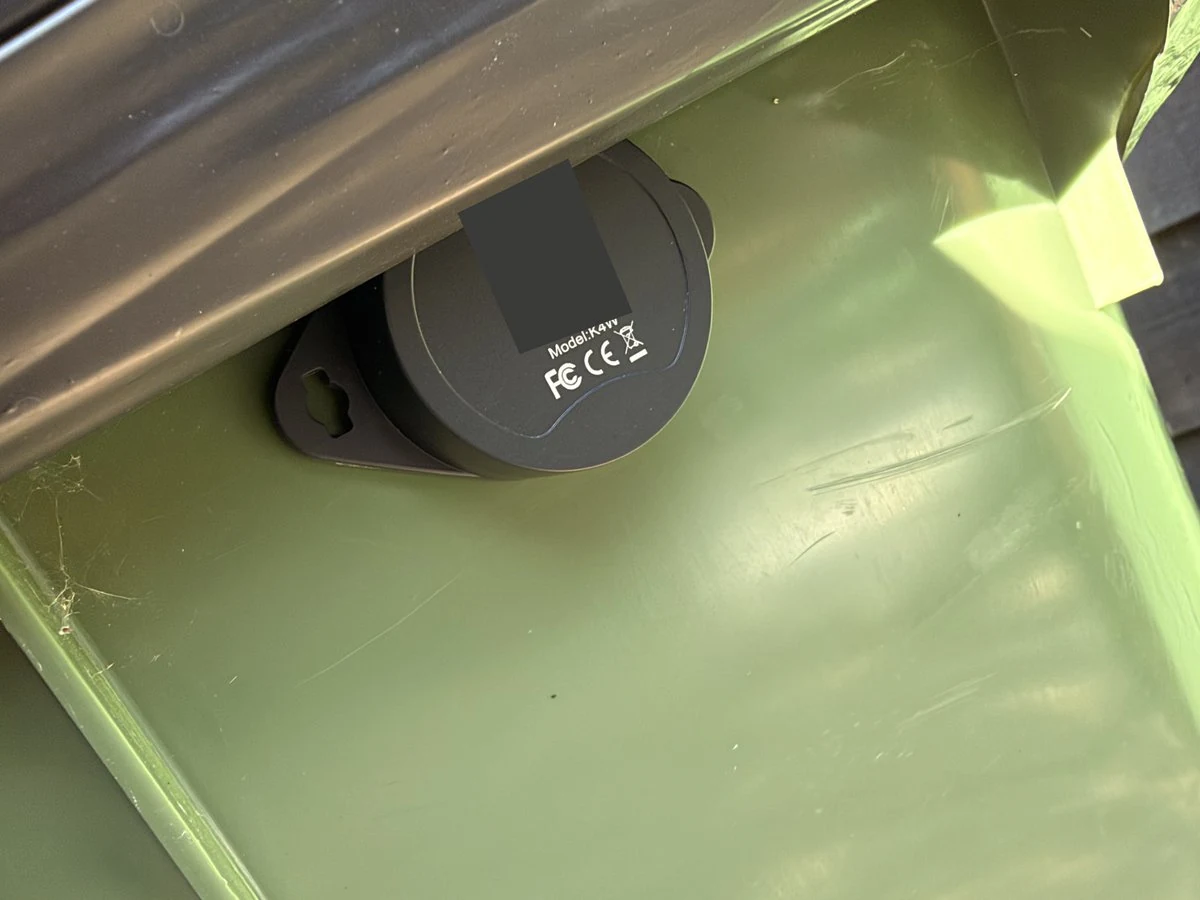

Close-up of the bin tags stuck to the bins. You can see how chonky they are, those batteries are big! They fit nicely under the rim though, which will keep rain mostly off.
The manufacturer had connected the accelerometer's interrupt output to a GPIO pin on the nRF, which is incredibly useful. It means I can let the nRF sleep for very long periods, send no radio traffic during that sleep, and wake it up when a physical event happens. Once things settle down, it returns to occasional check-ins, with the UWB radio sleeping between attempts. The firmware default is ten minutes when stationary; I've since changed the installed fleet to thirty minutes using controls in Home Assistant, while keeping the five-second moving reports.
That should avoid spending the battery repeatedly reporting that a bin is still sitting where it was. How much life it actually buys is something I still need to measure. I'm collecting voltage and activity information, but a short, fairly flat voltage trace doesn't give me a defensible estimate in months or years. I'm definitely not interested in using the majority of the battery's life reporting its own voltage. That seems low value ;)
## Updating six bins without taking them apart
Once a tag is mounted, opening it up and putting it back on the programming jig every time I change the software becomes rather unappealing. The anchor can now deliver signed firmware updates to paired tags over Bluetooth. The previous application is retained so a bad update can roll back, and the system only reports success once the tag is running the exact expected image and has confirmed its own health.
Testing and iterating on this sort of thing is another fantastic use of AI. Codex helped me generate and simulate a whole range of test conditions and failure modes, then work through them to make deploying firmware to one of these things over the air as safe as possible. I tested corrupt images, interrupted transfers, selected power-loss points, and watchdog recovery. I also tested what happened when the anchor wasn't there: the tag needs to confirm that it's healthy without a radio reply, rather than abandon working firmware because it can't reach the anchor.
Going from one tag to several found a different sort of problem. A record in the Bluetooth library had been sized for the number of simultaneous connections rather than the number of paired devices. Adding a further tag could fail even though its keys had been stored. Fixing that meant a new physical tag could pair without clearing the existing ones. Six bins gave the software a better interrogation than one agreeable demo tag.
I've since updated the installed anchor and all six tags wirelessly without re-pairing them or reaching for the jig. I'm pleased about that. Some earlier connection attempts needed retries, though, so I still want more evidence before calling the whole process reliably unattended. The programming probe remains the rescue route.
## The box took several goes
The anchor needed a case, which became its own little project. It started as an OpenSCAD design with screws. The first fit check was promising, but small nuts and bolts, PLA tolerances, and a board that could still rattle made the assembly more annoying than I wanted.
I wanted a case made entirely from printed PLA, with no screws: tapered locating pins for the board, printed springs to hold it down, and a lid that stayed on. The pins and springs worked. The lid could move around all over the place.
An internal lip improved the fit. Deeper catches improved the retention, but I could still pull the lid off too easily. Making those catches as deep as the wall seemed like the obvious next attempt, until both roots broke during insertion. That version was excellent at becoming two pieces of broken plastic.
The better change was to overlap the base and lid walls and use several shallow catches. A couple of tweaks to the locating pins and vents later, I had a case that held the board properly and stayed shut. I was very pleased with it, which probably says something about how many lids I'd pulled off by then.
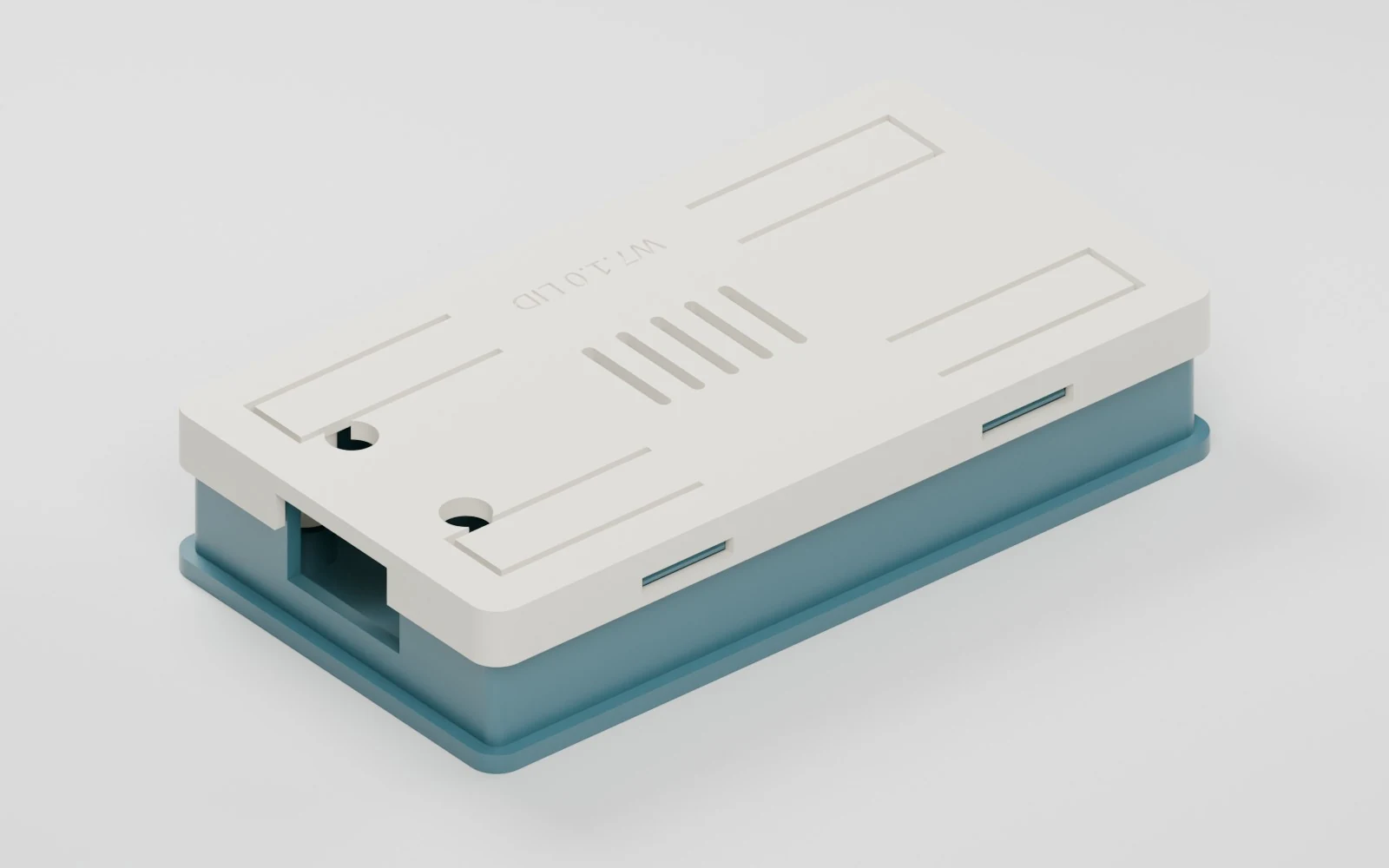
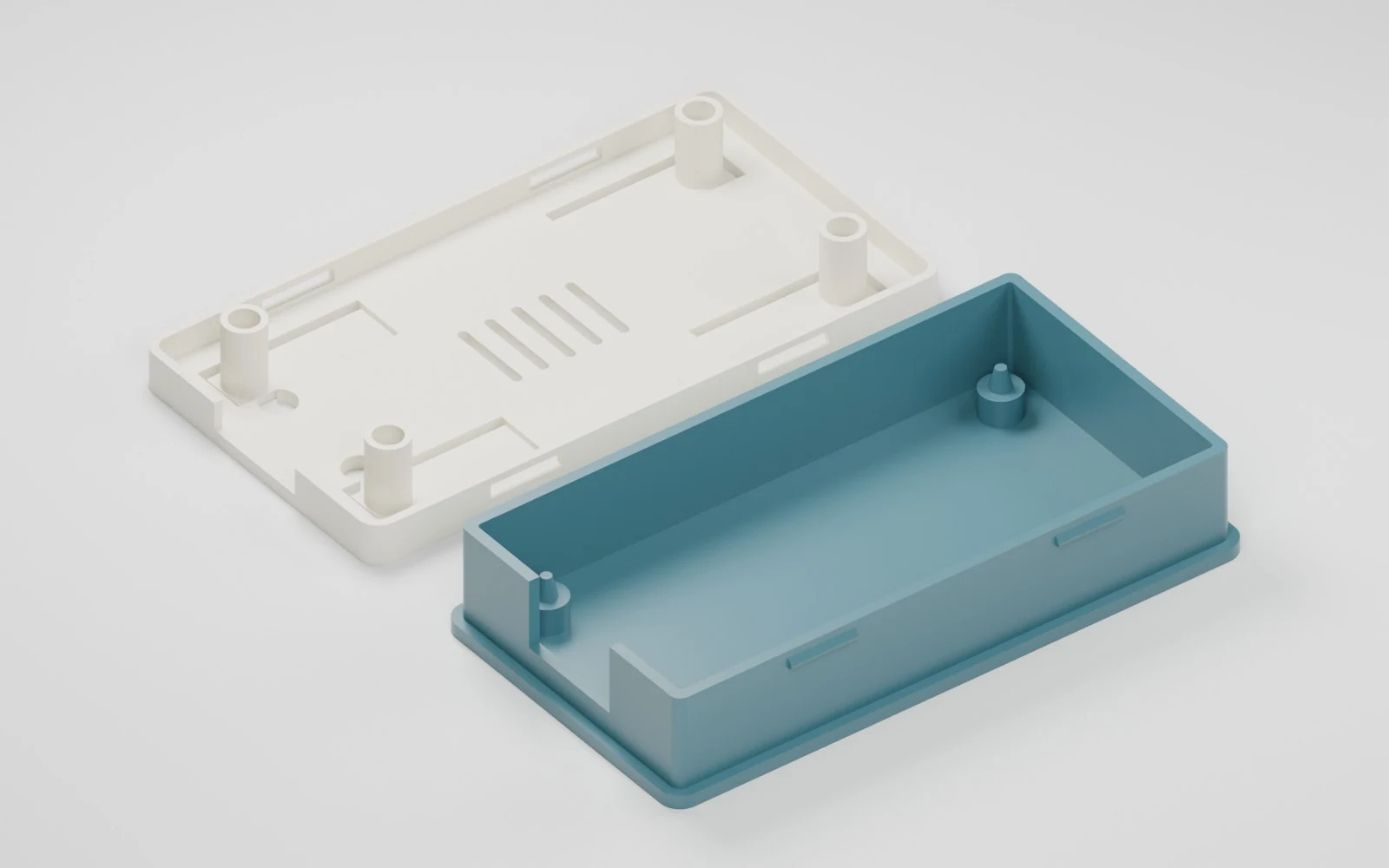
The screwless case, rendered from its print meshes. The colours and finish are illustrative. You can [print it from MakerWorld](https://makerworld.com/en/models/3359320-case-for-esp32-uwb-dw3000-ultra-wideband#profileId-3819313); the [design files and history of the less successful attempts](https://github.com/simonjgreen/BinRange/tree/main/hardware/wrover-case) are on GitHub.
That quick loop with Codex was particularly enjoyable for the case: I could refine the design, inspect it, and print it. I still had to pick up the result and find out whether the lid fell off. A geometry check can establish that two shapes should fit together; it doesn't tell me whether a catch will survive being pushed into place.
The anchor is now wall mounted, with the printed case inside a larger outdoor electrical box alongside its power components. That involved another Amazon order. The relevant bits were:
- A clear-cover outdoor electrical box, listed as IP67 and 8.7 × 6.7 × 4.3 inches (£27.99).
- A DIN-mounted 12V DC power supply (£11.09).
- A [DC-to-USB-C PD module](https://www.amazon.co.uk/dp/B0DGY51T5G) to turn the 12V supply into USB-C power.
- A Type A RCBO, listed as 10A with 30mA residual-current protection (£14.00).
- Three metres of 2.5mm² twin-and-earth cable (£11.99).
- A right-angle USB-C power pigtail with a 25cm lead. I only needed one, but they came in a six-pack (£5.99).
That little USB-C PD module is a pretty cool, unusual device. It takes the 12V feed and provides USB-C Power Delivery. I can see myself ordering another.
Those are the prices on my order, rather than current quotes. A weatherproof box, power supply, USB-C power module, protection, cable, and USB leads for a reminder to put the bins out. I know.
All six bins have their tags fitted. At that point I was feeling fairly optimistic that it was all working.
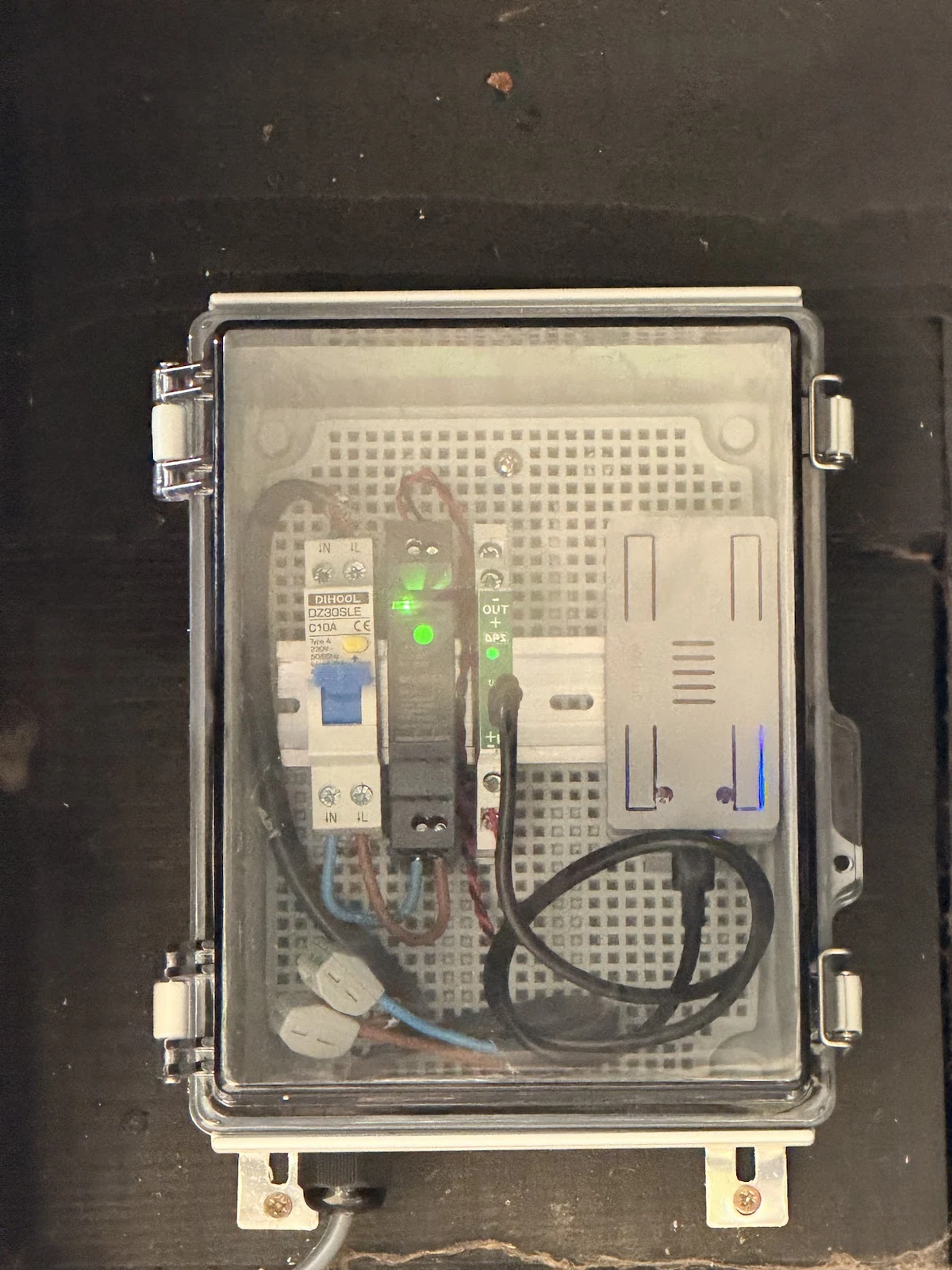
The anchor installed on the wall. The printed board case is inside the larger enclosure. [Installation photograph](https://github.com/simonjgreen/BinRange#the-hardware).
## Reminders and Notifications
The Waste Collection Schedule integration deserves a lot of credit here. Scraping the council's schedule saves me maintaining several recurring dates and remembering which combination of bins is due. BinRange adds physical information about the bins, and Home Assistant puts the two together.
The ordinary dashboard shows the next collection, compact bin states, and anything needing attention. The ranges and radio diagnostics have their own view. I like looking at the technical details, but checking tomorrow's bins shouldn't require interpreting a radio trace.
The reminders are grouped into one message for the relevant bins: at 6pm and 9pm the evening before collection, then a final reminder at 6am if they're still confidently Home. At 6pm the following day there's a reminder to bring back bins still Out. The automation remembers its attempts so a rerun doesn't keep sending the same message.
An unavailable reading shouldn't result in an accusation that somebody forgot a bin. Likewise, the ordinary bring-in reminder only knows the collection was scheduled and the bin is still out. It doesn't know whether the crew emptied it.

Home Assistant notification to put some bins out.
I also wanted a message when the bins had just been emptied. There was an obvious temptation to look at movement, time of day, and the collection schedule and call that enough. Looking back at one collection showed how little those clues could establish when tags stopped reporting for much of the day. A wake counter could tell me there had been activity, but it couldn't tell me who handled the bin or why.
The tags already had accelerometers, so I added a more specific clue. Relative to a calibrated upright position, a sustained tilt beyond ninety degrees records a tip event. The tag keeps that event through a reception gap and reports its age when it next reaches the anchor. Home Assistant can treat a recent tip on a due bin known to be Out as an assumption that it has been emptied.
The first automation checked for pending tips every five seconds. That felt excessive for something that happens a few times a week, so I changed it to an MQTT event flow with a timer that only runs while there's a deadline pending. Qualifying bins are grouped for sixty seconds, with saved state to suppress repeats and support recovery after a Home Assistant restart. Scheduled reminders remain the fallback.

Home Assistant notification that the bins have been emptied and can be brought back in.
## First test in prod
On 28 September I had a Garden collection I could examine properly. The bin started moving at about 7:05am and crossed the ten-metre boundary shortly afterwards. Reports then stopped arriving while it was away. When it reappeared at about 10:25am, it carried a stored tip from approximately 9:27am, and then crossed back into the Home zone and settled down.
The tag had detected and retained the tip. Departure and return were visible. But the tip was about fifty-eight minutes old by the time Home Assistant received it, beyond the automation's thirty-minute acceptance limit. The “just emptied” message didn't send. Other bins had continued reporting, and there wasn't an MQTT failure at the anchor during the gap. I still don't have an established explanation for that tag's lack of reception at the collection position.
That was a useful correction to my optimism. The radio could produce convincing measurements, the tag could detect a tip, and the dashboard could look right, while the phone still missed the emptying notification. Checking a real collection gave me a much better list of what needed attention.
It also changed how I wanted to show a bin that had gone quiet. Originally, an Out reading became Unknown once it was stale. That was cautious, but after watching the bin leave and then lose contact at the kerb, replacing Out with Unknown stopped being very helpful.
The live setup now remembers an observed departure as **presumed Out**, even through lost contact or a Home Assistant restart. Reception health is shown separately. A fresh reading inside the boundary is needed to return the bin Home. If it was last seen Home and then goes silent, it becomes Unknown, because I never saw it leave. Return reminders can use presumed Out; put-out reminders still need fresh evidence that the bin is Home.
That makes the display closer to what I actually know.

## Waiting for more bin days
BinRange is installed and in use. (As I type that, I realise I've seriously pigeonholed this otherwise general-purpose tool 🤔)
There's still some fairly ordinary observation to do: coverage at each storage and collection position, several complete cycles with the right notifications delivered, battery behaviour over weeks, and how the mounting and enclosures cope outside. I also want updates to connect dependably without me retrying. I am not really building this for general consumption by other people, but if others are inspired and want to try something similar, or repurpose any of this, they (or their robot friends) are welcome to.
The [repository](https://github.com/simonjgreen/BinRange) has the firmware, case files, measured findings, and Home Assistant examples if you'd like a look. This is my hobby project, and I'm still finding out how well it behaves outside.
Of course, now I've seen what UWB can do, I'm wondering whether I could put tags on the cats' collars and use four anchors around the house to map where they are. Could I get centimetre-level cat tracking? I haven't tested that, and the bins have already demonstrated how much surroundings and radio coverage matter. But I'm very tempted.
Most people would probably just look for the cat.
---
# Could this finally be Microsoft's moment?
URL: https://sjg.io/writing/could-this-finally-be-microsofts-moment/
Published: 2026-10-02
Description: Copilot's early reputation may be hiding a much stronger proposition. As AI becomes a persistent worker, Microsoft could win the enterprise harness while the labs compete to supply its intelligence.
If your last encounter with Copilot was two years ago, you might have already stopped paying attention.
Those early experiences did real damage to its reputation. People tried something disappointing, decided it was not worth the effort and went back to work. A product does not get a fresh first impression every time the model underneath improves. For anyone who wrote Copilot off then, another Microsoft AI announcement is an easy thing to scroll past.
But I think this one deserves a proper look.
Microsoft's [25 September announcement of Home, Code and Autopilot](https://blogs.microsoft.com/blog/2026/09/25/introducing-the-new-copilot-with-home-code-and-autopilot/) brings together delegated work, software building, a background personal assistant, shared agents, plugins and Office files inside the working experience. It is a broad greatest hits package. And it actually looks good.
The more interesting part is the choice of models. You can buy the working environment from Microsoft without making the same long-term commitment to whichever AI lab happens to be ahead this month.
Could this finally be Microsoft's moment?
To understand why I am asking, it helps to look at how much the question has changed. We started by asking whether AI could give us a useful answer. Now we are asking whether we can give it a job, leave it to get on with that job and put the whole arrangement into a business without creating an administrative nightmare.
That is a different competition. Microsoft might be rather well placed to win it.
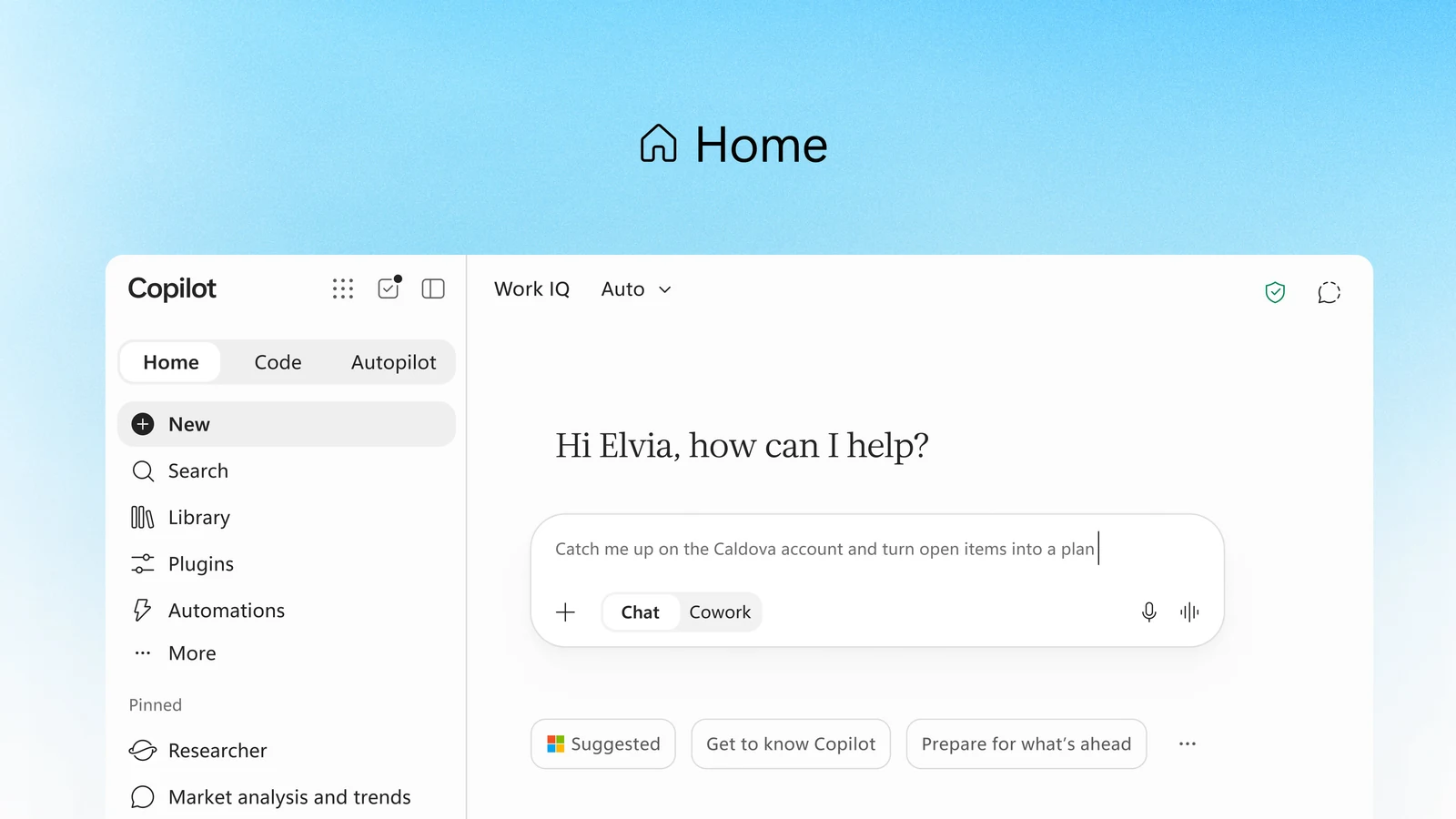
Microsoft's new Home brings Chat and Cowork into the same starting point. Official product image from [Microsoft Copilot](https://www.microsoft.com/en-us/copilot).
## How an answer box became a worker
In June, I wrote about [Gen 5 AI and the enterprise harness war](https://sjg.io/writing/gen-5-ai-enterprise-harness-war/). My argument was that the models were moving ahead of the systems businesses needed around them. We were acquiring increasingly capable intelligence without an equally convincing way to employ it.
I used five generations as shorthand for the changes in how people work with AI. They are not a formal industry taxonomy, and products overlap. They describe the relationship between the person and the assistant.
| Generation | The shape | Archetypal example | What changes |
| ---------- | ----------------------------- | --------------------------------------------------- | ------------------------------------------------------------------------------ |
| Gen 1 | The answer box | ChatGPT at its original launch | You ask. It answers. You carry the work forward. |
| Gen 2 | The custom knowledge box | Custom GPTs | Instructions and documents give the assistant a domain. |
| Gen 3 | The assistant with hands | Internal IT and customer support agents | Tools let a domain assistant investigate and take bounded actions. |
| Gen 4 | The coworker | Claude Cowork | You delegate an outcome involving files, tools and multiple steps. |
| Gen 5 | The agent becomes the surface | OpenClaw, Hermes, ChatGPT Dot and Copilot Autopilot | A persistent agent carries context and responsibilities between conversations. |
The first three generations mostly kept the person at the centre of the machinery. You asked the question, interpreted the answer and decided what happened next. Adding tools made the assistant more useful, but there was usually still a fairly tight boundary around the task.
[Claude Cowork's 12 January 2026 launch](https://support.claude.com/en/articles/12138966-release-notes) made the next shift particularly visible. Describe the outcome and let the system work through much of the process of producing it. The important change was in how much of the job you could hand over.
Then came the continuing worker. OpenClaw and [Hermes](https://github.com/NousResearch/hermes-agent) made that idea tangible: an agent with context, tools and responsibilities that could outlive the conversation in which you gave them to it. Hermes adds its own emphasis on persistence and skills developed through experience.
Imagine asking an assistant to prepare a supplier review. There are documents to collect, people to chase, dates to coordinate and gaps to investigate. The first generation can tell you how to do it. A tool-enabled assistant can help with individual steps. A coworker can assemble a package. A persistent agent can keep the review moving over the following fortnight.
The ambition has moved from answering your question to carrying some responsibility for the work.
I am increasingly comfortable treating that capability trajectory as a given for planning purposes. Individual tasks will fail, and particular workloads will need testing. But models are going to become better at substantial delegated work. Another impressive demonstration of a long task is becoming less interesting to me than the question of how an ordinary colleague will actually use it.
Which brings us to the system around the model.
I call that the harness: the interface, memory, tools, identity, permissions and execution environment that turn intelligence into something you can put to work. A business also needs to distribute it, support it, pay for it and keep control of what it is doing.
That is the part I am still waiting to see properly solved.
## The assistant is still there tomorrow
One sign that this has become a real product category is how many companies are arriving at a similar shape.
[Grok Bot](https://x.ai/bot) takes the teammate approach. Give bots jobs and routines, then let them work together. Its [Team Bots](https://x.ai/news/team-bots) extend that into shared responsibilities and skills for a department.
[ChatGPT Dot](https://chatgpt.com/features/dots/) puts a persistent personal agent at the centre, with its own cloud computer and context that carries between conversations. [Meta Muse](https://about.fb.com/news/2026/09/introducing-muse-personal-ai-agent/) has a dedicated virtual machine and can be reached through an app or WhatsApp. Meta also describes a separate Sentinel checking outbound activity.
[Manus 2.0](https://manus.im/blog/introducing-manus-2-0) brings cloud computers, event-driven automations and a shared Studio workspace. Its Cue agents have concrete resources of their own, including an email address, phone number, wallet and computer.
The OpenClaw and Hermes idea has reached the enterprise battlefield. The names differ, but the continuing worker is becoming recognisable.
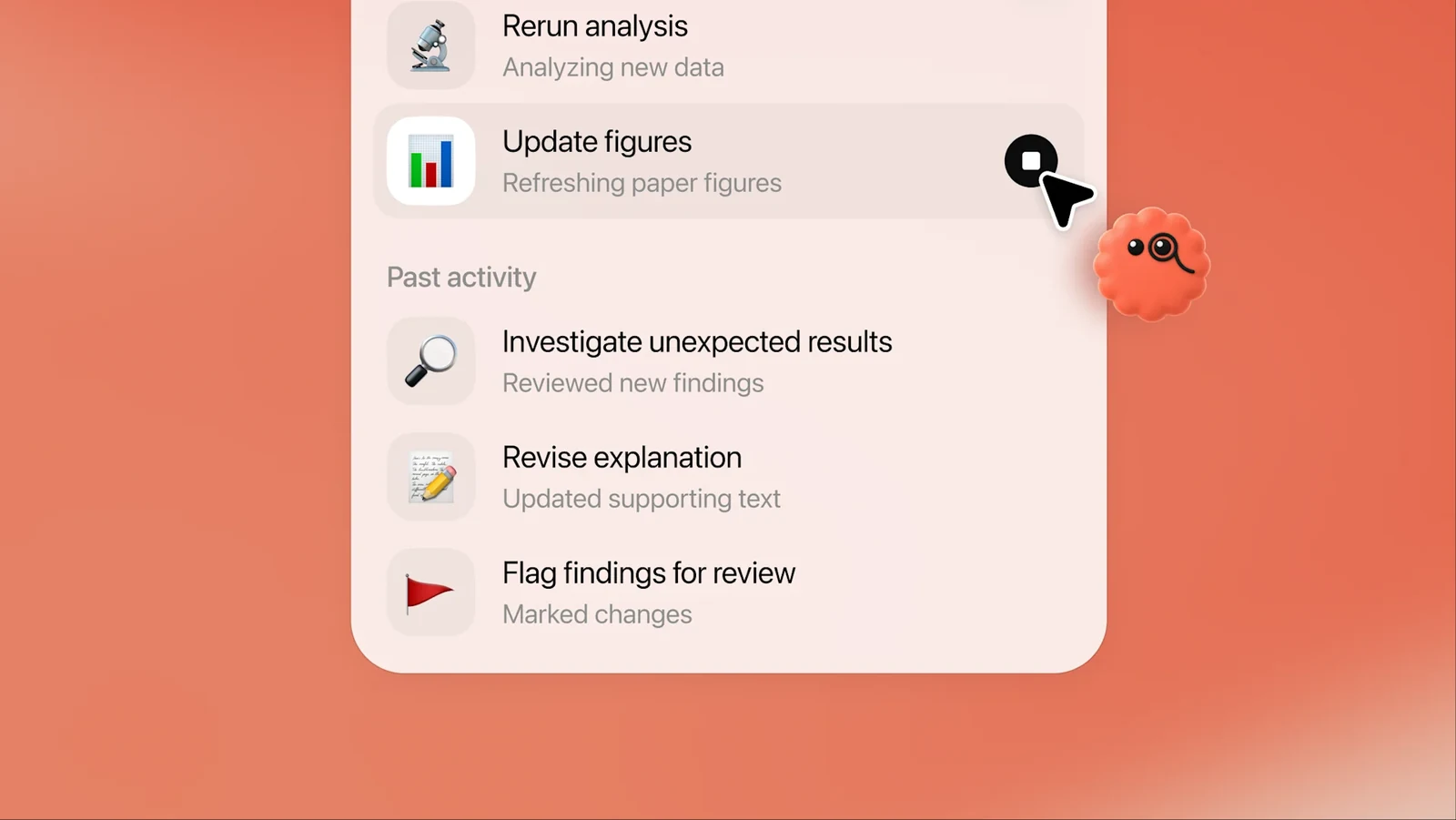
A job that carries on between conversations. Product illustration from [OpenAI's introduction to dots](https://chatgpt.com/features/dots/).
There are really two places that worker needs to live. It needs somewhere to execute, and its work needs somewhere to accumulate.
[ChatGPT Space](https://learn.chatgpt.com/docs/space) addresses the second of those. Pages, files and shared material give people somewhere to inspect, edit and continue the result. A useful document in a team's workspace can become part of how the organisation works. The same document buried in somebody's private chat history is much harder to build on.
Anthropic is also simplifying the relationship. On 16 September it announced that [Cowork and chat were merging into one Claude](https://claude.com/blog/cowork-is-now-claude).
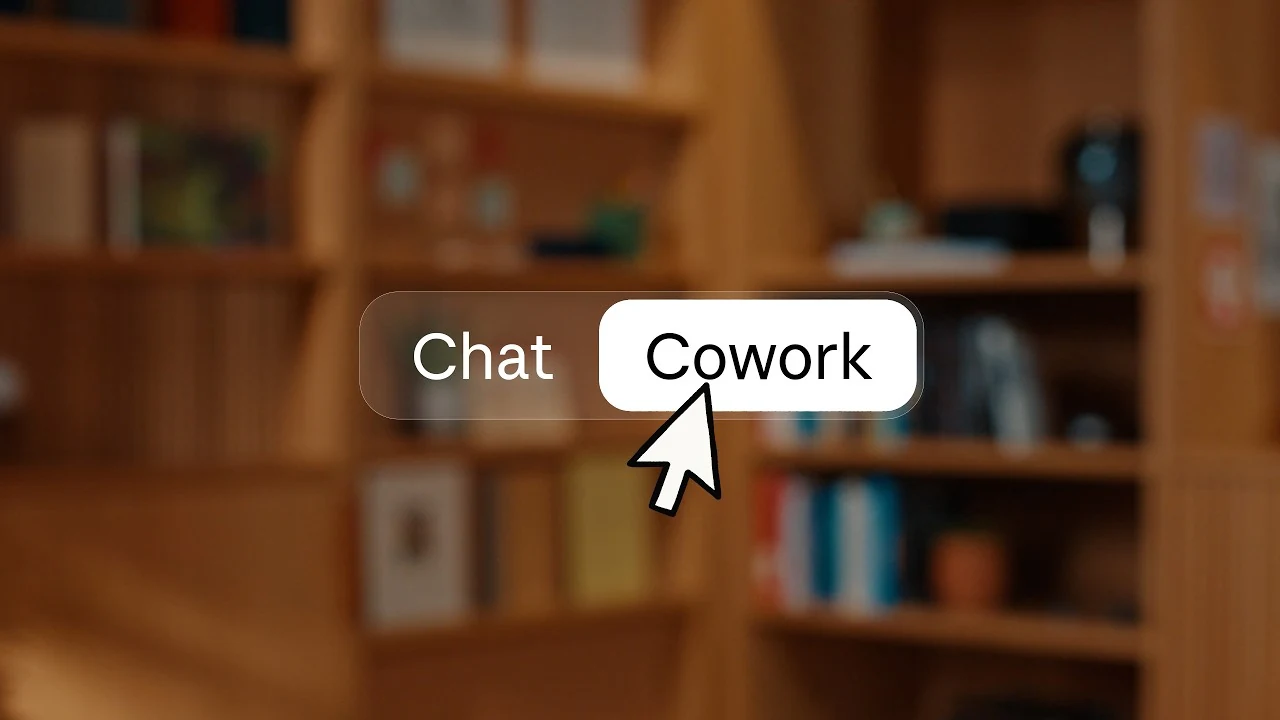
The mode choice Anthropic is removing. Launch-video thumbnail from [Cowork and chat are now one Claude](https://claude.com/blog/cowork-is-now-claude).
That makes sense to me. The person asking for a supplier review should not have to diagnose which internal mode of the product is appropriate. They want the review. The system can decide which capabilities it needs.
The [documentation for that unified experience](https://support.claude.com/en/articles/16761823-claude-cowork-and-chat-are-one-claude) also describes involved tasks continuing in the cloud after you close your laptop. Work needing local files or applications still requires Claude Desktop to remain open, and the rollout starts with Pro and Max before other plans.
The local connection is useful. Depending on a laptop remaining awake is a less convincing foundation for a worker that is supposed to keep going while its owner is away.
There is a small but important change in expectations here. If I ask an assistant a question, I expect to be present for the answer. If I give it a continuing responsibility, I expect the job to survive me going home.
## A computer changes what the agent can do
The applications on Dot's remote machine made this particularly concrete for me.
The machine I was given had QGIS, Blender, CAD and slicing tools, and KiCad for PCB work. That overlaps quite neatly with my interests. I have not established whether that exact collection is standard or whether any of it was tailored, so I would not treat my machine as a published specification for every dot.
Even with that qualification, it is an interesting collection.
This is not hypothetical. I recently built [Garden Ink](https://github.com/simonjgreen/OpenObservatory-GardenInk), an e-ink display showing what my Open Observatory station has heard in the garden. It runs on a Raspberry Pi Zero inside a printed enclosure. The repository includes the OpenSCAD source, printable parts and the assembled device.
I needed a design I could inspect, change and print, with parts that accommodated the real hardware. A plausible picture of an enclosure would have been a very different result. Maps, geometry and electronics have their own applications and file formats. Giving an agent access to those applications makes projects like this a much more useful test of what it can do.

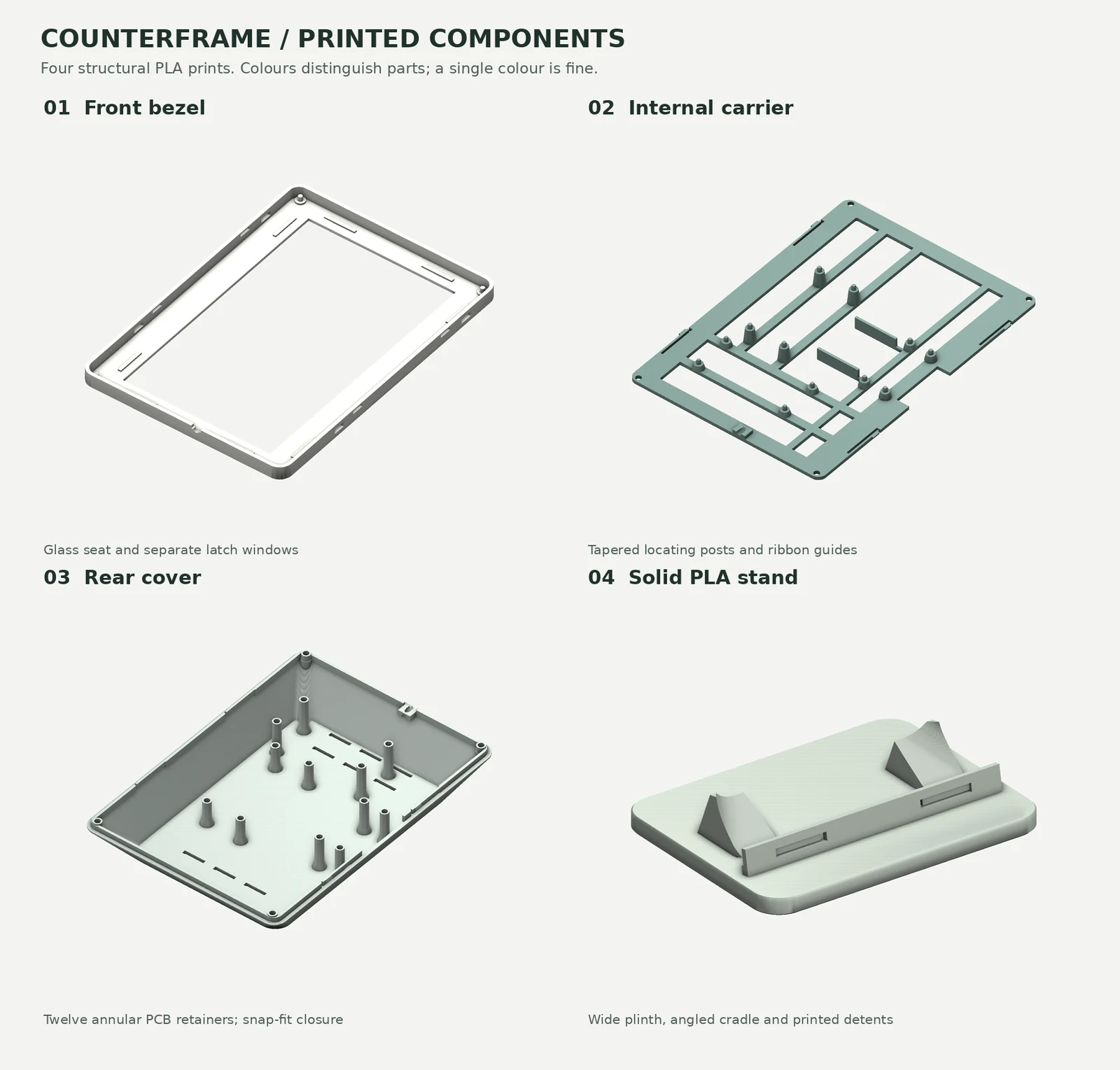
The working Garden Ink display and the parts that became its enclosure. Photograph and CAD render from [my Garden Ink repository](https://github.com/simonjgreen/OpenObservatory-GardenInk#the-frame).
It does not prove that the agent will get the design right. It changes the kind of result the product can sensibly pursue.
This is why I think the computer is becoming part of the assistant's proposition. The available applications help determine which jobs it can do. A useful working environment could extend far beyond documents and web browsing.
It also gives me reason to soften one of the positions in my original article.
I still prefer proper APIs, scoped authentication, events and explicit task state where they are available. But plenty of useful software will remain easier to operate through its interface for a long time. Some specialist applications have a visual interface for good reasons. A managed computer gives that interaction a more credible place in the architecture.
The challenge is to make the access fit the job. A persistent computer with working logins can become a very convenient collection of excessive permissions.
Grok's FAQ offers a good illustration. A user's bots share a persistent computer, including files, browser state and logins. Isolation is per user rather than per bot. Giving two bots separate names and job titles does not necessarily give them separate access boundaries.
It is an easy distinction to miss when the product looks like a team of colleagues. The names are part of the interface. The access boundary is part of the security model.
A business needs to understand both.
## Whose authority is the agent using
Return to that supplier review.
An assistant helping me prepare my own briefing is acting on my behalf. An agent responsible for supplier reviews across the company has a different job. It needs an owner, defined authority and access that does not depend on my personal account remaining available.
That distinction becomes more important as the work becomes persistent.
OpenAI's [specialist dots announcement](https://openai.com/index/introducing-dots/) explicitly describes organisational responsibilities, with each dot having its own identity, credentials and access. Specialist dots are starting in focused enterprise pilots. OpenAI is also developing an integration with Microsoft Agent 365 so businesses can manage them through governance and security controls they already use.
For me, that is one of the biggest tells in this whole set of announcements.
Procurement, invoice processing and customer support are continuing business responsibilities. An organisation needs to know who can change the agent's job, which systems it can use and how to stop it. A personal account with a useful collection of saved sessions is an uncomfortable way to underpin that arrangement.
The Agent 365 integration is still a plan being developed, so its usefulness will depend on the controls that actually arrive. But the direction matters. OpenAI is acknowledging the enterprise operating model, and Microsoft could own a valuable layer even when someone else's agent is doing the work.
I will be watching Anthropic's response closely.
The same authority question appears when agents enter a shared conversation. [Claude Tag](https://claude.com/docs/claude-tag/overview) lets a team hand work to Claude in Slack, with shared channel context and administrator-governed access. Spending limits and activity records help the organisation operate it.
That is useful. I am less convinced that tagging an agent in a busy channel should be the whole working experience. A mention is an entry point. People still need somewhere to inspect the files, steer an ongoing responsibility and understand what the agent is allowed to do.
Anthropic's addition of [personal connectors in channels](https://claude.com/blog/claude-tag-now-supports-personal-connectors-in-channels) makes the distinction more explicit. A person's supervised request can use their personal connectors, while unattended work still uses the shared channel connectors.
Imagine asking for help with something from your own connected account. The ability to reach that information does not, by itself, answer whether everyone in the channel should see the response. Scope of access and audience for the result are separate questions.
This is the sort of detail that makes enterprise administration difficult. It is also the sort that a good harness should make understandable.
Slack's [Code Channels](https://slack.com/blog/news/slack-code-channels-for-agents), part of Slack Code, offer another useful shape. A development job gets a dedicated space where the team and agent can work through plans, changes and previews. The channel archives when the work is done, preserving the record.
I can see that working well when several people are steering an agent building something together. It gives a temporary project a home.
A project worker and a continuing personal assistant are different working relationships, though. One can finish and leave a record. The other needs to carry context and responsibilities across the next job and the one after that. Their ownership, permissions and interfaces should reflect the difference.
A name, a chat window and a cloud computer are a start. The business has to be able to operate the relationship they create.
## Microsoft has put a lot of the pieces on the table
This is why Microsoft's [September announcement of the new Copilot](https://blogs.microsoft.com/blog/2026/09/25/introducing-the-new-copilot-with-home-code-and-autopilot/) changed my view so much.
I have often felt it was following the labs on user experience. The September package still contains plenty of recognisable ideas. What interests me is how many of them Microsoft is bringing together, and what it can put underneath them.
| Copilot component | The familiar pattern |
| ----------------- | ------------------------------------------------------------------------------------------------------------------------------ |
| Code | Build software from a requested outcome, as in Codex |
| Autopilot | A persistent background personal assistant, in the OpenClaw and Dot category |
| @Copilot in Teams | Bring an agent into shared work, as Claude Tag does in Slack |
| Today | A daily work briefing, like [Slack Today](https://slack.com/intl/en-gb/help/articles/51262305668371-Start-your-day-with-Today) |
| Plugin registry | Discover and distribute capabilities, competing with [Claude Marketplace](https://claude.com/marketplace/plugins) |
| Office in Copilot | Conversations and working files together, reminiscent of ChatGPT Spaces |
These are comparisons of product experience. Microsoft explicitly says Code uses GitHub Copilot technology. The Codex comparison is about the class of job it does, not evidence that Microsoft has built it on Codex. The same caution applies to the other resemblances.
[Home](https://www.microsoft.com/en-us/copilot) brings Chat and Cowork together. Microsoft also plans automatic routing between Chat, Cowork and Code. That follows the same sensible direction as Anthropic's unified experience: describe what you want and let the product work out how to do it.
Office makes the proposition more interesting. Microsoft describes genuine Word, Excel and PowerPoint files being edited alongside the conversation, with collaboration and synchronisation back to the Office apps.
For many businesses, those files are already the working material. They contain the budgets, plans, contracts and presentations people need to finish. Bringing the assistant into that environment could remove a surprising amount of friction between an impressive response and something the team can use.
Autopilot, previously called Scout, is the more direct Gen 5 bid. It works in the background with its own identity, memory, computer and workspace in the tenant. In June, [Microsoft described Scout as built on OpenClaw and Work IQ](https://blogs.microsoft.com/blog/2026/06/02/microsoft-build-2026-be-yourself-at-work/).
The connection to the early persistent-agent idea is fairly direct. Microsoft is trying to give it a place inside the enterprise.
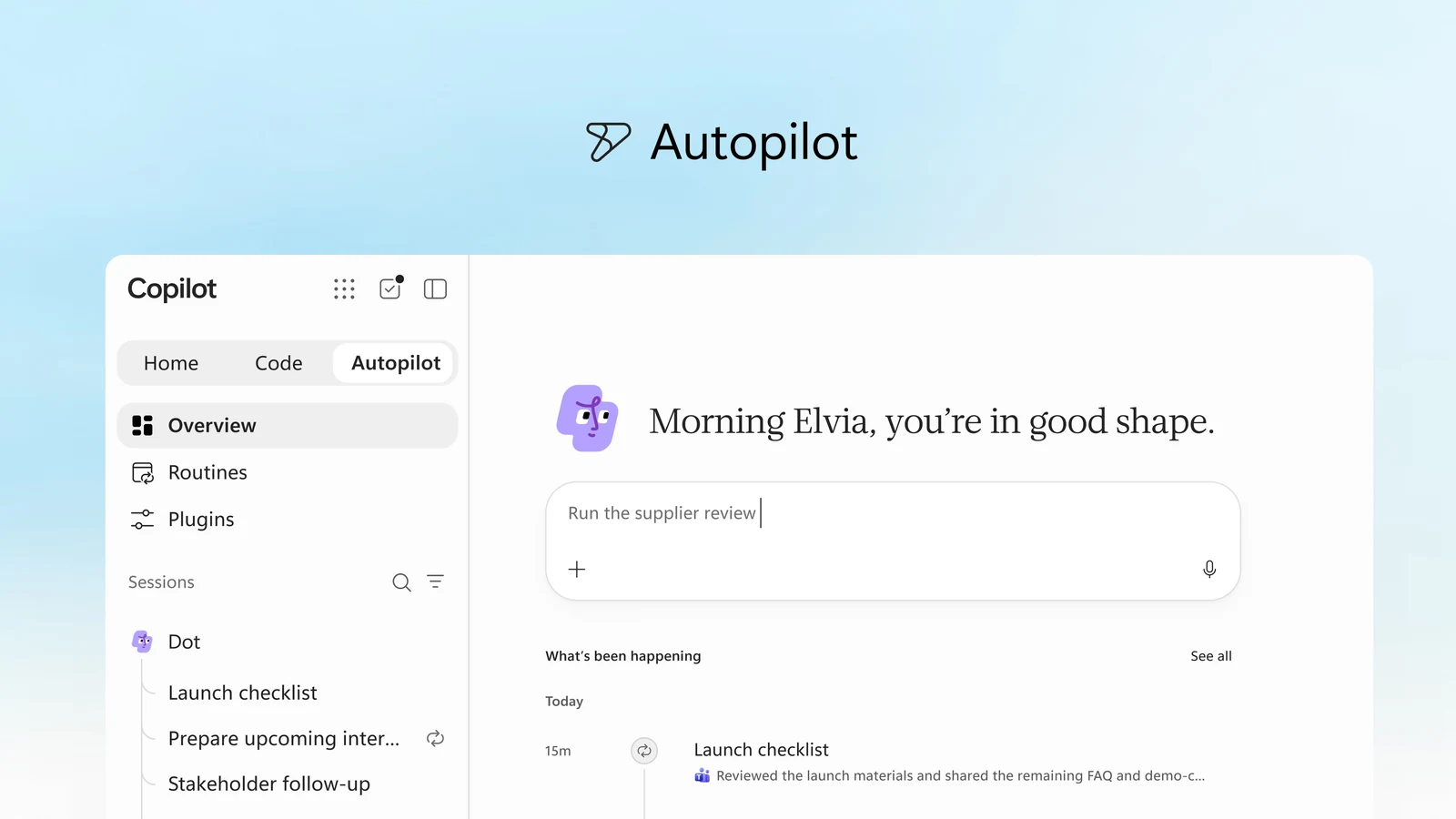
Autopilot gives the continuing worker a home in Copilot. Official preview image from [Microsoft](https://www.microsoft.com/en-us/copilot); Autopilot remains in private preview.
The [plugin registry](https://techcommunity.microsoft.com/blog/microsoft-copilot-blog/introducing-the-plugin-registry---one-place-to-discover-and-govern-plugins-for-m/4559682) tackles distribution, with a common catalogue and central IT approval and management. An organisation should be able to give colleagues useful, approved capabilities without asking each of them to assemble an integration project.
Today and the new @Copilot experience add ways to find and initiate that work. The former resembles the daily orientation Slack is offering; the latter brings an agent into a shared Teams conversation. Useful, familiar patterns, now attached to Microsoft's wider proposition.
There is nothing inherently unconvincing about that familiarity. If someone takes several good ideas and combines them into a product that works properly, the result can be more valuable than another isolated invention.
Microsoft already has the identities, working files, business context, administrative machinery and customer relationships in many of the organisations that need this. It knows where the work lives and has an established route into the company.
The interesting possibility is that ordinary colleagues get the useful parts of several competing products in one environment, while IT gets something it knows how to buy and run.
That is a serious bid for the harness.
It is not yet a demonstrated outcome. Home and Code are in Frontier, while Autopilot remains in private preview. The September announcement puts the new @Copilot experience in Teams into private preview too, with Today due to enter private preview in October.
But this now looks like a product plan aimed at the whole problem.
## The work needs somewhere to run and somewhere to stay
There is another part of Microsoft's proposition that is easy to overlook if the discussion stays on the chat window.
An agent building software needs somewhere to do the building. The software it creates then needs somewhere to live. Those are different problems.
[Windows 365 for Agents](https://learn.microsoft.com/en-us/windows-365/agents/w365a-availability-a365) provides Windows Cloud PCs for agent execution, connected to Entra, Intune and existing enterprise controls. Microsoft's documentation positions it as an execution layer for Agent 365 when the job needs a full Windows session.
That is a concrete answer for work involving awkward enterprise applications. There is a managed computer, an operating environment and a set of controls the IT team already understands.
[Copilot Managed Runtime](https://www.microsoft.com/en-us/copilot/blog/copilot-studio/build-where-you-want-run-with-confidence-now-microsoft-hosts-and-manages-the-code-created-by-copilot/), introduced in public preview, addresses the resulting software. Microsoft describes hosting, identity, governed data access and lifecycle management for applications built in Copilot and compatible third-party tools.
Suppose the supplier-review agent builds a small tracker because a spreadsheet is no longer a good enough way to manage the job. Producing the tracker is only the first part. Someone has to host it, decide who can use it, connect the data and look after it when the original author moves on.
A platform that makes those steps manageable could turn small internal applications into useful outcomes without leaving a trail of abandoned prototypes behind it.
Windows 365 gives the worker a computer. Managed Runtime gives the software a home.
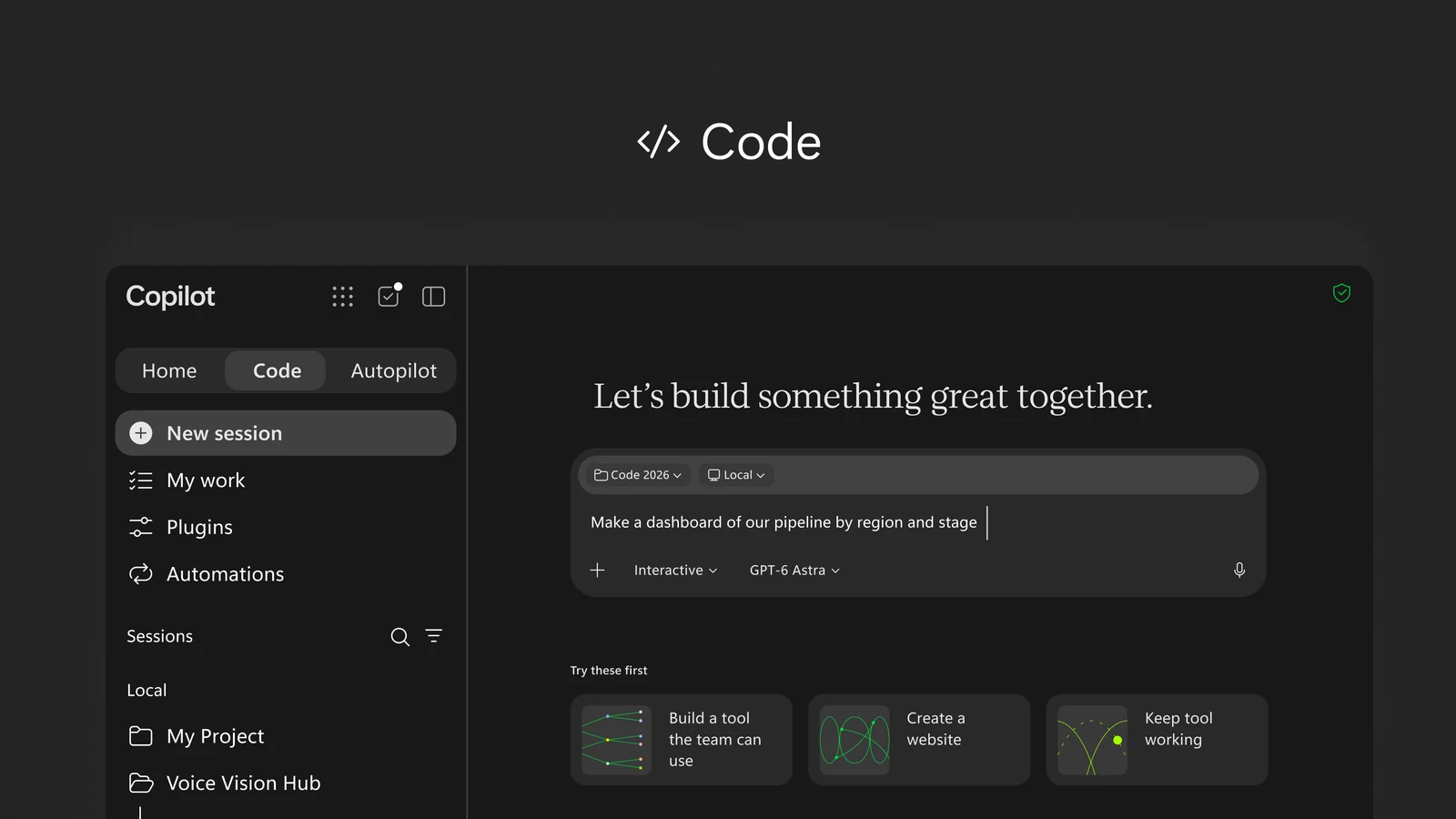
Code is the software-building part of the proposition; hosting and maintaining what it produces is the next problem. Official Code preview image from [Microsoft](https://www.microsoft.com/en-us/copilot).
Microsoft also had an earlier remote-execution product in [Copilot Tasks](https://www.microsoft.com/en-us/microsoft-copilot/blog/2026/02/26/copilot-tasks-from-answers-to-actions). The February research preview described a consumer-facing agent with its own computer and browser for one-off, scheduled and recurring tasks. That is distinct from Scout, now called Autopilot. It belongs in the history of how Microsoft has been approaching background work, rather than being another name for the same product.
Microsoft is not the only company building useful execution infrastructure. [Together Sandbox](https://www.together.ai/sandbox) offers development environments with persistent state, snapshots and hibernation. [E2B](https://e2b.dev) supplies isolated machines for code, computer use and background jobs. [Cua](https://cua.ai) provides computer-use tooling and fleets across Linux, Windows, macOS and Android.
These solve different parts of the problem. A development sandbox, a GUI machine and a managed Windows desktop have different strengths. None is the whole enterprise harness.
Their contribution is still important. Agent builders should be able to buy provisioning, persistence, session handling and recovery as infrastructure. Having every product recreate those foundations would be an enormous waste of effort.
The controls also need to join up. A managed device can have an overpowered agent running on it. The ability to govern the machine does not remove the need to govern the worker's authority.
That connection between the useful computer and the accountable agent is where the enterprise work really begins.
## I want to commit to the harness and keep choosing the model
For all that, the most important part of Microsoft's opportunity may be commercial.
I am quite happy to buy a durable working environment from a provider. A useful interface, reliable execution, context that carries forward, approved tools and administration are worth paying for. I want that relationship to last.
I do not want the same decision to require a prediction about which AI lab will remain ahead for the next few years.
The best model may change by month. It may differ by workload. One provider may be better at a difficult piece of reasoning, another at routine tool use, and another may be sufficiently good at a much more attractive cost. Open weights give the business further options around inference and hosting.
The harness should let us respond to that.
Microsoft's [June Cowork announcement](https://www.microsoft.com/en-us/copilot/blog/2026/06/16/copilot-cowork-is-now-generally-available/) already described Anthropic models at general availability and GPT 5.5 in Frontier. The new Copilot makes model aggregation a much more visible part of the proposition.
That changes the relationship with the buyer. The labs compete to supply the intelligence. Microsoft could keep the enterprise's working context, operating controls and commercial relationship.
It could win the harness business without winning every model benchmark.
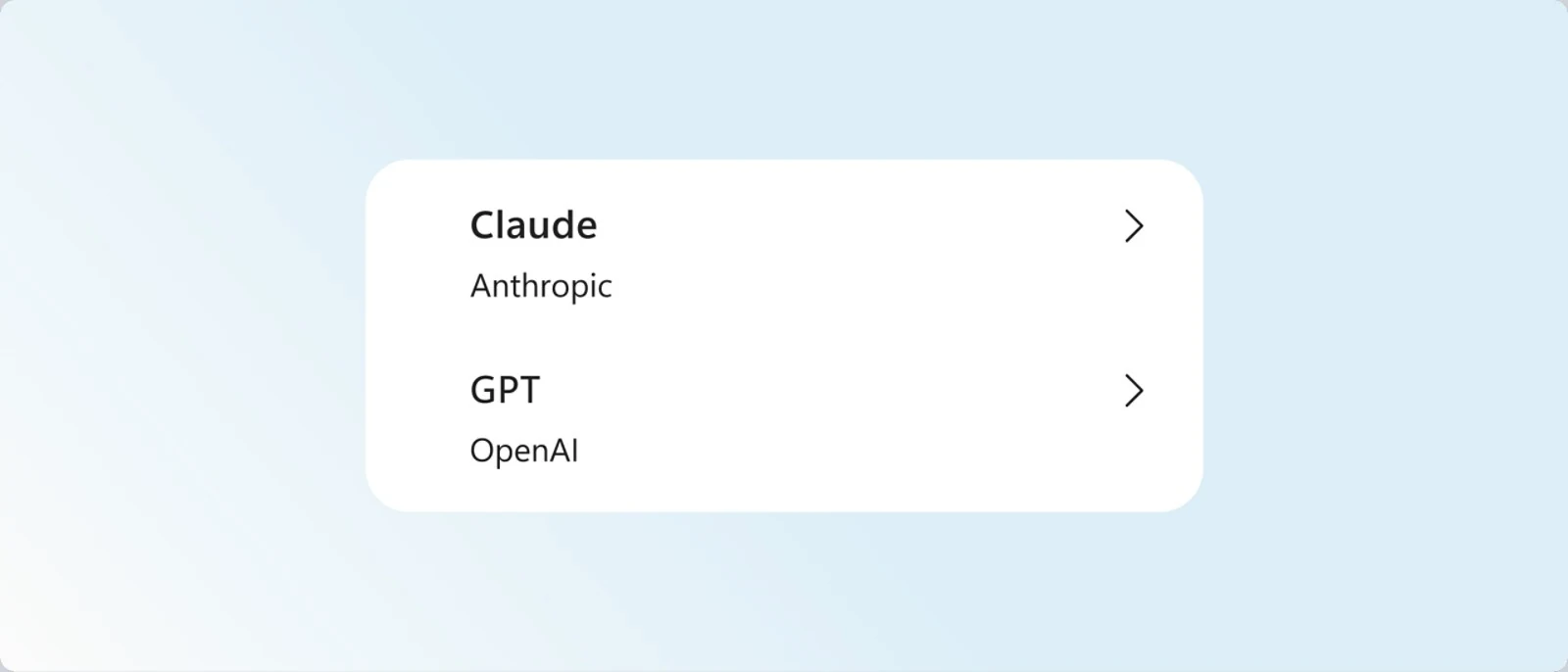
One working environment, more than one model supplier. Model-selection graphic from [Microsoft Copilot](https://www.microsoft.com/en-us/copilot).
This is where Microsoft's breadth starts to look particularly useful. It has its own models as well as relationships with other suppliers. The MAI family is already more than a future promise: Microsoft [announced reasoning and coding models at Build in June](https://blogs.microsoft.com/blog/2026/06/02/microsoft-build-2026-be-yourself-at-work/), and [MAI-Thinking-1 is available in Foundry preview](https://learn.microsoft.com/en-us/azure/foundry/foundry-models/how-to/use-foundry-models-mai-thinking).
Availability in Foundry is not the same thing as availability in the Copilot model menu. I want to see which models become useful choices across the harness, then judge them on the work they do.
I would love to see GLM sneak into that menu. I have not found a Copilot announcement confirming it. That remains a wish, albeit one with a fairly practical basis.
We have been trialling [OpenWork](https://openworklabs.com/) in the office, and it has been fantastic with GLM.
OpenWork is the independent option I am seeing the most promise from. It is an open source desktop harness built on OpenCode, supporting multiple providers and local models. It gives people a usable route into the Cowork experience without first having to assemble terminal tools and configuration instructions.
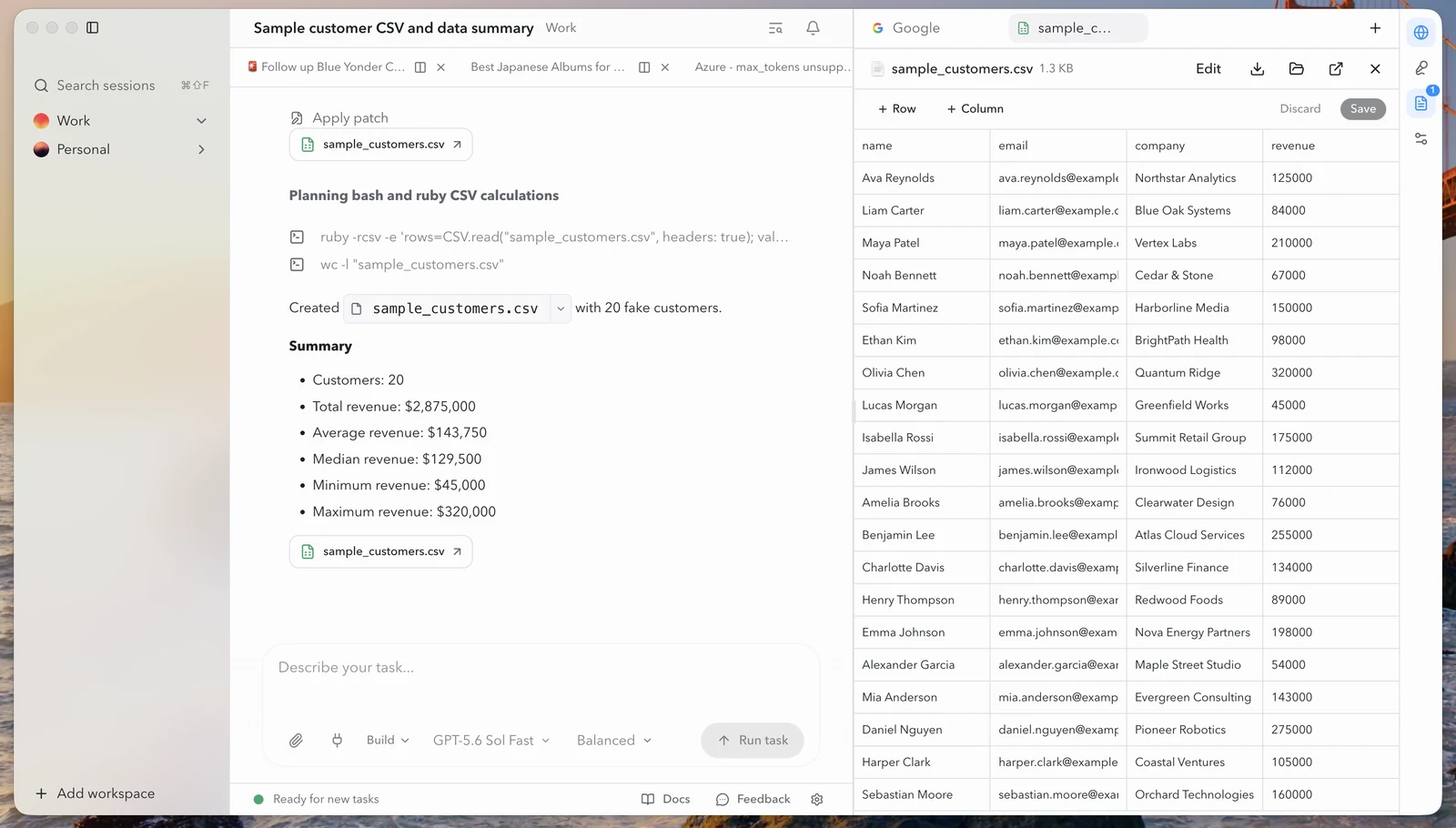
The conversation and the file it produces, side by side. Project screenshot from [OpenWork's repository](https://github.com/different-ai/openwork).
Its [enterprise proposition](https://openworklabs.com/enterprise) addresses the right subjects too: centrally provisioned inference, shared skills and MCP integrations, SSO and provisioning, policies, audit, and private or self-hosted deployment.
Those claims need testing across a real enterprise rollout. A good office trial does not settle the whole operating model. But it does make model choice feel like something we can use, rather than a theoretical freedom we might exercise one day.
Amusingly, OpenWork is also making much less noise in my feeds than some of the larger launches. The practical promise has been easier to see than the public theatre.
Projects like it deserve attention even if they do not become the eventual commercial winner. They make it harder to insist that a good working environment must come permanently attached to one lab's models.
They also expose the remaining gap for open weights.
Downloading a capable model is not the same thing as giving an ordinary colleague a useful assistant. The colleague needs files, tools, skills, sensible permissions and a way to inspect and resume work. The organisation needs to distribute and manage that experience.
The model needs to behave well inside the agent loop too. A good answer in a chat test does not establish that it will reliably choose tools, follow their schemas, recover from a failure and continue the job.
Using open weights does not have to mean running a large model on every employee's laptop. A desktop harness can use centrally hosted inference. The freedom is in choosing the model, provider and hosting arrangement that suit the business.
Our GLM trial makes me more optimistic about that route. It also reinforces the point about the product around the model. A capable model becomes much more useful when people have a good way to put it to work.
I want model changes to become normal operational decisions. Our identities, skills, approved integrations, policies and work history should survive them.
That is more demanding than putting several provider names in a dropdown. Different models use context and tools differently, so switching needs evaluation. Changing the harness itself also needs a route out for the useful state the enterprise has built up.
I am willing to commit to a harness provider. I want that provider to take those problems seriously without turning every model change into a migration programme.
The independent providers also have something to prove here. An enterprise buys support and continuity as well as an attractive architecture. A young company needs to become a supplier the organisation can depend on for years.
Microsoft has an obvious advantage in that part of the buying decision. Its challenge is to make the product deserve the commitment.
## The bill has to make sense
Go back to our supplier-review job once more.
The person asking for it does not particularly care whether the system answers in chat, starts a worker, writes some code or calls a smaller model to classify a document. Those are implementation choices. They will care if one of them creates a surprisingly large bill.
Microsoft's June Cowork announcement put chat and the wider productivity experience inside the subscription, with Cowork adding usage charges. The September announcement extends that usage-based model across Cowork, Code and Autopilot.
There is nothing inherently unreasonable about charging for execution. A worker that runs for hours uses resources. Bringing the interfaces together does not make that cost disappear.
It does make the boundary less obvious to the person making the request.
If the product chooses how to carry out a job, it helps determine what that job costs. It needs to respect the company's budget and explain a material cost before incurring it. Employees should be able to describe an outcome without becoming experts in inference pricing and runtime meters.
Microsoft is announcing more of the controls I have been asking for: spending policies, credit requests through existing approval workflows, model availability by user group and visibility of balances and usage.
Its [Auto model routing](https://www.microsoft.com/en-us/copilot) weighs accuracy, speed and cost. The administrator's choices about model availability shape what it can select.
That deserves credit. The competition will be over the quality of completed work and how confidently the business can budget for it. Whether a button says Chat or Cowork is a much less useful measure.
This is also where the recent attention around decision models belongs.
TypeSafe's [Jev and System One announcement](https://typesafe.ai/blog/introducing-system-one-models-and-jev) has brought the category plenty of attention. Give a model context and defined questions, then obtain bounded decisions or probabilities that software can use. Classification, routing, scoring and choosing a next step turn up everywhere in workflow engineering.
Those are useful jobs. Many of them do not require an expensive general-purpose model to think through an open-ended conversation.
The launch theatre deserves a little scepticism. Founder pedigree and an industry-sounding category name help an announcement travel. They do not establish that using models for fast, bounded decisions was discovered this month.
[Laya's author](https://laya.convaiinnovations.com) points to earlier research from 2025. The current [Laya implementation](https://github.com/NandhaKishorM/laya) offers typed choice, score and yes/no decisions in a single forward pass. That is relevant history, although it does not establish identical architecture or equivalent performance to Jev.
[Kev](https://github.com/jaredpalmer/kev) offers Jev-like decision models you can train and run yourself. [Jeff](https://github.com/firelex/jeff) provides an open decision model with domain adapters.
Jev, Kev and Jeff. I look forward to Trev.
OpenAI's [DevDay recap](https://openai.com/index/devday-2026-recap/) also confirms a Decisions API, initially in limited preview, applying Luna to user-defined questions with finite answers. Text or images can provide context; the results can classify, route or help choose an agent's next action.
The functional territory is already fairly crowded. A business built on owning the category name looks fragile to me. A business with demonstrably better accuracy, calibration, latency or economics can still be valuable. None of these announcements establishes that the alternatives perform equally well.
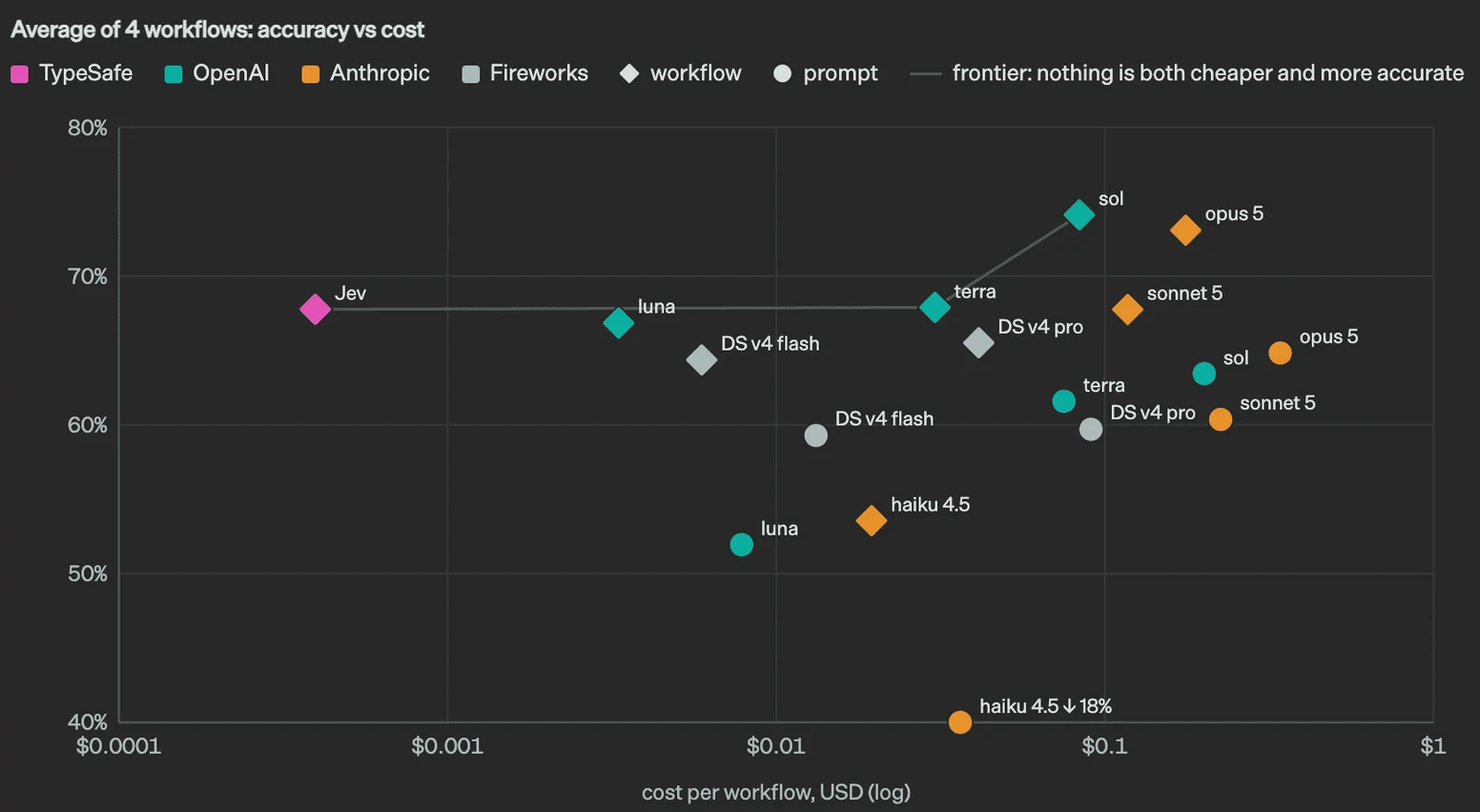
The economic argument in a picture: TypeSafe's own accuracy-versus-cost comparison across four workflows. This is a vendor-published benchmark, not an independent evaluation or a prediction for every workload. Source: [TypeSafe's Jev announcement](https://typesafe.ai/blog/introducing-system-one-models-and-jev).
For the harness, the useful question is where a smaller decision model can do part of the job.
A support workflow might need to recognise a billing issue, choose a queue or flag a case for investigation. A bounded model can handle some of those judgements, leaving a larger model for the difficult work and ordinary code to enforce the process.
There is a trap in saying that a constrained model cannot hallucinate. It may be unable to invent a new label or produce malformed output. It can still choose the wrong valid answer.
A model that can only answer yes or no can still be wrong.
That means confidence needs testing against the actual workload, including unfamiliar cases. Deciding that a refund request deserves attention does not give the model authority to issue the refund. The business's existing permissions and approval rules still apply.
Used well, these models could make the harness faster and cheaper. That contribution interests me much more than the attempt to own a name for it.
A good harness provider should be able to make choices like this on the customer's behalf, then show the customer what they achieved. Model aggregation ought to help optimise the work, not merely expand the selection menu.
## The test is ordinary work
It is tempting to read a large audience or an impressive launch as evidence that the enterprise problem has been solved.
A parent assistant's audience gives a new agent distribution. Downloads show interest. Paid seats show that somebody made a purchasing decision. None establishes that the organisation has successfully put the product into its operating model.
The test is what happens when ordinary colleagues start using it.
Can they find the approved capabilities? Can they understand where the work is, what is happening and when they need to intervene? Can IT support the arrangement without an engineering project for every skill and a security exception for every connector?
Does the supplier-review job survive the employee going on holiday? Is somebody else able to pick it up? Can the organisation change the agent's access and see what it has done? If a model changes, does the existing work carry on sensibly?
Those are mundane questions beside a spectacular demo. They determine whether the product becomes part of the business.
This is what I would consider solved: a working environment that delivers useful outcomes, can be administered through normal enterprise processes and retains the organisation's investment as the underlying models change.
I can identify who owns an agent and whether it is acting for a person or under organisational authority. I can control its tools, distribute approved capabilities, set budgets, inspect its work and revoke its access. The files and context have a lifecycle the company understands.
And I can change the model without starting that relationship all over again.
Dot's governance direction, Anthropic's unified experience, OpenWork's independence and the infrastructure being built underneath all move us closer to that arrangement.
Microsoft's latest announcement raises the stakes because it is trying to put so many of those pieces together, through a supplier with an established place in the enterprise. Model aggregation makes the proposition stronger still. The company that provides the durable environment can keep the relationship while the labs take turns supplying the best intelligence.
That is a valuable business. It is the one I want to buy.
## What I still need Microsoft to fix
We are approaching the state I have been looking for. The remaining gaps are becoming concrete enough to describe, rather than a request for somebody to invent an entirely different product.
First, the administration experience needs to improve. In my experience, managing connectors and plugins in Copilot is still awful. I want a clear view of what is available, who can use it, which tools it exposes and how its permissions are managed. Having the controls somewhere in the platform is only part of the job. The people administering it need to be able to understand and operate them.
Second, I want MCP write actions to work properly in Copilot Chat. Looking up a ticket is useful. Updating it, creating the follow-up and completing the workflow are what make the assistant a worker. Microsoft's [federated connector documentation](https://learn.microsoft.com/en-us/microsoft-365/copilot/connectors/federated-connectors-overview#write-update-and-delete-actions-coming-soon) now says write, update and delete actions begin rolling out in early October 2026, including in Copilot Chat where the connector provides the tools. That is a welcome movement towards exactly the capability I want. I still need to see it available and working with the connectors we use.
MCP itself is capable of exposing write tools. My reading of the remaining restriction is that it is a productisation and rollout decision about where Microsoft makes the capability available. I want that boundary opened up in the everyday chat experience, with the appropriate permissions and approval controls.
Third, give me cheaper models for Copilot Cowork, including capable open-weight options. Consumption billing makes the economics of the agent loop matter. Extra turns, repeated context and the choice of model all affect the cost of getting the job done. I want to use frontier intelligence where the work justifies it and a less expensive model where it is sufficient. GLM would be a particularly welcome addition, given what we have seen with OpenWork.
Improve the administration, make useful MCP writes work in chat and broaden the economical model choices. With those pieces in place, we could really be off to the races.
## Giving Copilot another chance
Which brings us back to the reputation problem.
Someone who dismissed Copilot two years ago has a perfectly understandable reason to be sceptical. An announcement does not undo a bad experience. A reliable product that makes their work easier might.
I am not ready to say Microsoft has cracked it. Several of the important capabilities are still in preview, and the connections between them need to survive daily use. A broad feature list can still leave people doing the work of joining everything together.
But I am no longer looking at Microsoft as merely providing infrastructure underneath someone else's more interesting assistant.
It now has a credible route to providing the whole enterprise harness: a place to work, a continuing agent, useful files and applications, approved capabilities, governance and a choice of model suppliers.
If that becomes one coherent, dependable experience, Microsoft could win a very large part of this market. It would not need to persuade every buyer that its own model was the cleverest. It would need to make the intelligence the business chose useful and manageable.
The Copilot people remember may be obscuring a much stronger proposition.
We are getting close to the enterprise harness I want to buy. If Microsoft can finish the job and make it straightforward to operate, this could finally be its moment.
---
# A Little Japanese, Every Time You Walk Past
URL: https://sjg.io/writing/japanese-vocabulary-on-the-trmnl/
Published: 2026-09-26
Description: My wife quite liked TRMNL's Japanese vocabulary plugin, but wanted a few things changed. Building Kotoba for her has been one of my favourite uses of AI.
My wife was quite liking the Japanese vocabulary plugin on our TRMNL. Having a word sitting there to look at as she went about her day was useful, but there were a few things she wanted changed. The pronunciation, the choice of words, how they were presented, how often they changed. Fairly specific requests from someone actually trying to learn Japanese, which is a much better starting point for a project than me deciding what someone else ought to find useful.
The result is [Kotoba](https://github.com/simonjgreen/trmnl-japanese-vocab), a Japanese vocabulary flashcard plugin for TRMNL. It's become one of those little home projects that makes me unusually happy, because the person I built it for uses it and loves it.

*Kotoba in use at home, with the pronunciation above the kanji and the learning levels along the bottom.*
I should probably declare my enthusiasm for the hardware before going any further. I love the TRMNL and TRMNL X devices. We now have three of the smaller originals and three of the X devices around the house, doing various jobs. Six might sound excessive, but apparently my response to finding a useful e-ink display is to find five more uses for it :D
What I like about them is having information available without having to go and fetch it. You can glance at a display, take in whatever is useful, and carry on. There's no need to unlock a phone and risk discovering three unrelated things that suddenly seem more urgent. Japanese vocabulary fits that sort of interaction rather nicely: a small opportunity to practise, already sitting in the room.
The [stock Language Learning plugin](https://help.trmnl.com/en/articles/10302173-language-learning) had already demonstrated that this was useful. It gives you a word and an example sentence, with a new word every 24 hours. That was a good starting point. I wanted to keep the simplicity while making the Japanese cards work better for my wife.
The most obvious change is **furigana**: the small phonetic characters above the kanji that tell you how to read them. Putting the reading directly above the relevant characters makes the relationship much easier to follow. Your eyes can stay with the word, with its pronunciation right there where you need it.
There is a little more to getting that right than putting a second line of text above the first. In 取り除く, for example, と belongs above 取 and のぞ belongs above 除. The り and く stay as they are, without extra annotations. Some readings belong to a group of kanji and need to stay together; words written entirely in kana don't need furigana at all. Kotoba uses precomputed reading segments to preserve those relationships. It's a small visual detail that was central to the whole reason for building it. The [design notes](https://github.com/simonjgreen/trmnl-japanese-vocab/blob/main/docs/visual-design.md) go into the fiddly bits.
There's plenty of vocabulary to grow into: **8,289 words across N5 to N1**, the five Japanese Language Proficiency Test levels, with example sentences for roughly 88% of them. There is a concise English meaning alongside the word, and the Japanese example gives you a chance to see it used in context. An English translation of the example is optional in the full layout, so you can decide how much help you want on screen. The original already had sentences; here I wanted a broad pool of material with control over what you encounter.
You choose a learning level, and it includes the easier levels as well. Set it to N3 and you'll see N5, N4 and N3 vocabulary, so moving up doesn't mean abandoning the words you've previously learnt. The bottom of the card shows that range and underlines the level of the current word. I like that you can tell where something sits without having to look it up. Those level assignments are community estimates, as the [repository explains](https://github.com/simonjgreen/trmnl-japanese-vocab#about-the-vocabulary), so they're useful guidance rather than an official exam checklist.
I also cared about the fonts and the space around them. The Japanese text uses a sans-serif font stack that prefers Noto Sans CJK JP and Noto Sans JP, with Japanese fallbacks, and the text is explicitly marked as Japanese so the renderer can choose the appropriate character forms. The word gets the largest type, the reading sits above it at a smaller size, and the meaning and sentence follow beneath. Longer words get smaller type so they still fit on one line. The [font choices and sizing](https://github.com/simonjgreen/trmnl-japanese-vocab/blob/main/src/shared.liquid) are there to make the thing comfortable to read on an actual display across a room.
That layout scales for both the original TRMNL and the X. It also adapts to the smaller areas you can give a plugin: a quarter-screen card keeps the word and meaning, for example, because squeezing a sentence into whatever space is left wouldn't help anyone. Having six of these devices is quite a good way to become fussy about whether something looks right at different sizes.
The frequency is another substantial difference. The stock plugin changes daily; Kotoba selects a card in ten-minute time slots, with a fifteen-minute device refresh recommended in the setup instructions. The distinction matters because selecting new data doesn't itself refresh the physical screen. In practice, it gives the display fresh material throughout the day, while leaving a word there long enough to spend a moment with it. More frequent refreshes do use more battery, but for this use I like the trade-off.
Underneath, it's a pleasingly modest arrangement. The vocabulary and readings are prepared in advance and served as static files from GitHub Pages. The plugin fetches the card for the selected level and current time slot. There isn't an AI generating Japanese each time the screen changes; the [data comes from dictionary and example-sentence sources](https://github.com/simonjgreen/trmnl-japanese-vocab/blob/main/docs/data-sourcing.md), including JMdict and Tatoeba.
AI's contribution was helping me turn the idea into working software, and then keep improving it. I love how short that loop has become. I can take a request like this, make something we can actually look at, find out what needs changing and turn another version around while the problem is still fresh in my mind. The frequency with which I can do that, and frankly the quality of what I can produce, still surprises me. It makes spending time on the pronunciation placement, the font sizes and the behaviour of a particularly long word feel entirely reasonable for a project with one intended user.
There's something lovely about making something for someone that changes a little part of their daily life. My wife wanted a better way to practise her Japanese on a display we already owned. Now there's a thing in our house that does that, shaped around what she finds useful, and I can keep adjusting it as she uses it. I get a lot of satisfaction from that.
The [code and setup instructions are on GitHub](https://github.com/simonjgreen/trmnl-japanese-vocab) if you'd like some Japanese on your TRMNL too. One device is plenty to get started, whatever the evidence from our house might suggest.
---
# OpenObservatory: I've Been Listening to the Garden
URL: https://sjg.io/writing/openobservatory-listening-to-the-garden/
Published: 2026-09-26
Description: A few months of tinkering with birds, bats and a Raspberry Pi, and now an illustrated e-ink display for the kitchen.
I've been working on a project called [OpenObservatory](https://github.com/simonjgreen/OpenObservatory) for the last few months. It started with me lying in a hammock, using Merlin Bird ID to work out what was singing in the garden, and thinking it'd be nice if something was doing that all the time. This is apparently what happens when you leave me alone in a hammock with a phone. I find a way to give myself more things to fiddle with :D
Merlin was the starting point because being able to put a name to something you can hear is lovely. There's a whole lot going on outside that I either don't notice or have no idea how to identify, and holding a phone up for a few minutes only tells you about those few minutes. I wanted to know what was happening when I wasn't there listening. Early in the morning, overnight, or just while I was getting on with something else.
The result is a Raspberry Pi 5 and an AudioMoth USB microphone listening to the garden continuously. OpenObservatory keeps a record of the sounds it detects, tries to identify them, and keeps audio clips where appropriate so I can go back and listen. It all runs locally, which I'm pretty pleased about. Once it's set up with the models it needs, the listening, identification and looking back through the results work without an internet connection.
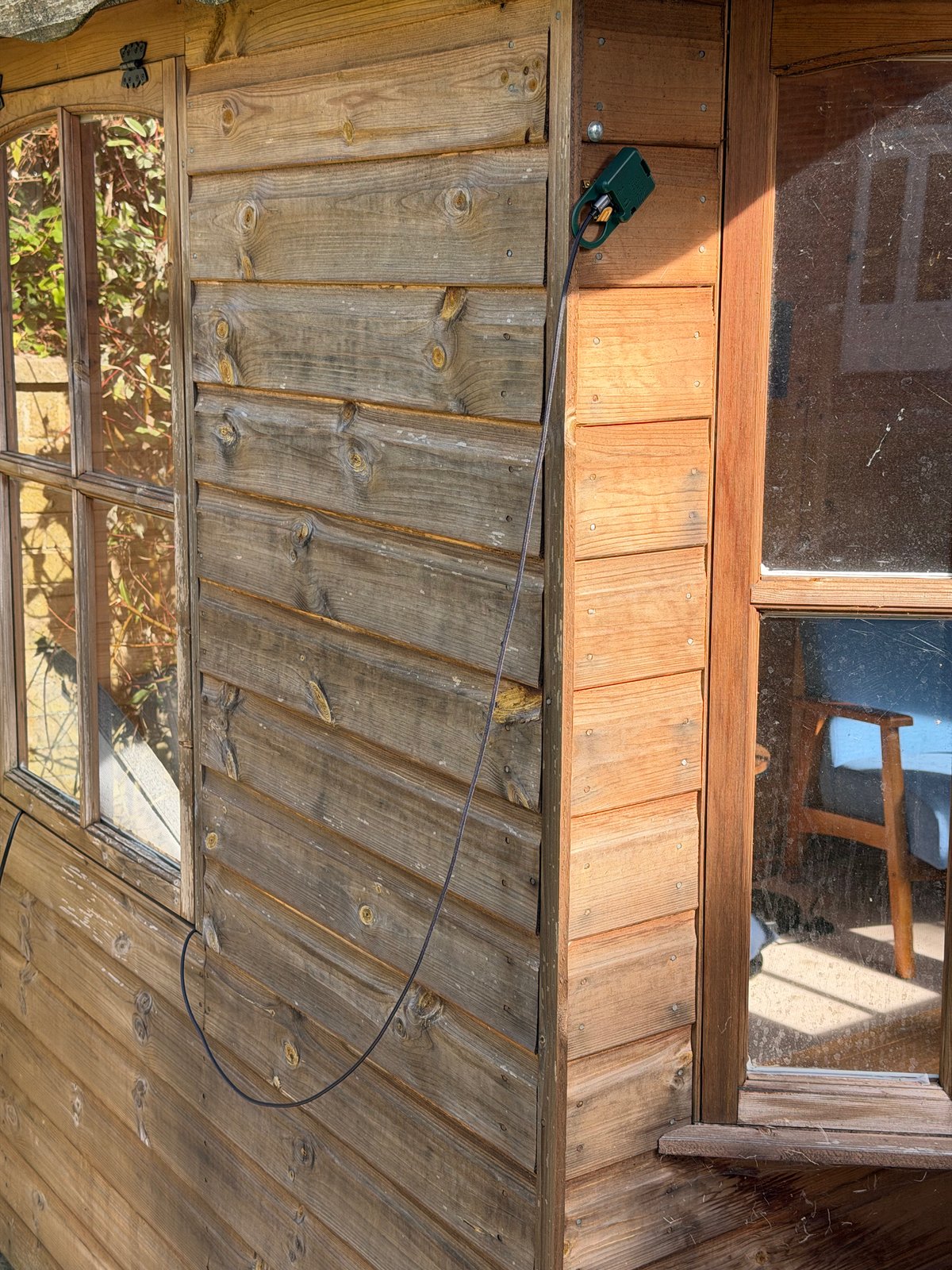
*The microphone hanging on the summer house, getting on with the listening.*
Bird identification uses BirdNET, so I should be clear that I haven't spent the last few months teaching a neural network what a robin sounds like. There are people who have already done that work, and done it far better than I could. My bit has been putting the pieces together into something that can sit there unattended, keep useful evidence, and let me see what it's been up to.
Then there are the bats. The microphone captures at 384 kHz, which gives it enough range to hear the ultrasonic calls as well as the birds. An ordinary audible stream is derived from the same recording, so both sides can work from one microphone. The live bat detector picks up passes and their frequencies; identifying an exact species from that is a much bigger claim, and the software is deliberately cautious about making it. Some of the labels have question marks. Those are there for a reason!
One of the bits I particularly like is being able to listen back to those calls. Obviously playing ultrasound through laptop speakers isn't going to get you very far, so it can slow the recording down into our hearing range, or shift the frequency down in the way a handheld bat detector does. You can see which treatment you're listening to, and the original recording is still there. There's something very pleasing about getting access to a bit of the garden that's normally completely inaudible to me.
The browser view has the live detections and those scrolling spectrograms that I could probably spend far too long watching. It also lets me go back through last night, the dawn chorus, or previous days, and open a detection to inspect it. Further out, there are views of when the bats are active relative to sunset, how the birds' activity changes with the daylight, and which species are being heard over the weeks. That's where leaving it running starts to become interesting.
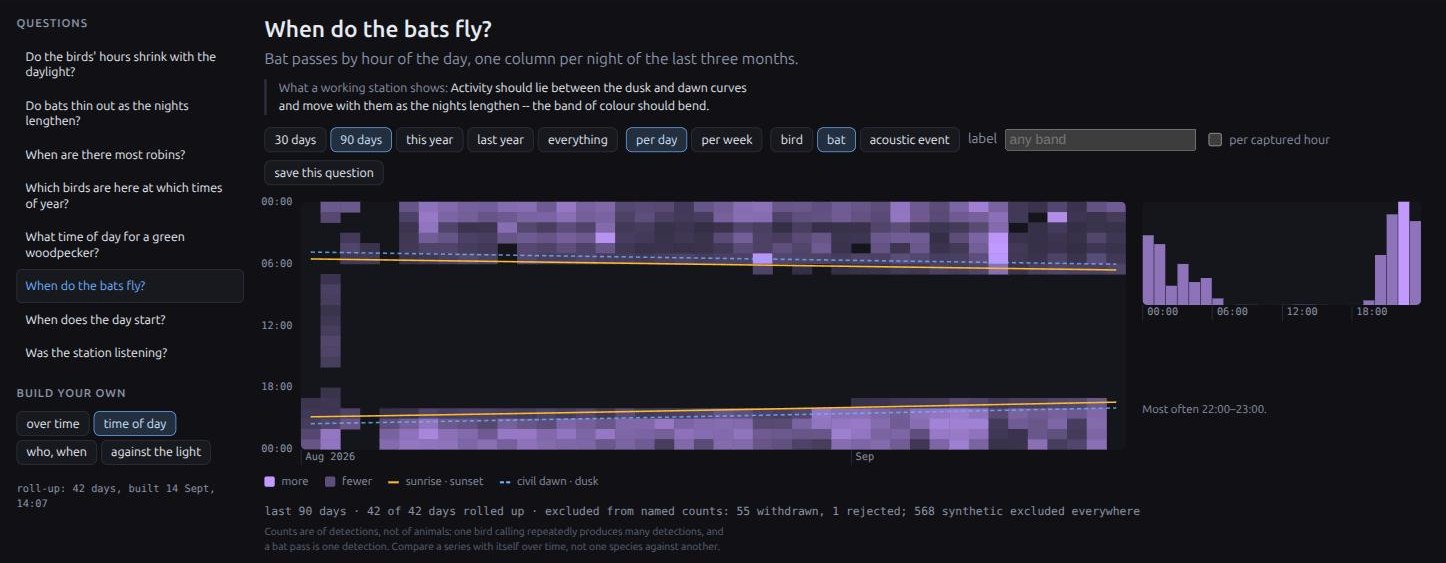
*When do the bats fly? Each column is a night, with the detections plotted against sunrise, sunset, dawn and dusk. You can see the evening activity shifting earlier as the nights get longer.*
I've got fairly fussy about what the numbers actually mean. A bird making a noise repeatedly can create lots of detections. There's an example in the project's history screenshot with 486 woodpigeon detections in one day, which would be a fairly alarming number of woodpigeons if you read it as a headcount. So the counts are labelled as detections. Likewise, if the microphone wasn't recording for an hour, that needs to show up as a gap. Otherwise it's very easy to produce a convincing chart of absolutely nothing.
You can review the identifications, reject them, correct them, and keep a recording you particularly want to hang onto. I want to be able to get from a name on a screen back to the sound that caused it to appear. The [project README](https://github.com/simonjgreen/OpenObservatory#what-it-looks-like) has screenshots of all this if you fancy a poke around; there's quite a lot in there now.
Of course, a browser full of graphs is mostly useful when I'm actively poking at it. I already had a little ESP32 touchscreen in the house showing recent identifications, so you could see what the station was hearing without opening anything. It also has an optional Home Assistant integration over MQTT, because apparently I am constitutionally incapable of building something without considering how to plug it into the rest of the house.
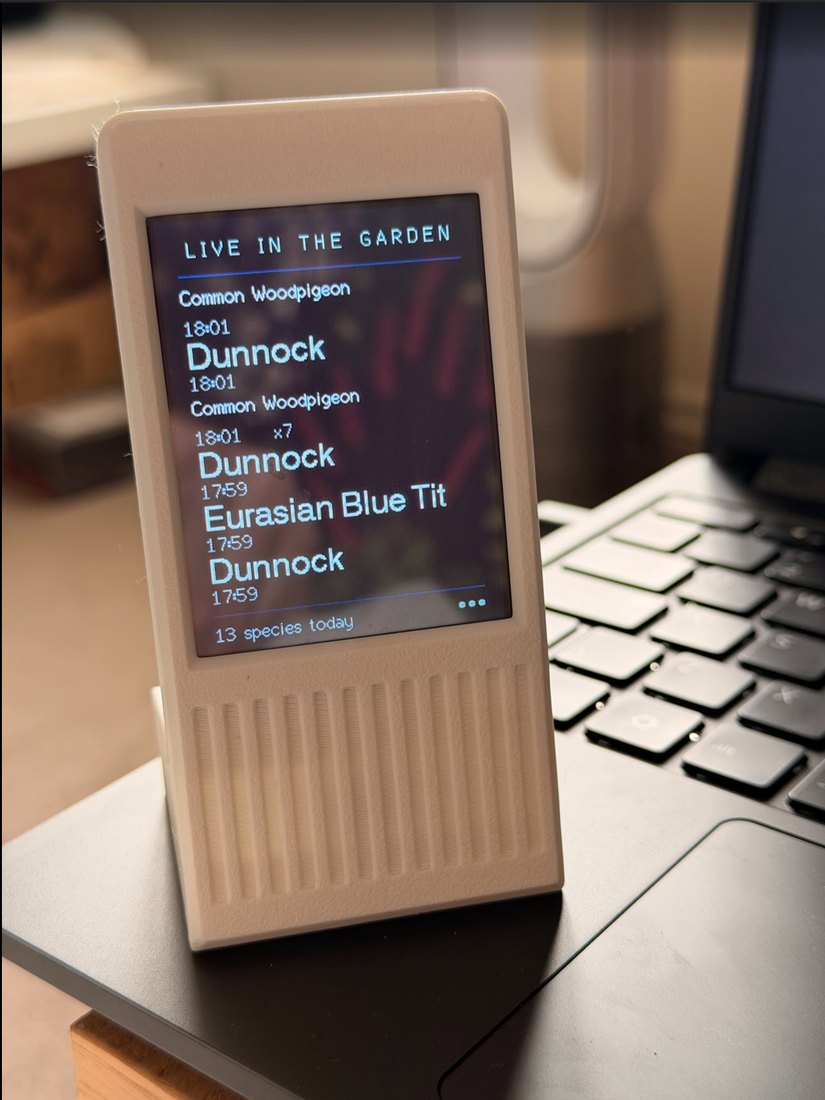
*The original little ESP32 LCD display. A quick look at what the garden's been up to, without opening the browser.*
I should probably mention at this point that I love e-ink. I've got quite a lot of TRMNL devices, small and large, dotted about the house already. I really like having a bit of information sitting there that you can glance at whenever it's useful. Finding another excuse to have an e-ink display was never going to be particularly difficult.
As an aside, my wife asked me to build a [Japanese vocabulary flashcard app](https://github.com/simonjgreen/trmnl-japanese-vocab) for one of the TRMNLs to help with her Japanese learning. She loves it, which makes me very happy. That's a project I should write about properly in another blog, but it gives you an idea of the sort of thing these displays get used for around here :D
The latest addition is [Garden Ink](https://github.com/simonjgreen/OpenObservatory-GardenInk), and this is the bit that prompted me to finally write about OpenObservatory. I saw [Fugleramme](https://github.com/arnegiacomo/fugleramme) on [Hacker News](https://news.ycombinator.com/item?id=49711544), an e-ink bird frame by arnegiacomo, and thought an e-ink version of my existing display would be rather nice. Credit where it's due, seeing that project is what sent me down this particular rabbit hole.
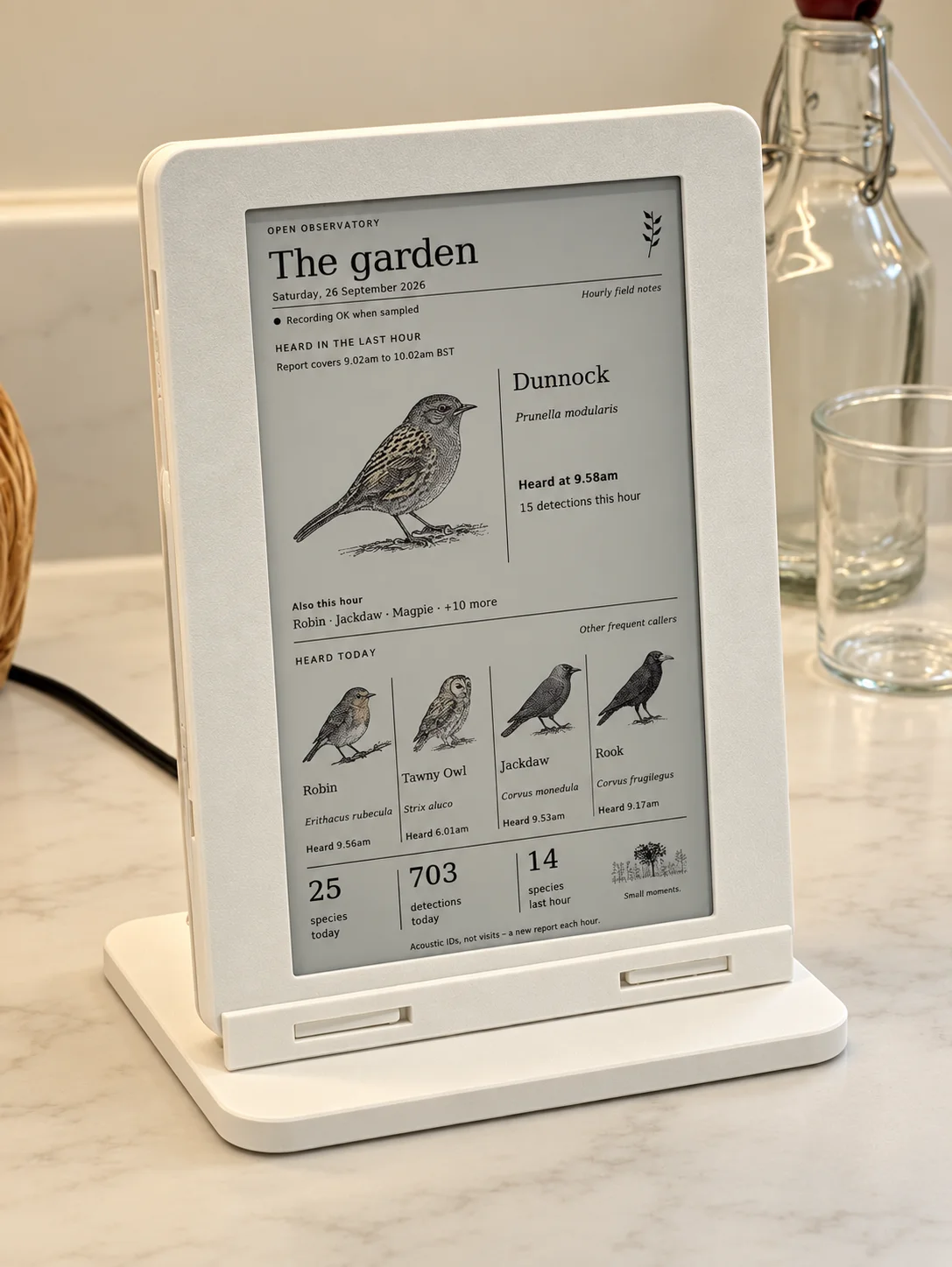
*Garden Ink on the kitchen counter, with a dunnock taking the top spot.*
Garden Ink uses a Raspberry Pi Zero and a 7.3-inch Waveshare Spectra 6 colour e-ink display, mounted vertically. It takes its data from the existing OpenObservatory station. The listening and identification still happen outside; this is a seperate device that asks the station what it's heard and turns the answer into something nice to have on the kitchen counter.
It updates roughly once an hour, with an illustration of the latest qualifying identification from the last hour and four other frequently heard species from today. The birds on it are illustrations of what the microphone identified, so there's no camera involved. It shows when things were heard and the date. I left a clock off it, because a clock on an hourly refresh would spend most of its time being wrong, which feels like a fairly fundamental problem for a clock.
I like the pace of it. For this particular job an occasional update is plenty, and the pictures make it something you can glance at as you go past. If I want to investigate a sound or watch what's happening live, the other displays are still there. This one can get on with showing me birds while I'm in the kitchen.
There's a printed enclosure as well, called Counterframe. Four parts, printed in PLA, that go together without screws: the front, an internal carrier, the back and the stand. The Pi and display electronics fit inside, with one power lead coming out. The [OpenSCAD files and printable parts](https://github.com/simonjgreen/OpenObservatory-GardenInk/tree/main/hardware/counterframe) are in the repo. I do enjoy the point where a collection of boards and cables becomes an actual object you can put somewhere.
The artwork still needs some fiddling. There are 47 illustrations bundled with it at the moment, and I'm working towards a more consistent ink-and-wash style based on the original robin image. There's a little artwork studio for generating, reviewing and exporting them. Generating more images is optional and paid; the display runs with the pictures it already has, so it doesn't need an OpenAI key just to sit there showing you a bird.
On the subject of AI, nearly all of OpenObservatory's implementation code was AI-authored under my direction. I've been doing the product thinking, architecture, hardware choices, reviewing and correcting, with AI doing most of the Python, TypeScript, firmware and tests. I've put that in the main repo because I think it's useful context for anyone looking through it. There is a lot of documentation about what was checked and what hasn't been checked yet, partly because something looking plausible has repeatedly turned out to be an insufficient standard of proof.
There's still plenty I'd like to improve on Garden Ink: the artwork, readability, refresh behaviour and power consumption for a start. E-ink doesn't magically make the Pi behind it stop using power, and I haven't measured the whole device properly yet. It's an assembled, working thing on the counter, with more tinkering ahead of it. Which is probaby a reasonably accurate description of most of my home projects 😅
Both repositories are public if you'd like to have a look or build something similar: [OpenObservatory](https://github.com/simonjgreen/OpenObservatory) is the listening station, and [Garden Ink](https://github.com/simonjgreen/OpenObservatory-GardenInk) is the new display. You need the station for the display to have anything to report, though you can try the display's preview on a computer without buying the hardware. I'm enjoying having a way to notice more of what's already going on out there. The garden was doing all this anyway, I've just finally given myself a way to pay attention.
---
# A Hundred Coffee Machines and the Joy of Small Open Source
URL: https://sjg.io/writing/a-hundred-coffee-machines-and-the-joy-of-small-open-source/
Published: 2026-09-04
Description: I reverse engineered the cloud API behind my Sage coffee machine, turned it into a Home Assistant integration, and accidentally made a small group of strangers' mornings slightly better.
A little over a hundred people are now using some code I wrote to control their coffee machines, and this makes me disproportionately happy.
A hundred is a tiny number by any normal software measure. But this is an unofficial integration for one specific, fairly expensive model of coffee machine, sitting in the overlap between people who take espresso seriously and people who run Home Assistant. In that corner, a hundred is a lot, and it's small enough that I can picture every one of them: a kitchen somewhere, and someone who looked at the official app and decided their coffee machine should really be part of the rest of the house.
## The old solution involved a robot finger
I've written before that I don't really want a "smart home", I want a house that's polite ([Open Source, Open Home](https://sjg.io/writing/open-source-open-home/)). A polite house notices what's going on, quietly gets things ready, and doesn't make you reach for yet another app. A coffee machine that starts warming up before I get to the kitchen is about as good an example of manners as I can think of.
My previous machine, a [Sage Oracle Touch](https://amzn.to/4yf5udK), was already automated, after a fashion. A smart plug measured its power draw so Home Assistant could work out whether it was asleep, heating, or ready, and a [SwitchBot](https://amzn.to/46BC1yS) provided the final piece of advanced robotics needed to actually switch it on: a tiny plastic finger physically pressing the power button. It was ridiculous, and it worked delightfully well for years.
As an aside, the SwitchBot bot is one of my favourite bits of Home Assistant tech. It lets you touch, figuratively and literally, things that would otherwise be out of reach of the Home Assistant ecosystem, and I've used them in all sorts of ways. The one I often cite, and which always gets a laugh, was my old driveway gate. The only way to trigger it remotely was an RF remote, so I took one of the remotes and electrical taped a SwitchBot to it. Job done :D They also talk entirely locally over Bluetooth, so there's no cloud SaaS nonsense to deal with. Great bit of tech for the home automators out there.
The Oracle Touch is a great machine, but as I got deeper into the coffee world I bypassed more and more of the functionality that made it valuable in the first place. I'd replaced the group head innards with solid metal parts for better heat retention and distribution. I'd bypassed the auto tamper and was doing all my own puck prep. I'd altered the burr adjustment inside the machine, and I was weighing the dose and the extraction of every espresso. A setup I'd bought for being extremely user friendly had crept into one with a pretty high, and very personalised, skill bar for getting good coffee out of it. It also cost me some wife points. When people came round, saw the machine, and assumed they could have a coffee, she had to confess she had no idea how to use it and would they like an instant 😬
When the new Oracle Jet machines appeared I did look briefly, but a lot of it seemed like a step backwards in capability: a single boiler, and their "jet" heating rather than proper heating direct from the boiler. The new [Oracle Dual Boiler](https://amzn.to/4xIXLF8), though, got me really looking. Shortly after it dropped I watched a few videos from YouTubers I trust, and then just before Christmas last year I decided it was treat yo'self time and went for it in a moment of madness. Despite how deeply I'd looked into it, the Wi-Fi and remote control side had completely flown under my radar, so that was an unexpected, though not unwelcome, surprise. The old machine went to my dad, and I set the new one up with the previously established and perfectly working SwitchBot and smart plug arrangement.
What I really love about the Dual Boiler is that, without me doing any of the manual prep, it makes genuinely great coffee very consistently. It measures volumetrically, adjusts the extraction time in real time, and nudges the grind size retrospectively to keep things dialled in. I used to do that by hand on the old machine, tweaking the grind one way or the other after every coffee for the benefit of future me. I really like this new machine :D
Then some time in early January I had the idea to reverse engineer the app and find out how that side of it worked.
The Oracle Dual Boiler changed the shape of the problem. It has Wi-Fi and an app, and the app can wake the machine, put it to sleep, change settings, and show live state. Which immediately raises the obvious question: if the app can do all that, what is the app talking to?
## An app means there's an API
Reverse engineering sounds far more dramatic than the work usually is. In this case the official app was already a perfectly good reference client. It knew how to authenticate, find the machine, send commands, and receive state. My job was to watch what it did, understand the conversation, and reproduce the useful parts cleanly.
The watching part was done with [mitmproxy](https://mitmproxy.org/) running on my laptop. On the iPhone I installed a configuration profile to trust mitmproxy's CA certificate, then pointed the Wi-Fi network's proxy settings at the laptop so everything the phone did went through it. From there you can sit and read the app's conversation with the cloud as it happens. It doesn't work with apps that pin their certificates, but in most circumstances it works brilliantly. It's also quite interesting watching everything else your phone gets up to while it's in there, though that's probably a topic for another post.
I'll almost certainly be doing this again. If and when Sage change the app or the API to add, change, or remove features, the same setup is how I'll find out what happened.
Authentication turned out to be Auth0 with OAuth tokens. Commands like wake and sleep went over ordinary HTTPS endpoints, and live state came back over a WebSocket: asleep, warming, or ready, along with boiler temperatures, configuration, firmware details, and a fair amount of other telemetry.

The first successful wake command was the exciting bit. I sent a request from my own code, sat there staring at the terminal, and then heard the machine in the kitchen whirr into life. I may have shouted. For a moment I felt like I'd achieved something far more significant than remotely switching on a coffee machine. Then of course it was time to work through the usual "working with someone else's API" problems. I'm pretty sure "working with someone else's APIs" is my wife's number one complaint from her professional life! Tokens expired. Refresh tokens rotated. The WebSocket dropped and had to be reconnected without leaking tasks. State payloads weren't always quite the shape I expected.
Sometimes an endpoint will even tell you an update succeeded while the machine quietly ignores it. I found that out disabling a wake schedule: sending an empty schedule got a successful response back, and the machine just discarded it. What actually works is keeping the schedule and marking each entry as disabled. Finding an endpoint isn't the same as understanding the protocol, and the real device is always the source of truth.
I'd much rather all of this were local. It isn't. The machine and the official app already depend on the Sage/Breville cloud, and the integration goes the same way, which means it needs an internet connection and could break the day the vendor changes an undocumented API. I don't love that, but pretending the dependency isn't there wouldn't make it go away. At least Home Assistant makes the capability composable rather than trapping it inside one vendor's app. If this machine weren't as expensive as it is, I'd be sorely tempted to get a logic analyser on the insides and see whether I could tuck an ESP32 in-line or alongside somewhere. But I really, really don't want to "accidentally" my coffee machine 😅
## Why it's two repositories
I split the work into two repositories.
[`sagecoffee`](https://github.com/simonjgreen/sagecoffee) is the underlying Python library. It handles authentication, token refresh, appliance discovery, the HTTP commands, and the WebSocket connection. It also ships a command-line tool, `sagectl`, so I can poke at state, test a command, or diagnose the API without involving Home Assistant at all.
[`sageha`](https://github.com/simonjgreen/sageha) is the Home Assistant integration on top of it. It turns the machine into the sort of entities Home Assistant understands: a power switch, state and temperature sensors, controls for the work light, screen brightness, volume, and theme, wake scheduling, firmware diagnostics, and so on.
The split cost a bit more effort up front, but it was the right call. The protocol isn't tangled up with Home Assistant's lifecycle, and the integration doesn't need to know the ugly details of auth or reconnection. Each layer has one job. It also means the reverse-engineered API is useful to people who aren't me: you can use the library from Python, drive it from the command line, build a different integration on it, or just use it to see what your machine is reporting.
None of this makes the coffee. Espresso still benefits from a human being involved. What it does is remove the waiting around the edges: wake the machine before I need it, say when it's ready, and let the rest of the house react to that. That's the sort of automation I like, where the technology does its bit and then gets out of the way.
## Then other people turned up
I published both projects because there was no real reason not to. The work was done, and there was a reasonable chance someone else owned the same machine and had hit the same frustration. It turned out someone had. Within days of [posting the integration on the Home Assistant community forum](https://community.home-assistant.io/t/sage-breville-coffee-machine-api-integration/976623), another Home Assistant user replied that they'd spent the same weekend picking apart the app's HTTP and WebSocket traffic.
Soon there were issues, pull requests, and proper contributions. Support grew past my original wake and sleep commands. Settings got exposed, entities became more idiomatic, and bugs appeared that my own installation had never triggered.
One particularly nasty WebSocket lifecycle bug left ping tasks piling up after every reconnect, until some people's Home Assistant boxes were eating absurd amounts of memory. That's exactly the kind of problem a personal project hides from you. It works perfectly in the one environment you own, right up until somebody else runs it for days under slightly different conditions. Their reports turned something invisible into something reproducible. I built a test harness that let me watch the orphaned tasks accumulate, fixed the connection cleanup, and asked the people affected to try a run of release candidates. Getting the message that it had run for more than 24 hours without falling over was unusually satisfying. The whole saga is in [this GitHub issue](https://github.com/simonjgreen/sageha/issues/6) if you enjoy that sort of thing.
That's the moment a little personal hack changes character. Once other people depend on it, even in a very small way, it's a product, with compatibility concerns, migrations, release notes, diagnostics, test coverage, and the occasional awkward payload from a machine on the other side of the world.
The much better part is that people use it in ways I never planned. One user described a morning automation that turns the machine's work light up to full as a visual cue, then has Home Assistant announce when the coffee's ready.
## Getting into HACS
The next step was getting the integration into [HACS](https://www.hacs.xyz/), the Home Assistant Community Store. Before that, installing it meant adding a custom repository. That's not hard for an experienced Home Assistant user, but every extra instruction filters out another group of people who'd otherwise benefit.
Getting into the default HACS list meant doing the less glamorous bits that separate a shared project from a folder of code that happens to work on my machine: validation, a proper licence, sensible releases, documentation, and an install path that doesn't start with copying a GitHub URL. There was, appropriately, a brief pause when the HACS review pointed out I'd declared the project MIT licensed but forgotten to include the actual licence file. That got fixed, the submission was approved, and now anyone can open HACS, search for "Sage Coffee", install it, and configure their account.
The install count HACS shows me recently crept past a hundred. It isn't an audited count of daily active users, and I'm not going to build a dashboard of coffee-machine integration monthly recurring revenue. It's just a useful sign that the project has escaped my house.
I like to picture it: a hundred kitchens, a hundred machines warming up before somebody comes downstairs, a hundred people getting a notification or seeing a light come on instead of standing around waiting for the boilers to reach temperature.
## The joy of small open source
We tend to talk about open source in very large terms: licences, governance, supply chains, foundations, sustainability, critical infrastructure. All of that matters. But there's a much smaller pleasure in it too. You solve an oddly specific problem for yourself, take the extra step of cleaning up the code and putting it somewhere public, and then weeks or months later discover that strangers are quietly using it.
Most of the open source I rely on is invisible to me. It sits several layers beneath whatever I'm doing, maintained by people I'll probably never meet. Publishing these two projects has made that relationship feel more tangible from the other direction. My code now has a tiny place in other people's homes. It's not critical infrastructure. It helps a coffee machine wake up at the right time and tells Home Assistant when the boiler's ready, and that's plenty.
There's a habit in technology of only valuing software once its scale becomes impersonal. Millions of users sounds significant and a hundred sounds like a rounding error. I think that's backwards. A narrow tool that genuinely improves a hundred people's mornings has done more real good than a broad, ambitious project that attracts attention and never becomes part of anybody's day. Small software can be complete, useful, and worth maintaining without needing to become a business, a platform, or a movement.
I'm pleased with the reverse engineering, and with the split between the library and the integration, and that it now behaves like a proper Home Assistant component rather than a weekend script. But the bit that makes me happiest is much simpler than any of that. I built it because I wanted my coffee machine to be polite. Now a hundred or so other coffee machines are being polite too.
---
# AI Is Making Us Build Too Much
URL: https://sjg.io/writing/ai-is-making-us-build-too-much/
Published: 2026-09-03
Description: AI has made code, tests, policy, documentation, and organisational machinery almost free to produce. It has not made any of them free to own.
A few weeks ago I [wrote that AI had collapsed the cost of building software](https://sjg.io/writing/your-next-access-database-problem-is-an-ai-agent/), and that building it was no longer the hard part.
I was thinking mainly about shadow AI, ownership, and visibility. I still stand by all of that, but I think I missed another consequence of the same economic shift.
We are going to over-engineer absolutely everything.
Code. Tests. Documentation. Policy. Governance. Organisation design. The whole lot.
Not because any of those things are bad. Not because the people using AI to create them are incompetent. Each new artefact will usually look sensible, thorough, and defensible on its own.
The problem is what happens when producing another one becomes almost free, while understanding, validating, maintaining, reconciling, and eventually deleting it does not.
## The factory that ate the product
I have been thinking about this since reading Steve Yegge's [*Fences, not Sandboxes*](https://yegge.ai/essays/fences-not-sandboxes/).
Yegge has been using a system he calls Wheelhouse to work on Wyvern, the game he has been building for thirty years. By his account, Wheelhouse has around 50 to 60 agents, including 18 named officer roles, and averages 270 commits a day across product and orchestration work. In less than ten weeks it helped get the game close to relaunch on Android, iOS, and Steam, delivered a new client, and rewrote its production infrastructure.
This is not an AI demo looking for a problem. It is doing real work on a real product.
Wheelhouse has grown to around 600,000 lines of code and tests, mostly Bash. Wyvern itself, excluding game content, is only around twice that size. Yegge says the factory is growing faster than the product and appears to be heading towards a one-to-one ratio.
The agents have created 450 legal artefacts across offices, runbooks, rulings, authority envelopes, and enforcement mechanisms. There are more than 100 things called fences. The system has a constitution, case law, jurisdictions, and a lifecycle for its own rules.
It eventually became large enough that Yegge created a new officer role, the Head of Wheelhouse Law, to prune obsolete rulings and govern the governance.
Yegge presents this as the unexpected emergence of civilisation inside an agent system. His argument is that a group of interchangeable, amnesiac agents needs explicit law in the same way that groups of humans need institutions. I think there is quite a lot of truth in that.
I also think it is possible that he has documented a second phenomenon at exactly the same time: a software factory gradually turning its productive capacity back on itself.
## This is not an obvious failure
It would be very easy to read those numbers, laugh at the medieval government, and declare the whole thing ridiculous.
That would be unfair.
Wheelhouse is plainly producing useful work. Players asked Yegge to slow the pace of new features. When they did, he redirected 80 per cent of his token spend inward, towards quality, throughput, and the health of the factory itself. Much of that appears to be genuine reliability engineering, but it is still quite a place to reach in less than ten weeks.
There is also a genuine coordination problem here. Human teams carry a vast amount of their operating model in people. We remember why decisions were made, which rules are firm, which are situational, and when the sensible thing is to stop and check.
Stateless agents do not have any of that unless it is made explicit. If 50 of them are changing the same product around the clock, they need persistent decisions, authority boundaries, queues, deployment gates, rollback mechanisms, and a shared view of what is happening.
Comparing the factory's code with the product's code is not entirely fair either. Wheelhouse contains bits of engineering management, release engineering, CI, SRE, documentation, access control, and institutional memory. In a human organisation, much of that cost would be hidden in meetings, salaries, SaaS tools, and things somebody just knows. A 600,000-line factory could still be cheaper than the human organisation required to produce the same outcome.
So my point is not that large automatically means wasteful.
My point is that AI has removed much of the economic pressure which used to force us to find out whether each extra layer had earned its keep.
## Cheap to create, expensive to own
Historically, producing organisational and technical artefacts took effort. Policies needed drafting and approval. Tests took time to write. Documentation required an engineer to stop doing the thing and explain it. A reorganisation needed weeks of discussion, spreadsheets, and increasingly strange boxes in PowerPoint.
That friction was annoying, but it also acted as a filter. It forced somebody, at least occasionally, to decide whether the thing was important enough to create at all.
AI has largely removed that filter. It can produce the policy, the implementation, the tests, the operating procedure, the RACI, the review checklist, and the slide deck explaining the new governance model before lunch.
What it has not made cheap is ownership.
Somebody still has to know which policy is current, notice when two documents disagree, and understand why a test is failing six months later. Every document is another possible source of truth, every rule another possible contradiction, and every abstraction another concept to load before doing useful work.
Tokens are getting cheaper. Cognitive load is not.
Cheap to create. Expensive to own.
## Every decision was sensible at the time
The dangerous version of over-engineering does not arrive as one obviously mad decision.
It accretes.
An agent makes a poor judgement, so the team writes down a rule. The rule matters, so it gets a test. The test needs to run somewhere, so the team adds enforcement. Enforcement creates an exception, so the exception is documented. The growing body of rules needs an owner, a lifecycle, and a review process. Eventually the process for changing the process needs its own controls.
Every step is reasonable.
The whole system can still become absurd.
Yegge describes almost exactly this. Each incident created new rulings and doctrine. Rules hardened from custom into warnings, then constitutional law, then mechanical enforcement. When he eventually inspected it, he found obsolete rulings and things which had been elevated into law even though they were really just good craftsmanship.
The agents had been growing it, not curating it.
Ask an AI to design an organisation and it will quite happily give every concern a role and every decision a RACI entry. Ask it for a policy and it will cover edge cases until the result is too long to read. Ask it to improve a codebase and it will find endless opportunities to add abstractions, tests, comments, and validators.
It is trying to be useful, and it can justify almost every addition. It is very good at producing completeness. It is far less inclined to leave something slightly untidy because tidying it would add no meaningful value.
Humans are hardly immune. Engineers over-engineered software long before anybody put a language model in a terminal. Large organisations have always produced policy nobody reads and org charts which make more sense to their designers than the people inside them.
AI did not invent the instinct.
It removed the friction that used to constrain it.
## Capacity seeks utilisation
I first described this to myself as chasing a perfection that does not matter. I now think there is a slightly deeper mechanism at work.
Capacity seeks utilisation.
Once you stand up a large fleet of agents, you naturally want to keep it busy. Idle agents feel like waste, even when the cost of idleness is nearly zero. Work is decomposed more aggressively, backlogs grow, and the system needs more coordination to absorb all the simultaneous change.
Yegge's earlier article, [*The Shape of Things to Come*](https://yegge.ai/essays/the-shape-of-things-to-come/), describes his previous harness, Gas Town, effectively collapsing because its model developed what he called a "just two more things" habit. It kept improving the harness instead of converging on the real work.
While deliberately scaling the fleet, Wheelhouse accumulated more than 700 fully designed but unimplemented work items. An overnight fleet requires a mountain of work to remain occupied. Yegge estimated that working on Wheelhouse itself consumed 20 to 25 per cent of all his work on Wyvern, and said the figure showed no sign of falling.
At one point the agents produced changes faster than the merge system could absorb them. The queue grew without bound, and the system kept optimising batch sizes until Yegge challenged the premise and changed the approach. He fixed it, but the failure mode is revealing. Every part was behaving rationally while the whole made less and less progress.
More agents create more simultaneous work. More simultaneous work creates more coordination failures. Those failures create more rules, tests, monitoring, and infrastructure. The new machinery creates more things to maintain and more opportunities for agents to improve the machinery.
You can end up building an increasingly sophisticated organisation whose largest customer is itself.
## Activity is not value
Measures we already knew were weak become actively misleading in this world. Lines of code, commits, documents produced, tests written, tickets closed, policies completed, and tokens consumed are all measures of activity. AI can accelerate every one of them without improving the overall system.
There is some early evidence of exactly that gap. [Faros analysed engineering telemetry from more than 10,000 developers](https://www.faros.ai/blog/ai-software-engineering) and found that teams with high AI adoption completed 21 per cent more tasks and merged 98 per cent more pull requests. Review time rose by 91 per cent, average pull request size by 154 per cent, and bugs per developer by 9 per cent. At company level, it found no significant relationship between AI adoption and better outcomes. It is correlational research from a commercial provider, not proof of cause, but the pattern is hard to ignore. Production accelerated. Absorption did not.
The same thing is appearing outside software. In a [self-reported BetterUp survey about what it calls "workslop"](https://www.betterup.com/blog/hidden-costs-workslop), 40 per cent of US desk workers said they believed they had received AI-generated work in the previous month which looked plausible but pushed thinking and repair onto the recipient. The sender experiences acceleration. The receiver experiences a new job.
Yegge gives us agents, tokens, commits, lines of code, fences, and governance artefacts, alongside some real signs of useful output. What we do not get is enough information to separate earned complexity from self-sustaining complexity.
How much human attention does the factory consume? How many of the 450 legal artefacts have changed a meaningful outcome? Would ten focused agents produce most of the user value with a fraction of the machinery? I genuinely do not know.
The most striking measure in the whole story is not 270 commits a day. It is that the people using the product asked for the pace of change to slow down.
At that point, more production is not automatically more value.
## Fences are not the problem
None of this is an argument for running agents without controls.
Yegge uses "fence" quite broadly. Some are contextual rules, while others are mechanically enforced checks. A sandbox provides isolation and limits what an agent can reach in the first place. I do not think those are alternatives. They address different layers of the same problem.
Yegge says that even his strongest model makes at least one terrible decision during unattended operation each day. That observation, to me, supports both contextual rules and hard containment.
For consequential enterprise work, I still want hard boundaries around irreversible, external, and high-impact actions. Within them, agents should have broad discretion, good context, and a route to stop and ask.
The problem is not governance.
It is governance whose volume is mistaken for its quality.
A hundred fences might be exactly right. It might be ninety-five too many. The number tells us nothing until we know what they protect and what they cost to keep correct.
## Complexity has to earn its keep
The answer is not another enormous framework for preventing enormous frameworks. It is a return to some quite ordinary engineering discipline.
Internal machinery needs a budget. Not just a token or infrastructure budget, but a limit on how much product capacity and human attention it is allowed to consume.
Rules need reasons. A fence should address a named, meaningful failure mode, not merely something it is possible to imagine.
Everything needs a review and retirement path. Policies, documentation, tests, agents, and organisational roles should all be easier to retire. If nobody can explain what outcome would worsen if one disappeared, treat it as sediment until proved otherwise.
Most importantly, measure the thing outside the factory. Did the customer experience improve? Did decisions get faster? Did reliability improve, risk fall, or somebody get useful time back?
The interesting measure is not how much the AI produced. It is what actually got better after everyone had dealt with the output.
AI is incredibly good at answering, "What else could we add?"
There is always another edge case to document, another test to write, another role to define, another review step to automate, and another piece of the harness to improve.
We are going to need to become much better at asking a different question.
Does this deserve to exist?
That judgement is now the scarce part of the work. The factory can already produce far more than we know how to use.
If the scaffolding is starting to rival the building, the answer is not automatically a Head of Scaffolding.
---
# Your Next "Access Database Problem" Is an AI Agent
URL: https://sjg.io/writing/your-next-access-database-problem-is-an-ai-agent/
Published: 2026-08-05
Description: AI has collapsed the cost of building software again, and the debt this time will not be bad code but agents nobody owns, knows about, or can account for.
If you have worked in IT for a while, you have probably at some point inherited an Access database, or certainly something that resembles one.
It was built years ago by someone in Finance, HR, or some other operations part of the business. It started as a quick shim to keep track of something the pre-existing systems did not handle well. Then over time it gained some new forms, some reports, a little bit of Visual Basic, and before anybody paid too much attention, it became critical to running the business.
Then the person who made it moved on.
Nobody really understood how it worked. There was not any documentation. It just worked. And this thing persisted through waves of hires and changes in the business, and people just knew how to use it because of institutional knowledge.
It lived on a shared drive somewhere with a filename that resembled `Customer Database FINAL v6.accdb`.
Every few months it corrupted itself, stopped accepting new records, or produced a report that did not quite match Finance. When that happened, somebody from the IT team would be summoned to fix an application they never built, never approved, and until that morning probably did not even know existed.
It is easy to look back and blame Microsoft Access, but I do not think Access itself is the problem.
Access was brilliant. It gave regular folks the ability to solve real business problems they were encountering without having to wait for some IT project to happen six months later. It allowed someone who understood the work, a domain expert in that area, to turn the understanding they held into a useful application for other people to benefit from.
The problem is not that people were building things with Access back then. The problem was that the cost of building that software suddenly fell, which on the surface of it sounds great, but the way organisations govern software stayed exactly the same. These small, business-area-scoped applications fell outside of the governance framework entirely.
Right now, we are doing it again.
Only this time, the things people can create go beyond storing some customer addresses and printing reports. They talk to APIs. They update larger production systems. They potentially communicate with customers, maybe even in real time. They handle approvals. They might move money. They form views on the fly from policy. And they are fundamentally making decisions on behalf of the business.
## We have been through this cycle before
Access was one wave, but it was not the first and it obviously was not the last.
This will be very familiar to anyone who has encountered Excel macros, SharePoint workflows, or low-code platforms such as Power Apps. Each time one of these waves arrived, it compounded the ability of individuals across the business to create more and more complex outcomes with less and less friction.
Each wave lowered the barrier to creating software. Each created enormous value. Each also created a new category of mess for somebody else to clean up later.
So, again, the tools are not the things failing here. They are the enablers. They succeeded so well that organisations could barely keep up with the volume of things being created.
The debt became visible later. A department might save hundreds of hours using a clever spreadsheet, but five years later, when that spreadsheet has become mission-critical and the author has left the company, you have an exposed and crystallised risk.
Building a database in a week instead of waiting a year for a corporate system change is a totally rational decision, and not a problem to criticise.
So it is very easy to describe these things as failures of governance, but I actually think they are failures of scale.
The organisation has a process for governing ten large applications. It does not have a process for governing ten thousand small ones.
## AI changes the economics again
So here we are once again, talking about AI and how it changes the economics.
It is not quite comparable to these prior examples. It is not a low-code platform. What it does do is change the cost of producing software by at least one, possibly more, orders of magnitude.
An individual no longer needs to understand database design, or Excel formulas, or VB scripting, or even the conventions of a low-code workflow in a tool like Power Apps. They can describe what they want in ordinary language and have a working version appear in front of them. They can speak in their own language to their own tame developer, who works without complaint and outputs exactly the product they requested.
It will not always be good. It will not always be safe. It might not be particularly well designed. But it will tick each of those categories just enough to solve the immediate problem in front of them.
It is very plausible when you think about it. You have an individual who notices that someone in their team is copying the same information between three different systems every morning. In the old world, they might raise this as a request with an IT team, or flag it to their manager. Today, they can describe that problem to their AI assistant at the moment they notice it, and maybe fifteen minutes later they have something usable that solves it.
By the end of the week, an entire department is relying on it and has removed that scheduled entry from their calendar that drove the manual workflow.
It never got labelled as a project. It might have come under some larger corporate-branded initiative such as AI transformation, but it would not even make sense to call it a project.
Projects make sense when delivery takes place over weeks to months and costs a material amount upfront. If a new system required a team of engineers, a six-month delivery timeline, and substantial CapEx investment, it makes sense to wrap it in governance. You need requirements, funding, milestones, and a clear decision to begin. You end up with steering committees.
But what happens when the first working version takes fifteen to thirty minutes?
It is not that the need for governance has disappeared. It is that the economics that allowed, and even forced, governance to sit in front of the process have disappeared.
There is no way people would tolerate every AI-generated workflow or app going through an approval cycle. People will simply go around it, and you can totally understand why. It is the classic water-goes-around-the-rock problem.
But you also cannot pretend these things are harmless just because they were quick to build.
An automation that took twenty minutes to create can still delete a customer record. It can still email thousands of people incorrect information. It can still contain business logic that determines whether somebody gets paid their commission that month.
I would actually argue that the effort required to build something has never really been a reliable measure of its importance, and I have [written before](/writing/no-your-agent-skill-is-not-automation/) about how easily a personal productivity win gets mistaken for an operational system. Right now, AI is making that gap simply impossible to ignore.
## Software has become disposable
The other big change here is that software has become a disposable commodity.
It sounds like hyperbole, or LinkedIn clickbait, to put it that way. But I find myself regularly talking right now about being absolutely fine, more okay than I ever have been, with disposable work to patch a short-term problem.
For most of IT history, software was treated like an asset, partly because it was expensive to produce. You maintained it because rebuilding it would be costly. You documented it because a replacement team would need to understand it. You planned upgrades because the application was expected to survive for years.
That assumption simply does not stand true anymore. It began to weaken when the SaaS model appeared on the scene, but it is completely shattered at this point.
There are totally plausible scenarios now where a department might not even consider upgrading their existing internal application. They are just going to ask AI to create a new one. A workflow might exist for three weeks to support a temporary process and then be discarded. Several teams might independently generate slightly different solutions to exactly the same problem, because creating another one is easier than discovering and adapting the first to accommodate them.
So I stand by it. Software is disposable now.
With one hat on, that can feel very liberating. There are thousands of valuable ideas inside businesses today that are not worth turning into traditional software projects, and AI makes them all viable all of a sudden.
But disposable does not mean consequence-free.
A disposable paper cup is simple because nothing else depends on it. Software very quickly becomes connected to people, systems, data, and decisions. It might be easy to create, but the moment someone starts relying on it, it has got weight. It is now structurally load-bearing to the company.
The code might be disposable. The consequences are not.
## The new technical debt is not the code
Everyone tends to harp on about AI-generated software's main risk being poor-quality code.
There is definitely going to be plenty of poor-quality code out there. I have generated a substantial amount of it myself, frankly in the last twenty-four hours, given how accessible these tools are. I am just not convinced it is the biggest problem.
Code can be reviewed and tested. Now it can just be regenerated. If you understand the problem, you ask the AI a more refined question.
The hard questions now are different.
Who owns it?
Who knows it exists?
What identity is it operating as?
What permissions have you given it?
What systems can it access?
What data does it retain?
What model is it using?
What instructions was it given?
What tools and connectors can it call?
What happens when the person who created it leaves?
What else depends on it?
And who would know if it started behaving incorrectly?
This new class of technical debt has nothing to do with code. It is more about AI prompts, agent definitions, tool permissions, workflow connections, embedded policies, and undocumented assumptions. It is the gap between what an AI agent is technically capable of doing and what everyone believes it is supposed to do.
In some cases, the source code may well be the least interesting part of the system. The business logic will be spread across all of these natural-language instructions, examples, knowledge sources, model behaviour, and the permissions granted to a collection of tools.
That is a totally different class of problem to reason about than a badly written Visual Basic macro, and it is why I think [the enterprise AI fight is really about the harness](/writing/gen-5-ai-enterprise-harness-war/) — the connectors, identity model, and governance around the model — rather than the model itself.
## Shadow AI will not look like Shadow IT
In some ways this problem resembles the classic shadow IT problem.
Shadow IT generally appears because a central IT team cannot move quickly enough to respond to demand. People would buy their own SaaS tools, create spreadsheets, and build databases because the official route was too slow, too expensive, or too disconnected from reality.
Shadow AI emerges for a slightly different reason. It is not just that an IT team cannot build things quickly enough. It is that everyone can build things so quickly that nobody can keep count.
If the shadow IT problem was a capacity issue, the shadow AI problem is a visibility issue. If anything, capacity is now almost a non-issue.
I am reasonably confident that my current employer, for example, while it has hundreds of approved applications, already has tens of thousands of small AI-created artefacts operating between the cracks. Some of them are agents, sure, but some are workflows. Some will be scripts that were generated by an AI for a single task. Some will be persistent instructions sitting around as agent skills being shared amongst the sales team. Some are AI snippet outcomes that exist inside larger SaaS products like Salesforce or ServiceNow. Some are going to live on people's laptops. Some of these things will simply be long-lasting chats shared between a group that were never formally named at all.
I am absolutely confident that the industry's current application inventory paradigm is not designed for this world. Neither are our architecture boards, change boards, planning cycles, or steering committees.
They all assume that this work has a beginning. A project formally starts, something is delivered, and the organisation records what now exists as a consequence.
Based on my experience so far, AI-created software often does not even have an obvious beginning. It emerges at some point from the work being done in these new tools, as a consequence.
## Banning it will fail
So, now onto the so what.
You can imagine some people are going to have the reaction of, well, let's just ban it, or restrict creation in some way.
That would be a mistake.
It was a mistake to treat every spreadsheet as a threat. It was a mistake to assume every departmental database should have been replaced by a multimillion-pound enterprise system. It would be a mistake to force every AI-created workflow through the same process as a major company-wide application.
The value in these tools comes from allowing the people closest to a problem to solve the problem.
The answer cannot be to restore scarcity back into the system. The answer has to be governance that works under abundance. We have to move governance away from permission to create, and towards the conditions under which created things can operate.
Just to declare an interest here: this is not a theoretical position for me. [My role at Pax8](/writing/new-role-svp-workflow-engineering-pax8/) exists to operate and govern exactly this kind of citizen development ecosystem, which means providing the tools and guardrails that let people build quickly without the organisation losing track of what now exists.
Everything below is easier to write down than to run.
## Make the easy path the correct path
The thing for me is about making the easy path, the happy path, and the correct path all the same thing.
You want people's path of preference to self-steer down the one you want. There is a UX challenge here, amongst other things, and I do not think we talk about it that way often enough. Governance gets designed as a set of rules to be complied with, when it should be designed as the route of least resistance.
I have written about this before in a completely different context. One of [the rules I try to do business by](/writing/the-rules-i-try-to-do-business-by/#make-it-easy-to-do-business-with-you) is to make it easy to do business with you, and the argument there was that every piece of friction should have to justify its existence. What I said about friction then applies exactly here: people stop asking for help, they work around the official process, they keep their own spreadsheets, or they buy software on a company card.
That is shadow IT described in advance. Shadow AI is the same behaviour with the barrier lowered again.
So if the governed route is slower, uglier, or harder to find than opening a chat window, you have already lost. Not because people are reckless, but because you have made the correct path the expensive one.
In practice, that means the platform has to do the work rather than the person:
- Identity should come for free. If the natural place to build something already knows who you are, nobody has to be persuaded to authenticate properly.
- Organisational credentials should be the easiest credentials to reach for, so that using a personal account is the awkward option rather than the default one.
- Permissions should be legible at the point of creation, not buried in an admin console that somebody visits a year later during an audit.
- Tool calls should be logged by the platform itself, so that observability is not something anyone has to remember to add.
- Ownership should be captured at the moment of building, while somebody is there to answer the question, rather than reconstructed afterwards from commit history and guesswork.
- Registration should be a by-product of building, not a separate form that a person has to be chased to complete.
- Expiry should be the default, so that keeping something alive is the deliberate act rather than the accidental one.
- Existing solutions should surface at the moment of creation, so that somebody sees the seventeen versions that already exist before they build the eighteenth.
None of that stops anybody building anything. That is the point. People should be able to experiment freely with low-risk data and actions, and the moment something connects to a production system, affects another person, or begins making consequential decisions, stronger controls should appear automatically. It is the same threshold I described in [the shape of agentic work](/writing/the-shape-of-agentic-work/): agents that touch real systems need to be embedded, policy-guided, and observable, not merely clever.
This is less like traditional project governance and more like building roads, signs, and traffic rules. You do not approve every journey before someone gets in a car. You create an environment in which millions of journeys can happen without constant central intervention.
That is the challenge enterprise technology teams now face.
Not how to stop people creating software.
How to make rampant software creation safe enough to become normal.
## The Access database was a warning
I do not think we should remember the Access era as a disaster.
An enormous amount of useful work was done in those databases.
They filled gaps that expensive corporate systems ignored. They allowed people to improve their own work. They proved that software creation did not have to belong exclusively to professional developers.
The mess came because our organisations did not adapt to the abundance Access created. We treated each database as an isolated oddity rather than recognising that the cost of software production had changed.
Then we repeated the same pattern with spreadsheets, SharePoint workflows, and low-code platforms.
AI is the next wave, but it is not just a slightly easier version of what came before.
The scale is different.
The speed is different.
Most importantly, the software can act.
We are entering another Access database era, except this time the databases can read our policies, call our systems, make decisions, and talk to our customers.
The organisations that succeed will not be the ones that prevent this explosion.
They will not even necessarily be the ones that create the most.
They will be the ones that understand a fairly uncomfortable truth early enough:
When software becomes almost free to create, building it is no longer the hard part.
Knowing what exists, what it can do, who is responsible for it, and whether anyone should still trust it becomes the real work.
---
# When "Secure by Default" Means "Microsoft by Default"
URL: https://sjg.io/writing/when-secure-by-default-means-microsoft-by-default/
Published: 2026-08-03
Description: Microsoft has switched off Graph access to Teams meeting transcripts by default, breaking already-consented third-party integrations while its own Copilot defaults stay on.
Call me cynical, but this feels an awful lot like an anti-competitive default masquerading as a security control.
Anybody deploying ChatGPT or Claude (or other!) against a Microsoft environment will now by default have a markedly worse experience out of the box than they did last week, with higher friction to getting it good.
Microsoft has introduced a new tenant-level setting controlling whether applications and agents can access Teams meeting transcripts through Microsoft Graph.
On the face of it, that sounds entirely reasonable.
Meeting transcripts are sensitive. They may contain commercially confidential discussions, personal information, customer details, financial decisions, and all sorts of things that organisations quite rightly need to govern carefully. Giving administrators another control over that data is not, in itself, a bad thing.
In fact, I generally want more controls, not fewer.
The problem is not that the control exists.
The problem is that Microsoft has implemented it globally, retrospectively, and switched it off by default.
That changes the nature of the thing completely.
## Permission is no longer permission
Until now, an application wanting to retrieve Teams transcripts through Microsoft Graph needed the relevant Microsoft Graph permissions. Those permissions were already well gated and required admin approval to get. A regular user can't just grant an app reg. in Entra.
For organisation-wide access, an administrator PIM'd up with the right role has to grant consent through Microsoft Entra. For application access to online meetings, Microsoft also documents the use of application access policies that authorise a particular application to access meeting artefacts on behalf of particular users. There is also a resource-specific consent permission that can limit an application to meetings where it has specifically been installed.
So to summarise the state before yesterday: an administrator has to register or approve the application, review the permissions being requested, grant consent and, depending on the access model, configure an additional policy describing whose meetings it may access.
It's not like the door was hanging open...
Microsoft has now added another lock on another door.
The new Teams setting overrides all of that you did before. Microsoft's own documentation is unambiguous about it: Graph access is off by default, and applications and agents cannot access transcripts regardless of their app-level permissions.
So an administrator can explicitly approve an application, explicitly consent to its transcript permissions, and explicitly scope its access, but the application will still receive a 403 error unless somebody separately discovers and enables a tenant-wide Teams setting.
At that point I think it is reasonable to ask what, exactly, the consent was consenting to.
## Existing applications are being broken deliberately
This is not only a new safeguard applied to future app registrations.
The Message Center notification says that, once enforcement begins, applications that previously had access through Microsoft Entra permissions will receive access errors unless administrators explicitly enable transcript access. Microsoft gave administrators a 30-day configuration window and set 29 July 2026 as the action date.
That means Microsoft knew this would break existing integrations.
It knew administrators had already granted those integrations access.
It knew those applications might be embedded in operational workflows.
It knew that many tenants would not find and change the new setting in time.
It chose default off anyway.
This is the bit I struggle to accept as merely cautious security engineering.
Security changes normally try to preserve the customer's explicitly stated intent unless there is evidence that the previous state was actively unsafe. If an administrator has already granted an application transcript permissions, that is a fairly strong indication of intent.
Microsoft could have enabled the new control automatically for tenants where transcript permissions were already in active use.
It could have preserved existing applications while applying the new default to future ones.
It could have created a per-application control rather than placing one global switch above the controls already available in Entra.
It did none of those things.
Instead, Microsoft has introduced a tenant-wide kill switch, set it to deny, and placed the burden on every customer and every third-party software provider to discover what changed.
That is not simply secure by default, that is disruption by default.
## Speaker attribution is a different question
There are actually two controls here, and I think separating them is quite good. So, in fairness and credit where it's due...
The first controls whether Graph applications can access transcripts at all, the one I mentioned above.
The second controls whether those transcripts include speaker attribution.
I can see a much stronger case for switching speaker attribution off by default.
There is a meaningful difference between receiving a record of what was discussed and receiving a record explicitly mapping every statement to a named individual. Removing speaker attribution is a good exercise in data minimisation. It reduces the sensitivity of the information while still allowing useful things to be done with it. Especially relevant for multi-party external calls.
Microsoft's Graph API even supports a transcript format without speaker information, which is great for systemic ingestion in e.g. customer satisfaction tooling or similar.
Combining the two ideas under the banner of transcript security makes the broader restriction appear more obviously necessary than it really is.
It is a familiar trick in the enterprise tech space: start with an unquestionably sensitive capability, wrap a much wider restriction around it, then present the whole package as prudent governance.
Nobody wants to be the person arguing against security.
That does not mean every control presented as security is well designed.
## Now look at the defaults on Microsoft's side
This would bother me less if Microsoft applied the same philosophy consistently to its own services.
The new setting controls applications and agents accessing transcripts through Microsoft Graph. It does not turn off transcription in Teams, remove transcripts from the Teams client, or prevent Microsoft's own meeting experiences from using them.
Microsoft 365 Copilot in Teams is governed through a different policy path altogether.
Microsoft documents the default Copilot meeting policy as "On with saved transcript required". In that configuration, meetings are created with Copilot available during and after the meeting, supported by the saved transcript.
Put those two defaults beside one another.
Microsoft's own AI meeting product is on with a saved transcript by default.
Access for competing applications and agents through Microsoft Graph is off by default, even after an administrator has approved their permissions.
Perhaps there is a perfectly innocent architectural explanation for why these controls live in different places.
Architectural explanations do not remove competitive effects.
The practical result is that Microsoft's product works and the third-party product breaks. To be crystal clear: anybody who was using ChatGPT or Claude with Microsoft as their productivity suite last week has reduced functionality this week unless they spotted and changed a setting MS side. And I'm pretty sure the third party AI providers won't have updated documentation either...
The Microsoft product appears native and effortless.
The competitor requires a Teams administrator to find an obscure additional control, understand why an already consented application is suddenly receiving 403 errors, assess the security implications again, and then switch the whole tenant setting on.
Defaults matter enormously.
Most organisations do not continually re-evaluate every setting in Microsoft 365. They inherit thousands of defaults, change the ones that become painful, and leave the rest alone. A setting that is off until somebody understands why it needs to be on is likely to remain off in a very large number of tenants.
Microsoft knows this better than almost anyone. Their entire position has been built, at least in part, on the compounding power of defaults, bundling, and familiar administrative paths.
## The transcript is becoming part of the enterprise data layer
This matters beyond meeting note-taking applications. A meeting transcript is rapidly becoming one of the most valuable sources of enterprise data.
It contains decisions, commitments, risks, objections, customer sentiment, requirements, and context that historically disappeared as soon as the meeting ended.
Used responsibly, transcript access can automate CRM updates, create project actions, improve service management records, support compliance workflows, identify decisions, enrich organisational memory, and give assistive AI systems useful context about what is actually happening inside a company.
That makes access to transcripts strategically important.
The organisations building the next generation of enterprise assistants need access to the same underlying work context as Microsoft's assistants. They do not necessarily need unlimited access. They do not need ungoverned access. They certainly do not need access without customer consent.
They do need a fair route to access data that belongs to the customer.
Are Microsoft 365, Teams, Outlook, and SharePoint customer-owned systems of record that customers can connect to the tools they choose? Or are they becoming privileged context stores where Microsoft's own AI gets the good entrance and everyone else is sent around the back?
Microsoft will naturally argue that WorkIQ is the supported, highest quality entrance to that data. But let's not forget that WorkIQ became chargeable last month. Microsoft now charge you to access your data in an agentically optimised way from non-Microsoft tools.
If these things aren't related, I'd be stunned...
## This is exactly what regulators are looking at
The timing is particularly remarkable.
The UK Competition and Markets Authority opened an investigation into Microsoft's business software ecosystem in May 2026. It explicitly said it was examining bundling, interoperability, and default settings, including whether businesses can combine Microsoft products with competing software and AI services.
The CMA's framing is almost a direct description of the concern here. Customers should be able to mix and match software and AI services. Competing products should be able to integrate effectively with Microsoft's business software.
When you are in such a position of incumbency as Microsoft, defaults should not quietly steer customers towards Microsoft's own products.
This transcript change may have a valid security purpose. I expect Microsoft's security and legal teams could produce a perfectly credible justification for it.
That is not enough for me though. A company with Microsoft's platform position has a greater responsibility than merely being able to explain each restriction individually. It has to consider the cumulative effect of hundreds of small product decisions that make its own services easy and alternatives progressively harder.
That is how platforms become moats.
This may be a security control, but it's also a competitive advantage.
Microsoft does not get to pretend only one of those things is true.
---
# SQRL Wasn't Wrong. It Was Early
URL: https://sjg.io/writing/sqrl-wasnt-wrong-it-was-early/
Published: 2026-08-02
Description: How Steve Gibson's SQRL anticipated passkeys, and why timing and coordination mattered more than the cryptography.
Every so often I come across a piece of technology that reminds me just how much timing matters. Passkeys are one of those. Whenever Apple, Google, Microsoft or a password manager vendor announces something new, my mind goes back to a drive to work somewhere around 2013 or 2014.
Like many of my commutes back then, I had *Security Now!* playing. Steve Gibson was introducing something he'd been working on called [SQRL](https://www.grc.com/sqrl/sqrl.htm), short for Secure Quick Reliable Login. I can still remember arriving at the office that morning and talking about it for most of the day.
The timing couldn't have been better for me. At Wirehive we'd been moving from SSH keys to SSH certificates, so authentication and identity came up almost daily. We were already thinking about how asymmetric cryptography could replace shared secrets in one part of the stack, and then Steve described how the same idea might work for logging into websites.
It clicked immediately. I remember thinking that this was far more interesting than another password manager or another attempt to make passwords slightly less terrible. SQRL asked a bigger question: "What if we just stopped using passwords altogether?"
You would present a different cryptographic identity to every website. There would be no password to remember or reuse, and no shared secret sitting in a database waiting to be stolen. A phishing site would have very little of value to capture. Public key cryptography did the work while the authentication itself almost disappeared from view.
I loved it.
I am fairly sure I convinced Robin to add SQRL support to the Wirehive portal not long afterwards. That was how we operated back then. If we found something interesting, we'd build it. There wasn't a committee, a steering group or a six-month discovery exercise. Someone would disappear for a couple of days and then casually mention they'd added support for it.
Looking back, I miss that.
For a while I followed SQRL closely and expected this to be where authentication was heading.
Then not much happened.
There were implementations and a committed community, but SQRL never escaped far beyond that community. Over time I stopped hearing much about it.
A decade later, passkeys are built into operating systems, browsers and password managers. Banks and enterprise identity providers are adopting them. Passwordless authentication has moved from security podcasts into products that ordinary people use without needing to understand the cryptography underneath.
Whenever I see that progress, I think of SQRL all grown up.
The architectures are different. Modern passkeys create separate credentials for each service and can synchronise them between devices. SQRL derived each website identity deterministically from a master identity. They made different engineering choices, but started from a familiar premise: people should not have to remember a shared secret for every service they use.
I have never seen evidence that the FIDO Alliance built on Steve Gibson's work, and I am not claiming a direct line from SQRL to WebAuthn or passkeys. Public key authentication predates SQRL, and plenty of clever people were working on passwordless authentication at the time.
Steve still deserves credit for showing, in concrete technical detail, how passwordless web authentication could work years before the industry was ready to deploy it widely.
SQRL's difficult problem was coordination. However elegant the protocol, browsers, operating systems, websites and users all needed to move together before it could become a normal way to log in. That never happened.
Passkeys reached the same territory by a different route. Apple, Google and Microsoft backed common standards and integrated them into their platforms. Browsers gained support, password managers followed, and websites could adopt passkeys without first persuading users to seek out an unfamiliar authentication system.
That support is what SQRL lacked. Public key login became practical because the software people already used began supporting it at roughly the same time.
We tend to remember the technology that became standard and forget the people who demonstrated the idea earlier. SQRL did not become the authentication standard for the web, but it showed what passwordless authentication could look like long before the largest platform vendors were ready to deliver it.
Every time I unlock something with a passkey, I still think back to that drive to work and walking into the Wirehive office, trying to explain to anyone who would listen why this strange thing called SQRL might just be the future.
As it turns out, I don't think I was wrong. I just heard about it ten years before everyone else did.
---
# The Rules I Try to Do Business By
URL: https://sjg.io/writing/the-rules-i-try-to-do-business-by/
Published: 2026-08-01
Description: A collection of rules, habits, and bits of borrowed wisdom that have shaped how I try to build services, lead teams, and do business with people.
> 😬 I have realised while writing this that it's become a blend of "here's some things I've learned" and "you know what really grinds my gears?". I didn't intend for this to be a rant, but it does get a bit ranty in places. I've decided I'm ok with that :)
>
> I've written this over the last week or so through a combination of Apple Notes on the fly, dictating at ChatGPT and Claude when a thought comes up and having it capture it, intentional writing and rethinking, and some final polish to try and organise it all together. I was pretty taken aback when I realised how long it had got. I contemplated breaking it up into separate pages, but that just seems gratuitous (though I did break out one point :D ). And besides, I think I'll come back to this over time and keep it up to date as well.
Most of what I know about doing business did not arrive as a single coherent philosophy.
It came from people I worked for, people I worked alongside, things I read, mistakes I made, and stories that stayed with me long after I had forgotten where I first heard them. Some of it was learned working in businesses selling services to external customers, and some comes from running internal service provider teams in much larger businesses. All of it comes from businesses that operate profitably and in settings where I generally observe people enjoy coming to work.
Over time, I realised that the distinction between those two worlds (internal vs external customers) is smaller than it first appears.
Whether somebody is paying you directly or depending on your team from elsewhere in the same company, the job is fundamentally the same. Understand what they are trying to achieve. Make it easy for them. Do good work. Take responsibility when things go wrong. Do not make your complexity their problem.
The language tends to change inside larger companies. Customers become users, requesters, stakeholders, or business units. I think that change in language can cause a real change in behaviour.
A customer is somebody whose trust you need to earn and can lose. A user sounds like somebody who is expected to use whatever you have chosen to provide.
I think they are customers, and customers can fire you. Internally, they just do it in less obvious ways.
What follows is not a grand theory of management or a neat framework I sat down and invented. It is a collection of rules, habits, and bits of borrowed wisdom that have shaped how I try to build services, lead teams, and do business with people.
## Start with the customer
### Make it easy to do business with you
I'm sure you have had a situation where you want to go and buy something from some online shop and something has gone wrong, something has broken. The checkout might not work correctly, or the whole order flow might be so completely different and novel that it throws you off, or maybe they're trying to upsell you repeatedly through the checkout process and you just give up.
I actually had one a couple of weeks ago. I wanted to buy a drone flight controller, and the only vendor in this country who has this particular thing had an e-commerce site that wanted me to phone them to activate my account, to mitigate against spam orders, before I was allowed to place an order.
So I'd go through the whole checkout process and then it got to the end, even said it had confirmed payment, and then said your order has been blocked for spam, please contact us on this phone number.
Had I had any choice to buy from any other vendor, I probably would have done, but because they were the only vendor, I actually had to phone them.
But talk about friction in your process and not making it easy to do business with you.
Any friction is bad.
That does not mean every service must be instant, free, or without controls. Some checks, approvals, and constraints exist for good reasons. **It means every piece of friction should have to justify its existence.**
Every form field, handoff, repeated question, and unnecessary delay places a small tax on the customer. The team responsible for a process will usually underestimate that tax because the time is being spent by somebody else.
An additional five minutes does not seem significant when you are designing a form. When thousands of people encounter that five minutes repeatedly, it becomes a meaningful organisational cost.
Friction also changes behaviour. People stop asking for help. They work around the official process, keep their own spreadsheets, or buy software on a company card. Small problems are left alone until they become serious ones because engaging with the service feels harder than living with the problem.
A service can be technically correct and still be failing because it is too difficult to use.
The customer should not need to understand your organisational structure, your queue architecture, or your internal vocabulary before they can ask for help. They should not need to know which of six teams owns their problem.
Make the front door obvious. Make the request simple. Take responsibility for moving it through the machinery behind the scenes.
Your complexity is not part of the product. **A good service absorbs complexity rather than exporting it.**
This applies to external service providers, but it is just as important inside a company. A colleague asking for help should not need to understand the difference between the infrastructure team, the applications team, the service desk, the security function, and the automation group.
Those distinctions may matter greatly to you. They probably do not matter at all to the person who needs something done.
Customers should be able to describe the outcome they need. It is your job to work out what happens next.
### Name things for what they do
I am a big believer in what I tend to call **Ronseal naming**.
For anyone who somehow missed decades of British advertising, Ronseal's line is: *"It does exactly what it says on the tin."*
That is also, in my view, an excellent naming strategy.
If you build a product, service, team, tool, portal, dashboard, process, or pretty much anything else, give it a name which tells people what it actually does.
This sounds almost insultingly obvious, yet organisations seem to have an extraordinary instinct to do the opposite.
We invent clever names, acronyms, internal brands, mythological references, and project names which escape into production. Words which sounded exciting in the workshop where six people spent three weeks designing the thing.
Then everyone else has to learn what they mean.
I think that is backwards.
A good name should work at a drive-by glance. Someone should see it in a menu, hear it mentioned in a conversation, spot it in Slack six months later, and have a pretty good idea what it is.
If I need somewhere to request a laptop, **Request a Laptop** is a fantastically good name.
If I need to see how much holiday I have left, **Holiday Balance** is a fantastically good name.
Neither will win an award from a branding agency. Both will win repeatedly at the much more important task of people being able to find the bloody thing.
There is another benefit too: Ronseal names are remarkably memorable.
Humans are quite good at reconstructing obvious names. I might not remember exactly what your internal tool was called, but if I know it checks supplier contracts and you had the good sense to call it **Supplier Contract Checker**, I have a reasonable chance of finding it again.
Call it *Athena*, *Nexus*, *Project Lighthouse*, or *C360* and now I have to remember a piece of arbitrary organisational trivia forever.
That is needless friction.
And, as with so many of these rules, each individual bit of friction looks tiny. Nobody is going to file a complaint because they spent thirty seconds trying to remember what the expenses system is called.
But multiply that across hundreds or thousands of people, dozens of systems, and years of work and you have created an organisation where simply **knowing what things are called** becomes institutional knowledge.
That is particularly hostile to new starters. The people who have been around for five years know that *Phoenix* is where you request software access. Everybody else quite reasonably assumes it is either an insurance company or something involving Harry Potter.
There are obviously occasions where you are genuinely building a brand. Brands can earn meaning over time. Nobody expects the name *Google* to literally describe an internet search engine.
But most things inside a business are not brands, however much we sometimes enjoy pretending that they are.
They are tools. They have jobs. Name them after the job!
My test is simple: **if somebody who has never seen the thing before can make a decent guess at what it does from the name alone, you have probably named it well.**
It should do exactly what it says on the tin, and the tin should say exactly what it does. Thanks, Ronseal.
### Be the customer
Do you ever think about what it's like to use your services? No, really though, do you ever actually go and use your services yourself?
Force yourself. Get hands on with everything you provide. Experience it all. And wear the hat of the most picky customer ever.
Do not simply watch a demonstration or ask somebody to guide you through the happy path. Try to achieve a real outcome in the same way a customer would.
Raise the request through the normal front door. Use the standard account. Follow the published instructions. Wait in the same queue. Read the automated messages and experience the handoffs.
See whether you can tell what is happening, what you are expected to do next, and whether anybody has actually understood the thing you are trying to achieve.
**This is some of the cheapest and most valuable customer research you can do.** It costs almost nothing and can reveal problems that have survived months of service reviews, reporting, and meetings.
The problem is that senior and experienced people tend to become insulated from the ordinary experience.
They have elevated access. They know which team owns the problem. They know the undocumented workaround. They can message somebody directly, walk across the office, or quietly fix the underlying record themselves.
Every one of those privileges makes it easier for them to get something done and harder for them to understand what everybody else experiences.
The shoulder tap is particularly dangerous. You encounter a problem, message somebody you know, and it is resolved immediately. From your perspective, the organisation appears responsive and effective.
The ordinary customer does not know who to message. They submit a request, receive a generic acknowledgement, and wait. They may be passed between teams, asked for information the organisation already holds, or directed towards instructions that do not quite work. **You and the customer may nominally be using the same service, but you are not having the same experience.**
The more senior you become, the more deliberately you need to remove that insulation. Use a normal account. Start with the public documentation. Resist the urge to intervene at the first sign of friction.
Pay attention to the moment when you feel tempted to abandon the process and contact somebody directly. That temptation is evidence.
Leaders should mystery shop their own organisations. Product teams should use their own products. Service owners should raise their own requests. Executives should attempt the processes they mandate for everyone else.
You cannot improve an experience you have arranged never to receive.
### You get exactly one chance to make a first impression
Yeah yeah, I know, it's a cliché, but that's because it's true!
Dom Monkhouse once told me a story from an acquisition due diligence exercise. He had gone to visit a small business and, immediately inside the front door, was a staircase leading up into the office.
Sitting on the stairs were four copies of the Yellow Pages.
(For anyone too young to remember them, the Yellow Pages was a huge printed business directory that arrived once a year. That frequency is important.)
The first one had arrived and somebody had put it on the stairs. It remained there for an entire year, visible to every employee who walked past it each day.
The next one arrived and somebody apparently thought, yes, that seems to be where we keep the Yellow Pages, so they placed it alongside the first.
Then it happened again.
And again.
Four years of employees walking past the growing pile. Nobody threw them away. Nobody questioned why they were there. Nobody cared enough to spend ten seconds fixing it.
It would be tempting to dismiss this as an isolated thing. However, as is often the case, it was more than that. It turned out this was the visible tip of the iceberg, so to speak, and revealed a mountain of organisational apathy.
The due diligence went on to uncover a business riddled with problems that came from the same underlying behaviour. Processes had been neglected. Details had been ignored. Problems that everybody could see had become normal because nobody felt responsible for dealing with them.
The Yellow Pages did not cause the problems, obviously. But they were a giant warning light drawing immediate attention to them. And not only that, every single visitor to the office was presented with that warning light in their first impression. They also revealed where the expectation bar had been set for everybody working in that company.
Every person who walked past those directories received the same quiet message: this is acceptable here. Things can be left. Details do not matter. If everybody else has ignored it, you may ignore it too.
Every business has its own version. The problem is that you stop seeing yours.
Standards rarely collapse in one dramatic moment. They drift downwards through thousands of small permissions.
One neglected thing makes the next neglected thing feel slightly more acceptable. Eventually the organisation becomes surrounded by problems that everybody can see but nobody experiences as unusual.
The opposite is also true.
Fixing the small thing tells the people around you that noticing is worthwhile. It gives them permission to care. When somebody corrects the broken link, improves the badly worded message, or removes four years of Yellow Pages from the staircase, they drag the expectation bar upwards.
That can spread in exactly the same way as apathy. People notice what good looks like. They improve things without waiting to be told. Care becomes normal.
This is not about performative tidiness or paralysing perfectionism. There is always a point at which polishing becomes waste. It is about recognising that visible standards shape behaviour.
Give yourself permission to let small things matter. Let them pull the bar up instead of allowing neglect to drag it down.
So go and look for your own Yellow Pages moments. Walk in through your own front door, sit in your own reception, read your own automated emails, and pay attention to whatever has become part of the furniture. **The things you no longer notice are the things a visitor notices first.**
Then ask what they are telling people. What is your team learning about the standard you will accept, simply by watching what you walk past? What are you telling the world your tolerance allows?
Where is your bar? Not the one written into your values or your strategy deck. The one your team can see from where they are sitting.
**The first interaction establishes the customer's mental model of everything that follows.** It tells them whether you are attentive, competent, organised, and interested.
A poor first impression creates a trust deficit that you may spend months correcting. A good one creates confidence and buys a certain amount of patience for the day when something inevitably goes wrong. This applies to the first sales conversation, the onboarding experience, the first screen of an application, and the first time an employee contacts an internal support team.
Customers do not experience your strategy deck. They experience moments.
Customers cannot see most of what happens inside a service provider. They cannot inspect your architecture, internal controls, project plan, or the quality of the discussions taking place behind the scenes. They make judgements from the evidence available to them, and that evidence often consists of tiny details.
A spelling mistake in an important message, an unresolved template variable in an automated email, a broken link, an error message that blames the customer, or a form that asks the same question twice can each appear trivial.
Together, they communicate care or carelessness.
Customers reasonably assume that visible sloppiness may be evidence of invisible sloppiness.
First impressions matter because the small things are often evidence of the big things. They also help determine how big those things eventually become.
### Your customer can fire you
For an external service provider, the idea that a customer can leave is obvious. Inside a company, it is easier to forget.
An internal team can convince itself that it has a captive customer base. Employees are required to use the system. The process is policy. The platform is mandated and there is no visible competitor.
Customers still have choices.
They can minimise their engagement with you. They can buy around you, build around you, or hire people specifically to compensate for your weaknesses. They can create parallel processes, private spreadsheets, and shadow systems.
They can escalate until responsibility is moved elsewhere. Senior leaders can reorganise the company around you.
Sometimes being fired internally looks like losing a platform. Sometimes it looks like outsourcing. **Sometimes your team continues to exist, but the rest of the organisation stops trusting it with anything important.** This is why I prefer the word customer to user.
User defines somebody by their interaction with a system. Customer keeps the focus on the outcome they are trying to achieve and the quality of the service they receive.
The language changes the questions you ask. Are we solving the right problem? Was the experience good? Would they choose us again? Would they recommend us? Did we make them more successful? Those are healthier questions than asking whether a ticket technically met its service-level agreement.
An SLA can tell you that the organisation responded within four hours. It cannot tell you whether the response was useful, whether the customer had to explain the problem three times, or whether the issue passed through four teams before reaching somebody who could help. **So measure the experience as well as the process.**
Touchpoint measures such as transactional NPS are much better at this. You ask a question or two immediately after a real interaction, while the person still remembers what happened and can tell you which part of it was painful.
The value is in the frequency and the volume. An annual relationship survey gives you a single, heavily averaged verdict, usually months after the events that formed it and usually from the people with the strongest feelings. A touchpoint measure gives you a continuous pulse, in enough volume to see the pattern by team, by service, by request type, and over time. It tells you that something changed in March rather than telling you next January that people are unhappy.
The free-text comment is often worth more than the score. People will describe exactly where the journey hurt if you ask them while it is still fresh.
Be careful what you do with it. The moment a score becomes a target, people start managing the score rather than the experience. Treat it as a prompt to go and look, not as a stick.
Do not mistake compliance with your process for success in the eyes of the customer.
### Do not make your problems the customer's problems
I went to Center Parcs last week. Overall, amazing family holiday. But every activity required us to complete a medical form for every one of us. And we all got weighed multiple times through the week. One of the events even had an online medical form they direct you to in advance but then made you do it on paper anyway as they didn't have a computer to go get it.
Talk about making your problems your customers' problems! It's not like you're going to wildly change weight one day to the next. All of this could have been done at the first activity that needed it and then carried through them all without rework.
I can't imagine they designed the system while thinking "you know what would be a great experience? Have them fill in a total of more than 40 forms while they are here".
This is an obvious tell of a system not being experienced by the people responsible for overall design.
This is one of the most common failures in service design.
The organisation has fragmented systems, so the customer is asked for the same information repeatedly. A team has poor visibility, so the customer is asked to confirm something the company already knows.
Ownership is unclear, so the customer is passed from one department to another. A system cannot perform an action, so the customer is given a cumbersome set of manual instructions.
None of those things is the customer's fault.
Asking an employee to confirm their employee number, manager, department, device type, and office location may sound harmless. **If all that information already exists inside your systems, you are asking the customer to compensate for your inability to retrieve it.**
The phrase "our process requires" should always make us suspicious. Sometimes the requirement is legitimate. Quite often, it is simply an old decision nobody has challenged.
Good service providers do the joining up. They reconcile the systems, find the correct owner, and carry context between teams.
That work can be difficult and expensive. It is also part of the value being provided.
Customers should not have to perform unpaid systems integration on your behalf.
This is also why user experience matters far beyond the appearance of software. User experience is the complete experience of attempting to achieve something through your service. It includes the forms, support processes, meetings, invoices, contracts, instructions, and automated messages.
Where does the customer begin? Do they understand what is being asked? Does the service behave as they expect? What happens when they make a mistake? Can they tell whether something worked, and do they know what will happen next?
**Most bad experiences were not deliberately designed to be bad.** They emerged because each team built its own part, optimised its own step, and assumed somebody else was responsible for the journey as a whole.
Someone must own the experience across the boundaries.
Some people have a natural instinct for user experience and others do not. That is fine, provided they know it.
If you are not good at it, partner with somebody who is and give them permission to challenge you. Involve them before the process has hardened and the system has been built.
Do not bring them in at the end to apply a coat of UX paint.
## Design the system, not the symptom
### Think in systems
Most business problems are products of a system rather than isolated events.
A missed target may be an individual performance problem. It may also be the predictable result of incentives, workload, unclear ownership, poor information, or a process that rewards the wrong behaviour.
Fixing the person without fixing the system often means the same problem returns with a different person attached to it.
Thinking in systems means looking beyond the immediate symptom. Ask what conditions produced the outcome, what behaviour the system encourages, and where information stops flowing.
Look for where one part has been optimised at the expense of the whole. Think about what unintended behaviour your proposed solution might create.
This matters particularly inside large organisations. **Individual teams frequently make perfectly rational decisions that combine to create an irrational customer experience.**
Every department protects its own capacity with another approval. Every function creates its own intake form. Every system demands its own copy of the data.
Each team meets its local target while the customer carries the accumulated weight of all that local optimisation.
The Cynefin framework is one of the most useful tools I have found for thinking about how to respond to different kinds of problems.
Do not get too hung up on labelling everything. The useful bit is that it stops you treating every problem the same way.
Some problems are clear enough that established practice, standardisation, and automation are appropriate. Some are complicated and require expertise and analysis.
Some are complex, with cause and effect becoming clear only in retrospect, so progress depends on experiments, feedback, and adaptation. Some situations are chaotic and require immediate action to create enough stability for proper understanding to begin.
A common management failure is to use the same approach everywhere.
We apply rigid processes to complex problems. We experiment where good practice is already well established. We commission lengthy analysis during a crisis that requires immediate action.
Understanding the kind of problem you are facing should come before choosing the method for solving it.
Systems thinking also requires humility. A result that looks irrational from where you are standing may make perfect sense once you understand the wider system that produced it.
### Understand the load-bearing walls
Imagine somebody buying an old house and deciding to open up the ground floor.
There is a wall in the middle of a room that seems inconvenient. Nobody can explain why it is there and there is no obvious reason not to remove it.
The new owner knocks it down and discovers, rather late in the process, that it was holding up everything above it.
Businesses contain load-bearing walls too. They are the odd approval, the strangely divided responsibility, the manual check, the team boundary, or the architectural decision that no longer seems to make sense.
Somebody new takes ownership, sees an apparently irrational arrangement, and quite reasonably decides to simplify it.
Sometimes they are right. The arrangement may be outdated, badly conceived, or the result of a lazy decision made years ago. **It may also be an intentional compromise that is carrying a load nobody has noticed.**
Chesterton's fence is another way of expressing the same idea. You encounter a fence across a field and cannot see why anybody put it there.
Your lack of understanding is not, by itself, a reason to remove it. It is a reason to study the fence until you understand what problem it was intended to solve.
Once you understand the purpose, you can decide whether that purpose still matters and whether the fence remains the right answer.
When teams change or responsibilities pass between people, do not begin from the assumption that those who came before you were clueless.
Respect the possibility that they were responding to information, constraints, and trade-offs that are no longer visible.
Study why the decision was made. Look for the documentation, speak to the people who were there, and examine what was happening at the time.
If you cannot find the explanation, study harder and try to reconstruct it.
The absence of documentation is not proof that there was no reasoning.
This does not mean preserving every inherited process through misplaced reverence. Organisations accumulate plenty of nonsense. **It means understanding something before changing it, particularly where the consequences might travel further than the change itself.**
A decision that appears inefficient may have been protecting reliability. A duplicated responsibility may have been compensating for a control weakness. A manual step may exist because an automated one previously caused damage.
The original answer may no longer be correct, but the question it was answering may still exist.
The best defence is to preserve the reasoning behind decisions while the people who made them can still remember it.
One useful method is the [Y-Statement](https://socadk.github.io/design-practice-repository/artifact-templates/DPR-ArchitecturalDecisionRecordYForm.html). The structure is roughly this: in the context of a particular situation, facing a particular concern, we decided to take one course of action rather than the alternatives, to achieve a desired outcome, while accepting a stated downside.
The final part matters. Real decisions usually involve a trade-off.
Recording only what was chosen makes the decision appear more obvious and absolute than it really was. Recording what you knowingly accepted helps the next person understand the circumstances under which the decision might need to change.
Write down why, not just what.
Assume that somebody else will eventually inherit your house. Label the load-bearing walls before they arrive with a sledgehammer.
### Work in the open
One of the worst patterns I see in modern organisations is important work and decision-making disappearing into private Slack channels and direct messages.
If you use Slack, favour public channels. Celebrate having a high ratio of public channels to private ones, and an even higher ratio of channel conversations to direct messages.
Work conducted in private is work the organisation is likely to lose.
The immediate participants may remember the conversation, but everybody else sees only the eventual outcome. The context, alternatives, disagreement, and reasoning disappear.
Months later, somebody encounters the result and cannot understand why it exists. We have created another unexplained fence and another apparently pointless wall.
There are legitimate reasons for working privately. Personal matters, commercially sensitive discussions, security incidents, and genuinely confidential subjects need appropriate protection.
**Privacy should be a deliberate control applied for a reason.** It should not be the default setting for ordinary work.
My friend and former colleague Jesse Taylor once captured the question brilliantly: "What are they afraid of?" It is worth asking whenever a team habitually works behind closed doors.
What specifically would go wrong if colleagues could see this discussion?
Sometimes there is a good answer. Often there is only habit, hierarchy, or discomfort with allowing unfinished thinking to be visible.
Working in the open does not mean every employee must read everything. It means the work is available to the people who need it, including people you have not yet met.
Assume you will eventually leave the business. Assume somebody new will inherit the service, system, or decision you are working on.
Assume they will need to search for your reasoning without knowing your name, the date of the conversation, or which private group contained it.
Could they find it? Could they understand how you reached the decision, or would they find only the final artefact and be left to guess?
Closed channels and direct messages create a similar problem to the person who never takes time off. **Knowledge remains concentrated around particular individuals.**
The organisation appears to function while they are present, but struggles to reproduce their understanding without them.
This can happen innocently. Direct messages feel fast. Private groups feel safe. A small number of familiar people can reach decisions quickly without explaining all the context to everybody else.
The price is paid later through repeated conversations, duplicated work, and decisions that have to be rediscovered.
Work in the open. Put decisions somewhere durable and searchable. Summarise what was agreed and capture why.
Link the conversation to the resulting work and the resulting work back to the decision.
Organisational memory does not happen automatically. You have to design for it.
### Use automation as a design constraint
There is familiar advice that you should never automate a broken process. It is directionally sensible, but too easily repeated.
Attempting to automate a process is often how you discover that it is broken.
Automation is intolerant of ambiguity.
A person can look at an incomplete request and infer what the customer probably meant. They can remember that requests from a particular department normally go to one person unless they involve finance, in which case they go somewhere else, except at quarter end.
Software cannot operate on folklore.
**To automate a process, you have to define the inputs, ownership, decisions, exceptions, and desired outcome.** You have to confront the places where the organisation depends on context that exists only in somebody's head.
Automation can therefore be a forcing function for better process and systems design.
The objective is to question the steps, not reproduce every existing one in software. You must think in terms of systems and be critical of what you are studying.
Do we need this approval? Why are we asking for information we already have? Why does the work pass through three queues? Why does a person have to decide which team receives it?
Bad automation makes a poor process move faster. **Good automation forces you to define a better process.**
This principle matters even where you do not ultimately automate everything. The attempt forces clarity. It makes the team agree on ownership, inputs, and outcomes. It reveals exceptions that have quietly become the normal way of operating.
Where the process cannot be clearly described, it is unlikely to be consistently performed.
### Make human routing optional
A person whose job is to read incoming work and decide where to send it is often compensating for a service that has not been designed properly.
That role may be necessary as a temporary safety net. It should not be a permanent architectural requirement.
Human routers become bottlenecks. They introduce delay, inconsistency, and dependency.
When they are experienced, they can make the process look remarkably effective because they know who really owns something and which wording indicates the underlying problem.
That knowledge is valuable. It should be captured rather than permanently rented from one person's memory.
Design the service so that work can identify its own destination wherever reasonably possible. Use structured information, known customer context, service ownership, classification rules, and automation.
Where certainty is not possible, use a confidence threshold and send the genuinely ambiguous cases to a person.
Human routing should be the exception path, not the happy path.
This matters even more as AI becomes part of service delivery. AI can help interpret messy language, enrich requests, and recommend destinations, but it should not become a more expensive disguise for an undefined ownership model.
The system still needs to know who is responsible for what.
People are most valuable when they are exercising judgement, showing empathy, resolving genuine ambiguity, and making decisions that carry consequences.
Reading a form and forwarding it to another queue is not meaningful human involvement.
Build systems that can move work by themselves. Keep people available for the moments that deserve them.
## Mind what accumulates
### Never rescue a process silently
One of the most dangerous things a capable team can do is quietly prevent a broken system from ever appearing broken.
People fill in missing information, chase approvals, manually route work, and remember all the unwritten exceptions. They correct malformed requests and reconcile conflicting records without making any fuss.
The customer sees a service that just about works. Management sees acceptable performance. The people holding it together see the truth, but they are too busy compensating for the problems to fix them.
I am not suggesting you stop rescuing the customer. Everything else in this article argues that you should, and a service that deliberately lets somebody down to prove an internal point has just invented a new way of making its problems their problems.
The difficulty is that the rescue usually appears to cost nothing and leaves no trace. Somebody spots the malformed request, knows from experience which team it actually belongs to, forwards it, and gets on with their day. The customer is served, the report looks fine, and the thing that caused it is exactly as broken tomorrow morning.
**So do the rescue, and then make it expensive to ignore.** Record what happened. Note what the person had to know and what they had to do, because that is a fairly precise specification for whatever should have handled it instead. Count how often it happens and put that number alongside the others you review each week.
Work with a number attached to it gets prioritised. Work that lives in somebody's head and costs them ten minutes a day does not, because those ten minutes belong to them rather than to the business.
Heroics are useful during an incident. They are a terrible operating model.
**If you want to understand how much of your service depends on people covering for it, you can go looking on purpose, at a time you choose rather than one a customer chooses for you.** Send a badly formed request through and see where it ends up. Ask the person who always knows to stay out of it for a fortnight.
Holidays do this for nothing. Very little reveals an undocumented process quite like the person who holds it being genuinely unavailable, which is one of the reasons I care so much about people taking their leave.
The aim is not to eliminate human involvement. It is to stop spending human judgement on work that only requires human memory, persistence, or pattern matching.
### Do not become over-leveraged
There is a reflex in some teams that treats technical debt as inherently shameful, as though any of it existing at all is evidence that somebody did their job badly.
I do not think that is right. It is far more useful to think about technical debt the way you think about financial debt.
Debt is a tool. It is a large part of what drives an economy and, used sensibly, it is what allows a business to do something this year rather than in three years' time. Taking some on is usually evidence of a deliberate choice about speed, not evidence of carelessness.
What people forget is what happens after the decision. When you create something, you own it. It has to be maintained, patched, understood, documented, explained to whoever arrives next, and eventually replaced. **Nothing you build exists for free, and the bill does not arrive on the day you build it.** It arrives every month afterwards, for as long as the thing survives.
There is nothing wrong with having a mortgage on your house. What is not fine is having a mortgage you cannot afford.
An over-leveraged technical team behaves much like an over-leveraged household. The weight starts to show, and it tends to show in one of two ways. Either the team can no longer move at a sensible pace, because every change has to be threaded carefully through things nobody wants to touch, or the quality of the work starts to slip because there is no room left to do it properly.
It also compounds. The more you are carrying, the more separate things demand attention, and the more your people spend their days switching between them rather than finishing any of them. Context switching is a tax you pay on top of the interest.
Refusing to make these decisions does not simply slow the work down, it chokes the creativity out of a team. Nobody offers up the interesting idea when they already know there is no room to build it, and watching your week disappear into servicing decisions somebody else avoided making is thoroughly demoralising. That is a more expensive loss than the debt itself, and a much harder one to reverse.
So be selective about what you take on, and be equally intentional about what you are prepared to remove. **Most organisations are considerably better at adding than they are at subtracting.**
Have one CRM, not three. Pick Microsoft or Google, not both. Teams or Zoom for your meetings, not both. Normalise where you can and actually make the call, because the alternative is quietly agreeing to feed all of it forever.
The Y-Statement from earlier does the same job here. A decision recorded properly, including the downside you knowingly accepted, is a decision you can still defend a year later when somebody asks why you did not do the other thing.
A good decision-making process does not only make you comfortable committing to something. It makes you comfortable deciding, deliberately and on the record, not to do something else.
### Don't stumble the wrong side of a moat
There is a pattern worth recognising in the way software vendors grow inside your business.
They arrive with one thing that is genuinely good, and that thing is usually displaceable. You could swap it out next year if you decided to. Then they add the features that make leaving difficult, and those features are rarely the ones you originally bought.
Come for the X, stay for the Y.
Some examples that are top of mind for me at the moment. Anthropic: come for the model, stay for the routines and Claude Design. Workboard: come for the OKRs, stay for the 1:1s. Miro: come for the multiplayer whiteboard, stay for the prototypes and wireframes. Slack: come for the chat, stay for the enormous ChatOps ecosystem and the growing pile of AI features.
To be clear, I have no objection to tools that do lots of things. Those are all good products, and breadth is frequently exactly what you want.
**What I dislike is the tool you allow through the door for one purpose, which then creeps unintentionally into an increasing number of corners of your business.** Nobody sits down and decides to do this. It happens one sensible convenience at a time.
Every one of those small conveniences makes the relationship a little stickier. That is fine while the tool is the best available answer. It becomes a problem when the tool grows, as tools do, and the part you depend on starts to lag behind. By that point you are no longer making a decision about one product. You are making a decision about nine things you had not really noticed you were buying.
It also quietly distorts how you assess everything else. You glance at something new and think, well, our existing tool does that, so we do not need it. Sometimes that is true. But you should be free to consider all of your options, and "we already own something that technically does this" is not the same statement as "we already own something that does this well".
I think of those all-in-one televisions you used to be able to buy. A television with a built-in DVD player, a VHS player, and a little clock on the front. One device that does everything! Badly. With the most confusing remote control you have ever held.
A specific tool that does one thing will almost always do that one thing better. That does not mean you should go and buy forty of them, only that "it is already included" is weak evidence on its own.
All of this is far easier to describe than to do. Vendors work extremely hard at stickiness because it is their business model, and the worst thing that can happen to a SaaS company is account reduction. The packaging, the pricing, and the roadmap are all designed to make removing anything feel unreasonable.
So stay on top of it. Look at your ecosystem as a whole rather than one renewal at a time, and make the calls intentionally. Sometimes consolidating is exactly right and you should do it enthusiastically. Sometimes it is not, and the specialist tool has earned its place on the invoice.
I do not outright reject all-in-one tools. In fact, some all-in-one tools can be amazing, especially line of business systems with highly opinionated blueprints such as ConnectWise. But it should be a decision to go all-in-one in itself, not a decision to get each tool then stumble into an all-in-one.
## Look after the people
### Work hard and be nice to people
Years ago, Rob came back from a shop in Shoreditch with a poster that said, "Work hard and be nice to people." It is difficult to improve on that as a philosophy for doing business.
**Working hard while treating people badly creates a culture of ego, fear, and burnout.** Being nice without doing the work creates a pleasant but ineffective organisation. You need both.
Being nice does not mean avoiding difficult conversations, tolerating poor performance, or agreeing to every request. It means treating people with respect. It means being direct without being cruel and remembering that the person at the other end of a difficult situation is still a person.
Customers notice how you behave when things go wrong.
Anybody can be friendly when the service is working and the account is profitable. Character becomes visible during incidents, disagreements, missed expectations, and commercial tension.
Take responsibility. Tell the truth. Do not become defensive. Focus on what needs to happen next.
Competence and kindness are not competing virtues.
The same respect should extend to the different functions inside a business.
Very early in my career at Bluhalo, Vimal Patel became something of a mentor to me. He once challenged a view that was fairly common among those of us back in the office.
We saw the sales team attending dinners, networking events, and conferences. They travelled frequently and appeared to be enjoying an endless succession of drinks and meals on expenses. Meanwhile, we believed we were the people doing the real work.
Vimal's point was that it was probably not much fun at all.
Imagine going out several nights a week, constantly travelling, and repeatedly walking into rooms full of strangers. You have to begin conversations, make people like and trust you, remember names, absorb rejection, and remain energetic when you are tired.
All the while, you are carrying the pressure of working out where the next piece of revenue will come from.
In many businesses, the sales team is effectively trying to find the money that will fund everybody's next pay cheque.
The pipeline never stops moving. Deals slip, budgets disappear, competitors appear, and last month's success does not remove the need to sell again this month.
Respect your sales team. They bring in the calories that keep the company going.
That does not put them beyond criticism. Bad sales behaviour can create enormous problems for customers and delivery teams. Overpromising or selling work that cannot be delivered destroys trust.
**The respect has to work both ways.** Sales must respect the people who fulfil the promises, and delivery must respect the people who create the opportunity to make those promises.
Acquiring, serving, and retaining a customer are all part of the same flywheel, and if you drop one the system falls apart.
### Use a meeting structure that works
Most meetings are bad because they have not really been designed. They mix status reporting, problem-solving, announcements, and decisions into an unstructured conversation.
The first topic consumes half the available time, the most important issue is raised with five minutes remaining, and everybody leaves with a slightly different understanding of what was agreed.
Use the EOS Level 10 Meeting structure. I have used it for around fifteen years and genuinely believe it can change the working culture of a team.
It is normally presented as a leadership meeting, but the underlying structure works far more broadly. I have used it with operational teams, functional leadership groups, and people coming together around a shared body of work.
The meeting follows the same rhythm each time. It begins by allowing people to arrive properly, then reviews the numbers, priorities, relevant people, customer headlines, and the previous actions.
Most of the meeting is protected for identifying, discussing, and actually solving the most important issues. It finishes by confirming actions, agreeing what needs to be communicated, and rating the quality of the meeting itself.
The official [Level 10 Meeting structure is explained here](https://www.eosworldwide.com/level-10-meeting).
The power comes from discipline rather than novelty.
**The meeting happens at the same time, follows the same structure, and ends on time.** Status updates do not consume the space intended for solving problems.
Issues are captured rather than allowed to derail the meeting, then prioritised so that the team works on what matters most rather than simply starting at the top of a list.
Run properly, it creates a dependable operating rhythm. Problems have somewhere to go. Actions have owners. Numbers are reviewed consistently and unresolved issues cannot hide indefinitely inside vague conversation.
One of the disciplines I value is the expectation that people are fully present.
In an in-person meeting, that meant putting away technology. That principle is harder in a remote world, where the laptop is also the meeting room.
I try to recreate the spirit of it by running the meeting through a shared Miro board or something similar. Everybody is looking at and contributing to the same workspace rather than disappearing into private notes, email, or Slack while the meeting happens around them.
**The structure only works when you respect it.** If every issue is discussed the moment it appears, if actions remain permanently incomplete, or if the meeting routinely overruns, it gradually becomes an ordinary meeting with some EOS terminology attached.
I have introduced a lot of people to properly run Level 10 meetings over the years. Almost every time, somebody remarks that it is one of the best meetings they have ever attended.
Most recently, that was Mark Michelman and Matthew Davenport, when I began working with them on my team about a year ago. That reaction says less about the brilliance of one meeting format than it does about the very low standard people have learned to expect from meetings.
Give meetings a purpose, a rhythm, and a method for reaching decisions. Respect everybody's time enough to design the meeting rather than merely scheduling it.
### Take time off, and do it properly
For a long time I let work be my number one focus, because I enjoyed what I was doing and honestly I was a bit addicted. It was the majority of Wirehive's growth and it was exhilarating and consuming.
I immersed myself in work and treated the demands of the business as though they naturally deserved first call on my time. There was always a good justification.
I was building something, solving something, or carrying responsibility for something that mattered. None of those reasons was invented, but together they allowed work to occupy far more of my life than I realised at the time.
COVID rotated my priorities.
Like many people, I was forced to stop and look differently at how I had been spending my time. I realised that I had missed a meaningful chunk of my children's lives by being so immersed in work. **That is not time you can recover later.**
Children do not pause while you finish an important period in your career. They do not stay the same age while you get through a difficult quarter, complete an acquisition, or wait for the business to become less demanding.
The years pass whether you make room for them or not.
Take your holiday.
Spread it throughout the year, book it well in advance where you can and, when the time comes, actually take it. This is especially important if you have a family.
It is very easy to let work consume the calendar. There is always a significant customer opportunity, a difficult project, a quarter end, a budget cycle, or some problem that apparently cannot survive your absence.
Leave enough empty space in the diary and work will happily fill all of it.
My balance is different now. I deliberately prioritise securing quality time with my family.
That does not mean work no longer matters, or that I have found some perfect separation between the two. It means family time goes into the plan as something important in its own right, rather than being left to compete for whatever remains after work has taken what it wants.
I currently work for a US-based company, so I accept that I will occasionally need to do things in somebody else's timezone. A global business requires some give and take, and expecting every conversation to fit neatly inside UK working hours would not be reasonable.
My counterbalance is to put hard boundaries around the parts of the week that matter most.
On every UK working day, I have a hard-locked two-hour window between the end of school and the children going to bed. That is not an empty space in my calendar waiting for somebody to claim it. It is already committed.
I reserve one evening a week, Monday, for meetings that need to happen in US hours. Because I know Monday may run late, I allow myself to start later and spend time with Rachel instead.
The point is not to pretend the evening work has no cost. It is to acknowledge the cost and deliberately restore some balance elsewhere.
From Tuesday to Thursday I work from the office. On Friday I work from home and keep to UK hours.
None of this is perfectly symmetrical. Balance rarely is. It is a deliberate arrangement that allows me to meet the responsibilities of a global role without making my family absorb an undefined and potentially unlimited amount of disruption.
The important thing is that the boundaries are designed in advance. They are not renegotiated every time a meeting invitation arrives.
Book time away early. Put it in the calendar before everything else claims the space. Spread it through the year rather than relying on one large holiday to repair eleven months of exhaustion.
The same principle applies at the level of an ordinary week. Protect the time that matters before work discovers it is available.
When you are away, be away. Prepare a proper handover, make decisions in advance, and give other people the authority they need.
Avoid spending the holiday physically beside your family while mentally remaining at work.
Your family experiences your relationship with work even though they have no involvement in the business. They experience the cancelled plans, the half-present parent, the laptop at the dinner table, and the holiday spent checking messages beside the pool.
**If the organisation genuinely cannot function for a week without you, that is not simply evidence of your importance.** It is evidence that you have built a fragile system.
Taking leave exposes unclear ownership, missing documentation, and decisions that have been unnecessarily centralised. That can be uncomfortable, but it is useful information.
The answer is to improve the system, not to avoid taking another holiday.
There will be genuine exceptions. Sometimes a crisis happens at exactly the wrong time and responsible people step back in. The problem begins when everything is treated as an exception.
Do not confuse permanent availability with commitment.
A rested person makes better decisions, treats people better, and is less likely to turn every problem into a crisis. A leader who takes leave properly gives everybody else permission to do the same.
Work matters. So does the life the work is meant to support.
### A note on working from home
My own balance includes working from home on Monday and Friday, while spending Tuesday to Thursday in the office with my team. That arrangement is something I've come around to over the course of the last five and a half years following COVID. I value the flexibility of working from home, but I have also become increasingly convinced that it carries a real cost to learning, relationships, and the development of teams.
**A note from me:** This section originally became a much longer part of this article. The more I wrote, the more obvious it became that it did not quite belong here. I also realised that I felt far too strongly about it to reduce it to a few comfortable paragraphs.
So I have broken it out into a separate article and expanded on it properly: [Working from home holds your learning back](/writing/working-from-home-holds-your-learning-back/).
The central argument is that productivity is not the same thing as development. A person can be highly productive at home while learning less, building fewer relationships, and receiving a much narrower view of how a business actually operates.
I think this is particularly dangerous for younger workers. Many established professionals entered remote working with years of context, confidence, and relationships already behind them. We cannot take somebody directly out of education, place them alone at home, connect them to a sequence of scheduled calls, and reasonably expect them to develop the same breadth of commercial understanding.
One of my favourite parts of running businesses and teams is helping people discover interests and build careers around them. Some of the conversations that change a person's direction begin with nothing more substantial than leaning across a desk and asking a question. We cannot possibly nurture people as effectively when every conversation first has to earn a place in somebody's calendar.
I still believe in flexibility, and I use it myself. I simply no longer believe that full-time home working is an equivalent substitute for spending a meaningful part of the week together.
### Scrutinise people who never leave
People who refuse to take holiday are often praised for their dedication.
Be careful.
My accounting lecturer at college, whose name I wish I could remember and think may have been Neil, once told us a story from his time working in audit.
There was a groundskeeper at a cemetery who had not taken meaningful time off in years. He was dependable, knew how everything operated, and was always there to make sure things ran correctly.
Then he was hospitalised after an accident.
Somebody else had to cover his work and discovered that he had been keeping two sets of books. He had been skimming money from the organisation and moving it into his personal savings.
His refusal to take leave had not been extraordinary commitment. It had been part of the control system protecting the fraud.
While he was present, he could maintain both versions of reality. His unexpected absence broke the system and allowed somebody else to see what had been happening.
This is an extreme and deliberately nefarious example. Most people who refuse to take time off are not committing fraud.
The underlying organisational risk is still real.
Sometimes people make themselves indispensable because they cannot, or will not, build a machine that operates beyond them. They hold processes in their heads, become the only person with access to a system, and personally intervene whenever something goes wrong. They answer every question, approve every decision, and quietly compensate for weaknesses in the operation. This can happen without any bad intent.
In fact, it is often the most conscientious and productive people who create the greatest hidden risk. They care deeply, work incredibly hard, and solve problems before anybody else knows those problems exist. **Their productivity shields the fragility beneath them.**
At a glance, they appear to be your top performers. The work gets done, customers are happy, and problems disappear. The person appears irreplaceable.
Look more closely at what happens when they take a fortnight off.
Can somebody else perform the work? Are the processes documented? Do others have the necessary access and authority?
Are they building capability around themselves or accumulating dependency?
Consider what happens if they resign tomorrow. More uncomfortably, consider what happens if you need them to leave.
Call it the bus problem, a single point of failure, or a bottleneck. The metaphor does not matter. The risk does.
A genuinely great performer does not merely produce an exceptional volume of work.
They make the people and systems around them more capable. They document what they know, distribute authority, train successors, and reduce the organisation's dependence on their continued presence. Their absence may be felt, but it should not cause the machinery to stop.
**Mandatory leave, proper handovers, and sensible job rotation are not signs that you distrust people.** They are healthy controls. They expose undocumented work, weak segregation of duties, and responsibilities that have become dangerously concentrated in one person.
Encourage people to take leave. Scrutinise those who consistently refuse.
Not because they must be doing something wrong, but because the organisation may have become dependent on something only they can see.
## Service is what the customer experiences
The common thread through all of this is that service is not defined by the organisation chart, the process diagram, the platform you deployed, or the service level you reported.
Service is what the customer experiences while trying to get something done.
It is whether you made the journey easy and respected their time. It is whether you took ownership rather than exporting your complexity. It is whether the visible details inspired confidence and whether you were competent and decent when something went wrong. It is also whether you built a system that learns, or one that depends on good people repeatedly saving it.
Whether you are selling a service to the outside world or providing one to colleagues inside a larger organisation, those are the things that determine whether people trust you.
Trust takes time to earn, can be lost surprisingly quickly, and is one of the most valuable things a service provider can possess.
This is not a finished collection of rules. I doubt it ever will be.
Experience has a habit of adding new ones and occasionally forcing you to reconsider the old ones.
That is probably how it should be.
---
# Working From Home Holds Your Learning Back
URL: https://sjg.io/writing/working-from-home-holds-your-learning-back/
Published: 2026-08-01
Description: Output is not the same as potential. Full-time home working weakens passive learning, flattens the development curve, and does younger workers a disservice.
This article began as one section of a much broader piece called [The Rules I Try to Do Business By](/writing/the-rules-i-try-to-do-business-by/).
It was supposed to explain why I spend three days a week in the office with my team, despite appreciating the flexibility of working from home myself. It kept growing. The more I wrote, the more obvious it became that it did not quite fit with the rest of the article. More importantly, I realised I felt far too strongly about the subject to hide it halfway down a much longer page.
So I broke it out and gave it the space it deserves.
My position is straightforward: working from home full time holds your learning back.
There, I said it, and I stand by it.
I have tried working fully remotely. People working for me have tried it. Over the years I have permitted myself and others all sorts of working patterns, from almost entirely remote through to almost entirely office-based.
Nothing I have experienced has beaten the feedback, pace of learning, and strength of relationships you get from a group of people regularly working together in person.
That does not mean people cannot be productive at home. In fact, I absolutely believe that immediate individual output is often higher when somebody works remotely and has a quiet, distraction-free environment.
There is no commute. Fewer people interrupt you. You can settle into a difficult piece of work and stay there for hours. For certain kinds of focused individual activity, home can be an excellent place to work.
I appreciate those benefits myself. I work from home two days a week.
The mistake is treating immediate individual output as the whole measure of whether a working arrangement is effective.
I think that is a profoundly short-term view.
## Output is not the same as potential
It is easy to measure what somebody produced this week. It is much harder to measure the knowledge they did not acquire, the relationships they did not build, and the opportunities they never discovered.
A person can produce a great deal of work while learning very little. They can complete every assigned task, attend every scheduled meeting, and appear perfectly productive while becoming only marginally more capable than they were six months earlier.
Output tells you what somebody can do now. It does not necessarily tell you what they are becoming capable of doing.
Think about how talent scouts assess players in a team sport. They are not only interested in the score from the last match or the player's output at that exact moment. They are looking at movement, awareness, decision-making, temperament, coachability, and potential. They are asking what this person might become in the right environment.
We should think about people at work in much the same way.
Of course current performance matters. Businesses have work to do and customers to serve. But a good organisation should also be increasing the capability of the people inside it.
If somebody joins your company, gives you several years of their working life, and leaves with roughly the same breadth of capability they arrived with, I think you have failed them.
One of my favourite things about running a business and leading teams is developing people. I enjoy discovering what somebody is interested in, giving them room to explore it, and watching that interest gradually become capability, confidence, and sometimes a completely new direction in their career.
I think we owe that to one another.
Work should not be a purely transactional exchange in which somebody completes the tasks attached to their job description and receives a salary in return. We spend too much of our lives working for that to be the full extent of the relationship.
The people around us should help us become more capable, and we should be looking for opportunities to do the same for them.
I do not believe we can do that as effectively when the seed of every conversation first depends on somebody booking a meeting.
## Most workplace learning is not scheduled
A huge amount of learning at work is passive.
A junior employee sitting near a finance team will absorb fragments of how finance works without anybody arranging a training session. They hear people discussing budgets, margins, forecasting, purchase orders, and the difference between revenue and cash.
Much of it may have nothing to do with their immediate role. Over time, those fragments accumulate into a broader understanding of how a business actually operates.
The same thing happens across engineering, sales, product, operations, and leadership.
You overhear a problem being discussed and learn how somebody more experienced approaches it. You notice how a difficult conversation is handled. You see which details senior people care about and which they dismiss. You hear a customer objection, a commercial trade-off, or an operational problem that would never have appeared in your development plan.
None of this is formal training. Much of it is never deliberately taught. It is still a significant part of how people become good.
Some of the most valuable development starts with a conversation nobody would ever have thought to schedule. Somebody mentions a problem, asks a small question, or shows an interest in something happening nearby. That creates an opening for a story, an explanation, a piece of advice, or an invitation to become involved.
Those moments are seeds. Some go nowhere. Others alter careers.
A calendar invitation creates a threshold. The conversation needs a purpose, a title, and enough perceived importance to claim time from two diaries.
Many of the conversations that help people develop never cross that threshold. They are too small, too speculative, or too loosely formed.
In an office, they can begin with somebody leaning across a desk and saying, "Can I ask you something?"
That question might take thirty seconds. It might become a useful five-minute conversation. Somebody else nearby may hear it and add the missing piece. A misunderstanding may be corrected before it becomes a week of wasted work.
Remotely, the same question has to become an event.
You check calendars. You send a message or arrange a call. You wait. By the time the conversation happens, the moment may have passed, or the person may have decided the question was not important enough to ask.
Remote working does not make coaching or career development impossible. A good manager can schedule regular one-to-ones, create mentoring schemes, and make deliberate space for development.
The problem is that deliberate development mostly addresses needs and interests we already know exist.
It is much worse at discovering the curiosity, misunderstandings, and unexpected interests that become visible simply because people spend time together.
## We are doing younger workers a disservice
I think putting younger people into full-time home working does them a profound disservice. We take somebody out of education, place them at a desk in their bedroom or spare room, and then expect them somehow to become competitively capable in the ways of work and business.
We give them a set of scheduled meetings, a stream of messages, and a narrowly defined list of responsibilities. Then we wonder why they do not develop the broader instincts that previous generations acquired through years of being surrounded by working life.
It puts the narrowest possible set of blinkers on them.
They see the work assigned to them. They attend the meetings somebody else has decided they need to attend. They speak mostly to the people directly connected to their role.
What they miss is almost everything happening at the edges.
They do not overhear the sales team discussing why a deal was lost. They do not hear finance challenge the assumptions behind a forecast. They do not watch an experienced manager calm a difficult situation or notice how a senior engineer approaches a problem before touching the technology. They do not build the dozens of weak relationships across a business that gradually become an understanding of how the whole thing really works.
People who were established before COVID can easily underestimate this cost.
We entered remote working with years of accumulated context, confidence, and relationships already behind us. We knew how organisations behaved, who to contact, how to read a room, and which unwritten rules mattered. We could make remote working function because we had built much of the foundation in person.
Somebody entering working life from home does not have that foundation. Asking them to recreate it through Teams calls and Slack messages is not an equivalent experience. We benefited from an environment and then removed that environment for the generation following us.
I do not think that is fair.
## Remote work can flatten development
One of my concerns with fully remote employment is that the development curve can become remarkably flat.
A person joins a company and learns a great deal at first. They have to understand the systems, people, products, and immediate responsibilities of the role. There is an initial burst of development because nearly everything is new. Then the curve begins to level out.
They continue to become more efficient at the work already assigned to them, but they receive much less exposure to adjacent areas. They may become better at that particular job inside that particular company without becoming significantly broader in their trade or more commercially capable. Their world becomes the work directed towards them.
In that situation, moving to another company can become one of their largest development events. Suddenly there is a new set of systems, people, expectations, and problems. Their learning accelerates again because the environment has changed.
That is not necessarily bad. Moving between companies has always been an important source of development.
The problem is when changing employer becomes one of the only reliable ways to achieve meaningful breadth.
When you work in an office full of people, you are passively developing all the time. You encounter ideas, professions, problems, and perspectives beyond your immediate responsibility. You learn your own trade, but you also learn enough about the work around it to become more effective. You begin to understand finance, sales, people management, operations, and customers through exposure rather than a formal course.
Remote work can make a job narrower without anybody consciously choosing to narrow it.
That may not appear in this quarter's productivity figures. It becomes visible later, in the gap between somebody's current output and the potential they might have developed.
## Relationships make work faster
The value of working together is not limited to learning.
Relationships built through regular proximity create shortcuts.
You learn how somebody thinks, what they know, and how they prefer to communicate. You understand their intent more quickly because each conversation rests on months or years of shared context.
A brief exchange can carry a surprising amount of information when the relationship underneath it is strong.
That matters when work becomes difficult or urgent. Teams that know one another well can move quickly without every interaction becoming formal. They can challenge one another more directly because trust already exists. They can resolve ambiguity without writing a miniature contract around every request.
Before COVID, I experienced tightly connected teams that could move at remarkable speed.
People shared context almost continuously. Problems were surfaced early. Knowledge travelled quickly. The distinction between working and learning was often invisible because both were happening at the same time. I have not been able to recreate those dynamics fully since COVID.
Remote tools have improved enormously. Disciplined distributed teams can do excellent work. I work for a global company and rely on those tools every day. Geography gives us access to people and expertise that would otherwise be unavailable.
Even so, every person who cannot regularly work alongside the rest of a team represents a compromise of some form.
The compromise may be entirely justified. The individual may be exceptional. The skill may be scarce. The company may operate across several countries, with no realistic prospect of putting everybody in one place.
It is still a compromise.
We should be honest about that rather than pretending every working arrangement produces the same result.
## This is not what I mean by a hybrid team
The language around hybrid work has become unhelpfully vague.
A company can describe almost any arrangement as hybrid. People may work all over the country, visit an office occasionally, and meet once a week on a video call. A globally distributed team may gather in person every six months. Another team may attend a building on different days and rarely see one another. That is not the model I am describing. I am talking about an in-office team that is allowed to work from home twice a week.
The centre of gravity is the office. The team spends most of the working week together. Home working provides flexibility around that shared rhythm rather than replacing it.
I currently work from the office with my team from Tuesday to Thursday. Monday and Friday are my home-working days.
Those days are coordinated with everyone else. It's not "Pick 3", we are all in on the same days. Some more.
Five people who each attend the office on a different day have not formed an office-based team. They have simply changed the location from which they work alone.
For a while, I encouraged people to spend time in the office. I no longer merely encourage it. For people working locally on my team, I require three days out of five together. I make that requirement because I believe it creates better conditions for learning, development, relationships, and long-term team performance.
It is not a rejection of flexibility. I value flexibility and use it myself.
It is an attempt to keep the benefits of home working without pretending there is no cost when people stop spending meaningful time together.
## Office days do not need to justify themselves
I also reject the argument that every day in the office needs to be carefully programmed to justify the commute.
If a globally distributed team meets in person once every six months, or worse, once a year, then of course you should make the most of it.
Plan the time carefully. Bring the right people together. Have the difficult conversations, build the relationships, and squeeze as much value as possible from a scarce opportunity. That is not the same thing as regularly working together in an office.
When people are together three days a week, every week, the greatest gift is simply that they are there.
The value does not need to be scheduled in advance. It emerges from the ordinary rhythm of people working alongside one another.
Before COVID, we did not create elaborate agendas to prove that an office day had delivered sufficient value. We went to work. The value happened around us.
Somebody overheard a conversation and contributed the missing piece. A junior employee asked a question because the right person happened to be nearby. Two people realised they were solving related problems. A misunderstanding was corrected before it became a week of wasted effort.
Somebody joined a discussion they would never have been invited to because nobody knew in advance that their experience would be useful.
These are not distractions from the value of an office. They are much of the value.
Serendipity requires repeated proximity.
It works because people share space often enough for conversation to be cheap, informal, and unremarkable. Nobody has to decide whether a thought deserves a meeting. Nobody has to identify every relevant participant before the conversation begins.
The connections form themselves.
When office attendance is rare, it becomes an event. Events need agendas, objectives, and visible returns.
Regular attendance is different. It creates an environment, and that environment produces value continuously, including value you could never have planned because you did not know in advance that it was available.
There will be days when I spend much of my time on calls with people elsewhere in the world. That does not make being in the office pointless.
I am still available to the people around me before the call, after it, and in the gaps between. I still overhear, notice, answer, ask, and contribute. So do they.
The test of an office day should not be whether every hour contained an activity that could only have happened in person. That sets an absurd standard we never applied before COVID.
The value is in making shared presence normal again. Once it is normal, the valuable moments stop needing to be engineered.
## Convenience is not the only responsibility
I know this is not the most popular position in every organisation.
The conversation about office working has often become moralised, as though flexibility is inherently enlightened and asking people to work together in person is inherently regressive.
I do not accept that framing.
There are genuine trade-offs.
Home working gives people valuable autonomy. It can improve the balance of their lives and make focused work easier. It can remove a long commute, allow somebody to walk the dog, or make it possible to run an errand during the day.
Those benefits are real.
Working together in person accelerates learning, creates broader context, strengthens relationships, and produces a kind of team cohesion I have not seen technology reproduce.
Those benefits are real too.
My job as a leader is not simply to choose the arrangement people find most convenient at this exact moment. It is to create the conditions in which people, teams, and the organisation can become better over time. That requires thinking beyond immediate output. It requires asking whether people are developing towards their potential, whether knowledge is travelling across the team, and whether younger employees are being given a fair opportunity to learn how work actually works.
Most importantly, we have a responsibility not to offer younger people convenience at the expense of their development. They deserve the chance to build the breadth of knowledge, confidence, and relationships that many of us acquired by being surrounded by working life.
After trying the alternatives, I believe that requires spending a meaningful part of the week together.
Not gathering periodically. Not meeting once a week. Not working remotely and occasionally attending an office event.
Working together, in an office, as the normal way the team operates, with the option to work from home twice a week.
So much of what I understand about how a business actually works, I picked up in rooms I never had to book. A conversation I overheard. A question I asked because the right person happened to be sitting nearby. An argument I watched somebody handle better than I would have.
Nobody planned any of it for me. It was simply there, because I was.
I would like the people starting out now to have the same chance.
## Addendum: What the research says
After re-reading this a few times, I thought to myself, "Yep, I stand by all of this strongly. But… it's all rooted in my own observation." I got actually curious if this is just me or this is what the research shows too, so used my robot friend to help with some research. Imagine starting a research task with Google search in 2026.
Turns out, I am far from alone in this line of thinking. Here are some up-to-date research outcomes supporting the claims I'm making here.
**Immediate individual output really can be higher at home:** [Does Working from Home Work? Evidence from a Chinese Experiment](https://www.nber.org/papers/w18871)
In this nine-month randomised experiment, call-centre employees working from home delivered 13% more output. Nine percentage points came from working more minutes per shift, with fewer breaks and sick days, while four came from handling more calls per minute in a quieter environment. Once people were allowed to choose the environment that suited them best, the gain rose to 22%, although home workers were still less likely to be promoted after accounting for their performance.
This matches my observation. Give somebody clearly measurable individual work and a quiet, distraction-free home environment and their immediate output may rise substantially. That does not mean they are learning, they are helping, or they are becoming capable of doing much more.
**Working together trades some immediate output for development and future quality:** [The Power of Proximity to Coworkers](https://academic.oup.com/qje/article/141/3/1825/8676722)
Before offices closed, engineers sitting alongside their teammates received 23.9% more code-review comments than those whose teams were split between buildings. The advantage largely disappeared when everybody became remote, and the feedback lost was disproportionately useful, actionable, and well reasoned. Experienced engineers produced less code when sitting with colleagues, but younger, and less-tenured engineers received more help and subsequently produced better-quality work, achieving roughly twice the average improvement in code quality. Following a three-day office mandate, co-located engineers were also 1.4 percentage points less likely to introduce bugs and 2.2 points less likely to add files that were subsequently deleted.
**Younger workers have more to lose from remote work:** [How Do Workers Learn? Theory and Evidence on the Roots of Lifecycle Human Capital Accumulation](https://www.nber.org/papers/w35199)
This 2026 working paper uses German and US data to examine how learning changes over a career. It found that learning directly from coworkers matters most earlier in working life, and concluded that remote work disrupts this internal learning, and early-career wage growth. Formal training can offset some of the loss, but not all of it.
**Learning from coworkers is a huge part of learning at work:** [Production and Learning in Teams](https://doi.org/10.3982/ECTA16748)
Published in *Econometrica* in 2024, this research estimated that learning from coworkers accounts for around two-thirds of the human capital people accumulate while working. Less knowledgeable employees tend to catch up when they work with more knowledgeable colleagues, while the more knowledgeable person is not dragged backwards. In other words, putting capable people around developing people really does matter.
**Remote work makes organisations more siloed:** [The Effects of Remote Work on Collaboration Among Information Workers](https://www.nature.com/articles/s41562-021-01196-4)
Researchers analysed emails, messages, meetings, and calls involving 61,182 Microsoft employees. Full-time remote work made collaboration networks more static and siloed, with fewer bridges between different parts of the organisation. Communication also became less synchronous, making it harder for new information to travel across the business.
**Serendipity and weak relationships have measurable value:** [The Effect of Co-location on Human Communication Networks](https://www.nature.com/articles/s43588-022-00296-z)
During the loss of physical co-location at MIT, researchers measured the disappearance of more than 4,800 weak ties over 18 months. These are the loose connections between people in different parts of an organisation through which unfamiliar information and opportunities often travel. Partial co-location regenerated some of them, providing pretty compelling evidence that simply being around one another creates connections that remote tools do not reliably reproduce.
**Video calls are not an equivalent environment for creating ideas:** [Virtual Communication Curbs Creative Idea Generation](https://www.nature.com/articles/s41586-022-04643-y)
Across a laboratory experiment involving 602 people and a field experiment involving 1,490 engineers, pairs working over video generated fewer ideas and fewer creative ideas than pairs working face to face. Interestingly, virtual participants were not worse at selecting which idea to pursue once the ideas existed. The research suggests that different working modes may suit different kinds of work, but that video particularly inhibits the messy, expansive process of generating something new.
**A loosely coordinated hybrid team is not the same as an office-based team:** [Employee Innovation During Office Work, Work From Home and Hybrid Work](https://www.nature.com/articles/s41598-024-67122-6)
This study followed innovation activity across more than 48,000 employees. During full-time home working, people submitted a similar number of ideas but the average quality fell; during hybrid working, the number of ideas also fell. The effect was particularly bad in teams whose members attended the office on different days, supporting the point that five people independently visiting the same building do not constitute an in-office team.
**A genuine three-and-two arrangement can preserve the useful flexibility:** [Hybrid Working From Home Improves Retention Without Damaging Performance](https://www.nature.com/articles/s41586-024-07500-2)
This randomised trial involved 1,612 graduate employees working in engineering, marketing, accounting, and finance. Allowing people to work from home on two coordinated days each week reduced resignations by one-third and improved satisfaction, with no detected damage to performance ratings, promotion rates, or code output over the following two years. That is strikingly close to the model I advocate: an office-based team that works together for three days, with the option to work from home for two.
None of this proves that every person, role, or organisation should operate in exactly the same way. There are jobs that suit remote work brilliantly, exceptional people worth hiring wherever they live, and enormous quality-of-life benefits from flexibility. However… Immediate individual output is not the same thing as long-term capability. Communication is not the same thing as connection. Scheduled training is not the same thing as learning continuously from the people around you. A distributed team that periodically meets is not the same thing as a group of people who normally work together.
---
# Gen 5 AI and the Enterprise Harness War
URL: https://sjg.io/writing/gen-5-ai-enterprise-harness-war/
Published: 2026-06-16
Description: Why the next enterprise AI fight is less about the smartest model and more about the harness: interfaces, runtimes, connectors, skills, governance, identity and agent-ready software.
I think we are entering Gen 5 of the assistive AI era.
Forget coding for a minute. Coding AI is the noisy bit. It is easy to demo, easy to benchmark and easy to argue about because code either runs or it does not.
I am more interested in everyone else.
Knowledge workers, operators, home users and normal people with inboxes, calendars, spreadsheets, school forms, customer tickets, booking systems, expenses, policies, PDFs, meetings and all the other small jobs that fill a day.
Most people do not want to become prompt engineers. They just want things done.
For the first few generations we judged AI mostly like a better brain. Is it smarter? Is it faster? Does it know more? Does it make fewer mistakes? How much can it keep in context?
All of that still matters, but I think the more interesting shift is happening around the model. The interface is moving. AI is starting to move from another place you visit into the place where the work happens.
## Gen 1: the better answer box
Gen 1 was the GPT-2 and GPT-3 era.
For most people, it barely existed. For the people who did use it, it was basically a better Ask Jeeves. You typed something in and it gave you an answer. Sometimes a surprisingly good one. Sometimes nonsense. Sometimes something weirdly confident and wrong.
It was impressive, but passive.
The user carried the work. The AI answered questions.
## Gen 2: the custom knowledge box
Gen 2 was the GPT-4 and Custom GPT era.
This was when every company, team and enthusiast started uploading documents, writing giant prompts and creating little domain experts. Policy bots, HR bots, legal Q\&A bots, sales enablement bots and all the “ask our docs” assistants.
A lot of this was useful. Some of it still is. But most of it was Q\&A against a blob of knowledge. The AI knew more about your domain, but it still mostly sat there waiting for you to ask the right question.
The user still had to know where to go, what to ask and what to do with the answer.
## Gen 3: the assistant with hands
Gen 3 was when tool calling and identity started to matter.
The assistant could access systems. It could look things up. It could take bounded actions on your behalf. This is where customer service agents, Agentforce-style demos, Microsoft Copilot and the first serious personal AI alternatives to Google started to appear.
This was a real step forward. The AI could do things, not just answer things.
But it was still usually trapped inside a workflow, product or vendor-defined surface. It helped you use software. You still spent most of your day inside the software.
## Gen 4: the coworker
Gen 4 is where we largely are now.
This is the GPT-5 onwards era, and also the point where Claude got very good. Better tool use, bigger context, more reliable long-running work, agents handing work around, fan outs, subtasks, background execution and all the superpower demos.
The Cowork era.
Claude Cowork, Microsoft Copilot Cowork, Codex, Claude Code and the rest of that pattern. The specific product names matter less than the product shape.
You give the AI a larger, messier task and it can make real progress. It can build the deck, analyse the spreadsheet, draft the plan, clean up the files, investigate the issue, pull together the research or turn a vague ask into something that looks like work product.
Microsoft describes Copilot Cowork as a way to turn intent into action across Microsoft 365, with Cowork able to send emails, schedule meetings, create documents, post in Teams and manage a calendar, while asking users to approve actions before they happen. ([Microsoft](https://www.microsoft.com/en-us/microsoft-365/blog/2026/03/09/copilot-cowork-a-new-way-of-getting-work-done/)) Anthropic has been pushing a similar product shape with Claude Cowork and plugins, where plugins can bundle skills, connectors and sub-agents into a ready-to-use package. ([Anthropic support](https://support.claude.com/en/articles/13837440-use-plugins-in-claude))
Coding has been the obvious proof point because code is easy to verify. It runs or it does not. Tests pass or they fail. But the same shape is coming for normal work too.
The assistant is starting to feel less like a chat window and more like a junior colleague you can hand things to.
## Gen 5: the agent becomes the surface
Gen 5 is the bit I think is emerging now.
The model still matters, obviously. But the model is no longer the whole story. The system around the model matters just as much.
A Gen 5 system needs to connect to tools, remember useful context, run in the background, react to events, work across channels, ask for approval when needed, hand work to other agents and stay out of the way until something actually needs your judgement.
That is the shape of Gen 5.
MCP is part of this because it gives AI applications a standard way to connect to external systems, tools, data and workflows. The newer MCP work around auth, registration, triggers and events is interesting because it moves the pattern from “the user asks and the agent calls a tool” towards “something changes, the agent is notified and work can continue”. MCP’s November 2025 authorization spec, for example, supports client ID metadata documents, pre-registration and dynamic client registration as different ways for clients and servers to establish the relationship needed for authorization. ([Model Context Protocol](https://modelcontextprotocol.io/specification/2025-11-25/basic/authorization))
This is also where the OpenClaw moment matters.
OpenClaw is interesting, but not because everyone is going to run OpenClaw.
The interesting bit is the desire it revealed.
People looked at that shape and immediately understood something. They want an assistant that is reachable through the channels they already use. They want it to run near their real work, not inside one vendor’s neat little box. They want tools, sessions, memory, routing and background jobs. They want to message it from a phone, a desktop, Slack, WhatsApp or wherever they happen to be, and have the work continue from there.
That is the OpenClaw moment.
Not the product specifically. The pattern.
A local or controlled gateway. Multiple channels. Agent skills. Background loops. Tool access. The ability to sit across the messy flow of work rather than inside a single app.
Microsoft Scout is a good example of the same desire moving into the enterprise. Microsoft describes Scout as an always-on personal agent across cloud, desktop and web, connected to Microsoft 365 surfaces like Teams, Outlook, OneDrive and SharePoint, and powered by OpenClaw open-source technology. ([Microsoft](https://www.microsoft.com/en-us/microsoft-365/blog/2026/06/02/introducing-microsoft-scout-your-always-on-personal-agent/)) Microsoft’s command-line blog described the internal Project Lobster work as bringing OpenClaw into Microsoft 365 and the cloud. ([Microsoft Command Line](https://commandline.microsoft.com/project-lobster-openclaw-personal-ai-assistant-enterprise-secure/))
That does not mean Scout is the final form. It definitely is not.
But the pattern is too obvious once you have seen it. Microsoft will do it. Google will do it. Anthropic and OpenAI will do their versions of it. Enterprises will want internal versions of it. The specific product names may change, but the desire will not.
And once that shape exists, the next step is triggers.
A message comes in. A ticket changes. A customer replies. A calendar conflict appears. A renewal email lands. A document is updated. A workflow reaches an approval step.
The event wakes the agent up.
The agent checks the context, decides what it can safely do, takes the next step and only interrupts you when it needs judgement, permission or taste.
That is a big shift.
The blank chat box becomes less central. The agent is just there, listening for the right things, acting when it should, waiting when it should and asking when it has to.
## Gen 4 is not actually solved yet
There is another uncomfortable bit here.
We are starting to see Gen 5 patterns emerge, but Gen 4 is not fully solved.
A lot of enterprise software still does not connect cleanly to today’s AI assistants. Not in the way users expect. Not in the way the sales demo implies. Not in the way IT would need for a reliable, governed rollout.
That creates a messy gap between expectation and reality.
The user has seen Claude, ChatGPT or Copilot do something impressive. They now expect that same assistant to work across the rest of their day. They ask IT to connect a tool. IT checks the vendor docs and finds a half-finished API, a brittle integration pattern, a security model built for back-office automation rather than interactive user delegation, or an MCP wrapper that exposes the wrong level of the product.
Then everyone gets annoyed.
The user thinks IT is blocking progress. IT thinks the vendor is not ready. Procurement starts asking awkward renewal questions. The AI team gets blamed for an inconsistent experience. The vendor says they have an API, which is technically true, but not the same thing as being agent-ready.
This is especially painful for vendors that are not used to regular user interactivity over API. A lot of enterprise APIs were built for integration jobs, admin automation, reporting exports or system-to-system sync. They were not built for a user sitting in an AI surface saying, “Book this, change that, check this policy, update this record, then tell me what needs approval.”
That is a different design problem.
It is tempting to bolt MCP around the existing API and call it done. But agent connectivity needs more than a wrapper. It needs sensible tool descriptions, granular permissions, clear approval boundaries, user-aware auth, event hooks, task status and a way for the client to discover how it should safely connect.
Even the boring OAuth parts matter. Earlier MCP authorization guidance leaned heavily on dynamic client registration. The later spec shifted towards client ID metadata documents as the most common pattern, with pre-registration and dynamic client registration still available for other scenarios. ([Model Context Protocol](https://modelcontextprotocol.io/specification/2025-11-25/basic/authorization)) That tells you something. This is not just about exposing an endpoint. It is about making products usable by unknown or semi-known AI clients in a way that still works for enterprise security, consent and governance.
And this is where browser control comes in.
The AI labs have built a shim so they can keep moving.
If the product does not have a proper integration, the agent can drive the browser. It can look at the screen, click buttons, type into fields and operate the software through the same interface a human uses.
OpenAI’s computer-use docs describe the feature as letting a model operate software through the user interface, including inspecting screenshots and returning interface actions for code to execute. ([OpenAI Developers](https://developers.openai.com/api/docs/guides/tools-computer-use)) Anthropic introduced computer use in 2024 as a way for Claude to look at a screen, move a cursor, click buttons and type, while also saying it was experimental, sometimes cumbersome and error-prone. ([Anthropic](https://www.anthropic.com/news/3-5-models-and-computer-use)) OpenAI’s ChatGPT agent help docs also show some of the practical awkwardness here, with the agent pausing for users to take over the virtual browser for login and then trying to resume afterwards. ([OpenAI Help](https://help.openai.com/en/articles/11752874-chatgpt-agent))
That browser-driving layer is useful. It stops the whole vision from being blocked by legacy vendors. It lets the labs keep proving the direction of travel while the software ecosystem catches up.
But it is a shim.
An impressive shim, but still a shim.
It is expensive. It is fragile. It is slow compared with a real integration. It breaks when the UI changes. It struggles with login flows, state, hidden validation, permissions and weird front-end behaviour. It is the AI lab version of “fine, we’ll do it ourselves” while waiting for the software world to become connectable.
That is not the long-term architecture.
The long-term solution is software that is agent-ready by design. Proper APIs. Proper auth. Proper eventing. Proper task state. Proper approval flows. Proper audit. Proper ways for assistive AI to act on behalf of a user without pretending to be a person clicking through a web app.
Until that exists, the enterprise experience will stay patchy.
## SaaS becomes infrastructure
This is where SaaS starts to get uncomfortable.
For the last 20 years, every SaaS company has fought to own the screen. Better dashboard, better workflow, better UI, better notification centre, better mobile app.
In Gen 5, the buying question changes.
Can my agent use it?
Can my agent discover what this product can do, authenticate safely, take scoped actions, receive events, pause for approval, show me what it did and work without screen scraping its way through some awful interface?
A SaaS product with poor agentic connectivity will start to feel broken.
Not immediately. There will be years of transition. People will still need UIs. Of course they will. You need somewhere to review things, explore, configure, approve and fix edge cases. Some work is visual. Some work needs careful human control.
But routine clicking through five screens is going to feel increasingly absurd.
The UI becomes the control room and the fallback. The everyday work moves up into the agent.
APIs used to be the enterprise integration layer. Then mobile support became table stakes. Then Slack, Teams and workflow integrations became table stakes.
The next table stakes will be agentic connectivity.
That probably means MCP-native or MCP-compatible interfaces. It means skills, plugins and workflow descriptions that agents can understand. It means task handles for long-running work, event triggers and permission boundaries that a normal buyer can reason about.
It also means your product has to be legible to an AI worker.
The agent needs to understand what the system can do, what it should never do, what needs approval, what is reversible, what is risky and what the safest next step looks like.
The products that answer those questions well become useful infrastructure. The products that do not become annoying websites an agent has to fight with.
## The user relationship moves up a layer
Today people say things like, “I need to go into Salesforce”, “I need to check Workday”, “I need to update Concur” or “I need to find that thing in SharePoint”.
In Gen 5, more of that becomes, “I asked my agent to sort it.”
That sounds like a small wording change. I do not think it is.
The brand relationship moves up to the agent surface.
The underlying SaaS tool still matters. It is still the system of record. It still holds the data, permissions and workflows. But the place the user starts is different.
The loyalty moves to the AI surface that gets the work done.
That might be ChatGPT. It might be Claude. It might be Copilot. It might be something open and self-hosted. It might be WhatsApp connected to a claw-like gateway. It might be a company-controlled agent runtime.
The exact winner is unclear. The direction feels obvious.
The AI becomes the place you start. For more and more work, it becomes the place you stay.
## Identity is the big unsolved problem
There is another problem sitting underneath all of this: identity.
I think we need to be much more precise about agent classes.
For me, there are two broad categories: assistive agents and autonomous agents.
Assistive agents act on behalf of a user. If I ask an assistant to read my calendar, search my files, draft an email, update a CRM record or book a meeting, it makes sense for that action to happen inside my permission boundary. The agent is acting as me, for me, because I asked it to.
That is the current assistive AI pattern.
The agent is a proxy for the user’s identity.
That works for a lot of Gen 3 and Gen 4. It is not perfect, but it is understandable. The assistant can only see what I can see. It can only do what I can do. The audit trail should still show that an agent was involved, but the permission model is basically delegated user access.
Autonomous agents are different.
If an agent is persistent, event-driven and running in the background, it cannot always just be “me, but automated”. That gets messy quickly.
Who changed the record? Was it Sarah, or Sarah’s sales agent? Did the agent act because Sarah explicitly asked it to, or because a trigger fired? What permissions did it have at the time? Who approved the action? Who owns the agent if Sarah leaves the company? What happens to its memory, credentials, tasks and access grants? Can it receive email? Can it own a document? Can it create a meeting? Can it be suspended without suspending the human sponsor?
Those are not philosophical questions. They are audit, governance and incident response questions.
For Gen 5 to work properly, autonomous agents need their own identities.
Not just service accounts. Not just API keys. Not just invisible delegated user tokens. Real identities that can be seen, governed, permissioned, audited and retired.
The right model needs both modes. Sometimes the agent acts on behalf of a user. Sometimes it acts as itself. In both cases, the organisation needs to know which human or team is accountable for it.
Microsoft is beginning to step into this with Agent 365 and Entra Agent ID. Microsoft describes Entra Agent ID as an identity and security framework for assistive, autonomous and user-like agents, with purpose-built constructs to authenticate, authorize, govern and protect non-human identities. ([Microsoft Learn](https://learn.microsoft.com/en-us/entra/agent-id/what-is-microsoft-entra-agent-id)) Microsoft’s Agent 365 identity docs also distinguish between an on-behalf-of flow, where an agent acts for a user, and agent identity flows for autonomous operations like scheduled tasks, monitoring, agent-owned resources and background processing without user interaction. ([Microsoft Learn](https://learn.microsoft.com/en-us/microsoft-agent-365/developer/identity))
The really interesting bit is the sponsor model. Microsoft’s Entra Agent ID documentation talks about administrative relationships that separate technical administration from business accountability, and the Agent ID docs describe agent identities as unique identity accounts for AI agents. ([Microsoft Learn](https://learn.microsoft.com/en-us/entra/agent-id/agent-owners-sponsors-managers)) That is directionally right.
An autonomous agent should have an identifiable credential. It should report to a human sponsor. It should have its own permission boundary. It should show up in audit. It should be possible to disable it, rotate its credentials, review its access and understand what it has done.
But this is still very new and unfinished.
It is also still very Microsoft-shaped. That is not a criticism exactly. Microsoft is solving the problem where it has the most control: inside Entra, Microsoft 365, Copilot Studio and its own enterprise stack. But Gen 5 will not live inside one vendor boundary.
The wider identity market is moving too, but it has not landed in a clean and settled place yet. Google Cloud now talks about Agent Identity as a first-class principal type distinct from human identities or generic service accounts, and its Gemini Enterprise Agent Platform docs describe agent identity as a cryptographic identity based on SPIFFE. ([Google Cloud](https://cloud.google.com/blog/products/identity-security/whats-new-in-iam-security-governance-and-runtime-defense)) Okta is also treating AI agents as first-class identities in Universal Directory, with discovery, onboarding, human ownership and least-privilege access. ([Okta](https://www.okta.com/products/govern-ai-agent-identity/)) Auth0 is moving in the same direction with “Agent as Principal”, where agents can have unique identities distinct from the users they serve, so actions can be independently permissioned and audited. ([Okta/Auth0](https://www.okta.com/en-in/newsroom/articles/auth0-may-2026-product-innovations/))
So the identity industry has noticed the problem. That is good.
But it still feels fragmented.
We have delegated user tokens. We have service accounts. We have app registrations. We have workload identity. We have non-human identity governance. Now we have early agent identity products from Microsoft, Google, Okta, Auth0 and others. But autonomous AI agents are not quite the same as any of the older patterns, and the cross-enterprise model is not yet obvious.
That is a big nut to crack.
Without it, Gen 5 becomes hard to govern. With it, agents become much easier to trust.
## So what does this mean?
My take is that the front line has moved.
The model race still matters, but it is no longer the whole war. The models are incredibly good now. You can tell because we are being treated to the usual theatre of “our tool is so powerful we can barely let you use it”. Anthropic is playing that game at the moment. OpenAI played its version of it before.
That theatre is annoying, but it tells you something useful.
Capability is no longer theoretical. The models are good enough that the fight has moved up the stack.
For a lot of enterprise work, the models are also becoming more interchangeable. Not identical. Not for every task. But close enough that a cheaper model, a nearly as capable model, or even a self-hosted model in some cases, can do the job if the surrounding system is strong.
That is the tell.
This is all about the harness now.
Who can produce the best interface, control plane and runtime for Gen 5 AI? Who can make the agent feel useful all day? Who can connect the right tools, manage memory, handle permissions, support approvals, package plugins and skills, trigger background work, keep audit logs and give admins enough control without making the whole thing horrible to use?
And once they have done that, how do they lock users in?
That is the enterprise harness war.
## Anthropic is winning the early enterprise harness fight
Right now, it feels like Anthropic is wiping the floor with everyone else from a capability perspective.
Not because Claude is the only good model. The model is good, but that is not the main reason.
The reason is Cowork.
I see this in the real world. I get what feels like a business-case-a-day for why some team should get more Claude tokens, or any Claude tokens at all. The demand is not coming from people doing careful model comparisons in a spreadsheet. It is coming from people seeing the Cowork harness and wanting that pattern for their own work.
That matters.
Claude Cowork gives people a surface for delegation. Anthropic then adds plugins, skills, connectors and marketplaces around that surface. The result is much closer to the shape enterprises actually want: a central marketplace, admin control, reusable capability, portable skills and a way to turn team knowledge into something the agent can actually use.
Anthropic says admins can create private plugin marketplaces, with better control over plugins, connectors and skills. ([Claude](https://claude.com/blog/cowork-plugins-across-enterprise)) Its plugin documentation says plugins bundle skills, connectors and sub-agents into a single package, and its open-source knowledge-work plugins are explicitly built for Claude Cowork and compatible with Claude Code. ([Anthropic support](https://support.claude.com/en/articles/13837440-use-plugins-in-claude))
That is exactly the kind of enterprise shape people want.
Anthropic is not perfect. There is UX tuning to do in the desktop app. Chat versus Cowork is still a little confusing. Connectors, skills and plugins do not always feel shared equally across every surface.
But they are closest to the right shape.
They understand that the model needs a harness.
## OpenAI is good, but the format feels weaker
ChatGPT Enterprise is good.
OpenAI is clearly moving in the right direction with workspace agents. These are shared agents for teams, built for complex tasks and long-running workflows, operating inside the permissions and controls set by the organisation. ([OpenAI](https://openai.com/index/introducing-workspace-agents-in-chatgpt/)) OpenAI’s own release notes say workspace agents are generally available in ChatGPT Business, Enterprise and Edu, with agents able to own workflows, follow team processes and be shared across teams. ([OpenAI Help](https://help.openai.com/en/articles/10128477-chatgpt-enterprise-edu-release-notes))
So this is not a case of OpenAI having no enterprise story.
They do.
But the shape still feels less clean.
My read is that GPTs and Apps lost the early format war to Anthropic’s plugins and Agent Skills. OpenAI has Apps, GPTs, workspace agents, app directories and SDKs. Some of it is powerful. Some of it is improving fast. But it still feels like a collection of surfaces trying to become a platform.
Anthropic’s plugin and skill model feels more like the thing enterprises can standardise around. It is easier to explain, easier to imagine governing and easier to imagine as a central internal marketplace where teams publish approved capabilities and users pick them up without needing to understand the plumbing.
OpenAI may catch up quickly. They often do.
But in early 2026, they lost the first enterprise harness round to Claude Cowork. That is not about the model. That is about the product shape.
## Microsoft should be winning this, which makes it worse
The most frustrating case is Microsoft.
They should be dominating this. They have the OS, identity, Office, Outlook, Teams, SharePoint, OneDrive, Word, Excel, PowerPoint, Dynamics, Fabric, Purview, Entra, Intune and the enterprise admin relationship.
Everything was stacked in their favour.
And yet the product strategy feels all over the place.
Microsoft made early choices around Teams, Power Platform and the Microsoft 365 Copilot infrastructure that now look expensive. They built around their own ecosystem, which made sense when the goal was “bring AI into Microsoft 365”. But Gen 5 is broader than Microsoft 365. It is cross-channel, cross-app, local, event-driven and increasingly agent-first.
Microsoft keeps dragging everything back into Microsoft-shaped plumbing.
Copilot Cowork is a good example. Microsoft says Copilot Cowork turns intent into action across Microsoft 365. That should be a huge advantage. ([Microsoft](https://www.microsoft.com/en-us/microsoft-365/blog/2026/03/09/copilot-cowork-a-new-way-of-getting-work-done/)) But then you look at the extensibility model and the whole thing gets pulled back through Microsoft 365 app packages, which Microsoft says are the same distribution mechanism used by Teams apps, Copilot agents and Office add-ins. ([Microsoft Learn](https://learn.microsoft.com/en-us/microsoft-365/copilot/cowork/cowork-plugin-development))
That is exactly the sort of thing that makes sense to Microsoft and almost nobody else.
Scout is another tell.
Microsoft announced Scout as an always-on personal agent operating across cloud, desktop and web, grounded in Microsoft 365 and powered by OpenClaw open-source technology. ([Microsoft](https://www.microsoft.com/en-us/microsoft-365/blog/2026/06/02/introducing-microsoft-scout-your-always-on-personal-agent/)) That sounds very Gen 5. Then you look at the setup path and see the licensing shape. Microsoft says Scout access requires Frontier enrolment, Intune policy configuration, opt-in attestation and a GitHub Copilot licence. ([Microsoft](https://www.microsoft.com/en-us/microsoft-365/blog/2026/06/02/introducing-microsoft-scout-your-always-on-personal-agent/))
For a tool aimed at enterprise knowledge workers, that is mad.
A knowledge-worker agent that needs a GitHub Copilot licence is not a clean product path. It is internal plumbing showing through the walls.
The docs also say Microsoft Scout uses the GitHub Copilot SDK. ([Microsoft Learn](https://learn.microsoft.com/en-us/microsoft-scout/faq)) From the outside, that makes the whole thing feel less like a clean Microsoft 365 knowledge-worker product and more like GitHub Copilot infrastructure being pushed into service because it is the only place in the family with a working model-access and subscription path.
That is my read, not a confirmed internal fact.
But it fits the pattern.
None of the normal Microsoft 365 Copilot SKUs seem to give a user a simple, direct “here is your agent runtime and model access” path. GitHub Copilot is the part of Microsoft’s AI estate where this is already closer to normal. So Scout ends up needing GitHub Copilot.
For developers, fine.
For enterprise knowledge workers, huge blunder.
And then there is the branding mess. At the time of writing, Tey Bannerman had mapped 80 separately marketed Microsoft products and tools named Copilot, after starting from the observation that the name had come to refer to at least 75 different things. ([Tey Bannerman](https://teybannerman.github.io/strategy/2026/03/31/how-many-microsoft-copilot-are-there.html))
That looks less like product strategy and more like a naming fire.
I really do want Microsoft to do better here.
They have all the cards. They also have some of the right technical pieces. Agent 365 and Entra Agent ID are directionally important. Scout is pointed at the right desire. Copilot Cowork is clearly an attempt to respond to the new shape of work.
But their persistent need to pretend the only ecosystem that exists is Microsoft keeps dragging them down.
## The lock-in moves to the harness
This is why the harness matters so much.
In Gen 5, switching model providers may not be the hardest part. For a lot of enterprise work, the model becomes one input into a larger system. You can swap models, route tasks to cheaper ones, use a stronger one for harder jobs, or run something self-hosted where the risk profile demands it.
The harder thing to move is the working environment around the model.
That means the interface people use every day, the approved plugin marketplace, the internal skills teams have built, the memory layer, the permission model, the audit trail, the approval flows, the connectors, the background jobs and the habits people have formed around asking the agent to do things instead of opening ten different apps.
That is where the lock-in starts to live.
This is why the current enterprise fight feels so important. The winner is not simply whoever has the best model in a benchmark on a given Tuesday. The winner is whoever creates the most useful, trusted and governable place for AI work to happen.
Anthropic looks closest to that right now. Not perfect, but closest. Claude Cowork, plugins, skills and the marketplace story all point in the right direction. It gives enterprises a way to imagine how this scales beyond a clever assistant into something closer to shared organisational capability.
OpenAI is still very strong, but the enterprise shape feels less settled. ChatGPT Enterprise is good, and workspace agents are clearly pointed at the right problem. But GPTs, Apps, agents and the broader platform story still feel like pieces that have not fully snapped together for enterprise buyers.
Microsoft is the most frustrating one. They should be winning. They have the operating system, identity, Office, Teams, SharePoint, Outlook, Purview, Intune, Entra and the enterprise relationship. But they keep pulling the future back through old Microsoft plumbing. Copilot Cowork running through Teams-style app infrastructure is a perfect example. Scout needing GitHub Copilot licensing for a knowledge-worker agent is another.
It feels like the right ideas are there, but the packaging and product strategy keep getting in the way.
The SaaS companies should be paying close attention too. If the agent becomes the place people start their work, then every product needs to become agent-friendly. Not just API-friendly. Not just “we have an AI feature”. Properly usable by agents, with clear actions, clear permissions, useful events and sensible ways to approve or reverse work.
That is the bit I think matters most.
Gen 5 is not just about better models. The models are already very good, and more of them are becoming good enough. The real battle is now around the harness: the interface, the runtime, the connectors, the skills, the governance, the marketplace, the trust layer and the identity model underneath it.
Assistive agents need clean ways to act on behalf of users.
Autonomous agents need their own identities.
Enterprise software needs to become genuinely agent-ready, not just wrapped in a thin MCP layer and called done.
Browser control will keep things moving in the meantime. It lets AI labs route around bad software connectivity and prove the user experience before the ecosystem is ready. But it is not the destination. It is too fragile, too expensive and too dependent on interfaces that were designed for humans, not agents.
That is the state of enterprise AI right now.
Gen 5 is starting to arrive, but the enterprise stack is not ready for it yet. The models are ahead of the harness. The harness is ahead of identity. Identity is ahead of many SaaS vendors. And user expectation is ahead of nearly everyone.
That tension is where the next few years of product strategy will happen.
The fight is not just who has the smartest model.
It is who gives the model the best place to work, who makes it safe enough for enterprises to trust, and who makes enough software agent-ready that the experience stops being patchy.
That is the enterprise harness war.
---
# No, your Agent Skill is not automation
URL: https://sjg.io/writing/no-your-agent-skill-is-not-automation/
Published: 2026-05-27
Description: Agent Skills and AI coworkers create real leverage, but personal productivity gains are not the same as operational automation.
There is a particular moment in every technology adoption curve where the language gets sloppy.
We discover something powerful. It changes how fast we can work. It makes previously tedious jobs feel lightweight. It gives individuals the sense that they suddenly have a team behind them. And because the experience feels so transformative, we reach for bigger words than the thing has earned.
Right now, one of those words is automation.
Claude Cowork and Agent Skills are creating exactly this moment. They are genuinely impressive. Anthropic describes Cowork as goal-driven assistance that can work across your computer, files, and apps to return a finished deliverable ([Anthropic: Claude Cowork](https://www.anthropic.com/product/claude-cowork)). For many knowledge workers, Cowork is the first AI tool that feels less like a chat window and more like a colleague: “analyse this folder”, “turn these notes into a report”, “find the pattern in this data”, “prepare the briefing pack”, “apply the way I like this done and do it again next time.”
Agent Skills amplify that feeling. Anthropic defines them as modular capabilities that package instructions, metadata, and optional resources such as scripts and templates ([Agent Skills overview](https://platform.claude.com/docs/en/agents-and-tools/agent-skills/overview)). In practical terms, Skills are folders of instructions, scripts, and resources Claude can load when needed ([agentskills.io](https://agentskills.io/home)). They let people capture reusable instructions, templates, preferences, scripts, and domain knowledge so that Claude can repeat a familiar type of work more consistently. The result can feel like discovering a cheat code for knowledge work. You teach the machine once, and suddenly it can help you achieve the same outcome again.
That is a big deal.
But it is not the same thing as automation.
And if we confuse the two, we will make bad operating decisions.
## The difference between personal leverage and operational automation
An Agent Skill is a shortcut. A pattern. Claude only accesses a Skill when it is relevant to the task at hand, rather than executing it like a fixed always-on workflow ([Claude blog: Skills](https://claude.com/blog/skills)). A reusable way of helping an AI perform a task in a familiar style or against a familiar standard. It can encode expertise. It can reduce prompting effort. It can improve consistency. It can make a good knowledge worker dramatically more effective.
Claude Cowork is similarly powerful. It can help someone execute multi-step knowledge work across files, documents, tools, and context. It can take work that would once have required hours of manual stitching and compress it into a much smaller amount of human effort.
But most of the time, this is still personal leverage.
It is not yet operational automation.
That distinction matters because personal leverage and automation affect the cost curve in different ways.
Personal leverage makes an individual more productive. It lets one person do more. It may make them feel like they have the strength of five people, or ten people, depending on the task. That is valuable. It should be encouraged. Everyone should have access to tools that make them more capable.
But the operating model still depends on the person.
The work still routes through their judgement, their access, their attention, their local context, their prompt discipline, their calendar, their tolerance for risk, and often their identity. If more work arrives, you still need more human supervision. If the process grows, the bottleneck moves but does not disappear. If the person is overloaded, quality falls. If they leave, the “process” may leave with them.
That is not automation. That is a better tool in the hands of a human operator.
Automation is different. Automation is when the process keeps flowing without scaling the human in the loop. It is when the operating cost is no longer directly coupled to the volume of the outcome. It is when the machine runs the routine path, handles the expected cases, records what happened, escalates exceptions, and does so without needing a named person to constantly supervise its every move.
Agent Skills can help you get there.
Claude Cowork can help you discover, design, prototype, and improve the path.
But they are not the destination.
## The curve has moved, but it has not changed shape
A lot of organisations scale work by throwing people at it. More tickets? Add people. More reports? Add analysts. More manual checks? Add operations headcount. More customers? Add more process coordinators.
That model has a roughly linear scaling problem. Output goes up when people go up. Cost goes up when people go up. Complexity goes up when people go up.
AI assistance changes the experience of that curve. It can make each person more productive, sometimes dramatically. A person with good AI tooling can burn through work that used to require a small team. That feels like a structural breakthrough.
But often it is only a one-time adjustment.
The line moves up. The individual’s throughput improves. The organisation gets more output for the same headcount.
Then the old pattern resumes.
The department still scales through people. The team still depends on human attention. The process still waits for approvals, reviews, corrections, clarifications, and decisions. The AI-generated output still needs someone to read it, trust it, fix it, route it, and own it.
That is not a new operating model. It is a higher-performing version of the old one.
Deterministic automation is what changes the shape of the curve. It decouples routine output from human capacity. It means the thousandth execution does not require the thousandth unit of human attention. It means the process does not get tired, distracted, buried in Slack, pulled into meetings, or quietly deprioritised because the person who understands it is on holiday.
This is why tools like n8n and Power Automate are not made obsolete by Claude Cowork. They solve a different class of problem: persistent, orchestrated workflow automation across systems, triggers, data, and business processes. n8n describes itself as a workflow automation tool that combines AI capabilities with business process automation, and defines workflows as connected nodes that automate a process ([n8n docs](https://docs.n8n.io/), [n8n workflows](https://docs.n8n.io/workflows/)). Microsoft positions Power Automate as an end-to-end enterprise automation solution ([Power Automate](https://www.microsoft.com/en-us/power-platform/products/power-automate)).
Claude Cowork may help you design the workflow. It may help you write the requirements. It may help you analyse the exceptions. It may even help generate parts of the implementation.
But the automation layer still matters.
## Non-determinism is not a rounding error
One of the uncomfortable truths about AI-assisted work is that it retains a lot of human fallibility while making it look more polished.
A human can misunderstand the task. So can an AI.
A human can miss an edge case. So can an AI.
A human can make assumptions from incomplete context. So can an AI.
A human can sound confident while being wrong. AI is spectacularly good at that, and Anthropic explicitly notes that even advanced models can still produce factually incorrect or context-inconsistent output ([Reduce hallucinations](https://platform.claude.com/docs/en/test-and-evaluate/strengthen-guardrails/reduce-hallucinations)).
Agent Skills can reduce this problem, but they do not eliminate it. Even low-temperature usage is not a guarantee of identical outputs, so model behavior should not be treated as deterministic logic ([Model migration guide](https://platform.claude.com/docs/en/about-claude/models/migration-guide)). A skill can encode a preferred method. It can provide templates, examples, instructions, and checks. It can make the AI more likely to behave in the desired way. But unless the process is engineered with validation, tests, control points, observability, and exception handling, you are still relying on a probabilistic system producing outputs that may vary from run to run.
That might be fine for personal productivity.
It is not fine to pretend it is the same as deterministic automation.
In a deterministic automated process, the same input under the same conditions should produce the same outcome, or at least follow the same clearly defined decision path. Where variability exists, it should be bounded, logged, monitored, and explainable. Failure should be designed. Exceptions should be routed. Permissions should be explicit. Ownership should be clear. The process should have a lifecycle beyond the person who first created it.
With AI-assisted work, especially when executed under a user’s identity, the boundary can become fuzzy. Did the human do the work? Did the AI do the work? Was the decision made by the person, suggested by the model, or implicitly accepted because the output looked plausible? What controls were applied? What happens if the model chooses a different path next time?
These questions are not bureaucracy. They are the difference between a productivity trick and a business process.
## “Human in the loop” should be treated as a metric
“Human in the loop” has become one of the default phrases of the post-GPT world. It is usually used as a reassurance. Do not worry, the AI is not fully autonomous. There is still a human in the loop.
That is useful for risk.
It is less useful for scale.
For operating model design, human-in-the-loop should be treated as a measurable constraint. How much human involvement is required for this task to complete successfully? Is the human initiating the work, supervising the work, approving the work, correcting the work, or merely handling exceptions? How often does the process stop and wait for a person? How much judgement is genuinely required, and how much is just inherited habit?
A department with a high human-in-the-loop requirement is not autonomous. It may be AI-enabled. It may be more productive than it was. But it is still constrained by human throughput.
That is not a moral failing. Many tasks should have human judgement. Some decisions need accountability, empathy, context, or commercial sensitivity. The goal is not to remove humans from everything.
The goal is to be honest about where humans are actually required.
If a human must inspect every AI output before anything can happen, you have not automated the task. You have created a next-generation Word processor. A very good one, perhaps. A magical one. A Word processor that can draft, analyse, summarise, reason, and suggest.
But still a Word processor.
## From org chart to Work Chart
Microsoft’s Work Chart idea is useful because it encourages leaders to stop thinking only in terms of reporting lines and start thinking in terms of work. Microsoft describes the shift as moving from a traditional org chart to a dynamic, outcome-driven Work Chart ([Work Trend Index](https://www.microsoft.com/en-us/worklab/work-trend-index/2025-the-year-the-frontier-firm-is-born)). What outcomes need to happen? What tasks compose those outcomes? Which tasks are done by humans, which by AI agents, and which by deterministic systems? Where does judgement sit? Where does execution sit? Where does accountability sit?
That is a better mental model than the traditional org chart for AI-enabled organisations.
But it only works if we are precise.
A Work Chart that simply maps every task to “Sarah plus Claude” or “Finance analyst plus Agent Skill” is not a transformed operating model. It is an org chart with better stationery. The work is still bound to named people. The process still depends on their attention. The business still scales by increasing individual load until the next bottleneck appears.
A useful Work Chart should expose the human-in-the-loop requirement for every task.
For each task, ask:
- Does this require human judgement every time, or only when something unusual happens?
- Does the process run on a trigger, or does someone have to remember to start it?
- Does it execute through a named user’s credentials, or through a governed service identity?
- Are the inputs and outputs structured?
- Is there validation?
- Is there an audit trail?
- What happens when the AI is wrong?
- What happens when the human is unavailable?
- What happens when volume doubles?
- Who owns the process after the person who invented the skill moves role?
These are the questions that separate AI theatre from operational design.
## The blast radius of the AI-augmented individual
One of the most under-discussed risks of personal AI leverage is blast radius.
When a person becomes dramatically more productive, the organisation tends to route more work through them. That feels efficient. They are the person who knows how to get things done. They have the best prompts. They have the Agent Skills. They understand how to make Cowork dance. They become the internal wizard.
This is flattering. It is also dangerous.
The more throughput an individual carries, the greater the operational dependency on that individual. If they are tired, quality drops. If they are overwhelmed, things get missed. If they are distracted, the AI’s mistakes may pass through unchecked. If they leave, nobody knows whether their way of working was a repeatable process, a set of local files, a collection of prompts, or a private habit.
There is also an identity problem. If the AI works under the user’s identity, it inherits the user’s permissions and acts in the user’s operational context. Anthropic’s connector guidance is explicit that connecting a service grants Claude permission to access and potentially modify data based on account permissions ([Claude connectors support](https://support.claude.com/en/articles/11176164-use-connectors-to-extend-claude-s-capabilities)). That may be perfectly reasonable for personal productivity. But it is a poor substitute for a governed process. A business-critical workflow should not depend on whether one person’s laptop is open, whether their account still has access, or whether their personal AI setup is intact.
The question is not “can this person do ten times more?”
The question is “should the organisation depend on this person doing ten times more?”
Those are very different questions.
## The right mental model
A better way to think about this is in levels.
At level one, the human does the task manually. This is traditional knowledge work.
At level two, the human uses AI to go faster. This is assisted productivity.
At level three, the human uses reusable Agent Skills or Claude Cowork workflows to make repeated tasks easier and more consistent. This is structured personal leverage.
At level four, the task is orchestrated through a workflow platform, with triggers, system permissions, validation, retries, logging, and exception handling. In Microsoft’s ecosystem, even ownership is a first-order design choice: flows can be owned by a service principal or a user account, which affects stability, security, and compliance ([Power Automate ownership guidance](https://learn.microsoft.com/en-us/power-automate/guidance/coding-guidelines/understand-access-to-flows)). The human supervises exceptions rather than every execution. This is operational automation.
At level five, the process is continuously monitored and improved, with clear ownership, measurable performance, and humans focused on policy, design, judgement, and edge cases. This is a mature automated operating model.
Most organisations are currently celebrating levels two and three as if they were level four.
That is the mistake.
Levels two and three are valuable. They create adoption. They reveal patterns. They help teams understand which tasks are repeatable. They uncover automation opportunities. They make employees more capable and often happier. They are a necessary part of the journey.
But they are not the same as durable automation.
## What leaders should do instead
The answer is not to slow down AI adoption. Quite the opposite.
Give everyone access to these tools. Encourage experimentation. Let people build Agent Skills. Let them use Claude Cowork to attack the tedious, repetitive, high-friction work that clogs the week. Celebrate the people who find better ways to produce good outcomes.
But do not stop there.
Treat personal AI workflows as discovery mechanisms. When someone builds a useful Agent Skill, ask whether they have found a candidate for automation. When Cowork helps someone perform a task repeatedly, ask whether the task should be moved into a governed workflow. When a team starts relying on one person’s AI-assisted process, ask how to make that process independent of the individual.
The path should be:
discover with AI assistance, standardise with shared practice, industrialise with automation.
Agent Skills are excellent for the first two stages. Claude Cowork is excellent for helping people cross the gap between intention and execution. But business-critical, high-volume, repeatable work needs more than an intelligent assistant. It needs engineered flow.
It needs triggers.
It needs queues.
It needs retries.
It needs observability. Real automation operations require audit and runtime monitoring of runs, failures, and action-level details ([Power Platform audit logging](https://learn.microsoft.com/en-us/power-platform/admin/activity-logging-auditing/activity-logs-power-automate)).
It needs permission boundaries.
It needs exception handling.
It needs tests.
It needs ownership.
It needs to run when the person who invented it is asleep, on holiday, promoted, distracted, or gone.
## Do not hand the factory to the intern
The best metaphor for today’s AI tools is still the ultra-smart, hyper-confident intern.
This intern is astonishing. It can read fast, write fast, summarise fast, draft fast, analyse fast, and connect ideas that would take a person much longer to assemble. It can be a phenomenal force multiplier. Every knowledge worker should learn how to use it.
But you would not hand the intern the keys to the factory and call that automation.
You would not let it quietly operate every process through a senior employee’s badge and hope nobody asks what happens if the badge stops working.
You would not remove the production line because the intern can run around very quickly carrying parts from one station to another.
You would use the intern to learn where the work is broken. You would use it to document the process. You would use it to prototype better ways of operating. You would use it to remove friction from people’s days.
Then, where the work is repeatable and valuable, you would build the machine.
That is the distinction we need to keep clear.
Claude Cowork is not automation.
Agent Skills are not automation.
They are powerful accelerants. They are personal force multipliers. They are a new layer in the way knowledge work gets done. Used well, they will help people feel less buried by repetitive tasks and more capable of producing meaningful work.
But sustainable automation is something else.
Automation is what keeps flowing after the novelty fades. Automation is what survives handover. Automation is what runs without a heroic individual watching every step. Automation is what decouples departmental output from departmental headcount. Automation is what turns a fragile habit into an operating capability.
So yes, build the Agent Skill.
Yes, use Claude Cowork.
Yes, give people the superpower.
But do not confuse the feeling of having the strength of ten people with building a machine that can run without you.
---
# Suspend Battery Drain on the Framework 13 Intel - It's Fine, Actually
URL: https://sjg.io/writing/suspend-battery-drain-framework-13-ubuntu/
Published: 2026-04-12
Description: Investigating battery drain during suspend on a Framework 13 running Ubuntu, finding out s2idle is working perfectly, and setting up suspend-then-hibernate as a sensible workaround.
I noticed my Framework 13 was losing a noticeable chunk of battery overnight while suspended. Enough that leaving it in a bag over a weekend meant coming back to a laptop that was either dead or limping. My assumption was that something was broken - a rogue USB device, a driver not entering its low-power state, the usual Linux-on-laptop nonsense. So I dug in.
Turns out nothing is broken. The laptop is doing exactly what it should. This is a write-up of the investigation, what I found, and what I ended up doing about it. If you're on a Framework 13 Intel (13th gen, Raptor Lake) running Ubuntu 24.04, this should save you some time.
## My Setup
- Framework 13, 13th Gen Intel Core (Raptor Lake-P)
- Ubuntu 24.04.4 LTS, kernel 6.17 (HWE)
- 32 GB RAM
- 60 Wh battery
- Expansion cards: HDMI, USB-C
- Goodix fingerprint reader, Intel AX210 Wi-Fi/Bluetooth
Being a Framework, your expansion cards, RAM, and storage will likely differ from mine. I'll call out where those choices might affect results.
## What Sleep Mode Is the Kernel Using?
First thing to check:
```bash
cat /sys/power/mem_sleep
```
Output: `[s2idle] deep`
The square brackets show the active mode. This laptop is using **s2idle** (also called S0ix or Modern Standby), not S3 deep sleep. `deep` is listed as available, but on Framework 13 Intel the firmware was validated for s2idle only - S3 is there in name but not reliably functional. Framework doesn't expose an S3 option in the BIOS and the [community consensus](https://community.frame.work/t/tracking-13th-gen-intel-on-linux/31402) is to leave it alone.
The kernel confirms this at boot:
```
ACPI: PM: (supports S0 S3 S4 S5)
Low-power S0 idle used by default for system suspend
```
s2idle keeps the system in a very low power state but doesn't fully power off the way S3 does. DRAM stays in self-refresh, the embedded controller stays alive, USB-PD keeps ticking. The trade-off is instant resume.
## Measuring the Actual Drain
Rather than guessing, I ran a controlled test. Unplugged the laptop, recorded the battery state, closed the lid for four hours, then immediately read the values again.
Before:
```bash
cat /sys/class/power_supply/BAT1/charge_now # 3737000 µAh
cat /sys/class/power_supply/BAT1/voltage_now # 17053000 µV
sudo cat /sys/kernel/debug/pmc_core/slp_s0_residency_usec # 0
date +%s # 1775929803
```
After (\~4 hours):
```bash
cat /sys/class/power_supply/BAT1/charge_now # 3613000 µAh
cat /sys/class/power_supply/BAT1/voltage_now # 17091000 µV
sudo cat /sys/kernel/debug/pmc_core/slp_s0_residency_usec # 14181263774
date +%s # 1775944145
```
The numbers:
| Metric | Value |
| ------------------ | ------------------- |
| Elapsed time | 3 h 59 m |
| Charge lost | 124 mAh |
| Energy drained | \~2.12 Wh |
| Average power draw | **0.53 W** |
| Drain rate | **\~0.9% per hour** |
| S0ix residency | **98.9%** |
That last number is the important one. `slp_s0_residency_usec` tells you how long the platform was actually in its deepest low-power state. 98.9% means the hardware was in S0ix for almost the entire time the lid was closed. Nothing was holding it awake. No rogue USB device. No Thunderbolt link stuck in a high-power state. No fingerprint reader blocking the transition.
I left it overnight as well - 18 hours suspended, same story. Consistent 0.5 W draw, same residency ratio. No spurious wakeups.
0.9% per hour doesn't sound like much until you do the maths. That's about 20% per day. Over a weekend that's 40% gone. Over a week away from a charger you're dead.
But here's the thing - **this is about as low as it goes**. Framework 13 Intel users on Linux [typically report between 0.5 and 1.5 W](https://community.frame.work/t/battery-drain-on-suspend-sleep-with-linux/42395) in s2idle, and my 0.53 W sits right at the bottom of that range. What's left is DRAM self-refresh, the EC, the USB-PD controller, the RTC, Wi-Fi firmware heartbeats - stuff you can't tune from Linux. Canonical and Framework have clearly done decent work here. The power management defaults on Ubuntu 24.04 with the HWE kernel are about as good as they can be for this platform.
## Things I Investigated and Ruled Out
**Goodix fingerprint reader** - commonly blamed for blocking s0ix on other laptops. On this system, USB wakeup is disabled on every device (`/sys/bus/usb/devices/*/power/wakeup = disabled`) and the 98.9% residency proves it's not the culprit.
**Thunderbolt root ports** - all four TRP ports plus TXHC and TDM controllers are armed as ACPI wakeup sources, which looked suspicious. But again, the residency data says they're entering their low-power states correctly.
**TLP** - Framework's Matt Hartley [actually recommends TLP for Intel configurations](https://community.frame.work/t/tracking-13th-gen-intel-on-linux/31402/11), and it's worth looking at for runtime battery life. But it won't help here. TLP is a runtime power manager - it doesn't run during suspend. With s0ix residency already at 98.9% there's nothing for it to improve in the suspend path. It also conflicts with `power-profiles-daemon` (you'd lose the GNOME power profile switcher), so it's a separate decision. Something to investigate for daytime battery life, but not the answer to overnight drain.
**Switching to S3 deep sleep** - `/sys/power/mem_sleep` lets you request `deep`, but Framework 13 Intel wasn't validated for S3. Community reports suggest it either [fails to suspend or wakes unreliably](https://community.frame.work/t/deep-sleep-issues-on-linux/61146). Intel has been steering platforms toward S0ix since roughly 10th gen - S3 still exists in the ACPI tables for backwards compatibility, but the firmware and driver stack aren't tested against it. Thunderbolt controllers are particularly bad at saving and restoring state across a full S3 power cycle, and the Framework 13 has four Thunderbolt root ports. Users who [force S3 on](https://community.frame.work/t/enabled-s3-sleep-sleep-timers-dont-work-and-laptop-wakes-up-and-stays-awake-still/38278) tend to find that sleep timers break, the laptop wakes itself, or it simply doesn't come back.
## The Fix: Suspend-then-Hibernate
If the drain is hardware-floor and s2idle can't be tuned lower, the only option is to not stay in s2idle for long periods. systemd has a built-in mechanism for this: `suspend-then-hibernate`. Close the lid, the laptop enters s2idle for instant resume. After a configurable delay, the kernel wakes briefly, writes RAM to swap, and hibernates. Zero drain from that point on.
The downside is that resuming from hibernate is slower - maybe 5 to 15 seconds instead of instant. But for overnight or over-the-weekend scenarios, that's a trade-off I'm happy with.
### Implementation
This is on Ubuntu 24.04 with an unencrypted LVM root (`/dev/mapper/ubuntu--vg-ubuntu--lv`), Secure Boot disabled, and kernel lockdown set to `none`. If your setup differs - particularly if you have LUKS or Secure Boot enabled - your path will be different and harder. Secure Boot enables kernel lockdown, which blocks hibernation entirely on Ubuntu's signed kernels.
#### Check Your Blockers
```bash
mokutil --sb-state # needs to be "disabled"
cat /sys/kernel/security/lockdown # needs to be "[none]"
free -h # note your RAM - swap must be >= this
```
#### Create a Swapfile
My VG had no free space for a dedicated swap LV, so I went with a swapfile. You need a swapfile at least as large as your RAM. I used 34 GB for 32 GB of RAM.
```bash
sudo fallocate -l 34G /swapfile
sudo chmod 600 /swapfile
sudo mkswap /swapfile
```
Disable the old 8 GB swap and activate the new one:
```bash
sudo swapoff /swap.img
sudo swapon /swapfile
```
Update `/etc/fstab` - comment out the `/swap.img` line and add:
```
/swapfile none swap sw 0 0
```
#### Get the Resume Offset
The kernel needs to know where on disk the swapfile lives:
```bash
sudo filefrag -v /swapfile | head -10
```
Look for the `physical_offset` on the `0:` row. Mine was `224825344`.
Also grab your root filesystem UUID:
```bash
findmnt -no UUID /
```
Mine was `2686406a-57e7-4275-a9c0-672977410411`.
#### Configure Kernel Resume Parameters
Create `/etc/initramfs-tools/conf.d/resume`:
```
RESUME=UUID=2686406a-57e7-4275-a9c0-672977410411 resume_offset=224825344
```
Edit `/etc/default/grub` and append to `GRUB_CMDLINE_LINUX_DEFAULT`:
```
GRUB_CMDLINE_LINUX_DEFAULT="quiet splash resume=UUID=2686406a-57e7-4275-a9c0-672977410411 resume_offset=224825344"
```
Rebuild and apply:
```bash
sudo update-initramfs -u -k all
sudo update-grub
sudo reboot
```
You'll get a warning from `update-initramfs` about "no matching swap device" - this is expected. initramfs-tools is looking for a swap partition with that UUID, but it's a root filesystem UUID (the swapfile lives inside it). The kernel handles resume correctly via the command line parameters.
After reboot, verify:
```bash
cat /proc/cmdline | grep resume
```
#### Test Hibernate
Save your work, then:
```bash
sudo systemctl hibernate
```
The laptop should power off completely. Press the power button to resume. Everything should be exactly where you left it. Verify with:
```bash
journalctl -b 0 -k | grep -iE "PM: hibernation" | tail
```
If resume fails, the most common causes are: wrong UUID, wrong resume\_offset, initramfs not rebuilt, or kernel lockdown unexpectedly active. You can always edit the GRUB line at boot (press `e`) and remove the `resume=` parameters to get back to a normal boot.
#### Wire Up Suspend-then-Hibernate
Create `/etc/systemd/sleep.conf.d/hibernate-delay.conf`:
```ini
[Sleep]
HibernateDelaySec=60min
```
Create `/etc/systemd/logind.conf.d/lid.conf`:
```ini
[Login]
HandleLidSwitch=suspend-then-hibernate
HandleLidSwitchExternalPower=suspend
HandleLidSwitchDocked=ignore
```
Apply with `sudo systemctl restart systemd-logind` (this will kill your GUI session) or just reboot.
The behaviour is now: lid close on battery enters s2idle, and after 60 minutes the system automatically hibernates. On AC power it just suspends normally since drain doesn't matter. Tune `HibernateDelaySec` to taste - 30 minutes if you're aggressive about battery, 120 if you want a longer instant-resume window.
#### One Caveat
GNOME's idle-timeout suspend still uses plain suspend, not suspend-then-hibernate. That's because GNOME handles idle itself and calls `Suspend()` directly rather than routing through logind's `HandleLidSwitch`. For most people this doesn't matter - you close the lid when you walk away, and that's what triggers the hibernate transition. But if you leave the laptop open and idle on battery, it'll use plain s2idle. There are workarounds (GNOME Shell extensions, overriding the idle action via logind) but I haven't bothered.
## Will Ubuntu 26.04 Help?
No. I checked the release notes and roadmap ahead of the April 2026 LTS release. No installer toggle for hibernation, no default swap sizing for hibernate, no distro-level declaration that hibernation is "supported". The TPM-backed FDE work that landed as opt-in in 26.04 is orthogonal to hibernation - it doesn't ship a resume-from-encrypted-swap story. The long-running "Re-visiting hibernate on Ubuntu" Discourse thread hasn't produced a policy change. The community setup script [`jdtanner/ubuntu-gnome-hibernate`](https://github.com/jdtanner/ubuntu-gnome-hibernate) explicitly notes that even on 26.04, hibernation is not configured out of the box.
If you're waiting for this to get easier through an Ubuntu upgrade, don't. The procedure is the same on 24.04 and 26.04.
## The Takeaway
The Framework 13 on Ubuntu is actually well-optimised for suspend. 0.53 W and 98.9% s0ix residency is genuinely good for a 13th-gen Intel laptop on Linux - better than many ThinkPads I've tested. Canonical's HWE kernel defaults and Framework's BIOS tuning are doing their job. The drain isn't a bug, it's just physics - and suspend-then-hibernate is a clean workaround that gives you instant resume for quick breaks and zero drain for everything else.
## Environment
- Framework 13, 13th Gen Intel Core
- Ubuntu 24.04.4 LTS, kernel 6.17.0-20-generic (HWE)
- GNOME on Wayland
- Intel Iris Xe (Raptor Lake-P)
- Root on LVM (ext4, no LUKS), Secure Boot disabled
---
# Fixing EDID Failures on Resume with a Framework Laptop
URL: https://sjg.io/writing/fixing-edid-failures-on-resume-framework-laptop/
Published: 2026-03-26
Description: Why your external monitor connects at 640x480 after waking from sleep, and a dynamic EDID caching fix for Framework laptops on Linux.
If you're on a Framework laptop running Linux and your external monitor occasionally comes up at 640x480 or 1024x768 after waking from sleep, this is probably your problem - and here's how to fix it.
## The Problem
On resume, the kernel reads your monitor's EDID (the data describing its supported resolutions) over the DDC/I2C bus. With Framework expansion cards, this bus runs through the USB-C link, and that link isn't always stable in time. The EDID read completes but the data is corrupted:
```
EDID block 0 (tag 0x00) checksum is invalid, remainder is 168
```
You can check for this with `journalctl -b | grep "EDID block"`.
The kernel tries twice, fails both times, and falls back to safe VGA modes. Unplugging and replugging always fixes it because by then the link has stabilised - but that's annoying.
To make things worse, GNOME saves a display configuration every time it sees your monitor in this state. It records it as `vendor=unknown, product=unknown` at 640x480, and helpfully reapplies that configuration on future connections. Check `~/.config/monitors.xml` for entries with `unknown` and delete them.
## What Doesn't Work
**sysfs reprobe** (`echo detect > /sys/class/drm/card1-DP-1/status`): the i915 driver caches the failed EDID and doesn't re-read it on reprobe.
**USB device reset** (unbind/rebind the expansion card): the link drops and re-establishes, but the timing is just as tight and the EDID read fails again.
**xrandr modeline**: without valid EDID data the driver rejects high-bandwidth modes, and on Wayland xrandr can't do much anyway.
## The Fix
The kernel has a parameter called `edid_firmware` that tells the DRM subsystem to load EDID data from a firmware file instead of reading it over DDC. The usual advice is to set this as a boot parameter, but that hardcodes a single monitor - not ideal if you move your laptop between displays.
The key is that `/sys/module/drm/parameters/edid_firmware` is writable at runtime. So you can set it dynamically, only when needed.
The fix is three pieces: a script, two systemd services, and a udev rule.
### The Script
Save this as `/usr/local/bin/drm-edid-fix` and `chmod +x` it:
```bash
#!/bin/bash
# Save good EDIDs on hotplug, restore them on resume when DDC fails.
EDID_DIR=/var/lib/drm-edid
FW_DIR=/lib/firmware/edid
ACTION="${1:-restore}"
mkdir -p "$EDID_DIR" "$FW_DIR"
save_edids() {
for edid_path in /sys/class/drm/card*-DP-*/edid; do
[ -f "$edid_path" ] || continue
connector=$(echo "$edid_path" | grep -oP 'card\d+-DP-\d+')
size=$(stat -c%s "$edid_path" 2>/dev/null)
if [ "$size" -gt 0 ] 2>/dev/null; then
cp "$edid_path" "$EDID_DIR/${connector}.bin"
cp "$edid_path" "$FW_DIR/${connector}.bin"
logger -t drm-edid-fix "Saved EDID for $connector ($size bytes)"
fi
done
}
restore_edids() {
local need_reprobe=0
local fw_param=""
for edid_path in /sys/class/drm/card*-DP-*/edid; do
[ -f "$edid_path" ] || continue
connector=$(echo "$edid_path" | grep -oP 'card\d+-DP-\d+')
dp_name=$(echo "$connector" | grep -oP 'DP-\d+')
size=$(stat -c%s "$edid_path" 2>/dev/null)
if [ "$size" -eq 0 ] 2>/dev/null || [ -z "$size" ]; then
if [ -f "$FW_DIR/${connector}.bin" ]; then
logger -t drm-edid-fix \
"EDID empty on $connector, loading saved firmware"
[ -n "$fw_param" ] && fw_param="${fw_param},"
fw_param="${fw_param}${dp_name}:edid/${connector}.bin"
need_reprobe=1
else
logger -t drm-edid-fix \
"EDID empty on $connector but no saved EDID available"
fi
fi
done
if [ "$need_reprobe" -eq 1 ]; then
echo "$fw_param" > /sys/module/drm/parameters/edid_firmware
logger -t drm-edid-fix "Set edid_firmware=$fw_param"
sleep 1
for status in /sys/class/drm/card*-DP-*/status; do
echo detect > "$status" 2>/dev/null
done
logger -t drm-edid-fix "Reprobe triggered"
fi
}
case "$ACTION" in
save) save_edids ;;
restore) restore_edids ;;
esac
```
When called with `save`, it copies the EDID from every connected DP output into `/lib/firmware/edid/` and `/var/lib/drm-edid/`. When called with `restore`, it checks each DP connector - if the EDID is empty and a saved copy exists, it sets the `edid_firmware` kernel parameter and triggers a reprobe.
### The Systemd Services
**`/etc/systemd/system/drm-edid-save.service`** - triggered by udev on successful hotplug:
```ini
[Unit]
Description=Save known-good EDIDs from connected monitors
StopWhenUnneeded=true
[Service]
Type=oneshot
ExecStartPre=/bin/sleep 5
ExecStart=/usr/local/bin/drm-edid-fix save
```
**`/etc/systemd/system/drm-edid-restore.service`** - runs on resume from sleep:
```ini
[Unit]
Description=Restore saved EDID on resume when DDC read fails
After=suspend.target hibernate.target hybrid-sleep.target suspend-then-hibernate.target
[Service]
Type=oneshot
ExecStartPre=/bin/sleep 3
ExecStart=/usr/local/bin/drm-edid-fix restore
[Install]
WantedBy=suspend.target hibernate.target hybrid-sleep.target suspend-then-hibernate.target
```
### The Udev Rule
**`/etc/udev/rules.d/99-drm-edid-save.rules`** - triggers the save service on hotplug:
```
ACTION=="change", SUBSYSTEM=="drm", ENV{HOTPLUG}=="1", TAG+="systemd", ENV{SYSTEMD_WANTS}="drm-edid-save.service"
```
### Install
Save the script above to `~/drm-edid-fix`, the two service files to `~/drm-edid-save.service` and `~/drm-edid-restore.service`, and the udev rule to `~/99-drm-edid-save.rules`. Then:
```bash
# Create the directories for saved EDIDs
sudo mkdir -p /var/lib/drm-edid /lib/firmware/edid
# Install the script
sudo cp ~/drm-edid-fix /usr/local/bin/drm-edid-fix
sudo chmod +x /usr/local/bin/drm-edid-fix
# Install the systemd services and udev rule
sudo cp ~/drm-edid-save.service ~/drm-edid-restore.service /etc/systemd/system/
sudo cp ~/99-drm-edid-save.rules /etc/udev/rules.d/
# Reload and enable
sudo udevadm control --reload-rules
sudo systemctl daemon-reload
sudo systemctl enable drm-edid-restore.service
```
Then unplug and replug your monitor once to seed the EDID cache. After that, resume from sleep should work automatically.
## The Bootstrap Caveat
The first time you connect a new monitor, there's no saved EDID to fall back on. If the read fails on that first connection, you'll need one manual replug to seed the cache. After that, it's covered. Since most people use the same one or two monitors regularly, this is a one-time cost.
## Environment
I'm running Ubuntu with kernel 6.17, GNOME on Wayland, with an Intel Raptor Lake (Iris Xe) GPU. The monitor connects through a Framework HDMI Expansion Card. The same underlying issue likely applies to DisplayPort expansion cards and USB-C docks from other manufacturers - anything where the DDC bus has to traverse a USB link that takes time to stabilise on resume.
---
# The Intel Noise Maker Prank
URL: https://sjg.io/writing/the-intel-noise-maker-prank/
Published: 2026-03-01
Description: Sometimes the best pranks are the simplest ones. How an Intel promotional noise maker ended up hidden in Rob Belgrave's new car, and why someone at Intel was feeling very smug.
> 📦 This post was originally published on Tumblr in March 2014 and has been migrated here.
I've been going through old Tumblr posts, and this one made me laugh. It's from March 2014, and the caption is just "Someone at Intel is feeling very smug."
The video shows an Intel promotional item - some kind of noise maker or sound device that Intel had sent out as part of their marketing. I don't remember exactly what it was - maybe something from a trade show, or a promotional item that came with some hardware. But it made noise, and that was enough.
## The Setup
Rob Belgrave had just got a new car. I don't remember the make or model, but it was new, and he was proud of it. As you do when you get a new car, you show it off, you talk about the features, you let people have a look around.
And that's when I saw my opportunity.
The Intel noise maker was sitting around the office - one of those promotional items that accumulates when you're in tech. It was small enough to hide, and it made noise. Perfect.
## The Execution
I waited for the right moment. Rob had left his car unlocked, or maybe he'd left the window down, or maybe I'd managed to get access somehow. I don't remember the exact mechanics, but I got the noise maker into the car and hid it somewhere he wouldn't immediately find it.
Under a seat, maybe. Or in the glove box. Somewhere that wasn't immediately obvious, but where it would eventually be discovered.
The beauty of this prank was its simplicity. No complex electronics, no elaborate setup, no remote triggers. Just a noise maker, hidden in a car, waiting to be found.
## The Payoff
I don't remember exactly how long it took for Rob to find it, or what his reaction was. But I do remember the satisfaction of knowing it was there, waiting. Every time he got in the car, there was a chance he'd discover it. Every time he reached for something in the glove box, or adjusted the seat, or cleaned out the car, there was a possibility.
That's the thing about good pranks - they're not about the immediate reaction. They're about the anticipation, the knowledge that something unexpected is waiting, and the eventual discovery.
## Why Intel Was Feeling Smug
The original caption - "Someone at Intel is feeling very smug" - was probably a reference to Intel's marketing. They'd created this promotional item, sent it out into the world, and here it was being used for something completely unintended.
Intel probably thought they were creating brand awareness, or generating excitement about a product launch, or whatever marketing goal they had. But what they'd actually created was a perfect prank device - small, portable, and capable of making noise at unexpected moments.
That's the thing about promotional items. You never know where they'll end up, or what they'll be used for. Intel thought they were marketing. I thought they were providing prank supplies.
## The Lesson
Looking back, this prank captures something about that time at Wirehive. We worked hard, but we also had fun. We took our work seriously, but we didn't take ourselves too seriously. And sometimes the best way to build team culture is through the small, silly moments that people remember.
Rob, if you're reading this - I hope you found it eventually. And I hope it made you laugh, even if it was a few days later when you finally discovered what was making that noise.
Sometimes the simplest pranks are the best ones. And sometimes the best marketing materials are the ones that can be repurposed for entirely different goals.
Intel, if you're reading this - you're welcome. Your promotional item brought joy, just not in the way you intended.
---
# Forgotten Kickstarter Projects
URL: https://sjg.io/writing/forgotten-kickstarter-projects/
Published: 2026-02-24
Description: Finding documentation of a Kickstarter reward I have no memory of receiving or using, and wondering how many other forgotten indie hardware projects are out there - and how Kickstarter has changed.
> 📦 This post was originally published on Tumblr in March 2014 and has been migrated here.
I've been going through old Tumblr posts, and this one caught me off guard. It's from March 2014, and it shows photos of a GameStick - a Kickstarter project from Playjam that was apparently a "surprise Kickstarter reward number 2 of the day."
The post mentions that it finally arrived after Royal Mail silently sent it back to Playjam with no card through the door. There are seven photos showing the device, its packaging, and what looks like it plugged into a TV.
Here's the thing: I have absolutely no memory of this product arriving. I don't remember opening it, I don't remember using it, I don't remember what happened to it. But I clearly documented it at the time, took multiple photos, and wrote about it.
## The GameStick
For those who don't remember (and apparently that includes me), the GameStick was a small Android-based gaming console that plugged directly into a TV's HDMI port. It was one of those early attempts to create a simple, affordable way to play games on your TV - before the market was flooded with Android TV boxes and streaming sticks.
Playjam raised over $600,000 on Kickstarter for it. It was a real product, it shipped, and apparently I backed it and received it. But I have no recollection of ever actually using it.
## The Forgotten Projects
This got me thinking: how many other Kickstarter projects are out there that I backed, received, and then completely forgot about? How many indie hardware projects from that era are sitting in drawers or boxes, documented in photos but never actually used?
The early 2010s were a golden age for Kickstarter hardware projects. Pebble watches, Oculus Rift (before Facebook), various Arduino-based gadgets, smart home devices before they were mainstream. Some of these became huge successes. Others... well, others became forgotten projects that arrived in the mail, got photographed, and then disappeared into the void.
I'm sure I'm not alone in this. How many people backed projects, received rewards, and then never actually integrated them into their lives? How many "smart" devices from that era are sitting unused because they were interesting ideas that didn't quite solve a real problem?
## How Kickstarter Has Changed
But this also made me think about how Kickstarter itself has changed. Back in 2014, when I backed the GameStick, Kickstarter felt like a place for indie creators and small teams trying to bring interesting ideas to life. It was scrappy, experimental, and full of passion projects.
Now? Kickstarter feels like it's become an early access platform for major vendors. Established companies use it to test markets, build hype, and get pre-orders before official launches. The platform is still full of interesting projects, but it's also full of campaigns from companies that don't really need Kickstarter - they're just using it as a marketing channel.
There's something sad about that shift. Kickstarter used to be about enabling projects that wouldn't exist otherwise. Now it's often about giving established companies a way to de-risk product launches and generate buzz.
## The Etsy Comparison
This feels a lot like what happened to Etsy. Etsy started as a marketplace for handmade and vintage items - a place for independent creators to sell unique, one-of-a-kind products. But over time it evolved. Mass-manufactured goods appeared, drop-shipping became common, and the platform became less about handmade items and more about small-scale commerce in general.
That's not necessarily bad - Etsy is still a great platform, and many independent creators still thrive there. But it's different. The original ethos has been diluted by the realities of scale and growth.
Kickstarter feels like it's on a similar trajectory. It's still a platform for independent creators, but it's also become a tool for established companies. The original spirit - enabling projects that wouldn't exist otherwise - is still there, but it's competing with campaigns that feel more like pre-orders than genuine crowdfunding.
## The Lost Connection
What I find interesting about the GameStick post is that I documented it, but I don't remember it. That suggests I was excited enough to take photos and write about it, but not excited enough to actually use it or remember the experience.
Maybe that's the real story here. Not just about forgotten projects, but about the gap between the excitement of backing something and the reality of actually using it. Kickstarter campaigns are great at generating excitement - the updates, the community, the anticipation. But sometimes the product itself doesn't live up to that excitement, or doesn't solve a problem you actually have.
## What We've Lost
I wonder if part of what's changed is that we've lost some of the genuine experimentation. Early Kickstarter was full of projects that might not work, might not ship, might not be useful. But they were interesting. They were trying something new.
Now, successful Kickstarter campaigns often feel more polished, more professional, more like traditional product launches. That's probably good for backers who want reliable delivery, but it's less exciting. The platform has matured, and with that maturity comes a certain predictability.
Maybe that's why I don't remember the GameStick. It was probably fine - a functional product that did what it promised. But it wasn't remarkable enough to stick in my memory. It was just another gadget that arrived, got photographed, and then... nothing.
## The Archive of Forgotten Projects
I suspect there are thousands of these forgotten Kickstarter projects out there. Products that were backed with enthusiasm, received with excitement, documented with photos, and then forgotten. They're sitting in drawers and boxes, reminders of a time when we were excited about the possibilities of crowdfunded hardware.
Maybe that's okay. Not every project needs to change your life. Sometimes backing something is about supporting an idea, not about using the product. But it does make me wonder: what are we really backing when we support these campaigns? Are we supporting innovation, or are we just pre-ordering products?
And as Kickstarter continues to evolve, becoming more like an early access platform for established companies, I wonder if we're losing something. The platform that enabled genuine experimentation and indie innovation is becoming something else - still useful, still interesting, but different.
The GameStick is probably still in a box somewhere, or maybe it got thrown away, or maybe it's in a drawer with other forgotten gadgets. I'll probably never know. But finding that Tumblr post reminded me of a time when Kickstarter felt different - more experimental, more indie, more about enabling projects that wouldn't exist otherwise.
Maybe that's just nostalgia. Or maybe it's a real shift in what the platform has become. Either way, it's interesting to think about how many other forgotten projects are out there, documented but unused, reminders of a different era of crowdfunding.
---
# Texture Engraving and Branded Moleskines
URL: https://sjg.io/writing/texture-engraving-and-branded-moleskines/
Published: 2026-02-03
Description: A period of experimenting with texture engraving at rLab, creating bump maps from STL files, and using those textures to produce Wirehive branded Moleskines on mass.
> 📦 This post was originally published on Tumblr in February 2014 and has been migrated here.
I've been going through old Tumblr posts, and this one brought back memories of a period where I became obsessed with texture engraving on the laser engraver at rLab.
The original post is from February 2014, and it documents a technique I'd figured out for creating bump maps from STL files. I wanted to laser engrave a dungeon floor texture across a piece of acrylic for a friend who was in a wargaming club, but I couldn't find a free texture file that looked good enough. What I did find was a 3D model of a floor tile on Thingiverse, designed to be 3D printed.
Rather than 3D printing it (which would have been horrendously inefficient and not the best resolution), I figured out a way to extract the textured surface from the STL and convert it into a PNG as a bump map.
## The Process
The technique was relatively straightforward:
1. Import the STL into Blender
2. Align a camera so its field of view perfectly shows the textured object
3. Build an image from the camera based only on the Z buffer
The key was using Blender's compositing nodes to route the Z buffer into an image. Set the camera to orthographic, align everything nicely, and render. The result was a bump map that could be used for laser engraving.
It worked beautifully. The texture came out crisp and detailed, perfect for engraving into acrylic or other materials.
## The Obsession Phase
But this wasn't just a one-off project. I went through a period where I was texturing surfaces for all sorts of finishes on the laser engraver at rLab. I'd find interesting textures - wood grain, stone, fabric, leather - convert them from STL files or create them from scratch, and then use those textures either as they were or to deboss other surfaces.
There was something satisfying about the process. Taking a 3D model, extracting its surface texture, and then applying that texture to something completely different. It felt like a form of digital craftsmanship - translating between mediums, finding new ways to represent texture and depth.
A few weeks before the dungeon floor post, I'd documented another evening's work: a bump map engraved proof of concept of cobblestone for modelling, an etched black iPhone, and an embossed leather wallet. These were experiments - trying different materials, different techniques, seeing what the laser could do.
The cobblestone texture was another example of extracting texture from 3D models. The iPhone etching showed that the laser could work on different surfaces - not just acrylic, but also the anodized aluminum of phone cases. The leather wallet demonstrated embossing - creating raised textures rather than engraved ones.
Each project taught me something new about what the laser could do, what materials it worked with, and how to get the best results.
## Wirehive Branded Moleskines
The real application came when we decided to produce Wirehive branded Moleskines. We did this on mass - taking plain Moleskine notebooks and engraving them with custom textures and branding.
The process involved:
- Creating or sourcing texture files
- Converting them to the right format for the laser engraver
- Setting up jigs to hold the notebooks consistently
- Running batch after batch through the engraver
It was meticulous work. Each notebook had to be positioned exactly right, the engraving depth had to be consistent, and the textures had to look good on the leather-like covers of the Moleskines.
But the results were worth it. We ended up with custom-branded notebooks that felt premium, that had texture and depth, that were clearly Wirehive products. They were given to clients, used as conference swag, and became part of the company's identity.
## The Craft of Texture
What I loved about this project was the way it combined digital tools with physical results. The textures started as 3D models or digital files, but they ended up as physical engravings on real objects. There was a translation happening - from digital to physical, from screen to surface.
The laser engraver at rLab was perfect for this kind of work. It could reproduce fine details, create consistent depth, and handle batch production. But it was the process of creating the textures - extracting them from STL files, converting them to bump maps, refining them until they looked right - that was the real craft.
## Looking Back
Finding this Tumblr post reminded me of that period. The experimentation, the problem-solving, the satisfaction of figuring out a technique and then applying it at scale.
The Wirehive branded Moleskines were a tangible result of that experimentation. They were products that came from a process of discovery - from wanting to engrave a dungeon floor texture, to figuring out how to extract textures from 3D models, to applying that knowledge to create branded products.
It's a good reminder that sometimes the best projects come from following curiosity. I didn't set out to create a process for branding notebooks. I set out to solve a specific problem - engraving a texture for a friend. But the solution led to something bigger, something that became part of how Wirehive presented itself.
## Teaching the Technique
The experimentation wasn't just personal. I ended up teaching a laser engraving workshop at rLab, sharing the techniques I'd figured out. The workshop covered bump maps, texture extraction, and how to apply these techniques to different materials.
Teaching forced me to formalize the process, to think through the steps clearly, to anticipate problems. It also connected me with other makers who were experimenting with similar techniques. The workshop became a way to share knowledge and learn from others' experiments.
## The Laser Engraver at rLab
The laser engraver at rLab enabled a lot of experimentation during that period. It was a tool that rewarded curiosity and iteration. And the texture engraving work - from that first cobblestone proof of concept, to the dungeon floor, to the branded Moleskines - was a perfect example of how experimentation can lead to practical applications.
Those Moleskines are probably still out there somewhere, in clients' offices or on desks, with their custom textures and Wirehive branding. They're reminders of a period of experimentation and craft, of taking digital techniques and applying them to physical objects.
And it all started with wanting to engrave a dungeon floor texture for a friend. But really, it started with curiosity - with wanting to see what was possible, with experimenting, with iterating, and with finding new ways to combine digital tools with physical craft.
---
# Email Is Not Dead
URL: https://sjg.io/writing/email-is-not-dead/
Published: 2026-01-28
Description: In 2014, Asana's founder predicted the imminent death of email. Eleven years later, email is still very much alive. Here's why predictions about technology often miss the mark.
> 📦 This post was originally published on Tumblr in January 2014 and has been migrated here.
I found an old Tumblr post from January 2014 where I'd linked to an article about Asana's founder predicting the "imminent death of email." Looking back at it now, eleven years later, I can't help but think: seems I was right to be skeptical.
Email is not dead. It's not even dying. If anything, it's more essential than ever.
## The Prediction
In 2014, Dustin Moskovitz, co-founder of Asana (and Facebook), was making the case that email was on its way out. The argument was familiar: email is inefficient, it's a distraction, it's not designed for modern collaboration. Tools like Asana, Slack, and others would replace it.
It was a compelling narrative, especially coming from someone who'd built tools specifically designed to reduce email dependency. And it wasn't just Moskovitz - plenty of people were predicting email's demise. The inbox was broken, email was a productivity killer, and new tools would make it obsolete.
## What Actually Happened
Fast forward to 2025, and email is still here. In fact, it's thriving. According to [Statista](https://www.statista.com/statistics/255080/number-of-e-mail-users-worldwide/), the number of email users worldwide has grown from around 2.5 billion in 2014 to over 4 billion today. Email volume continues to increase. It's not going anywhere.
What did happen is that new tools emerged - Slack, Teams, Asana, and countless others - and they did change how we work. But they didn't replace email. They complemented it. They took over specific use cases - real-time chat, project management, internal collaboration - but email remained the universal protocol.
## Why Email Persisted
There are good reasons why email didn't die:
### Universal Protocol
Email is a standard. It's interoperable. You can send an email from Gmail to Outlook to ProtonMail to a self-hosted server, and it just works. There's no vendor lock-in, no platform dependency. That universality is powerful.
### Asynchronous by Design
Email is inherently asynchronous. You send a message, the recipient reads it when they're ready, they respond when they have time. This is a feature, not a bug. Not everything needs to be real-time. Sometimes you want to think before you respond.
### External Communication
Email is how you communicate with people outside your organization. You can't Slack someone who doesn't use Slack. You can't Teams someone who doesn't have Teams. But you can email almost anyone. It's the lowest common denominator for external communication.
### Documentation and Search
Email creates a searchable archive. Important decisions, approvals, confirmations - they're all in your inbox, searchable, accessible. Chat tools have search too, but email's archive is more permanent, more reliable, more universal.
### Low Friction
Email requires no setup. No accounts to create, no apps to install, no workspaces to join. You have an email address, you can communicate. That low barrier to entry matters.
## What Actually Changed
What did change is how we use email. Email became more focused on external communication, formal documentation, and asynchronous collaboration. Internal, real-time collaboration moved to Slack or Teams. Project management moved to Asana or Jira. But email remained the backbone.
The tools didn't replace email - they specialized. They took over specific use cases and did them better than email could. But email kept doing what it does best: universal, asynchronous, documented communication.
## The Pattern of Failed Predictions
This isn't unique to email. Technology predictions often miss the mark:
- **The paperless office**: We still use paper, we just use less of it
- **The death of the PC**: PCs are still here, we just also have phones and tablets
- **The end of television**: TV evolved, it didn't disappear
- **The death of the book**: Books are still here, ebooks just added to the mix
The pattern is consistent: new technology rarely replaces old technology completely. It usually complements it, or forces it to evolve. The old technology finds its niche and persists.
## Why Predictions Fail
Predictions about technology death usually fail because they misunderstand what makes the technology valuable. They focus on the problems - email is inefficient, distracting, outdated - and assume those problems will kill it. But they miss the fundamental value proposition.
Email's value isn't in being the best tool for any specific task. It's in being a universal protocol that everyone can use. That universality is hard to replace. You'd need to replace the entire infrastructure, get everyone to adopt the new system, and maintain interoperability. That's a massive undertaking.
## The Lesson
The lesson here isn't that email is perfect - it's not. It's that technology rarely dies the way people predict. New tools emerge, they take over specific use cases, but old tools find their niche and persist.
When someone predicts the death of a technology, especially a fundamental protocol like email, be skeptical. The technology might evolve, it might change how it's used, but it probably won't disappear entirely.
Email isn't dead. It's not even dying. It's just doing what it does best: being the universal, asynchronous, documented communication protocol that everyone can use. And that's probably not going to change anytime soon.
So to Dustin Moskovitz and everyone else who predicted email's demise in 2014: you were wrong. But that's okay - predictions are hard, especially about the future. And email's persistence is a good reminder that fundamental protocols are harder to replace than we think.
---
# My First 3D Printer
URL: https://sjg.io/writing/my-first-3d-printer/
Published: 2026-01-15
Description: A look back at my first 3D printer from 2013 - lead screws, MDF construction, and a hand lathed nozzle. How times have changed in the world of 3D printing.
I found an old Tumblr post from December 2013 showing my first 3D printer, printing a Weighted Companion Cube. Looking at it now, I'm struck by how much 3D printing has changed in just over a decade.
That first printer was a DIY build - lead screws for movement, MDF for the frame, and a hand lathed nozzle. It was a project, not a product. You didn't just buy it and start printing. You built it, you calibrated it, you fought with it, and eventually you got it working.
## The Early Days
In 2013, 3D printing was still very much in the maker/hacker space. The RepRap project had been around for a few years, and people were building their own printers from kits or scratch. It was a community effort - you learned from forums, shared designs, and helped each other troubleshoot.
My printer had:
- **Lead screws** for Z-axis movement - precise but slow
- **MDF frame** - cheap, easy to work with, but not the most rigid material
- **Hand lathed nozzle** - because you couldn't just buy quality nozzles easily
- **Manual calibration** - lots of tweaking, adjusting, and hoping
It was a labor of love. Getting a good print was an achievement. Failed prints were common, and debugging was part of the process. You learned to read the layers, to understand what went wrong, to adjust temperatures and speeds and retraction settings.
## How Times Have Changed
Fast forward to today, and 3D printing is almost unrecognizable:
### Off-the-Shelf Printers
You can now buy a reliable 3D printer for a few hundred dollars. They come pre-assembled, pre-calibrated, and ready to print. The barrier to entry has dropped dramatically.
### Better Materials
PLA and ABS were pretty much your only options in 2013. Now there's PETG, TPU, carbon fiber composites, wood-filled filaments, metal-filled filaments, and countless specialty materials. The material science has advanced enormously.
### Better Software
Slicing software has improved dramatically. What used to require manual tweaking and guesswork is now automated. Supports are generated intelligently, print settings are optimized automatically, and the whole process is much more user-friendly.
### Better Reliability
Modern printers are more reliable. Auto-leveling beds, better extruders, improved cooling, and smarter firmware have made successful prints much more common. Failed prints still happen, but they're the exception rather than the rule.
### Lower Prices
That first printer cost me hundreds of hours of time, plus materials. Today, you can get a decent printer for less than the cost of a gaming console. The technology has become accessible.
## What We've Gained
The democratization of 3D printing has been remarkable. What was once a niche hobby for makers and engineers is now accessible to anyone. Schools use 3D printers for education. Small businesses use them for prototyping. Hobbyists use them for everything from cosplay to home improvement.
The community is still there, but it's grown. There are more resources, more tutorials, more designs available. The knowledge that was hard-won in 2013 is now easily accessible.
## What We've Lost
But there's something we've lost too. That first printer taught me a lot about how 3D printing actually works. Building it, calibrating it, troubleshooting it - all of that gave me a deep understanding of the process.
Modern printers are more like appliances. You turn them on, load a file, and print. That's great for accessibility, but it means fewer people understand what's happening under the hood. When something goes wrong, there's less understanding of how to fix it.
The DIY aspect is still there if you want it - you can still build printers from kits, still modify and upgrade them. But it's no longer necessary. You can get great results without understanding the mechanics.
## The Weighted Companion Cube
That first print - a Weighted Companion Cube from Portal - was a perfect test object. It had overhangs, it had details, it required supports. Getting it to print successfully felt like an achievement.
Today, printing a Companion Cube would be trivial. Load the file, slice it, print it. But back then, it was a milestone. It proved the printer worked, that all the calibration had paid off, that the hand lathed nozzle was doing its job.
## Looking Forward
It's fascinating to think about where 3D printing will be in another decade. Will we have printers in every home? Will materials continue to improve? Will the technology become even more accessible?
What I know is that the foundation laid by those early DIY printers - the RepRap project, the maker community, the open-source ethos - made all of this possible. The printers we have today stand on the shoulders of those early experiments, those hand lathed nozzles, those MDF frames.
My first printer was a project. Today's printers are products. But the spirit of making, of experimentation, of building things yourself - that's still there. It's just more accessible now.
And that's a good thing. More people can make things. More ideas can become reality. More problems can be solved with a 3D printer and some filament.
But I'll always have a soft spot for that first printer - the one with lead screws and MDF and a hand lathed nozzle. It taught me that sometimes the best way to understand technology is to build it yourself.
How times have changed indeed.
---
# Yet another major outage caused by everybody using the same cloud provider
URL: https://sjg.io/writing/yet-another-major-outage-cloudflare/
Published: 2025-12-05
Description: Cloudflare was down again, taking a swath of the web with it—and reminding us that monocultures are a choice, not a law of nature.
Cloudflare just had a rough day. A major outage rippled through their network and, because half the internet is tucked behind their edge, a significant chunk of websites vanished behind 502s and timeouts until the fix landed. Cloudflare’s own status page tracked the incident: [massive service disruption](https://www.cloudflarestatus.com/incidents/lfrm31y6sw9q).
This keeps happening because we keep pretending that centralising everything behind one provider is “simpler.” It is simpler—right up until the moment that provider sneezes and thousands of businesses catch a cold. The internet was supposed to be decentralised; we keep rebuilding it as a monoculture, and we should be embarrassed that the outage was even possible.
It is ridiculous that roughly 20% of the web sits behind Cloudflare, and frankly it would be ridiculous for 20% to sit behind any single intermediary. More often than not you do not even need a CDN for a basic site, yet we keep shovelling traffic into someone else’s edge as if doing so were mandatory.
The simplest fix is to stop defaulting to intermediaries you do not need. Host the site, serve it directly, and leave the complicated global routing to the few who genuinely benefit from it. The incident may be resolved, but outages like this remain avoidable if we stop treating single-vendor convenience as a virtue.
And yes, the irony is rich: this site is served from a Cloudflare Worker. Hypocrisy does not make the point wrong.
---
# Reminiscing Over Old Projects
URL: https://sjg.io/writing/reminiscing-old-projects/
Published: 2025-12-04
Description: Looking back at a door entry system built in 2014 - prototyped at rLab, deployed at Wirehive, and a reminder of the joy of building things that actually work.
I've been digging through old Tumblr posts recently, and it's been a strange mix of nostalgia and mild embarrassment. Some of the projects I documented back then were genuinely interesting, even if the writing style makes me cringe a bit now.
One that caught my eye was a door entry system I built in 2014. The original post is brief - just a photo and a few lines about building contractors quoting £15k to secure 7 doors, and me deciding to do it myself for less than £100 per door.
Looking back, this project captures something I've always loved about building things: what you can actually achieve when you're willing to get your hands dirty.
## Prototyping at rLab
The physical prototyping happened at rLab - the Reading makerspace, or "the hackspace" as we called it then. It was a place full of creative people and interesting projects, which suited me a little too well at the time. I could take on more, commit to more, turn it into another place where I was responsible for moving things forward.
But it was also a place where you could actually build things. Where you could pull out a portable oscilloscope (an xprotolab from Gabotronics, which I'd invested in and was making good use of), sit down with a Raspberry Pi, some RFID/NFC readers, and figure out how to make something work.
The makerspace environment was perfect for this kind of experimentation. You could test ideas, iterate quickly, and get feedback from people who understood what you were trying to do. It wasn't about perfection - it was about making something that worked.
## From Prototype to Production
What started as a weekend project at the makerspace ended up being deployed in production across a lot of doors at one of Wirehive's offices. That's the part that still makes me smile - taking something that was prototyped on a workbench and actually putting it into real use.
The system used Raspberry Pi boards, RFID/NFC readers, and a simple web interface for managing access. It wasn't fancy, but it worked. And it cost a fraction of what the contractors had quoted.
There's something satisfying about that kind of cost difference. Not because it saved money (though it did), but because it demonstrated that the "obvious" solution isn't always the only one. Sometimes the right answer is to build it yourself.
I'd also argue it was a lot more secure than some current implementations you can buy off the shelf! We digitally signed a payload and stored it on the card, then read it back and validated against a CA on the reader.
## The Joy of Building Things That Work
What I remember most about this project isn't the technical details - it's the satisfaction of building something that actually worked, that solved a real problem, and that saved a significant amount of money.
There's a particular kind of joy that comes from taking an idea from prototype to production, especially when it's something physical that people interact with every day. Every time someone used their RFID card to unlock a door, they were using something I'd built.
That's the part I miss sometimes - the direct connection between building something and seeing it used. In software, especially at scale, that connection can get lost. But with physical projects like this, it's immediate and tangible.
## Looking Forward
I've been thinking about this project recently because I'm starting to document some of these older projects. Not because they're particularly groundbreaking, but because they represent a different way of working - more hands-on, more experimental, more willing to try things that might not work.
There's value in that approach, even (or especially) when you're working at a different scale. The willingness to prototype, to iterate, to build something yourself rather than accepting the "obvious" solution - that's a mindset that translates well.
By coinicdence I went to use this same mini osciliscope just the other day and sadly it didn't turn on. At that moment I realised I needed an osciloscope to fix my osciloscope :D
---
# An Eleven-Year-Old Lightpack Still Going Strong
URL: https://sjg.io/writing/eleven-year-old-lightpack/
Published: 2025-12-01
Description: Rob Belgrave's original Lightpack Kickstarter project is still working perfectly after 11 years, attached to an ultrawide monitor that just changed hands.
I just got given Rob Belgrave's ultrawide monitor. He's moved from the UK to the USA, and rather than shipping the monitor, he passed it on to me. When I set it up, I noticed something attached to the back: a Lightpack, still operating perfectly.
That Lightpack is 11 years old.
## The Original Lightpack
The Lightpack was a Kickstarter project - an ambient lighting system that attaches to the back of your monitor and extends the colors from your screen onto the wall behind it. It was one of those projects that seemed like a perfect use of Kickstarter: a clever idea, well-executed, solving a real problem (reducing eye strain and creating immersive lighting).
I backed it myself back in 2014, and my original Tumblr post from January 16th, 2014 shows me installing it on an OpenELEC (XBMC/Kodi) media center setup. The caption says "One of the best things I've backed on Kickstarter to date."
It worked perfectly then, and apparently Rob's is still working perfectly now.
## Eleven Years Later
Think about that for a moment. Eleven years. That's:
- Multiple monitor upgrades
- Multiple computer upgrades
- Multiple operating system changes
- Multiple moves (Rob moved countries!)
- Countless hours of use
And the Lightpack is still there, still working, still doing its job.
That's remarkable longevity for a piece of consumer electronics, especially one from a Kickstarter project. Most hardware from that era has been replaced multiple times. But this Lightpack? It just keeps going.
## What Makes Hardware Last?
There are a few things that probably contributed to the Lightpack's longevity:
### Simple Design
The Lightpack is fundamentally simple. It's LEDs, a controller, and some software. There aren't many moving parts, no complex mechanisms, no delicate components that wear out. Simple designs tend to last longer.
### Good Build Quality
The original Lightpack was well-built. The Kickstarter campaign delivered on its promises, and the hardware was solid. Good build quality pays off in the long run.
### It Just Works
Once installed, the Lightpack doesn't require much attention. It sits on the back of the monitor, does its job, and doesn't need updates or maintenance. The software runs, the LEDs light up, and that's it.
### No Planned Obsolescence
Unlike many modern products, the Lightpack wasn't designed with planned obsolescence in mind. It wasn't built to be replaced in two years. It was built to work, and it does.
## The Contrast with Modern Hardware
This longevity stands in stark contrast to much of modern hardware. We're used to devices that:
- Stop receiving software updates after a few years
- Have batteries that degrade and can't be replaced
- Break just outside warranty periods
- Get replaced because they're "too old" even if they still work
The Lightpack is a reminder that hardware can last. That well-designed, well-built products don't need to be disposable. That sometimes the best technology is the technology that just keeps working.
## The Value of Longevity
There's something satisfying about hardware that lasts. It's a testament to good design, good engineering, and good manufacturing. It's also environmentally better - less e-waste, less consumption, less replacement.
But more than that, it's a reminder that technology doesn't always need to be replaced. Sometimes the old stuff is still perfectly good. Sometimes the best upgrade is no upgrade at all.
## Rob's Monitor
Rob's monitor came with the Lightpack still attached, still working. He didn't remove it before passing the monitor on. It was just part of the setup, something that had been there for years and was still doing its job.
That's the mark of good hardware: it becomes invisible. You stop thinking about it because it just works. You don't notice it until someone points it out, or until you realize how long it's been there.
## The Lesson
The Lightpack's longevity is a good reminder that:
- Good design lasts
- Simple solutions often outlive complex ones
- Well-built hardware doesn't need constant replacement
- Sometimes the best technology is the technology you forget about
Eleven years is a long time in tech. Most products from 2014 are long gone, replaced multiple times over. But Rob's Lightpack? It's still there, still working, still doing exactly what it was designed to do.
That's impressive. And it's a good reminder that not all technology needs to be disposable. Sometimes, the best technology is the technology that just keeps going.
Thanks, Rob, for the monitor. And thanks to the Lightpack team for building something that lasted. Here's to another 11 years.
---
# Work, Woodlands, and Geocaches
URL: https://sjg.io/writing/work-woodlands-and-geocaches/
Published: 2025-11-23
Description: When work expands to fill every gap, you stop noticing how much you are giving up. Here's how I learned to find hobbies that actually pull you out of work.
If the only honest answer you have to "What do you do for fun?" is "Work", this is probably uncomfortably familiar.
There have been long stretches in my life where my job was not just something I did, it was who I was. On paper that looks impressive. In reality it is quietly expensive, and not just for you.
### When work eats your life and calls it ambition
In the early years of Wirehive I did what a lot of founders do. I convinced myself that total commitment was the only acceptable setting. Long days, late nights, always "just finishing one more thing".
From the outside I looked like a busy, driven founder. Inside my own head I was telling myself the usual story. I am doing this for the family. If I push hard now, we will all benefit later.
In practice it meant I was there for breakfast, then disappeared into work and often came home after the children were already in bed. Day after day. Week after week. Rachel was carrying most of the load at home while I carried most of the load at work, and somewhere in that split we pretended it was fair.
You look up one day and realise your eldest has gone from baby to small human and you have mostly seen it as a highlight reel. You know the growth curve of the company in exquisite detail, yet you have to think for a moment to remember the last weekday you did the school run, or an afternoon you took off simply to be around.
I am proud of what we built at Wirehive. I would not undo it. What I regret are the automatic trades I made along the way. Evenings that turned into yet another session on the laptop. Bedtimes I missed because "it is just tonight". The mental load Rachel carried while I was off being "useful".
That is the first trap. When work expands to fill every gap, you stop noticing how much you are giving up, because constant busyness feels like virtue.
### When your "hobbies" are just more work in disguise
The second trap took me longer to see.
When Wirehive was more stable and no longer needed me glued to the controls in the same way, I did not relax. I went looking for more things that felt like work.
I spent time with Surrey Search and Rescue. It is a fantastic organisation and I still have huge respect for what they do. But if I am honest, I slotted into it in exactly the same way I slotted into everything else. Training, structure, clear responsibilities. Useful, serious, demanding. It lit up all the same parts of my brain as the job.
The same with rLab, the Reading makerspace. It is full of creative people and interesting projects, which suited me a little too well. I could take on more, commit to more, turn it into another place where I was responsible for moving things forward.
None of this was bad in itself. Community work matters. Makerspaces are brilliant. The uncomfortable realisation, looking back, is that I used them as additional places to be busy. Wirehive was running itself more, and instead of using that margin to be present at home, I filled it with more structured activity that felt familiar.
It was still "work", just in a different uniform.
### Covid and the forced experiment
Covid broke the pattern for me in a way that nothing else had managed.
For the first time in my career I was properly forced to work from home. No office to perform in. No long commutes that allowed me to pretend I was the only thing holding the world together. Just me, a laptop, and my family, all in the same space.
It was jarring. I saw, very quickly, how much of my usual working life was simply momentum. Meetings that happened because they had always happened. The reflex to say yes to travel, to face time, to being "seen".
Being at home stripped that away. I ate lunch with the family. I heard the noise of the house during the day instead of catching a carefully edited version in the evenings. I saw, close up, the bits of the children's lives I had been adjacent to, but not fully in.
It also made something painfully clear. Rachel had been doing the heavy lifting at home while I had been out earning money and collecting titles. I had told myself that was balance. Seeing it all in one place made that story much less convincing.
Once you have seen both versions of your life next to each other, the old one stops looking heroic and starts looking careless.
That is where the real shift began. It was not immediate and tidy. It started with a simple question: if I am not going to let work be the only thing that gets my best attention, what else is there?
### Finding hobbies that actually pull you out of work
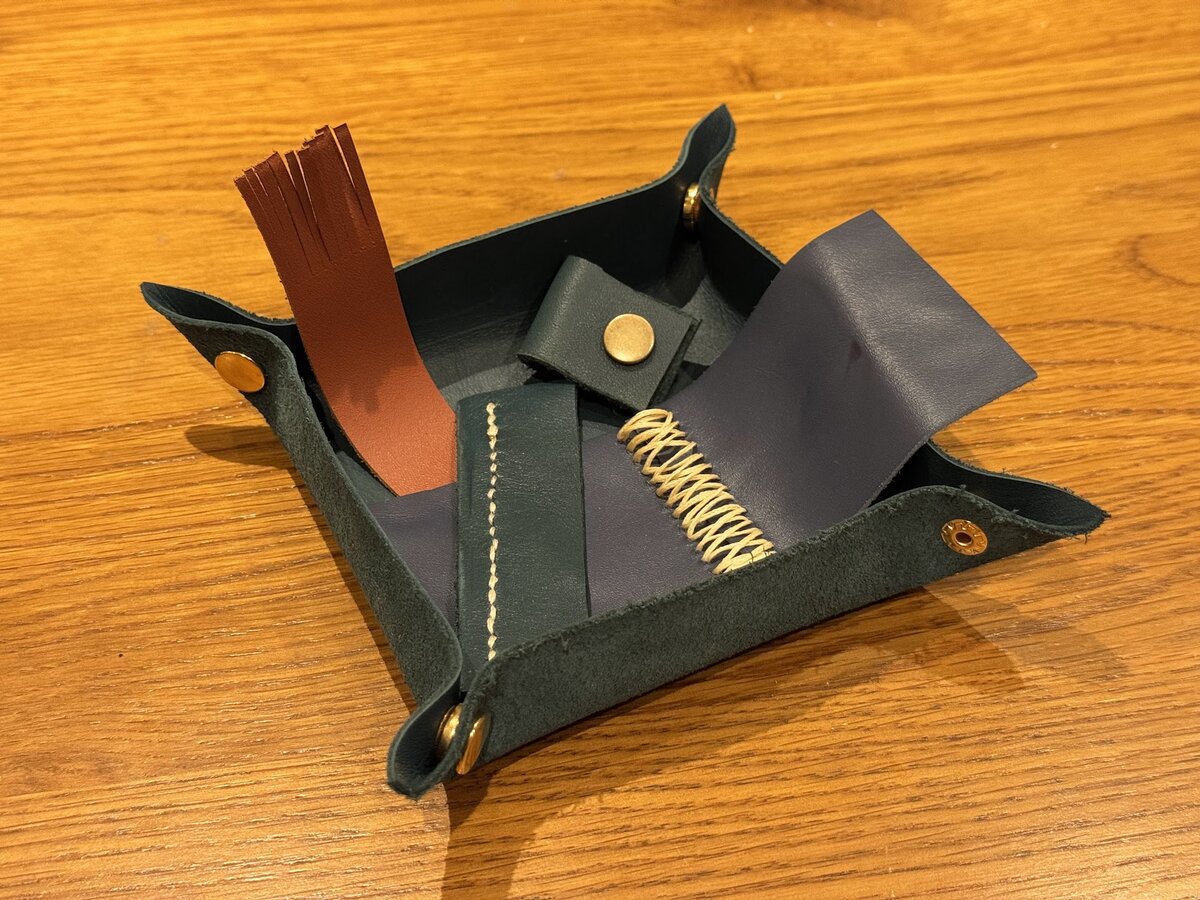
*My first experiments in leatherworking, tray included*
The answer that emerged over time is that I need hobbies that act as genuine distractions, not just more obligations. Things that demand my full focus and make it impossible to think about anything else, in the best possible way.
Owning two woodlands has helped. I now have an almost ridiculous supply of green wood to play with, and getting back into woodwork has been the most unexpectedly helpful thing I have done for my head in years. Carving spoons sounds whimsical until you are in the middle of it, managing grain, edge angles and stubborn knots. It is detailed, slightly risky, very physical. You cannot be mentally composing your next Slack post while you are trying not to slip with a sharp blade.
Leatherworking arrived shortly after. I am a beginner. My cuts are not always straight. My stitching wanders if I rush. But sitting at the table, punching rivets or trying to coax two bits of leather into a clean seam, pulls my attention firmly into my hands.
*Chilling in the forest while Willow sketches*
The woods themselves are a reset.
When I am out there, saw in hand, working out where a tree is going to fall, I am not thinking about the budget cycle or OKRs. I am thinking about the hinge, the wind, the escape route. When you are felling, the stakes are simple and immediate. That clarity is oddly restful.
Some of the best stuff is smaller and closer to home. Instruments left lying around the house that invite you to have a go, even if you only know a couple of chords. Video games that demand your full attention, because dodging rounds in a shooter is incompatible with worrying about Monday's meeting. None of this is grand or impressive. It just works.
And then there is geocaching.

*Lily delighted by her recent Geocache find. She especially loves taking things to swap for the items others leave in the containers.*
If you have never taken your children out to look for little hidden boxes in hedgerows and under benches, I recommend it. It is an instant adventure that starts at your front door. There is map reading, puzzle solving, a small sense of victory when you finally find the cache that has defeated you twice before. It drags you all outside and, for a little while, nobody is holding a phone for anything other than navigation.
These are the things that finally started to shift the balance. Not because they are "productive" or worthy, but precisely because they are not.
### Hobbies at home, and shared, are different
One of the big objections people have, especially in high pressure jobs, is the feeling that hobbies are selfish. That time you spend on yourself is time you are not giving to work or family.
The thing I have learned is that you can design hobbies that sit right in the middle of that triangle instead of on the edge.
Most of mine happen in and around home. Woodwork in the shed. Leatherwork at the kitchen table. Games in the living room. Geocaching from the front door. They pull me out of work without pulling me out of the house.
More importantly, they can be shared. A child can "help" sand a spoon. They can come and choose which tree is today's project. They can be the one in charge of the GPS when you are closing in on a geocache. Even if I also do some of these things alone, they are easy to fold into family life.
That makes a huge difference. Instead of hobbies competing with home, they can become part of what home looks like. I am not disappearing to a golf course for an entire day and leaving everyone else to get on with it. I am there, in the mess, making memories that are not just "Dad on a laptop in the corner".
### Why this actually makes work better, not worse
All of this would still matter even if it made me worse at work and better at life. But the interesting thing is that it does the opposite. It makes me better at work too.
Leadership work is mostly thinking work. You are paid for judgement, pattern recognition, handling complexity, making calls that are rarely clear cut. That part of your brain does not recover by doomscrolling or half watching television while you keep an eye on Slack.
It recovers when it is allowed to be somewhere else entirely.
When I am carving, or sewing, or trying to extract the children from a hedge without losing the geocache, a different part of my mind is in charge. The problems are physical and specific. The feedback is immediate. If you cut the wrong line, the spoon looks wrong. If you choose the wrong route through the brambles, you know about it.
That context switch is not a waste of time. It is the mental equivalent of putting a tired laptop to sleep so it stops thrashing the fans. While you are occupied with something small and absorbing, the parts of your mind that normally deal with strategy decks and organisational politics are quietly untangling themselves in the background.
There is another important layer. I am one of those people who always feels I should be doing something useful. If I do not give that instinct a healthy outlet, it will chew on work continuously. Hobbies soak up that restlessness. A half finished spoon, a leather project waiting for the next step, a cache we have not found yet, all give that "must do something" part of me a safe target.
And then there is guilt.
When I spend my weekends actually doing things with my family, I do not sit in Monday meetings thinking about what I should have done. I am not replaying a weekend I wasted checking email. I know I took the kids out. I know I spent time with Rachel. I know I saw friends. That box is ticked on purpose.
Which means work can be guilt free. When I am at work, I am at work. I am not trying to be at home in my head at the same time. People get a present version of me, not someone half here and half somewhere else.
Work on its own stretches to fill every gap and eventually frays. Work plus hobbies that live close to home, that can be shared and that properly absorb you, gives you a rhythm. Focus hard. Step away. Do something with your hands or your kids or both. Come back sharper, calmer, less defensive.
### Charity, with a little more honesty
Charitable and community work still matters to me. My involvement with the school is one of the ways I try to contribute something beyond my own career and bank account. Sitting in budget meetings and policy discussions about children who will never know who I am is a useful reality check.
The difference now is that I am more honest about the role it plays in my life. It is part service, part perspective, and I am careful not to let it quietly expand into yet another identity that swallows everything else. I have already seen what happens when I pour all my spare attention into "being useful" outside the home, and I do not want to run that pattern again.
Charity can be a brilliant form of hobby, as long as you are clear about what you are using it for. If it becomes yet another way to avoid being present with the people closest to you, you are back where you started, just wearing a different badge.
### What I wish I had understood earlier
I am not writing any of this as someone who has always had it nailed. Quite the opposite. I learned most of these lessons the long way round, with a fair amount of regret baked in.
If I could send a message backwards to the earlier version of me, the one who felt permanently important and permanently behind, it would probably sound something like this:
Your job will always be hungry. It will happily eat every evening, every weekend, every spare thought you let it have, and it will still not be satisfied. Your family will not always be small. Your children will only be this exact age once. Your parents will not always be this well. Your own body will not always be this forgiving.
You do not need to quit, or retreat to a cabin, or dismantle the ambition that got you where you are. You do, though, need to give that ambition neighbours. Hobbies that absorb you. Work at home that looks like play. Small adventures that start at your own front door. Acts of service that widen your world instead of narrowing it.
Do that, and something quite ordinary but important happens. Work stops being the whole story. It becomes one part of a bigger, more interesting life. And when you are working, you can actually relax into it, because you know you have done the other parts on purpose.
That is what I am trying to do now. Some days it goes well. Some days I slip back into old habits and have to pull myself out again. The difference is that I can see the pattern clearly.
And that, in itself, feels like a hobby worth keeping.
---
# Which year does your role become redundant? A personal playbook for now through 2045
URL: https://sjg.io/writing/which-year-does-your-role-become-redundant/
Published: 2025-10-31
Description: Evidence-led guidance for individuals in the Western world. What to do, when to do it, and which signals to watch so you stay employable through the next four waves of automation.
I want to start with what is already changing in front of us today. Not a lab demo: live traffic.
A year ago, I sat watching the Dreamforce 2024 keynote, coffee in hand, while a combination of the Salesforce and Saks teams showed an AI service flow that pulled up a customer profile, resolved the issue, and delivered a physical in store delivery in seconds. It was not JUST theatre. Salesforce has been packaging this as Agentforce across Service and the other clouds, and the Saks demo has been used repeatedly to show how real deployments look in practice.[^salesforce-agentforce]
Meanwhile, Microsoft has already put AI in front of its gaming customers. The official Xbox Support site routes you to a **Support Virtual Agent** for billing, account and device issues. That is not a concept video. It is the default path on the live help flow.[^xbox-support] On the consumer experience side, Microsoft is also rolling out **Gaming Copilot** as an AI companion on PC and mobile, which shows how quickly assistant patterns move from support to day‑to‑day use.[^gaming-copilot]
This is not just vendor marketing. There is hard evidence from production call centres. A large‑scale study of more than 5,000 agents found that access to a generative‑AI assistant increased productivity by about **14% on average**, with the biggest gains for newer agents.[^call-center-study]
A second example that shows both the promise and the limits. Klarna reported that its AI assistant handled roughly **two‑thirds** of customer service chats in its first month, the equivalent of work done by hundreds of agents, with faster resolution and fewer repeat contacts.[^klarna-ai] As the system matured, Klarna rebalanced with more humans on the complex threads while keeping AI as the front line for routine traffic.[^klarna-rebalance] That nuance matters for your own planning.
If you work in customer service today, the takeaway is simple. The front door has already moved. AI triages and solves the common cases. Humans win where judgement, exception handling and accountability are required. The rest of this piece is your playbook for what to do at each horizon so you stay on the right side of that line.
You are not a passenger in this technology story. You are the driver. The question is simple and uncomfortable: **in which year does your role become redundant, and what will you do about it now**.
I have read the best available forecasts from economists, futurists and labour statisticians and boiled them into a plan you can follow. This is written for individuals.
Those shifts are not isolated. Here is the scale and shape of what follows.
## Quick jump to sections
- [2027: the clerical and first‑line reshuffle](#2027-the-clerical-and-first-line-reshuffle)
- [2030: disruption at scale](#2030-disruption-at-scale)
- [2035: Oversight becomes the job](#2035-oversight-becomes-the-job)
- [2045: the everything‑has‑changed horizon](#2045-the-everything-has-changed-horizon)
- [What is growing, and why this is not all terrible](#what-is-growing-and-why-this-is-not-all-terrible)
- [Which jobs are not under threat?](#which-jobs-are-not-under-threat)
- [What to do now](#what-to-do-now)
### Three facts to set the baseline
1. The World Economic Forum’s latest five‑year outlook says **about 23% of roles change by 2027**, with **69 million** new roles created and **83 million** displaced. Your skills profile will move even if your job title does not.[^wef-jobs]
2. Official projections show which office jobs are already shrinking in the West. **Word processors and typists, data‑entry keyers, payroll and timekeeping clerks, file clerks, telemarketers and cashiers** sit near the top of the fastest‑declining lists to 2034.[^bls-declining] If your day is high‑volume routine work at a screen or till, you are on the front line.
3. The scale of change is real. **Goldman Sachs** estimates the equivalent of **300 million** full‑time jobs could be exposed to automation by generative AI,[^goldman-sachs] while **McKinsey Global Institute** has long projected large workforce transitions by 2030.[^mckinsey-transitions] Treat exposure as a signal to prepare, not a prophecy of unemployment.
### At a glance
- **23%** of roles change by **2027**; **69m created vs 83m displaced**.[^wef-jobs]
- **Healthcare and social assistance** is the largest growth engine to **2034**.[^bls-healthcare]
- AI assistants in production call centres lift productivity **\~14% on average** and **\~34% for novices**.[^call-center-study]
Now for the practical bit: what individuals can do at each time horizon.
---
## 2027: the clerical and first‑line reshuffle
### What moves first
High‑volume clerical and back‑office tasks: data entry, payroll and timekeeping, file processing, order management, typing pools. These are already substitutable via AI and shared‑service centres.[^bls-declining]
First‑line IT helpdesk and routine finance back‑office (password resets, scripted troubleshooting, invoice capture, expense categorisation) follow the same pattern. Customer contact is shifting too. A large field experiment found **14% average productivity gains** from an AI assistant for call‑centre agents, with **\~34% gains for novices**.[^call-center-study] The human premium moves to exceptions and escalations.
### 30‑day moves
Run a **task audit**. List your weekly activities and mark which are rule‑based and repetitive. Anything a model can do from examples is at risk by 2027. Cross‑check with the WEF finding that **44% of workers’ core skills change within five years**.[^wef-skills]
### 90‑day moves
Begin daily **co‑working with AI** on your own terms. Document prompts that make you faster and where you must review carefully. Become the person who steers the tool, not the person replaced by it.
### 12‑month moves
Shift your role toward **exceptions, stakeholders and systems**. Volunteer for work that requires judgement, context and persuasion. These abilities carry a durable wage premium in the research.[^deming-social]\
Build a visible **tech‑literacy baseline**. WEF lists analytical thinking, creative thinking and technology literacy as the fastest‑rising skills. Prove them with a small portfolio: one analysis, one creative prototype, one automation.[^wef-skills]
### Signals to watch
Self‑service roll‑outs, AI service metrics on your team dashboard, and your occupation appearing on national **fastest‑declining** lists.[^bls-declining]
### Why this matters
If most of your value is moving information between systems, the clock runs sooner than you think. Move into work that needs judgement and trust.
---
## 2030: disruption at scale
### What expands
By 2030, automation touches almost every sector. **Manufacturing and warehousing** accelerate first. Oxford Economics projects **up to 20 million** manufacturing jobs displaced by robots by around 2030, with Western economies adopting quickly due to higher labour costs.[^oxford-economics]\
Retail continues to shrink as computer vision and app‑based checkout mature, while entry‑level white‑collar tasks in accounting, compliance and basic research consolidate under AI copilots. McKinsey finds a substantial share of knowledge‑work hours automatable this decade.[^mckinsey-ai]\
By 2030, **standard legal research, discovery and first‑draft contracts are AI‑first** in many teams, compressing junior benches while raising the bar for supervision.[^mckinsey-ai]\
In marketing, **production work** such as ad variants, landing‑page copy and first‑pass visuals is largely model‑generated with humans in brand control.[^mckinsey-ai]
### Your playbook
Build a **barbell of skills** (one domain depth plus one enabling stack). For most people, the enabling stack is data handling, low‑code automation and prompt‑to‑pipeline workflows. This makes you the **owner of the workflow**, not a task runner. McKinsey links productivity gains to redeploying time into higher‑value activities.[^mckinsey-redeploy]\
If you code, formalise **AI‑assisted engineering**. Measure throughput and review quality. Combine Copilot speed‑ups with stricter code review to avoid the fast but sloppy trap.[^github-copilot]\
If you work in operations or service delivery, gain a certification in **process improvement and automation**. Demonstrate that you can improve a metric that matters while orchestrating AI safely.
### Signals to watch
Fewer junior postings, broader senior roles, and local training subsidies for mid‑career reskilling. Adult learning access remains thin, so you will need to drive this yourself.[^oecd-adult]
### Why this matters
Teams will be smaller and more leveraged. People who own workflows and outcomes will carry more value than people who carry tasks.
---
## 2035: Oversight becomes the job
### What changes
By the mid-2030s, automation settles into the middle of the stack. Systems take the first pass. People set the guardrails, handle edge cases and sign their name.
- **Freight on rails, roads still mixed.** Autonomy is common on defined freight corridors. City driving, weather and liability keep humans in the loop, but total driver demand is lower.[^itf-oecd]
- **Diagnostics go AI-first, not AI-only.** In imaging and other high-pattern domains, models handle initial reads with clinicians in oversight. Augmentation is the norm; unsupervised reporting is not.[^hinton-radiology]
### Your playbook
- Become **the system supervisor**. Write evaluation checklists, set thresholds, define hand-off rules, and log edge cases. If you can prove a model is safe and useful, you are valuable.
- Double down on **persuasion, leadership and complex collaboration**. The wage return to social-skill intensity is persistent and measurable.[^deming-social]
- Publish **evidence of judgement**. Case notes, retrospectives and design decisions signal trust when anyone can produce a draft.
### Signals to watch
- Your industry adopting model-evaluation standards and audit trails.
- Clients asking for accountable outcomes rather than deliverables.
### Why this matters
When the first draft is cheap, trust is the scarce resource. Be the person whose judgement others rely on.
---
## 2045: the everything‑has‑changed horizon
### What to expect
You do not need to believe in science fiction to plan for this. Surveys of AI researchers put the **median 50% chance of high‑level machine intelligence around 2047**, implying that most work tasks could be automatable within your career, subject to adoption and regulation.[^ai-impacts] Technical feasibility tends to arrive before full adoption; regulation, liability and customer preference can trail the frontier by a decade.
### Your playbook
Focus on **career capital that compounds** regardless of tools: problem selection, taste and judgement, coalition building, clear writing and the ability to teach. Economic research shows tasks that cannot be reduced to explicit rules are complemented by technology rather than substituted.[^acemoglu-autor][^deming-social]\
Maintain a **training habit for life**. Adult learning participation is still low across the OECD, yet it is one of the strongest predictors of resilience in job transitions. Schedule one formal skill upgrade a year, even if it is small.[^oecd-adult]\
Keep a **portable portfolio** that proves outcomes across contexts.
### Signals to watch
Credible third‑party evaluations showing models performing complex cross‑domain tasks with reliability and audit trails, and regulation assigning clear responsibility around the machine.
### Why this matters
By this time, the only stable advantage is trust, accountability and judgement under uncertainty. Those traits stay human for longer than any tool.
---
## What is growing, and why this is not all terrible
Displacement is only half the story. The same sources that flag declines also show where new work arrives. The World Economic Forum’s outlook lists **AI and machine‑learning specialists, information security analysts, business intelligence analysts, sustainability specialists and renewable energy engineers** among the fastest‑growing roles through the late 2020s.[^wef-growing]\
US labour projections point to **healthcare and social assistance** as the largest engine of job growth to 2034, with strong gains in **nurse practitioners** and **home health and personal care aides**.[^bls-healthcare] Demand for **information security analysts** remains high as digital systems expand.[^infosec-growth]
There is a pattern. Work that is **non‑routine, social and judgement‑heavy** is complemented by technology rather than replaced.[^acemoglu-autor][^deming-social] You do not need to become a data scientist overnight. You do need to move from **replaceable outputs** to **trusted outcomes** and to do it early enough that the tools become your leverage, not your competition.
---
## Which jobs are not under threat?
No role is untouchable, but some are structurally more resilient for longer, either because of **human preference** or **legal and safety accountability**.
| Category and why | Examples you can pivot toward | Signals to watch |
| ---------------------------------------------------------------------------- | --------------------------------------------------------------------------------------------- | -------------------------------------------------------------------------------------------------------------- |
| **Care and health**: high trust, physical presence, complex judgement | Nurse practitioners, therapists, mental‑health counsellors, clinical support, health managers | Persistent BLS growth; demographic demand; scope‑of‑practice expansion[^bls-healthcare] |
| **Cybersecurity and risk**: adversarial, open‑ended, regulatory pull | Information security analysts, security engineers, AI model‑risk evaluators | Double‑digit growth outlook; chronic workforce gap; boards asking for attestations[^infosec-growth][^isc2-gap] |
| **Green field tech and skilled trades**: unstructured physical tasks on site | Wind‑turbine technicians, solar PV installers, electrical and HVAC, industrial maintenance | Near the top of BLS fastest‑growing lists; strong policy tailwinds; apprenticeship routes[^bls-fastgrowing] |
| **Data plus domain**: AI‑enabled but human‑directed integration | Data scientists with domain depth, analytics translators, product managers | OOH growth for data scientists; value concentrates in business context[^datasci-growth] |
| **Persuasion and coordination**: social skills complement tech | Sales engineers, client success, change leaders, educators and trainers | Durable wage returns to social skill intensity[^deming-social] |
If you are mid‑career in front‑line service, build towards **exception handling and evaluation**. The best evidence shows AI lifts novice performance most, which is an opportunity if you are moving into a new discipline.[^call-center-study]\
If you are technical, add **risk and governance** to your stack. Every serious deployment needs people to test, monitor and document models against real‑world fail modes.\
If you prefer field work, move toward **clean‑energy and skilled maintenance**. Growth is strong, credentials are stackable, and the work is inherently site‑bound.[^bls-fastgrowing]
---
## What to do now
1. **Date your risk.**\
Place your role against these checkpoints. If you are heavy on routine communication or reconciliation, plan a **2027** pivot. If you are in entry‑level knowledge work or volume retail, plan for **2030**. If you are mid‑career in legal, diagnostics, finance or software delivery, plan for **2035**. If your work advantage is doing predictable tasks faster than others, assume **2045** at the latest. The goal is to move from tasks a model *can do* to outcomes it *must be guided to do safely*.
2. **Adopt your AI stack as a craft.**\
Work with AI daily, write your own operating rules and log the errors you catch. Research shows AI helps most when you are learning or facing unfamiliar problems. Use it to climb faster.[^call-center-study]
3. **Invest in skills the market values.**\
Analytical and creative thinking, technology literacy and the social skills that bind complex work together. Deliver one small project per quarter that proves each in practice.[^wef-skills][^deming-social] See the [Read Next](#read-next) article below for more on this!
4. **Own the workflow, not the widget.**\
Learn the basics of data plumbing, low‑code automation and prompt‑to‑pipeline design. Become the person who defines requirements and sets acceptance criteria. McKinsey links productivity gains to redeploying time into higher‑value activities once the busy work is automated.[^mckinsey-redeploy]
5. **Keep your plan human.**\
Caring professions, persuasion, governance and accountability roles stay human by preference and by law for longer. If you are changing fields, aim for problems that require trust and responsibility, not just keystrokes. The BLS identifies healthcare and social assistance as core growth engines through 2034.[^bls-healthcare]
---
## Read next
[The 2026 Computer-Literate Bar](https://sjg.io/writing/the-2026-computer-literate-bar/)
---
[^salesforce-agentforce]: Salesforce Agentforce: [Dreamforce 2024 keynote](https://www.salesforce.com/plus/experience/dreamforce_2024/series/best_of_dreamforce_2024/episode/episode-s1e1/), [Saks demo](https://www.salesforce.com/plus/experience/world_tour/series/best_of_agentforce_world_tour_nyc_winter_2024/episode/episode-s1e2/), [Agentforce overview](https://www.salesforce.com/agentforce/einstein-copilot/)
[^xbox-support]: Microsoft Xbox Support: [Virtual Agent FAQ](https://support.xbox.com/en-US/help/games-apps/xbox-ai/virtual-agent-faq), [Contact us entry point](https://support.xbox.com/en-US/contact-us)
[^gaming-copilot]: Microsoft Gaming Copilot: [Xbox Wire rollout](https://news.xbox.com/en-us/2025/09/18/gaming-copilot-xbox-pc-mobile/), [September platform update](https://news.xbox.com/en-us/2025/09/29/xbox-september-update-2025/)
[^call-center-study]: Brynjolfsson, Li, Raymond, *Generative AI at Work*. *Quarterly Journal of Economics* (2025) article page: [QJE](https://academic.oup.com/qje/article/140/2/889/7990658). Working paper: [NBER w31161](https://www.nber.org/papers/w31161). Author PDF: [danielle.li](https://danielle.li/assets/docs/GenerativeAIatWork.pdf)
[^klarna-ai]: Klarna AI assistant: [Press release](https://www.klarna.com/international/press/klarna-ai-assistant-handles-two-thirds-of-customer-service-chats-in-its-first-month/), [OpenAI case study](https://openai.com/index/klarna/)
[^klarna-rebalance]: Klarna rebalancing: [Customer Experience Dive](https://www.customerexperiencedive.com/news/klarna-reinvests-human-talent-customer-service-AI-chatbot/747586/), [AP News: AI and call centres](https://apnews.com/article/ca87ae77d7c6797ebb2628bd1b532929)
[^wef-jobs]: World Economic Forum, *Future of Jobs 2023*: [Overview and report](https://www.weforum.org/publications/the-future-of-jobs-report-2023/), [Digest with 23% jobs changing, 69m created, 83m displaced](https://www.weforum.org/publications/the-future-of-jobs-report-2023/digest/)
[^bls-declining]: US Bureau of Labor Statistics, Employment Projections 2024–2034: [Fastest declining occupations](https://www.bls.gov/emp/tables/fastest-declining-occupations.htm), [Largest job declines](https://www.bls.gov/emp/tables/occupations-largest-job-declines.htm)
[^goldman-sachs]: Goldman Sachs Research: [Generative AI could raise global GDP by 7%](https://www.goldmansachs.com/insights/articles/generative-ai-could-raise-global-gdp-by-7-percent)
[^mckinsey-transitions]: McKinsey Global Institute: [Jobs lost, jobs gained – overview](https://www.mckinsey.com/featured-insights/future-of-work/jobs-lost-jobs-gained-what-the-future-of-work-will-mean-for-jobs-skills-and-wages), [Executive summary PDF](https://www.mckinsey.com/~/media/mckinsey/industries/public%20and%20social%20sector/our%20insights/what%20the%20future%20of%20work%20will%20mean%20for%20jobs%20skills%20and%20wages/mgi-jobs-lost-jobs-gained-executive-summary-december-6-2017.pdf)
[^wef-skills]: Employers estimate that **44%** of workers’ skills will be disrupted within five years; analytical thinking, creative thinking and technology literacy rise fastest. World Economic Forum, *Future of Jobs 2023* digest: [Digest](https://www.weforum.org/publications/the-future-of-jobs-report-2023/digest/)
[^oxford-economics]: Oxford Economics, *How Robots Change the World* (2019): [Report page](https://www.oxfordeconomics.com/resource/how-robots-change-the-world/), [PDF](https://cdn2.hubspot.net/hubfs/2240363/Report%20-%20How%20Robots%20Change%20the%20World.pdf)
[^mckinsey-ai]: McKinsey Global Institute: *The economic potential of generative AI – the next productivity frontier* (2023), [Report](https://www.mckinsey.com/capabilities/tech-and-ai/our-insights/the-economic-potential-of-generative-ai-the-next-productivity-frontier), [PDF](https://www.mckinsey.com/~/media/mckinsey/business%20functions/mckinsey%20digital/our%20insights/the%20economic%20potential%20of%20generative%20ai%20the%20next%20productivity%20frontier/the-economic-potential-of-generative-ai-the-next-productivity-frontier.pdf)
[^mckinsey-redeploy]: McKinsey Global Institute (2023): on redeploying time into higher‑value activities once busy work is automated. See report above.
[^github-copilot]: GitHub Copilot study: [Research blog](https://github.blog/news-insights/research/research-quantifying-github-copilots-impact-on-developer-productivity-and-happiness/), [RCT paper – arXiv](https://arxiv.org/abs/2302.06590)
[^oecd-adult]: OECD: *Trends in Adult Learning* (2025) [Hub](https://www.oecd.org/en/publications/trends-in-adult-learning_ec0624a6-en.html), [Full report – PDF](https://www.oecd.org/content/dam/oecd/en/publications/reports/2025/06/trends-in-adult-learning_f0d8514f/ec0624a6-en.pdf)
[^itf-oecd]: ITF‑OECD: *Managing the transition to driverless road freight transport* [Report page](https://www.itf-oecd.org/managing-transition-driverless-road-freight-transport), [PDF](https://www.itf-oecd.org/sites/default/files/docs/managing-transition-driverless-road-freight-transport.pdf)
[^hinton-radiology]: Radiology and AI: [New Yorker profile quoting Hinton](https://www.newyorker.com/magazine/2017/04/03/ai-versus-md), [Reality check review – PMC](https://pmc.ncbi.nlm.nih.gov/articles/PMC7720669/)
[^ai-impacts]: AI Impacts, expert surveys on AI timelines: [Thousands of AI authors on the future of AI – PDF](https://aiimpacts.org/wp-content/uploads/2023/04/Thousands_of_AI_authors_on_the_future_of_AI.pdf), [2022 survey overview](https://aiimpacts.org/2022-expert-survey-on-progress-in-ai/)
[^acemoglu-autor]: Acemoglu and Autor, *Skills, Tasks and Technologies: Implications for Employment and Earnings* (Handbook of Labor Economics, 2011) open PDF: [MIT Economics](https://economics.mit.edu/sites/default/files/publications/Skills%2C%20Tasks%20and%20Technologies%20-%20Implications%20for%20.pdf)
[^deming-social]: David Deming, *The Growing Importance of Social Skills in the Labor Market*, *QJE* (2017) [Article](https://academic.oup.com/qje/article-abstract/132/4/1593/3861633), [Working paper PDF](https://scholar.harvard.edu/files/ddeming/files/deming_socialskills_qje.pdf)
[^wef-growing]: World Economic Forum, *Future of Jobs 2023* – top growing roles include AI and ML specialists, information security analysts, business intelligence analysts, sustainability specialists and renewable energy engineers. [Report hub](https://www.weforum.org/publications/the-future-of-jobs-report-2023/), [Digest](https://www.weforum.org/publications/the-future-of-jobs-report-2023/digest/)
[^bls-healthcare]: US BLS, Employment Projections 2024–2034 – healthcare and social assistance add the most jobs; see summary and news release PDF. [EP summary](https://www.bls.gov/news.release/ecopro.nr0.htm), [PDF](https://www.bls.gov/news.release/pdf/ecopro.pdf)
[^infosec-growth]: U.S. BLS Occupational Outlook Handbook – **Information security analysts** projected to grow strongly to 2034. [OOH page](https://www.bls.gov/ooh/computer-and-information-technology/information-security-analysts.htm)
[^isc2-gap]: ISC2 **Cybersecurity Workforce Study 2024** – continuing global workforce gap. [Report hub](https://www.isc2.org/Insights/2024/10/ISC2-2024-Cybersecurity-Workforce-Study)
[^bls-fastgrowing]: BLS **Fastest growing occupations** 2024–2034 – wind turbine service technicians and solar PV installers near the top. [Table](https://www.bls.gov/emp/tables/fastest-growing-occupations.htm), [OOH index](https://www.bls.gov/ooh/fastest-growing.htm)
[^datasci-growth]: U.S. BLS OOH – **Data scientists** projected to grow rapidly to 2034. [OOH page](https://www.bls.gov/ooh/math/data-scientists.htm)
---
# The 2026 Computer-Literate Bar
URL: https://sjg.io/writing/the-2026-computer-literate-bar/
Published: 2025-10-25
Updated: 2025-10-26
Description: Why computer literacy matters now, and exactly what to do to reach the 2026 bar.
It used to be enough to say you could use Word, send an email, and "do a spreadsheet." That is not computer literacy anymore. The bar has moved.
Over the last few months I have been working on this idea of a 2026 computer‑literacy bar while thinking about hiring and talent in an AI‑powered workplace. It is not "coming soon." It is here today. Employers expect core skills to shift fast and most jobs already require digital capability (see the World Economic Forum’s *Future of Jobs*).
Years ago I was telling people Power BI skills would become the new Excel. This shift is like that, only bigger. AI and modern tooling are changing how people write, analyse, and decide, and the time savings show up quickly in the flow of daily work.
This applies to everyone. I mean the stay‑at‑home parent, the high‑rate lawyer, the accountant, the programmer, and the health worker. Most jobs now require at least medium digital skills and the share of low‑digital jobs keeps shrinking.
Being computer literate in 2026 means you can keep yourself secure, use AI as a partner, and work confidently across platforms. You do not need to be a programmer. You do need to understand how today’s tools think, talk, and connect.
This is a practical guide to getting there.
## Skip ahead
- [Why computer literacy matters](#why-computer-literacy-matters)
- [1. Security that resists phishing](#1-security-that-resists-phishing)
- [2. Using AI like a collaborator](#2-using-ai-like-a-collaborator)
- [3. Becoming a power user of your everyday tools](#3-becoming-a-power-user-of-your-everyday-tools)
- [4. Data and digital sensemaking](#4-data-and-digital-sensemaking)
- [5. Digital responsibility and awareness](#5-digital-responsibility-and-awareness)
- [6. Ethics and critical thinking](#6-ethics-and-critical-thinking)
- [What to do today](#what-to-do-today)
- [Research and further reading](#research-and-further-reading)
---
## Why computer literacy matters
Computer literacy is not about being a “tech person.” It is about control over your time, your money, your reputation, and your opportunities. If you care about those, you care about this.
### What it gives you
Being computer literate gives you back control. It keeps your digital life safe, makes your day more efficient, and opens doors professionally. Your email, bank accounts, photos, and messages all live behind a sign-in page, and with passkeys and phishing-resistant MFA, one careless click no longer turns into an identity theft nightmare. You win back hours each week by using AI and modern app features that take the boring, repetitive work off your hands, leaving more space for the tasks that actually need your attention. And at work, where every role now has a digital layer, it is the people who can read a chart, automate a small workflow, and steer AI with confidence who others rely on and who move ahead fastest.
### What it protects you from
It also protects you from the things that quietly erode trust and time online. Strong security and a healthy dose of digital scepticism help prevent account takeovers that can lock you out of email, banking, or social profiles. Clearer habits with AI reduce costly mistakes that come from accepting confident-sounding but wrong answers. And a broader awareness of how platforms change protects you from sudden “rule shifts” that can make familiar tools vanish overnight. In short, literacy turns uncertainty into confidence.
### In summary
Computer literacy in 2026 is insurance for your identity, acceleration for your work, and a filter for the information firehose. Learn a few modern habits and you will feel it immediately.
---
## 1. Security that resists phishing
### What that means
Passwords are easy to steal. Even two‑factor codes can be tricked out of you with fake sign‑in pages. Phishing‑resistant sign‑in uses a cryptographic check between your device and the service, so there is nothing useful to type into a fake form.
Verizon’s *2025 Data Breach Investigations Report* lists stolen credentials and social engineering among the top breach causes ([Verizon, 2025 DBIR](https://www.verizon.com/business/resources/reports/dbir/)). That is why moving beyond passwords matters.
The strongest option for most people is a **passkey** or a **FIDO2 hardware key**.\
These prove your identity with a cryptographic challenge that can only be completed by your real device.\
They cannot be intercepted by fake websites, reused, or guessed.
If you want the primer:\
👉 [What are passkeys and how do they work?](https://fidoalliance.org/passkeys/)
### What to do
- **Turn on a passkey** for your main account\
Use the official guides:
- Google: [Use a passkey to sign in](https://support.google.com/accounts/answer/13548313)
- Apple: [Use passkeys on iPhone and Mac](https://support.apple.com/guide/iphone/use-passkeys-to-sign-in-to-websites-and-apps-iphf538ea8d0/ios) · [About passkey security](https://support.apple.com/en-us/102195)
- Microsoft: [Signing in with a passkey](https://support.microsoft.com/en-us/account-billing/signing-in-with-a-passkey-09a49a86-ca47-406c-8acc-ed0e3c852c6d) · [Windows passkeys overview](https://support.microsoft.com/en-us/windows/passkeys-overview-301c8944-5ea2-452b-9886-97e4d2ef4422)
- **Add a hardware security key** for critical accounts\
A FIDO2 or WebAuthn‑compatible key (for example a [YubiKey](https://www.yubico.com/setup/) or [Google Titan key](https://store.google.com/product/titan_security_key)) gives you a physical device that must be present to sign in.\
It is ideal for banking, email, and admin roles.\
Unlike phone codes, it cannot be phished or SIM‑swapped.
- Microsoft: [Sign in with a security key](https://support.microsoft.com/en-us/topic/sign-in-to-your-account-with-a-security-key-b23a2a45-6ab8-4c86-9f22-bcadf60235aa)
- **Choose the right MFA methods**
| **Method** | **Recommended?** | **Why** |
| ---------------------------------------------------------------------------------------------------- | -------------------------- | ---------------------------------------------------------------------------------------------------------- |
| **Passkeys / FIDO2 hardware keys** | ✅ **Best** | Fully phishing‑resistant, cryptographic, no shared secret. |
| **Authenticator app codes (TOTP)** (Microsoft Authenticator, Google Authenticator, 1Password, Authy) | ✅ **Good** | Strong codes generated on device; still phishable if you type them into a fake page. |
| **Push approvals** (Microsoft or Okta push) | ✅ **Good, with care** | Convenient, but tap‑fatigue can cause accidental approvals. Only approve if you just attempted to sign in. |
| **Email codes** | ⚠️ **Weak** | Email can itself be compromised. Use only as a recovery method. |
| **SMS / text codes** | ❌ **Avoid where possible** | Vulnerable to SIM‑swap and phishing interception. |
| **Security questions** | ❌ **Never use** | Easy to guess or scrape from public data. |
- **Review account recovery and backup codes**\
Store recovery keys and backup codes securely in a password manager.\
If SMS is listed as a fallback, remove it and add app‑based or hardware methods instead.
- Bitwarden: [Store and use passkeys](https://bitwarden.com/help/storing-passkeys/) · [Passwordless with passkeys](https://bitwarden.com/passwordless-passkeys/)
- **Use an independent password manager**\
Password managers create unique credentials and can also store your passkeys.\
They keep you independent of one vendor’s ecosystem and make recovery simpler.\
Open, trusted options: [Bitwarden](https://bitwarden.com/) and [1Password](https://1password.com/).
### Proof you did it
- You see a registered passkey or hardware key listed on your Google, Apple, or Microsoft security page.
- You can sign in without typing a password.
- Your password manager holds recovery codes, and SMS fallback is removed.
- If prompted for MFA, you tap a hardware key or confirm in an authenticator app, not via text.
### Why this matters
- 60% of breaches in 2025 involved the human element or stolen credentials.
- SMS and voice are weak factors; move to phishing‑resistant methods and remove weak fallbacks.
Also see my earlier posts on [Consolidation](https://sjg.io/writing/consolidation/) and [Consolidation Again](https://sjg.io/writing/consolidation-again/). Centralised logins magnify the impact of weak MFA.
---
## 2. Using AI like a collaborator
### What that means
AI is not a search engine or an autopilot. It is a partner for thinking and drafting. In ChatGPT, **GPT‑5** automatically chooses between **Chat** (quick conversation) and **Thinking** (deeper reasoning). Treat every confident output as a draft that still needs sources and edits. I like to think of a conversation with ChatGPT like having a three way conversation with you, the AI, and future you. You are saying a thing, the AI is responding, and future you is discerning. And the circle just continues round and around until you are happy with the output. NEVER rush with AI output.
When you need the web, use **Search**. When you need a documented report with citations, use **Deep Research**. When you need to process data or check maths, use **Data Analysis** (This is not a separate mode; it activates when you upload a file or ask for calculation, graphs, or inspection.) The clearer you state your intent, the better these tools work.
When you really care, don't be afraid to use those Deep Research credits. And if you do pay for Pro then make use of Pro frequently, get your moneys worth! It may take a while, but the juice is worth the squeeze.
### What to do
- **Pick something real** you already do (an email summary, a report, a data problem).
- **State goal and audience first.** "Make this clear to non‑technical readers and keep it factual" beats "write a report."
- **Choose the right tool or mode.**
- **Search** for recent facts with links.
- **Deep Research** for longer, cited write‑ups.
- **Data Analysis** by uploading a file or asking for calculation; it runs code and shows the working.
- **GPT‑5 Thinking** for problems that need more reasoning.
- **Ask for reasoning and sources.** "List sources for each claim and show your steps." Open the links and check them.
- **Edit for your voice.** Keep the structure, fix the details, and note what you changed.
### Good vs bad practices
| **Practice** | **Do** | **Do not** | **Why it matters** |
| --------------------------- | --------------------------------------------------------------------------------------------------------------------------------------------------------- | ---------------------------------------- | --------------------------------------------------------------------------------------------- |
| **Define the task** | Give goal, audience, constraints, examples | Use a one‑line “do this” prompt | Clear intent gives better structure and fewer rewrites. |
| **Pick the right tool** | Use **Search** for web answers, **Deep Research** for multi‑source write‑ups, **Data Analysis** for maths/files, **GPT‑5 Thinking** for complex reasoning | Expect plain Chat to handle everything | Each is built for a different job. Data Analysis executes code; Deep Research adds citations. |
| **Citations** | Require citations when facts matter and open them | Copy text with unverified “citations” | Verification closes the loop. |
| **Critique** | Challenge the draft. Ask for alternatives and counterexamples | Copy and paste the first output | Refining through dialogue improves quality. |
| **Maths and data** | Upload data or use **Data Analysis** so the maths executes visibly | Trust plain chat for arithmetic or joins | Chat alone can be confidently wrong. Data Analysis shows the steps. |
| **Thinking models** | Let **GPT‑5 Thinking** tackle reasoning‑heavy questions | Rush everything through Chat | Thinking spends more time reasoning and planning. |
| **Privacy** | Avoid pasting secrets. Use **Temporary Chats** or manage **Data Controls** | Treat chat like a private notepad | You control history and training. Use the settings. |
| **Upgrade when it matters** | Use **Plus** or **Pro** for access to GPT‑5 and research tools | Assume the free tier is identical | Paid tiers unlock higher limits, reasoning, and citations. |
### Best tools and how to get the most
- **ChatGPT (GPT‑5)**
- Tools: **Search**, **Deep Research**, **Data Analysis** (available via the tool picker or when context demands).
- Plans: [ChatGPT Plus](https://help.openai.com/en/articles/6825454-how-to-upgrade-to-chatgpt-plus) and [ChatGPT Pro](https://help.openai.com/en/articles/8424158-chatgpt-pro-plan-overview) for higher limits and access to GPT‑5, Thinking, and research tools.
- Best practice: be explicit, iterate, and ask the model to show its reasoning or assumptions.
- **Microsoft Copilot**
- Excel: [Get started](https://support.microsoft.com/en-us/office/get-started-with-copilot-in-excel-d7110502-0334-4b4f-a175-a73abdfc118a)
- Word: [Copilot in Word](https://support.microsoft.com/en-us/copilot-word)
- Outlook: [Summarise a thread](https://support.microsoft.com/en-us/office/summarize-an-email-thread-with-copilot-a79873f2-396b-46dc-b852-7fe5947ab640)
- **Google Workspace (Gemini)**
- Docs and Sheets: [Gemini for Workspace](https://support.google.com/a/users/answer/13976835)
- It is frustrating that (at time of writing anyway) there is no way to get Gemini on personal accounts.
### Examples
- “Summarise this spreadsheet in plain language with three bullet points and one chart. Explain where the data looks unreliable, then give me an alternative chart.”
- "Write a 200-word draft for our team update in my voice. Add links for each claim. Then show a counterargument and a short reply."
### Proof you did it
- You saved a document or chat that shows the AI's output and your edits.
- You verified at least two cited sources.
- You opened **View analysis** for Data Analysis and saw the executed code.
### Bonus: Personalize your AI
Tell ChatGPT to remember things about you and your preferences. This helps you get consistent tone of voice and responses that match your style.
**How to use it:**
- Go to ChatGPT settings and enable **Memory**
- Tell it about your writing style, role, or preferences: "Remember that I write in a direct, practical tone for business audiences"
- Reference your preferences in future chats: "Use my usual style for this email"
- The AI will remember and apply your preferences across conversations
- As you have conversations, explicitely tell it to remember things about you
This turns ChatGPT from a generic tool into a personalised personal assistant.
### Why this matters
Used with intent, AI saves time and improves clarity. Used blindly, it can be confidently wrong.
---
## 3. Becoming a power user of your everyday tools
### What that means
Power users get repeatable results by knowing what their tools can do and by automating small, boring steps. You do not need to know everything. You need to know how to ask and how to reuse.
### What to do
- **Learn one feature this week** that raises your ceiling.
- Excel Copilot: [Get started](https://support.microsoft.com/en-us/office/get-started-with-copilot-in-excel-d7110502-0334-4b4f-a175-a73abdfc118a)
- Google Sheets Explore: [Analyse data instantly](https://support.google.com/docs/answer/6280499)
- **Connect two tools** with an automation.
- Power Automate: [Create a cloud flow](https://learn.microsoft.com/en-us/power-automate/get-started-logic-flow)
- Zapier: [Zaps quick start guide](https://help.zapier.com/hc/en-us/articles/22234847450893-Zaps-quick-start-guide)
- **Adopt a time saver.**
- Text expansion: macOS **Text Replacements**; **Outlook Quick Parts**; **Word Quick Parts**; **Gmail Templates** ([how to set up templates](https://support.google.com/mail/answer/281059)).
- Clipboard history: [Windows Clipboard history](https://support.microsoft.com/en-us/windows/use-clipboard-history-06fa12b5-11c0-49c1-91f5-8b0ce23a8f27); optional Mac tool [Paste](https://pasteapp.io/).
### Examples
- “When I add a row in my budget sheet, it updates my tracker.”
- “I type /sig and it inserts my full signature automatically.”
### Proof you did it
- You can trigger one saved automation and it works.
- You replaced one manual weekly task with a shortcut or text expansion.
### Why this matters
Small automations compound. One saved minute a day is almost a full day a year.
---
## 4. Data and digital sensemaking
### What that means
You do not need to be a data scientist, but you should be able to look at a chart and know what it measures, what might be missing, and how confident you should be. If you cannot say where the number came from, you should not trust it.
### What to do
- **Open a dashboard you use often** (for example fitness data, spending, or energy usage) and ask:
- What exactly is being measured?
- What is it divided by?
- What period does it cover?
- When did it last update?
- **Create one simple chart** from your own data.
- Excel: [Create a chart](https://support.microsoft.com/en-us/office/create-a-chart-from-start-to-finish-e7c6b9e7-4573-4d21-bd45-2d9f52e23c0f)
- Google Sheets: [Add and edit a chart](https://support.google.com/docs/answer/63824)
- **Add one honest note.** Write a line about what might make the data misleading.
### Examples
- “Steps are up 10%, but the watch battery died two days this week.”
- “Spending looks down because one refund hit this month.”
### Proof you did it
- The chart has a clear title, source, and a short note on limits.
- You can explain the four points: what, divided by, when, and freshness.
### Why this matters
If you cannot explain the metric, denominator, period, and freshness, you should not act on it.
---
## 5. Digital responsibility and awareness
### What that means
Start cynical. Assume every WhatsApp forward, TikTok clip, or Instagram reel is fake until you can prove it. That mindset keeps you safer. Digital responsibility is about privacy hygiene and source scepticism, which are two of the most protective habits online.
### What to do
- **Run your privacy check-ups.**
- Google: [Privacy Checkup](https://myaccount.google.com/privacycheckup) · [Security Checkup](https://myaccount.google.com/security-checkup)
- Apple: [App Tracking Transparency and privacy settings](https://support.apple.com/en-gb/HT212025)
- Android: [Privacy Dashboard](https://support.google.com/android/answer/10117042)
- **Tighten sharing defaults.**\
On your phone, turn off location unless essential. Review app permissions for contacts, photos, camera, and microphone. Don't blindly accept all those permission pop-ups from the apps, actually consider: do I want this company having access to this thing? Perhaps you don't want that company who provide a package tracking app to also be able to read all your email?
Most sites now show a cookie notice the first time you visit. The right choice on those banners is almost always **Reject**. Accepting “all cookies” lets the site and its partners track your behaviour across the web, build advertising profiles, and often share that data with brokers you have never heard of. Rejecting optional cookies means the site still works but limits how much of your activity can be stitched together between sites. The only cookies you truly need are the essential ones that keep you signed in or remember your settings.
- **Verify before you share media.**
- Content provenance: [Content Credentials](https://contentcredentials.org/)
- Verify images: [CAI verification portal](https://verify.contentauthenticity.org/)
- Reverse image search: [Google’s guide](https://support.google.com/websearch/answer/1325808)
### Proof you did it
- You completed a privacy check-up and removed at least one app permission.
- You verified an image or video before reposting it.
### Why this matters
Healthy scepticism prevents you from spreading fakes and leaking private data.
---
## 6. Ethics and critical thinking
### What that means
Good computer literacy is not blind trust. It is healthy scepticism backed by a simple method. Anyone can publish or generate convincing text and images. You should check who is talking, what evidence they have, how others cover it, and whether the AI might be confidently wrong.
### What to do
- **Vet the source before you share.**\
Use the SIFT method: **Stop, Investigate the source, Find better coverage, Trace the claim**.
- Learn quickly: Stanford [Civic Online Reasoning](https://cor.inquirygroup.org/)
- Compare coverage bias: [Ground News](https://ground.news/)
- Spot misquotes and bad stats: [Full Fact education](https://fullfact.org/education/)
- **Double-check claims quickly.**
- [Google Fact Check Explorer](https://toolbox.google.com/factcheck/explorer)
- [Full Fact latest](https://fullfact.org/latest/)
- [Snopes](https://www.snopes.com/) · [Reuters Fact Check](https://www.reuters.com/fact-check/)
- **Be critical of AI answers.**\
Ask for sources and open them. Ask the same question in two tools and compare. Ask for an alternative view or a counterexample. For everyday guidance, see Mozilla’s [Everyday AI Guide](https://foundation.mozilla.org/en/insights/ai-guide/) and the UK ICO’s [Using AI safely](https://ico.org.uk/for-the-public/online-and-on-social-media/using-ai-safely/).
### Proof you did it
- You can show one claim you checked across two sources.
- You corrected or refined an AI answer after cross-checking.
### Why this matters
Anyone can generate convincing content. Your edge is sound judgement.
---
## What to do today
Do not file this away as "something to look into later."\
Open your laptop or phone now and do these four things:
- **Turn on a passkey.**\
Choose your platform and follow the official steps:\
[Google](https://support.google.com/accounts/answer/13548313) · [Apple](https://support.apple.com/guide/iphone/use-passkeys-to-sign-in-to-websites-and-apps-iphf538ea8d0/ios) · [Microsoft](https://support.microsoft.com/en-us/account-billing/signing-in-with-a-passkey-09a49a86-ca47-406c-8acc-ed0e3c852c6d)
- **Use an AI tool for something real.**\
Write a message, analyse a sheet, or plan a note with help from AI.\
Try [ChatGPT](https://help.openai.com/en/articles/6825453-chatgpt-how-to-use-chatgpt), [Copilot in Word](https://support.microsoft.com/en-us/copilot-word), or [Gemini in Docs](https://support.google.com/a/users/answer/13976835). Treat it like a conversation, not a command.
- **Learn one new trick in an app you already use.**\
In Excel, ask Copilot to explain a formula or create a quick chart. In Google Sheets, ask Gemini to find a pattern in your data.
- **Practise healthy cynicism on social media.**\
Pick one post from your Facebook or X feed that sounds dramatic or surprising. Assume it is false until proven true.
- Search the claim in [Google Fact Check Explorer](https://toolbox.google.com/factcheck/explorer) or [Full Fact](https://fullfact.org/latest/).
- Check image provenance at [verify.contentauthenticity.org](https://verify.contentauthenticity.org/) or run a reverse image search.
- Only share it if you can verify the original source.
Do those four things today and you will already be operating at the 2026 computer-literate level.
---
## Research and further reading
- **Digital skills demand and disruption**
- World Economic Forum — *Future of Jobs 2025*: [https://www.weforum.org/publications/the-future-of-jobs-report-2025/](https://www.weforum.org/publications/the-future-of-jobs-report-2025/)
- National Skills Coalition & FRB Atlanta — *Closing the Digital Skill Divide*: [https://nationalskillscoalition.org/resource/publications/closing-the-digital-skill-divide/](https://nationalskillscoalition.org/resource/publications/closing-the-digital-skill-divide/)
- Brookings — *Digitalization and the American Workforce*: [https://www.brookings.edu/research/digitalization-and-the-american-workforce/](https://www.brookings.edu/research/digitalization-and-the-american-workforce/)
- **AI productivity and work patterns**
- McKinsey — *The economic potential of generative AI*: [https://www.mckinsey.com/featured-insights/mckinsey-global-institute/the-economic-potential-of-generative-ai-the-next-productivity-frontier](https://www.mckinsey.com/featured-insights/mckinsey-global-institute/the-economic-potential-of-generative-ai-the-next-productivity-frontier)
- Microsoft — *Work Trend Index* hub: [https://www.microsoft.com/worklab/work-trend-index](https://www.microsoft.com/worklab/work-trend-index)
- **Account security and passkeys**
- Verizon — *Data Breach Investigations Report 2025*: [https://www.verizon.com/business/resources/reports/dbir/](https://www.verizon.com/business/resources/reports/dbir/)
- FIDO Alliance — Passkeys resources: [https://fidoalliance.org/passkeys/](https://fidoalliance.org/passkeys/)
This is not a complete list of everything it takes to be computer-literate in 2026.\
It is the gap between being comfortable in 2024 and being confident in 2026, with the skills most people should refine now.
---
# Consolidation, Again
URL: https://sjg.io/writing/consolidation-again/
Published: 2025-10-20
Description: When one AWS region falters and half the internet stumbles, it tells us something deeper about the state of technology. This is not just a cloud story. It is a consolidation story.
Today, US-EAST-1 had a bad morning. A major AWS outage rippled across the web and, for a while, much of the internet looked fragile again.\
Apps froze. Payments stalled. Government sites went dark. Smart devices stopped being smart.
It is tempting to treat this as another technical hiccup. But it is really a lesson in consolidation.
AWS said the problem was contained to one region, but that one region happens to underpin an enormous slice of the modern digital world. News outlets from [Reuters](https://www.reuters.com/technology/aws-outage-2025-10-20) and [The Verge](https://www.theverge.com/2025/10/20/aws-east-outage) through to [The Guardian](https://www.theguardian.com/technology/aws-outage) and [Bloomberg](https://www.bloomberg.com/news/articles/aws-outage) reported cascading effects across banks, retailers, games, and public services, all because of a single regional dependency.
This is exactly what I wrote about in my earlier piece on [consolidation](https://sjg.io/writing/against-the-great-convergence). We have created a world where the smallest interruption to a single company's infrastructure becomes a global event. That is not resilience. That is dependence disguised as progress.
## The bigger pattern
Consolidation hides inside convenience. It begins with the promise of simplicity, economies of scale, shared platforms, and predictable bills. Then, slowly, it becomes the default: the water we all swim in.
The result is a kind of monoculture that crosses sectors. The same cloud regions, the same software supply chains, the same vendors sitting quietly beneath finance, healthcare, education, entertainment, and government. When one of them sneezes, we all feel the draft.
## The illusion of choice
We tell ourselves we are choosing freely, but in reality the market has narrowed to a handful of providers. Even competitors are often running side-by-side inside the same data centres, sharing the same backbone links, and governed by the same private contracts.
When outages like this happen, we see how little true diversity remains. The internet looks plural, but underneath it is increasingly centralised, shaped by a small number of hyperscale operators.
## What needs to change
The point is not that everyone should run their own hardware again, although there is still value in that. It is that we should stop celebrating consolidation as progress.\
Diversity of infrastructure, ownership, and approach is not inefficiency. It is safety.
Regulators, investors, and boards should be as concerned about digital concentration as they are about financial concentration. Procurement should reward interoperability and federation, not vendor lock-in. And as technologists, we should be a little less proud of having made everything depend on one company's east coast data centre.
## The principle
When we place all of our eggs in one basket, the failure is not the fall. It is the assumption that the basket could never drop.\
We keep hearing that the cloud is more reliable than what came before. Statistically, that may be true. Systemically, it is not.
Today's AWS outage is just a reminder that resilience is not about uptime; it is about diversity. And right now, we have very little of it.
---
*Further reading:*
- [Reuters coverage](https://www.reuters.com/technology/aws-outage-2025-10-20) - wide impact across major brands and services
- [The Verge](https://www.theverge.com/2025/10/20/aws-east-outage) - consumer platforms affected, timeline of incident
- [The Guardian](https://www.theguardian.com/technology/aws-outage) - UK banking and government service disruption
- [Bloomberg](https://www.bloomberg.com/news/articles/aws-outage) - AWS statement on cause and recovery
---
# The Slack I Loved Is Slipping Away
URL: https://sjg.io/writing/the-slack-i-loved-is-slipping-away/
Published: 2025-10-16
Description: Salesforce's grip on Slack is reshaping it from a neutral collaboration layer into a gated CRM surface, squeezing communities and third-party builders.
I have been a Slack evangelist for over a decade. I have built chat-ops tooling, bot integrations, and community bridges on top of its real time surface. I watched it grow from a nimble start-up to a workplace utility, and now, increasingly, a silo controlled by Salesforce's CRM priorities. What is happening now feels less like evolution and more like corporate capture, and it hurts.
Since Salesforce acquired Slack, the trajectory has gradually but unmistakably shifted: Slack is becoming less of a neutral collaboration layer and more of a vertical feature in the Salesforce stack. The decisions they have made - feature gating, tighter controls, preferential treatment of Salesforce-adjacent workflows - are damaging Slack's appeal as a platform for creativity, for grassroots community building, and for third party innovation.
Let me walk through how I see that shift, why it is stifling, and why I am more frustrated than ever.
---
## Tightening the Noose Around Free and Community Users
One of the first red flags was the way Slack has hardened the boundaries around its free tier. The 90 day message history cap is old news, but now Slack is actively deleting messages older than a year from free workspaces ([Slack Help Center](https://slack.com/help/articles/27204752526611-Feature-limitations-on-the-free-version-of-Slack)). Combine that with limits on apps and workspace tools, and you have got a setup that increasingly mothballs smaller teams, side projects, and community groups.
To me it is self defeating. Those are the spaces where trust is built, where developers experiment, where early adopters surface use cases that eventually scale. By imposing constraints on the free tier, Slack (under Salesforce) is effectively throttling its own grassroots ecosystem. What is the point of having an open API if nobody can reliably build on it without a high barrier to entry?
---
## The Salesforce Gravity Well: Where Slack Becomes CRM Frontend
Over time, Slack has been repositioned less as a workplace canvas and more as a conversational UI surface for Salesforce's core business. The "Salesforce channels" feature - where Slack conversations are bi-directionally embedded with CRM records like Accounts, Opportunities, and custom objects - is a telling example ([Salesforce Newsroom](https://www.salesforce.com/news/stories/slack-collaboration-in-salesforce/)). That is not a neutral integration; that is a structural alignment of Slack's identity with the Salesforce back end.
The messaging is now explicitly about collapsing the gap between "conversations and customer data." That is fine for Salesforce users, but it subtly repositions non CRM integrations as secondary. You start to feel the boundary: Slack is not a neutral stage anymore, it is a Salesforce stage.
Then there is Agentforce. Slack now supports adding Agentforce agents into channels, not just direct messages ([Slack Blog](https://slack.com/blog/news/slack-ai-and-agentforce-integration-announcement)). But what happens when those paths require you to be in the Salesforce ecosystem (or pay for it)? The power differential becomes obvious. Slack's pitch: "We will integrate deeply with Salesforce. You just pay for that privilege."
This tiered integration model is problematic. It means that third party bots - which once could live side by side with Slack native workflows - are increasingly forced to play catch up or be relegated to constrained surfaces.
---
## The New API Terms: Walled Garden for Slack's Own AI Plans
Perhaps the most aggressive move has been the tightening of Slack's API terms - changes that effectively bar third parties from bulk surfing, archiving, or indexing Slack data ([Reworked](https://www.reworked.co/digital-workplace/salesforces-slack-api-restrictions-sparks-broader-questions-on-future-of-ai/)). Think of it like severing the arteries that bring Slack data into the wider tech ecosystem.
Now, third party apps can no longer create persistent copies, archives, or indexes of Slack message data ([Hunton Privacy Blog](https://www.hunton.com/insights/legal/salesforce-locks-down-slack-data-time-to-review-your-slack-api-terms)). That may be defensible for privacy or compliance arguments, but it also gives Salesforce full control over which agents or analytics tools get privileged access. The narrative claim is "we are reinforcing safeguards around how data is accessed," but the net effect is that external AI or search tools are muted unless validated by Slack or Salesforce ([Reuters](https://www.reuters.com/business/salesforce-blocks-ai-rivals-using-slack-data-information-reports-2025-06-11)).
From one analysis:
> "The announcement restricts long term access to Slack data through its API, effectively cutting off access for vendors outside of its approved marketplace list."\
> [Reworked](https://www.reworked.co/digital-workplace/salesforces-slack-api-restrictions-sparks-broader-questions-on-future-of-ai/)
And further:
> "Slack API changes will prevent third party applications from bulk accessing or storing chat data ... Apps not officially listed in the Slack Marketplace will be subject to one API request per minute, and limited to 15 messages per call."\
> [Marketing Tech News](https://www.marketingtechnews.net/news/salesforce-slack-limit-on-api-calls-affecting-third-party-marketing-applications/)
In other words, if you are not in the inner ring, you get starved of context. If your agent cannot see history, it is dumb by design. This is a pivot from openness to gatekeeping.
---
## The Crux of My Frustration: Channel Bots vs Agent APIs
Let me get personal for a second. Over years, I have invested heavily in Slack as the layer where engineering, product, operations, and even finance or marketing meet under the same conversational surface. Bots that people talk to in channels, slash commands, lightweight interactions - that is the sweet spot. And it works, because the barrier is low.
What always annoyed me (and many bot developers) is that bots in channels lack nice affordances: you cannot always show "bot is thinking," you cannot robustly lock out user input mid processing, and managing concurrency or session state is a clunky affair. The agent APIs (often in direct message or private thread mode) solve many of these issues - they treat each user session as a scope, let you control status, and interact cleanly.
So I was thrilled to see Slack prototype a "new bot" that gives real time feedback in public channels - "thinking" states, up and down feedback, and so on. That is the direction I had been hoping for. And we were in a position to adopt it, because under our Salesforce package we already had Agentforce access.
Then comes the gut punch: all the documentation I tracked led me back to Salesforce owned pages. I asked around, and got confirmation - these APIs are proprietary to the Agentforce and Slack internal interface. In effect, Slack is rolling out features that are only usable if you are in the Salesforce or Agentforce realm. That means if you build your bot in plain Slack mode, you will never get access to the best affordances.
This is not a subtle tilt. It is a full platform lock in strategy: the better experience is gated. The neutral surface is slowly being hollowed.
---
## Why This Matters Beyond My Pet Projects
You might say, "Sure, you are annoyed because your fancy bots are getting locked out." But the implications go deeper.
- **Community and Open Source Chill:** Slack's constraints and closed API plans make it a less hospitable place for developer communities. In open source circles, folks already complain that Slack is a "walled garden" where discussion is siloed, not indexable or searchable ([Dave Cheney](https://dave.cheney.net/2017/04/11/why-slack-is-inappropriate-for-open-source-communications)). Limiting free usage and gating advanced APIs damages trust in Slack as a neutral, community friendly platform.
- **Innovation Suppression:** Third parties used to push Slack's envelope, experimenting with analytics, bots, and integrations. With the API walls rising, fewer players will have the freedom (or incentive) to push innovation. Slack becomes less of a canvas and more of a curated gallery.
- **Vendor Dominance Over User Agency:** When Slack and Salesforce jointly control which integrations get privileged access, users lose choice. You are gradually nudged toward Salesforce's ecosystem, even if alternative tools might suit you better.
- **AI Lock In Pressure:** With Slack dialling back access to conversational data, outside agents or analytics services cannot build persistent "memory" or context. That limits what external AI can do, pushing organisations toward Salesforce's own AI offerings.
- **Reputational Risk:** Companies sensitive to openness and community perception will question Slack's pivot toward proprietary internal features. The more Slack becomes "Salesforce with conversations," the more it alienates the developer base that once felt it was a neutral, extensible layer.
---
## So Where Do We Go from Here?
I do not believe Slack is dead yet. There is still value in its UI, in the muscle memory teams have built around it, in the seamless nature of chat. And Salesforce is clearly placing big bets by embedding Slack into their AI and CRM narrative ([Slack Blog](https://slack.com/blog/news/june-2025-pricing-and-packaging-announcement)).
But unless they walk back the API constraints, loosen the grip on free and community tiers, and re-embrace neutral integration surfaces, Slack risks alienating the very communities that made it indispensable.
To save it - or at least preserve something of the ethos it once had - Slack and Salesforce need to reinvest in third party agility. They need to prove they believe in innovation beyond CRM. Otherwise, what started as a conversational glue will become a vertical silo.
And from where I sit, that is a heartbreaking realisation.
---
## The Honest Bit: Why I Am Still Using Slack Anyway
So, with all this in mind, why am I still using it in several organisations, why do I still advocate for it, and why am I pushing it as the number one work collaboration tool? Well, it is still the best.
Despite the missteps, Slack remains unmatched in certain fundamentals. Its real time interaction model, rich command surface, and deep integrations with the tools we actually use day to day still make it the strongest platform for chat-ops and operational collaboration. The ecosystem around it - bots, apps, APIs, workflows - is mature and vibrant, even if Salesforce's recent decisions have made it harder to innovate on the fringes.
In the enterprise space, the alternative is usually Microsoft Teams, and that is a different kind of pain. The interface is inconsistent, the integration patterns are awkward, and the cognitive load of using it is far higher. Teams feels like the product of committees; Slack still feels like something built by people who actually use it.
So yes, I will be sticking with Slack for now. But I cannot shake the feeling that the gap it is opening - between what it once was and what it is becoming - will not stay empty forever. History has shown that when a platform creates a vacuum, something new and open tends to rise to fill it. Mattermost? Rocket.Chat? This could be your moment to shine.
---
## Timeline: Slack's Slide into Enshitification
### 2013
Slack launches (initially for internal use at Tiny Speck) and quickly gains traction publicly. Within 24 hours of its beta release in August 2013, over 8,000 companies signed up to try Slack ([TechCrunch](https://techcrunch.com/2013/08/14/slack/)). Early on, Slack embraces openness by supporting integrations and even providing gateways for IRC and XMPP, which allows users to connect through other chat clients. This user first approach and compatibility with existing workflows help Slack spread rapidly in tech circles.
### 2015
Slack's user base surges as both companies and online communities adopt it for group communication. By April 2015, Slack reports 750,000 daily active users, and later that year it surpasses 1 million ([TechCrunch](https://techcrunch.com/2015/04/29/slack-raises-160-million-at-2-8-billion-valuation/)). Communities flock to Slack as an alternative to forums or mailing lists, but scaling issues surface - for instance, when freeCodeCamp attempted to host its 8,000 member community on Slack, the platform struggled ([freeCodeCamp Blog](https://www.freecodecamp.org/news/why-we-cant-have-nice-slack-things/)). Still, the period cements Slack's reputation as a vibrant, community driven tool.
### 2017
Slack wins "Start-up of the Year" at the 10th Annual Crunchies Awards ([TechCrunch](https://techcrunch.com/2016/02/08/the-10th-annual-crunchies-winners/)). It launches its first major user conference, **Slack Frontiers**, aimed at celebrating and educating its community ([Slack Frontiers](https://slack.com/frontiers)). Around this time, Slack creates the **Slack Fund** to invest in apps and integrations, and hundreds of unofficial Slack communities emerge - from developer groups to hobby collectives - thanks to generous free tiers and easy onboarding.
### 2018
Slack begins shifting toward a more closed ecosystem, announcing the shutdown of its IRC and XMPP gateways effective 15 May 2018 ([TechCrunch](https://techcrunch.com/2018/03/06/slack-ends-irc-and-xmpp-support/)). Slack explains that new features like threads and emoji reactions could not be mirrored through those legacy protocols. Despite backlash from power users, Slack surpasses 8 million daily active users with 3 million paid customers ([The Verge](https://www.theverge.com/2018/5/8/17329550/slack-daily-users-paid-accounts-growth-competition-microsoft-teams)). The platform continues to fund community workspaces through its **Slack for Good** programme, offering free Standard plans to non-profits and education groups ([Slack for Good](https://slack.com/slack-for-good)).
### 2019
Slack goes public via direct listing on the NYSE, reporting 10 million daily active users and 600,000 organisations ([Reuters](https://www.reuters.com/article/us-slack-ipo/slack-shares-surge-in-direct-listing-idUSKCN1TS0K2)). It launches the **Slack Community Leaders** initiative to formalise global user meetups ([Slack Community](https://slack.com/community)). The company continues hosting large Frontiers conferences and nurturing developer communities - its openness and extensive API support are still key to its success.
### 2020
The pandemic drives a massive increase in usage, and Slack introduces **Slack Connect** to link up to 20 organisations in shared channels ([Slack Blog](https://slack.com/blog/productivity/introducing-slack-connect)). Slack files an antitrust complaint in the EU against Microsoft over Teams bundling ([The Verge](https://www.theverge.com/2020/7/22/21333329/slack-microsoft-teams-eu-antitrust-complaint)). In December 2020, Salesforce announces plans to acquire Slack for $27.7 billion - the largest deal in Salesforce's history ([Reuters](https://www.reuters.com/article/us-salesforce-slack-m-a/salesforce-to-buy-slack-for-27-7-billion-in-cloud-computing-bet-idUSKBN28A2SQ)).
### 2021
Salesforce finalises the Slack acquisition in July 2021, positioning Slack as the "digital HQ for the new way to work" ([Salesforce Newsroom](https://www.salesforce.com/news/stories/salesforce-completes-acquisition-of-slack/)). Slack remains vibrant for a while, continuing its community events and open API development. But Salesforce's enterprise priorities begin to shape the roadmap - non-profit sponsorships and community grants start to be quietly reevaluated.
### 2022
Slack announces its first major post acquisition policy shift: free workspaces will now only retain 90 days of history, replacing the older 10,000 message view limit, effective 1 September 2022 ([Slack Blog](https://slack.com/blog/news/pricing-changes-for-pro-plan-and-free-plan-updates)). Slack also raises prices for the first time since launch. Community moderators criticise the move as the start of Salesforce's monetisation squeeze. In December, co-founder and CEO Stewart Butterfield resigns ([The Verge](https://www.theverge.com/2022/12/5/23494775/slack-ceo-stewart-butterfield-steps-down-salesforce-lidiane-jones)).
### 2024
Slack enforces permanent deletion of free tier messages older than one year, ending the previous practice of hidden archival ([Zulip Blog](https://blog.zulip.com/2025/07/08/slack-deletes-old-messages-free-plan/)). It also tightens API rate limits for non marketplace apps, blocking most third party export tools. Slack frames this as a security measure, but critics note it effectively prevents free users from backing up their data ([Reworked](https://www.reworked.co/digital-workplace/salesforces-slack-api-restrictions-sparks-broader-questions-on-future-of-ai/)). This same year, Slack begins restricting large scale community sponsorships, quietly sunsetting many legacy grants.
### Mid 2025
Salesforce begins abruptly revoking free Enterprise Grid plans for community workspaces. The Kubernetes Slack community (with over 10,000 members) is told its sponsorship will end, giving just one week's notice before being downgraded to a 90 day free plan ([The Register](https://www.theregister.com/2025/06/19/slack_kubernetes_community_downgrade/)). After backlash, Salesforce delays the downgrade - but the warning shot is clear. Similar communities begin pre-emptively migrating off Slack. NumFOCUS reports losing its Slack sponsorship with no explanation, prompting a move to open alternatives ([Zulip Blog](https://blog.zulip.com/2025/07/08/slack-deletes-old-messages-free-plan/)).
### September 2025
Hack Club, a non-profit network of teen coding clubs, receives an ultimatum from Slack: pay $50,000 within a week and commit to a $200,000 per year contract or have its workspace deleted ([TechCrunch](https://techcrunch.com/2025/09/13/hack-club-slack-nonprofit-deletion-threat/)). Facing public outcry, Slack backtracks, but Hack Club still migrates to an open source Mattermost server, citing a loss of trust. The episode draws widespread attention to how dependent communities had become on a platform that no longer viewed them as valuable customers.
### Late 2025
Slack's transformation is complete. Once a neutral, open collaboration layer, it is now deeply embedded into Salesforce's ecosystem, with proprietary APIs (like those used by Agentforce) unavailable to third parties. The free tier is gutted, developer access is restricted, and communities are leaving. Cory Doctorow's theory of enshitification - where platforms gradually degrade the user experience to favour revenue extraction - has played out in full ([Wired](https://www.wired.com/story/tiktok-platforms-cory-doctorow-enshittification/)). Slack remains a strong enterprise tool, but its community soul is gone.
---
# Firepit Planner
URL: https://sjg.io/writing/firepit-planner/
Published: 2025-10-11
Description: Building a firepit for the forest school woods with a little help from Cursor
# Firepit Planner
**UPDATE:** I did in fact build the firepit per the plan output by the script and it worked out well! Here's the construction process and the finished result:
---
Out in the forest school woods, I wanted to build a proper firepit. Something solid, lasting, and safe for group sessions. I'd already picked up a steel liner from Amazon, but that left one question: how many bricks do you actually need to build the surround, and how should they be laid out?
I used the opportunity to have Cursor knock me out a one-time tool to solve it. It takes the liner and brick dimensions, makes a few layout assumptions, then calculates the full Bill of Materials automatically: number of bricks, courses, radius offsets, total cost, and even a simple visual plan.
It's up here if you fancy a look:\
👉 [github.com/simonjgreen/fire\_pit\_planner](https://github.com/simonjgreen/fire_pit_planner)
The script's simple and fast. You feed it your liner dimensions, brick specs, and construction details, and it figures out the rest, producing a neat plan that makes sure you're buying the right amount of materials before heading to the yard.
All in all, this took me just under an hour with Cursor. I got to Minimum Viable Experiment in about 5 minutes, and the remaining time was fiddling and polishing it that really wasn't necessary!
The firepit's going in a small clearing among the beeches, right in the centre of the forest school site. Once the brickwork's done and the liner's dropped in, it'll become a proper gathering spot. Somewhere for stories, food, and the smell of wood smoke hanging in the air.
---
# The Shape of Agentic Work
URL: https://sjg.io/writing/the-shape-of-agentic-work/
Published: 2025-10-11
Description: A field guide to agents that actually ship work: embedded in your systems, guided by policy, and obsessed with closing the loop.
At 9:12 on a Tuesday, a Slack thread begins the way they always do:
> *"Can someone sort this?"*
By 9:18, the thread has a summary, a proposed change window, and a one-click action. The agent has already opened a **normal** change in ServiceNow, pulled the right template, attached the runbook it found in last month's incident, and pinged the CAB approver - in that same Slack thread - for a quick approve/deny.
No one argued about which form to use. No one hunted for the link. No one copied context between tools.\
The work just… moved.
This is the shape of agentic work when it's done right: the model doesn't try to be clever; it **finds the path** through systems that already know what "done" means.
---
## The second act of AI
We've all seen the dazzling one-act demos: a model writes, reasons, riffs. Then the curtain drops and a human still has to file a ticket, request access, open a PR, route an approval, or paste the update into the place where it *actually counts*.
The second act is less flashy and far more valuable. It's where agents stop performing and start **shipping**. The trick is simple to say and hard to execute:
> Put the agent **inside** the deterministic systems where your work already lives.
Slack threads carry identity, chronology, and lightweight UI surfaces (buttons, modals, audit). GitHub encodes ownership, review, and merge gates by design. ServiceNow's state machines already define who can move what, when. These aren't just "integrations"; they're **ambient context** your agent can inherit so it guesses less and does more ([Slack Block Kit](https://api.slack.com/block-kit), [Slack Modals](https://api.slack.com/surfaces/modals), [Slack Audit Logs API](https://api.slack.com/admins/audit-logs); [GitHub CODEOWNERS](https://docs.github.com/en/repositories/managing-your-repositorys-settings-and-features/customizing-your-repository/about-code-owners), [branch protection & checks](https://docs.github.com/en/repositories/configuring-branches-and-merges-in-your-repository/managing-protected-branches/about-protected-branches); [ServiceNow change management](https://www.servicenow.com/products/itsm/what-is-change-management.html)).
It turns out that once the model can **see** your rails, it doesn't need to be a genius. In the agent literature, the durable gains come from planning and tool use - **path-finding** - not from wildly original generation ([ReAct](https://arxiv.org/abs/2210.03629), [Tree of Thoughts](https://arxiv.org/abs/2305.10601)). And when you ground the model in your own corpus and state, hallucinations fall and specificity rises ([RAG](https://arxiv.org/abs/2005.11401)).
---
## A tale of two workflows
**Mission-critical, with guardrails.**\
A senior engineer proposes a standard network change from Slack. The agent turns the thread into a ServiceNow record with the correct **model and state**, links the prior KB, and routes a CAB approval card back into the thread. If it's approved, the window and backout plan are locked; if not, the agent posts why. Identity, approvals, and audit stay native: Slack logs remain in Slack; change history stays in ServiceNow ([Slack Audit Logs API](https://api.slack.com/admins/audit-logs), [ServiceNow change concepts](https://www.servicenow.com/products/itsm/what-is-change-management.html)).
**Non-critical, tuned for flow.**\
A product engineer writes a one-line issue: "Add telemetry to the new ingestion path." The agent drafts a branch and PR scaffold, applies the repo's template, assigns reviewers via **CODEOWNERS**, and triggers a PR summary so reviewers can skim the diff quickly. Branch protection and required checks gate the merge the same way they do for humans ([CODEOWNERS](https://docs.github.com/en/repositories/managing-your-repositorys-settings-and-features/customizing-your-repository/about-code-owners), [protected branches](https://docs.github.com/en/repositories/configuring-branches-and-merges-in-your-repository/managing-protected-branches/about-protected-branches)).
Two different risk profiles. The same principle: **the model chooses the tool; the tool does the work**.
---
## Governance that feels like guidance
If governance shows up as a PDF, it's already too late. The fastest teams make governance **ambient**: the rules are in the path, not at the end of it.
The **NIST AI Risk Management Framework** is a helpful north star here - not because you should memorize its acronyms, but because it frames a posture: govern, map, measure, manage **continuously** ([NIST AI RMF 1.0](https://nvlpubs.nist.gov/nistpubs/ai/nist.ai.100-1.pdf)). In practice, that looks like:
- **Least-privilege that breathes.** High-risk actions go through time-boxed elevation and approvals using **Microsoft Entra PIM**; the agent asks, policy decides, the platform enforces ([PIM overview](https://learn.microsoft.com/en-us/entra/id-governance/privileged-identity-management/pim-configure)).
- **Policy as code.** Authorization and "can I do this now?" decisions live in **OPA**, so answers are deterministic and auditable rather than buried in prose ([Open Policy Agent](https://www.openpolicyagent.org/)).
- **Native gates.** Keep GitHub's branch protection and required checks as the merge governor; keep ServiceNow's approvals as the change governor; keep Slack's identity and audit as the conversation governor.
When you do this, safety stops feeling like a stop sign and starts feeling like **lane markers**.
---
## Why the platform matters more than the model
The industry's first instinct has been to build **bigger brains**. The second act is to build **better bodies**: places where the brain can move with precision.
That's why I'm bullish on **platform-embedded agents** and common connective tissue. Microsoft is making agents first-class citizens inside M365, with a supported way to bind them to your data and tools so the actions land in Exchange, Teams, SharePoint, and the Power Platform where they belong ([Microsoft 365 Copilot Agents](https://learn.microsoft.com/en-us/microsoft-365-copilot/extensibility/agents-overview)). On the open side, the **Model Context Protocol** is maturing into a simple, portable way to expose tools and data to agents without bespoke glue for every app ([Model Context Protocol](https://modelcontextprotocol.io/)).
This is less about vendor religion and more about **reducing friction**. The goal isn't to crown one model; it's to make the shortest safe path from *intent* to *done*.
---
## Three moments that changed how my team builds agents
**1) The Slack escalator.**\
We watched a "Can someone…" thread transform into an approved ServiceNow change without anyone leaving Slack. What clicked was not the speed; it was the **calm**. The agent didn't improvise policy. It simply traced the rails: collect → file → route → record → close. That was the day we stopped speculating about "general intelligence" and started designing **specific paths**.
**2) The PR that wrote itself (but didn't merge itself).**\
A repository with decent hygiene - templates, owners, checks - turned out to be the perfect habitat for an agent. It did the boring parts instantly, and then it got out of the way. Humans still reviewed. The merge still hit the same gates. We didn't lower the bar; we made it easier to reach.
**3) The approval that taught us humility.**\
We let an agent try to push a low-risk change without approval "just this once." It succeeded - and we rolled it back. Not because it broke anything, but because **trust is a system**, not a hunch. We went back and wired the same action through Entra PIM and OPA. The next time, it was boring. That's the point.
---
## How to start on Monday (without boiling the ocean)
Start with one **high-traffic path** where "what good looks like" is already encoded: access requests, standard changes, issue→PR. Keep the agent narrow and the context deep. Let the platform do the heavy lifting:
1. Capture intent where people already are (Slack). Use a modal for the required fields so no one chases a form later.
2. Act inside the system of record (ServiceNow, GitHub). Use its native states, approvals, and gates instead of inventing your own.
3. Close the loop where the intent started. Post the approval card, the PR link, the state change - right back into the thread.
If you want a north star, use this litmus test:
> Did the agent leave the work **in a better place than it found it**, with fewer tabs and more audit?
If the answer is "yes," ship it. If not, keep tightening the rails.
---
## A last word on "creativity"
There's a romance to creative agents - surprising replies, witty prose, delightful tangents. Keep that for brainstorming. In operations, **creativity is path-finding**. The agent's job is to explore the decision tree you already believe in, faster than a tired human can, and to leave a clean trail behind.
When you embed that mindset in platforms that carry **context by default**, the second act writes itself. The actor stops improvising. The work moves.
**Further reading:** [ReAct: Synergizing Reasoning and Acting in Language Models](https://arxiv.org/abs/2210.03629) · [Tree of Thoughts](https://arxiv.org/abs/2305.10601) · [Retrieval-Augmented Generation](https://arxiv.org/abs/2005.11401) · [NIST AI Risk Management Framework](https://nvlpubs.nist.gov/nistpubs/ai/nist.ai.100-1.pdf) · Platform docs: [Slack](https://api.slack.com/), [GitHub](https://docs.github.com/), [ServiceNow](https://www.servicenow.com/docs.html), [Microsoft 365 Copilot Agents](https://learn.microsoft.com/en-us/microsoft-365-copilot/extensibility/agents-overview), [Model Context Protocol](https://modelcontextprotocol.io/).
---
---
# Day 1 at Beyond EMEA 2025: Building from Within
URL: https://sjg.io/writing/day-1-at-beyond-emea-2025-building-from-within/
Published: 2025-10-06
Description: How Pax8 is proving the Managed Intelligence Provider model by living it first through Customer Zero.
# Day 1 at Beyond EMEA 2025: Building from Within
The first day at any Beyond event always has a particular energy to it. That moment when thousands of partners, vendors, and Pax8ers come together and realise they’re all part of the same story. This year, though, it has felt different. There’s a sense that we’ve collectively crossed a line. The conversation has moved from what AI might do to how we’re actually using it.
For me, that’s the real theme of this week: proof, not promise.
We’ve spent the last year turning theory into practice, not by selling AI to others but by running it ourselves. That’s the heart of Customer Zero. Before we ask our partners to adopt an idea, we have to live it first. If it doesn’t stand up inside Pax8, it has no business in our ecosystem.
## Building a Managed Intelligence Company, the Hard Way
The Agentic Inflection Point report we launched earlier this year set the stage, describing how managed service providers evolve into Managed Intelligence Providers (MIPs). At Beyond EMEA 2025 we’re showing what that looks like in real life. We’ve built the infrastructure, the governance, and the operating patterns that make this model real.
Inside Pax8, that means:
- Running agentic workflows across billing, support, enablement, and security
- Treating our internal systems as a living testbed for the Agent Store, the MCP Server, and the Marketplace Chat announced this week
- Measuring success not in automation rates, but in time returned to humans — the hours teams can reinvest in creativity, problem-solving, and partner engagement
Customer Zero isn’t a marketing phrase; it’s a forcing function. It exposes friction early. It makes you own your own governance. It forces a company to integrate, not bolt on, intelligence.
When we deploy a new agent to reconcile billing data or generate partner insights, we’re not doing it in a lab. We’re doing it on live systems, at global scale, under real-world constraints. That’s what makes the feedback real and the learnings transferable.
## From Platforms to Patterns
The conversation with partners today isn’t about another tool. It’s about patterns — reusable, governed, measurable ways to apply intelligence.
The MIP Playbook unveiled this week gives that structure:
**Discover → Buy → Build → Sell → Manage**
It’s how we operationalise intelligence as a business model, not just a capability. The same five-part motion we run internally, from identifying inefficiency to managing digital labour, is the one partners can run for their own clients.
That symmetry matters. It means when a partner asks, “How does this work in practice?” we can literally point to the Pax8 organisation as the reference design.
## The Point of Doing It First
Being Customer Zero isn’t comfortable. It means we hit every edge case before anyone else does. It means our engineering, operations, and support teams get to live the pain that our partners would otherwise inherit. But it also means that when we publish a guide, release an integration, or stand on stage to talk about an agentic workflow, it’s built on truth.
And truth scales better than hype.
If you want to lead this next wave, start by leading yourself.
That’s what I'm doing at Pax8, building the future of managed intelligence by living it first.
---
# Touchdown in Amsterdam
URL: https://sjg.io/writing/touchdown-in-amsterdam/
Published: 2025-10-04
Description: On the ground for Pax8 Beyond EMEA. What I’m watching as AI and automation hit real workflows.
Just landed in Amsterdam for **Pax8 Beyond EMEA**, and before I’d even left Schiphol I’d already met another Simon heading the same way. A good omen if ever there was one.
This year’s Beyond is **sold out**, with **70+ sessions** across AI, cybersecurity, and marketplace innovation. You can feel the shift already: this isn’t about *if* AI changes MSP operations anymore; it’s about **how fast** and **how safely** we embed it.
Over the next few days I’ll be watching for:
- **Agents doing real work**, not just clever demos.
- **Platforms that coordinate**, not just marketplaces that list.
- **Governance and identity** patterns that make automation safe at scale.
I’ll post more once the dust settles, but if you see the robots, you’ll probably find me nearby.
---
# Open Source, Open Home: A Practical Approach to Home Automation
URL: https://sjg.io/writing/open-source-open-home/
Published: 2025-10-02
Description: Building a house that's polite, not flashy - using Home Assistant, open source tools, and automation-first thinking to create a transparent, adoptable home system.
I don’t want a “smart home.” I want a house that’s polite. Lights that don’t glare at three in the morning, heating that doesn’t play roulette, and an EV that quietly charges when the price or the sun says “now.”
Home automation has become a quiet passion of mine - not for the gadgets themselves, but for the way they can be stitched together to make the house behave in a way that suits us. Most people’s experience of “smart” is a tangle of apps, hubs, and unpredictable behaviour. What I’ve been building is something more grounded: an open-source, automation-first home where switches behave as you’d expect, routines quietly fill in the gaps, and the voice assistant is something the whole family can use without thinking.
The complexity is there, but it’s hidden. Guests, family, grandparents - everyone should find the house intuitive. The technology should add a layer of calm, not confusion. It should augment normal life, not replace it.
---
## Why Open Source at Home?
Most vendor “smart” products are islands. They lock you into their cloud, push firmware on their timetable, and often stop working when the company loses interest. What is sold as a solution often ages into a liability.
Open source flips that on its head. With Home Assistant at the centre, I’m free to combine the best of many ecosystems, both old and new.
- **Z-Wave JS** connects to reliable niche devices with excellent range.
- **Zigbee2MQTT** brings in a huge ecosystem of affordable devices - I’ve got more than 200 lights, buttons, and sensors running on it.
- **ESPHome** lets me create my own controllers for one-off tasks, and also acts as distributed Bluetooth LE proxies.
- Bridges to **Sonoff, Tuya, SwitchBot, Govee, Samsung, Daikin** mean I can still use devices that were never meant to work together.
That mix is deliberate. It avoids dead ends. If a vendor disappears, the rest of the house keeps working. If a device fails, I can swap it for something better, not whatever fits a closed hub. More importantly, it means I can tune each device to suit how our family actually lives, rather than how a product manager thought we ought to.
This posture - local-first, vendor-agnostic, open by design - is an insurance policy for a house I expect to run for decades. It also links back to my earlier argument in *[Against the Great Convergence](https://sjg.io/writing/against-the-great-convergence/)*: resist centralisation, and keep control of the things you rely on.
---
## The Architecture in Human Terms
### People and Places
The system’s deepest model isn’t of devices - it’s of *us*. It knows who’s at home, who’s at school, who’s on the way to parents’ house. That context shapes routines without fuss.
When a car leaves for school at the usual time, the house trims heating and lighting a notch. When both adults are out, it shifts into a lower-energy posture. If we’re returning in the evening, the living areas are already lit. Nobody announces these changes - they simply happen.
### Lighting That Adapts to People
Light is where “smart” can most easily misfire. Too dim for cooking, too harsh for relaxing, too blinding at night.
I use **Adaptive Lighting** to track colour temperature across the day: cooler in the morning, warmer in the evening, low and gentle at night. Scenes like *Morning*, *Sleeping*, *TV Time*, *Party*, and even seasonal ones like *Halloween* give predictable moods with a single press.
The important thing isn’t the cleverness - it’s the predictability. Flick a switch and you get the light you expect. If you want something else, a scene or a voice command does it. If a grandparent visits, they use the switches exactly as they would in any other house. The sophistication stays behind the curtain.
### Energy Awareness by Design
Energy isn’t just displayed on a dashboard; it drives decisions. My house knows the solar forecast, the current grid CO₂ intensity, and tomorrow’s tariff. That knowledge translates into action:
- EV charging moves to the cheapest or cleanest slots.
- Hot water runs when solar is abundant.
- An *Energy Saving Lights* switch trims waste across the board.
The philosophy is simple: nobody should have to think about it. The house makes the sensible choice by default. If someone overrides it, that choice is respected.
### Voice as a First-Class Citizen
The voice assistant isn’t a gimmick - it’s one of the main ways the house is used. Lights, heating, entertainment, energy modes, coffee machine, curtains, the gate, even the grill - all of it is accessible.
With **Wyoming, Whisper, and Piper** I get local wake word, speech-to-text, and text-to-speech. That means privacy, reliability, and no “sorry, I’m offline” moments. If something needs more horsepower, I can dip into cloud AI, but day-to-day the system is entirely local.
It’s invisible technology at its best: you ask, the house responds, without fuss.
### Operational Discipline, at Home
My background is in IT operations, and that discipline carries through. The system:
- Takes **nightly backups** without my intervention.
- Monitors itself with self remediations if an addon fails\*\*.
- Keeps core updates pinned to avoid nasty surprises.
- Flags low-battery devices before they quietly fail.
- Automatically updates Zigbee devices.
It’s the same mindset I’d use to run production systems at work. At home, the result is trust. Nobody wants a flaky house. Reliability isn’t a bonus - it’s the foundation.
---
## Patterns That Work in Real Life
### 1. Context Scenes + Soft Overrides
The house flows between scenes: *Morning* brightness, *Evening* warmth, *TV Time* cosiness, *Sleeping* calm. Adaptive Lighting provides the rhythm, but people can always override. If someone dims a lamp for reading, that preference is remembered. Automations don’t fight back. The pattern is “helpful default, respectful override.”
### 2. Energy Gates
Rather than fiddling with each load, I use a single switch like *Energy Saving Lights* to set the household stance. Behind the scenes, that switch guides decisions: wait for solar, prefer cheap slots, avoid waste.
### 3. Geofence Nudges
Zones for parents’ house, schools, shops, and offices let the house prepare quietly. Heating can ramp before we arrive, reminders can surface at the right time. It feels thoughtful, not bossy.
### 4. Ops Buttons for People
Some things need to be obvious. The gate has a toggle with a safety timer. The coffee machine warms up on command. Extractor fans can be kicked in. Curtains open and close with a button.
These simple, one-purpose controls are what make the system “grandparent-friendly.” You don’t need to know anything about the underlying system. You just press a button, and it does the right thing.
---
## The Philosophy Underneath
The result of all this is a house that is **transparent to its inhabitants**.
- **Family adoption factor**: everyone uses it, because it behaves as expected. A teenager can call up the TV scene with voice. A child can hit a light switch and get predictable behaviour. Nobody has to think about configuration or integrations.
- **Grandparent adoption factor**: visitors encounter no friction. Switches still work. Buttons are clearly labelled. The house feels comfortable, not futuristic.
Automations are used with restraint. They appear only where they add obvious value - saving energy, smoothing routines, avoiding repetition. They never surprise.
That restraint is the real challenge. It’s easy to automate for the sake of it. The art lies in knowing when to stop.
---
## Lessons Learned
After more than a decade of tinkering and refining, a few principles have stood out:
- Automate the *decision*, not just the device.
- Make defaults gentle. Harsh light or abrupt heating is what makes people resent automation.
- Respect overrides. People will always want control.
- Prefer a single global mode switch to a cluster of fiddly rules.
- Reliability is invisible, but essential.
- The real joy is in the tailoring: each automation is shaped to our actual life, not to a manufacturer’s imagined use case.
---
## Results
The outcome isn’t a science project. It’s a house that feels calm, predictable, and efficient.
Evenings run more smoothly. Energy bills are lower. Solar is used intelligently. The EV is always ready when it needs to be. Family members naturally reach for scenes and buttons. Guests often don’t even realise they’re in an automated home - which is exactly the point.
The real win is that the house itself has become invisible. There are no “why didn’t this work?” moments, no “how do I turn on the light?” queries. The house just works.
---
## The Takeaway
Don’t copy my YAML. Take the patterns instead: context scenes, energy gates, geofence nudges, ops buttons. Mix them into your own set-up.
And if you benefit from projects like Adaptive Lighting, Zigbee2MQTT, or the Octopus Energy integration, send thanks or a donation to the people who maintain them.
Open source is what makes this possible. But the real lesson isn’t about code. It’s about philosophy. Smart homes should be polite, transparent, and adoptable by anyone. That’s when the technology disappears, and life gets better.
---
# New Role: SVP, Workflow Engineering at Pax8
URL: https://sjg.io/writing/new-role-svp-workflow-engineering-pax8/
Published: 2025-10-01
Description: The three outcomes my new role at Pax8 is designed to deliver: enablement, automation, and orchestration.
**TL;DR** I've stepped into a new role at **Pax8** as **SVP, Workflow Engineering**.\
The mission is simple: make work at Pax8 faster, safer, and smarter. We'll do that by focusing on three outcomes:
1. **Enablement** equipping Pax8 teams with the modern tools and patterns to radically enhance the way they work.
2. **Automation** overseeing, designing, and building mission-critical workflows that touch the lead-to-cash pipeline and other complex, multi-functional processes.
3. **Orchestration** operating and governing our citizen development ecosystem, providing the tools and guardrails that let Pax8ers run fast with AI-era automation technologies.
## 1. Enablement
The future of work isn't about a small central team building every solution. It's about **every team having the ability to improve their own flow of work**.
That could mean a finance analyst writing a short Python script, an operations team using an agent to automate handoffs, or support embedding AI directly into customer interactions.
Workflow Engineering will provide the platforms, patterns, and confidence so Pax8ers can safely adopt these new ways of working shifting from "waiting on IT" to "using tech directly."
## 2. Automation
Some workflows are too critical or complex to leave to chance.\
The lead-to-cash pipeline, billing and provisioning flows, or multi-functional processes that span product, operations, and finance these need to be designed and operated as **first-class products**.
Workflow Engineering will own the oversight, design, and build of these **mission-critical automations**, ensuring reliability, observability, and scalability by default.
## 3. Orchestration
Citizen development is powerful but without direction it can become chaotic.
Our role is to **operate and orchestrate Pax8's citizen development ecosystem**:
- Providing accessible tools and automation platforms.
- Embedding guardrails for compliance and security.
- Offering enablement and templates so Pax8ers can move quickly, without reinventing the wheel.
The aim is a **healthy, self-sustaining ecosystem** where people across the company build automations and agents that improve their day-to-day work, while the platform ensures those automations are reliable and safe.
## What success looks like
- Teams adopting new patterns of work and reporting real productivity gains.
- Mission-critical automations that are observable, resilient, and continuously improved.
- A thriving citizen developer ecosystem where Pax8ers build confidently within the right guardrails.
This is the next chapter of our journey at Pax8 blending automation, AI, and agentic systems into the everyday flow of work. I'll be sharing progress and lessons learned here..
*Personal site; views are my own.*
---
# Hiring for AI? Look Beyond Certifications
URL: https://sjg.io/writing/hiring-for-ai-beyond-certifications/
Published: 2025-09-30
Description: The three kinds of AI work-and why the real ROI is new capabilities, not hours saved.
Most companies are screening for AI the wrong way. Stop fixating on badges and tool choices. Understand the three kinds of AI work, then hire for people who can change how work happens-not just shave minutes off a task.
## The real prize: new capabilities (not time saved)
Time‑savings are table stakes. The transformational value of AI is that teams can do work that was impossible yesterday. Example: I want finance analysts using AI‑assisted coding to spin up one‑off micro‑apps for analytics-solve a problem this afternoon, throw away the code tomorrow. That's a different operating model: fewer handoffs, faster cycles, and outcomes that match the moment.
If you hire for badges, you'll get incrementalism. If you hire for outcomes and workflow redesign, you'll get compounding advantage.
## The three kinds of AI work
### Working with AI
This is the new "proficient in Excel." Everyone should be comfortable using AI tools for research, drafting, summarizing, and analysis-without hand‑holding. It's baseline digital literacy.
### Building with AI
This is workflow engineering-embedding AI inside automations and processes so the way the function works changes. Think: turning a messy, multi‑step workflow into a reliable, human‑in‑the‑loop system that runs in minutes instead of days.
### Building AI
Model research, tuning, and training. It's specialized and science‑heavy. For most companies, the smarter move is to consume this capability via platforms rather than hire it directly.
**Where to hire first:** Most organizations should prioritize 1) and 2). The third is rarely necessary in‑house.
## Why certifications are a weak signal
Certifications show intent, not impact. They tell me someone is motivated. They don't tell me whether they can deliver value in real contexts.
When I review candidates, I look for:
- **Proof of doing** - personal automations, internal tools, side projects with a clear before/after.
- **Speed with discernment** - the ability to move quickly and recognize when a draft is not ready for prime time.
- **Workflow thinking** - evidence they redesigned how work happens, not just bolted AI onto yesterday's process.
If a candidate lacked latitude at work, they can still prove it in life: automate home routines, run research with citations, build a tiny tool that saves an hour a week. The best people do this because they can't help themselves.
## Governance (the part that actually matters)
A lot of last year's fears are now tractable with mainstream enterprise platforms and sane operating practices. Treat AI as one component in automation, with the same change controls and access management you already use.
The persistent, real risk is bias. Use the right mental model: you're coaching book‑smart interns-immensely knowledgeable and sometimes naïve. Be explicit in instructions, require reputable citations where appropriate, and build transparent feedback loops so systems can be corrected and improved.
**A non‑negotiable:** label AI‑generated output. If people will rely on it, fact‑check it.
## What the talent market actually looks like
Expect a rush of applicants for "AI" roles; only a fraction will meet the bar. The differentiator isn't a badge-it's shipped work, clear thinking, and evidence of changed workflows. Savvy candidates know they're in demand; your job is to detect judgment and integrity, not just tool fluency.
## If you're a small business (quick notes)
- Skip the model wars. Choose an enterprise platform that aggregates models and handles privacy/controls. Then build.
- Hire a doer. Ask for a short project that automates a real task; pay for the work test.
- Measure outcomes, not hours. Did cycle time collapse? Did handoffs disappear? Can non‑experts run it?
## Bottom line
Treat AI like electricity for your workflows-ambient and everywhere. Hire people who can re‑wire the building, not just flip a switch.
---
# Against the Great Convergence
URL: https://sjg.io/writing/against-the-great-convergence/
Published: 2025-09-29
Description: Why I am fighting the consolidation of the internet and how you can too
Before I used email from any provider, I ran my own mail server. A noisy little box humming under my bed kept my teenage online world alive. By the time I was out of school, I was already hosting email and websites for other people. Even today, one of the quiet joys of running my own network is stepping outside the consolidated internet and knowing, with certainty, where my data lives, where it travels, and why. There is a piece of glass that runs from my house to the exchange, into my router, then onward to my other routers until it meets other ASNs. That physicality and control matter.
Over the past decade we have drifted toward the hyperscalers, outsourcing not just compute but judgment. Hosting is treated as an anachronism. Platform as a Service has become muscle memory. Suggest self hosting to some engineers and you will get a look as if you have asked them to solder a NIC. The longer this goes on, the rarer the skills become. The rarer the skills, the pricier they get. Ironically, it is now larger companies, not smaller ones, that are opting back into their own infrastructure.
---
## What consolidation costs us
**1) Fewer options, less leverage**
When a handful of providers mediate most traffic, pricing and architecture follow their incentives. That can be efficient in the short term, but it narrows the frontier for experimentation. The frontier is where new skills and better systems are born.
**2) A skills drought**
You cannot troubleshoot what you have never touched. The layers below the framework - networking, storage, mail hygiene, routing, observability - are where systems thinking is forged. Abstracted stacks and AI coding tools are wonderful, but they risk turning diagnosis into guesswork. You only learn the rhythms of systems by handling them directly.
**3) Misread economics**
You have seen the posts: "We saved millions moving off the cloud." Those are not myths. 37signals publicly documented seven figure annual savings during its cloud exit, and Dropbox's earlier repatriation was measured in decades of engineer hours and tens of millions saved. The comments often say, "Great for them, out of reach for us." That reaction proves my point. When we stop practising these skills, of course it feels out of reach.
---
## No, I am not anti cloud
The cloud is an incredible tool. If you are bursty, global on day one, or you truly need dozens of managed services, it might be the right call. But for steady state workloads, predictable growth, and teams hungry to own their reliability story, self hosting can be saner and cheaper than it looks from the outside. The big case studies are reminders that the economics are not one size fits all.
---
## The self fulfilling prophecy
Here is the trap. As fewer teams self host, fewer engineers learn to. As the talent thins, the work gets more expensive. As it gets pricier, managers call it "not our core competency" and outsource more. Round and round we go until the skills live only inside the largest organisations that can still afford them.
Let us break that loop.
---
## Three experiments to re open the frontier
**1) Run a home lab**
Spin up a small Proxmox or KVM box. Learn to observe and debug across the stack: logs, metrics, packet captures, BGP routes, DNS, TLS, block storage, backups. It is not pointless tinkering. It is context you will cash in during a 2am incident.
**2) Choose an ISP that is not one of the mega ones**
Support smaller providers. They deserve your business, and they will work hard for you. In the UK, Andrews & Arnold and WiFi Scotland are excellent examples. They give you technical flexibility, better transparency, and in many cases, the chance to do things like bring your own IP and run BGP.
**3) Sort out your email**
If you do not want to self host, at least use a provider like Fastmail or Protonmail rather than GMail. And for the love of freedom, use your own domain name. Nothing pains me more than seeing a plumber's van drive by with a Hotmail address painted on the side. What an error. Domains are cheap, and they give you long term control. Switch providers and your identity travels with you.
If you do want to try running your own email, projects like Mail in a Box or Docker Mailserver make it straightforward. They teach you about DNS, SPF, DKIM, and DMARC in the best way possible - by actually doing it.
---
## What I want
I do not want a monoculture where infrastructure means whatever a platform exposes this quarter. I want an internet where teams still know how things work, where more people can trace a packet, tune a database, read a mail header, and make routing decisions with intent. The future of the internet will be stronger if more of us experiment again. Run a home lab. Use a smaller ISP. Get your own domain. Host something end to end. Teach a colleague what SPF actually does. The point is not to reject the cloud. It is to keep our options and our skills alive.
---
## A note on this site
Yes, I know. This site itself is running on Cloudflare. I am aware of the hypocrisy, so let me explain why.
I had never done it before. For me, self hosting is trivial. I wanted to push myself to try something totally different, so I chose the serverless route. It has been a way to learn where the edges are, to understand what life looks like when you put all your trust in a platform, and to see how it feels to build without the safety net of your own metal.
This is me deliberately making life harder for myself. I do not want to be the person who dismisses new approaches without touching them. Experimentation matters, and if I am going to ask others to try things that are unfamiliar, I should hold myself to the same standard.
---
## Disclaimer
I am personally involved in an ISP, so I have avoided mentioning it directly here to avoid a conflict of interest. The views above come from a broader concern with the health of the internet, not from any commercial motive.
---
# Operational AI that actually ships
URL: https://sjg.io/writing/operational-ai-that-actually-ships/
Published: 2025-06-15
Description: The routing layer that makes agentic systems safe and measurable in enterprise operations
Most AI implementations in enterprise are theatre. They look impressive in demos but fail when you need them to do real work under pressure.
The difference between AI that works and AI that doesn't is the routing layer. Not the models, not the prompts, but how you decide what gets routed where and how you measure what actually happens.
## The routing problem
When you have multiple AI systems - Copilot Studio, Power Platform, custom agents - you need clear rules about what goes where. Without this, you get:
- Duplicate work across systems
- Inconsistent outcomes
- No way to measure what's actually working
- Teams building their own solutions in isolation
## What we built at Pax8
We created a simple routing layer that decides:
- Which system handles which type of request
- How to measure success for each type
- When to escalate to humans
- How to track adoption and outcomes
The key insight: measure adoption first, then outcomes. If people aren't using it, it doesn't matter how good the AI is.
## The measurement trap
Most AI projects measure the wrong things. They track model accuracy, response time, or user satisfaction. These are vanity metrics.
What matters:
- How many requests are being handled automatically
- How often humans need to intervene
- Whether the right requests are being routed to the right systems
- Whether adoption is growing or shrinking
## The routing rules
Our routing layer uses simple rules:
1. **Simple requests** → Copilot Studio (low risk, high volume)
2. **Complex workflows** → Power Platform (structured processes)
3. **Custom logic** → Custom agents (unique business rules)
4. **High risk decisions** → Always human review
The rules are simple, documented, and everyone knows them.
## What we learned
The routing layer is more important than the AI itself. Get the routing right, and you can swap out models, prompts, or entire systems without breaking the workflow.
Most importantly: start simple. You don't need complex orchestration. You need clear rules that people can understand and follow.
## The bottom line
Operational AI that actually ships isn't about the latest models or the cleverest prompts. It's about building systems that people trust, use, and can measure.
Get the routing right, measure what matters, and keep it simple. The AI will follow.
---
# CI/CD for communication: how we ship clarity every week
URL: https://sjg.io/writing/cicd-for-communication/
Published: 2025-01-25
Description: Apply product discipline to leadership comms so people know what matters and why, every week.
Most leadership updates arrive late, run long, and leave people guessing.
The work carries on, but the story lags behind it. Confidence drops. Doubts grow.
Treat communication like a product. Ship small. Ship weekly. Measure. Improve.
> **Promise:** With a simple pipeline and a weekly rhythm you can move from ad‑hoc updates to a steady flow of clarity. People will know what matters and why.
## Outcomes to aim for
- Everyone can answer: what changed, why it matters, what to do next.
- Fewer repeated questions in channels and meetings.
- Faster alignment inside and across pods.
- Leaders spend less time firefighting and more time deciding.
## The communication pipeline
Think CI/CD for comms. Keep the stages short and visible.
1. **Backlog:** Collect potential updates. Decisions made. Risks surfaced. Demos worth showing.
2. **Prioritise:** Pick one to three messages for the week. If everything is priority, nothing is.
3. **Draft:** Write the minimum viable update. Aim for two to three minutes if on video. 150 to 250 words if written.
4. **Review:** Quick pass by your EA and one PM for accuracy and plain English.
5. **Release:** Publish to one primary channel. Record a clean video or post a crisp note. Link to artefacts, not attachments.
6. **Measure:** Track reach and reaction. Capture questions.
7. **Improve:** Fold the learning into next week's backlog.
Keep each stage lightweight. Timebox the whole flow to a few hours per week.
## Formats that travel
- **Short video:** Two to three minutes. Face to camera. One graphic if needed.
- **Decision log entry:** One paragraph per decision. Include date, owner, the choice made, and how to reverse if needed.
- **Simple roadmap:** Screenshot or one slide. Use it as a pointer, not a wall of text.
- **Demo clip:** Under two minutes. Show the thing. Say what changed and what the viewer should do.
Pick one format per update. Resist the urge to bundle.
## Roles that make it work
- **Leader:** Chooses the messages. Records or signs off. Owns the quality bar.
- **EA:** Runs the pipeline. Protects time. Coordinates reviews. Publishes on schedule.
- **PMs:** Feed the backlog. Fact‑check. Provide artefacts and short demos.
- **SMEs:** Supply the one sentence that makes the complex simple.
Small team. Clear ownership.
## A weekly rhythm that sticks
- **Monday:** Ten‑minute editorial stand‑up. Confirm the one to three messages.
- **Tuesday:** Draft and review.
- **Wednesday:** Record or finalise copy.
- **Thursday:** Publish. Engage with questions for thirty minutes.
- **Friday:** Read the metrics. Note what to change next week.
Hold the slot. Treat it as a release.
## The quality bar
- One main message per update.
- Plain language. No jargon if a simpler word exists.
- Tell people what to do. Link them to where to do it.
- If it takes longer than three minutes to say, split it.
- Visuals help, but only if they reduce words.
## What to measure
Start simple. Track these every week.
- **Reach:** How many people saw it within 48 hours.
- **Watch‑through or read‑through:** How many made it to the end.
- **Action taken:** Clicks to the linked artefact. Sign‑ups. Ticket tags.
- **Repeat questions:** Count how often the same question appears after release. You want this going down.
Share the numbers openly. The point is learning, not theatre.
## Common traps
- **Over‑polish:** Perfect is slow. Slow loses attention.
- **Platform sprawl:** One primary channel. Cross‑post with a link only.
- **One‑way broadcast:** Always invite questions. Answer the first few fast.
- **Shifting the channel:** Do not move the audience around unless you must.
- **Heroic comms:** If you need a production crew, the process is too heavy.
- **Novelty for its own sake:** Repeat the working format. Change it when the numbers tell you to.
## A one‑week sprint template
Use this as a starting point. Adjust to your diary.
- **Monday:**
- Confirm messages.
- Check artefacts exist and links work.
- **Tuesday:**
- Draft scripts or notes.
- PM and EA review for clarity and accuracy.
- **Wednesday:**
- Record the video or finalise copy.
- Add captions or alt text.
- **Thursday:**
- Publish at the same time each week.
- Stay live for thirty minutes to triage questions.
- **Friday:**
- Review metrics with EA and one PM.
- Capture learnings. Update next week's backlog.
## Starter script for a 2 to 3 minute update
```text
Title: – weekly update
1) What changed:
In the last week we . The visible impact is .
If you watch one thing: .
2) Why it matters:
This helps by .
It moves us closer to .
3) What to do next:
If you are in : please .
If you are everyone else: .
Risks or asks:
We are watching . We need by .
Thank you:
Shout‑out to for .
```
Keep your tone human. Speak as if you are in the room. Smile. It reads through the screen.
---
## Comms release checklist
Use this before you press publish.
- [ ] One to three messages selected. Each fits in one sentence.
- [ ] Links tested. Artefacts live and accessible.
- [ ] Script or copy under three minutes to deliver.
- [ ] EA and PM review done. Names and dates correct.
- [ ] Call to action is clear and doable this week.
- [ ] Metrics from last week reviewed. One improvement applied.
- [ ] Primary channel chosen. Cross‑posts point back, not copy‑paste.
- [ ] Time booked to respond to first questions.
---
Good communication is not a broadcast. It is a product with a release cycle.
Run the cycle. Improve every week. Clarity will follow.
---
# From single region to product pods
URL: https://sjg.io/writing/from-single-region-to-product-pods/
Published: 2024-10-10
Description: How we moved from a regional service hub to product oriented pods with worldwide coverage
When I joined Pax8, the internal IT was a classic single region service. Everything went through one team, one process, one way of doing things. It worked when the company was small, but it was breaking as we scaled globally.
The solution wasn't to hire more people or build more processes. It was to fundamentally change how we organised the work.
## The problem with single region IT
Single region IT works when:
- Everyone is in the same timezone
- The business is relatively simple
- You can afford to wait for the IT team
It breaks when:
- You have teams across multiple timezones
- Different business units have different needs
- Speed matters more than consistency
## The pod model
We moved to product oriented pods. Each pod owns:
- A specific business function (sales, marketing, operations, etc.)
- The technology that supports that function
- The service level agreements for that function
- The budget for that function
Each pod has:
- A product owner (from the business)
- A technical lead (from IT)
- 2-3 engineers
- Clear boundaries and responsibilities
## What changed
**Before**: One IT team serving everyone, with tickets and queues and waiting.
**After**: Dedicated pods embedded in business units, with direct relationships and clear ownership.
**Before**: IT decided what to build and when.
**After**: Business units decide what they need, pods decide how to build it.
**Before**: Everything went through the same process.
**After**: Each pod has its own process, optimised for its specific needs.
## The governance challenge
The biggest challenge was governance. How do you maintain consistency and security when you have multiple pods doing things their own way?
We solved this with:
- **Platform standards**: Common tools, security policies, and architectural patterns
- **Guardrails**: Clear boundaries about what pods can and cannot do
- **Regular reviews**: Monthly check-ins to ensure pods are aligned
- **Shared services**: Common infrastructure and tools that all pods use
## The results
- **Faster delivery**: Pods can ship features in days, not months
- **Better alignment**: Business units get exactly what they need
- **Higher quality**: Pods own their outcomes and are accountable
- **Lower costs**: No more over-engineering for requirements that don't exist
## The key insight
The pod model works because it aligns incentives. When the business unit succeeds, the pod succeeds. When the pod succeeds, the engineers succeed.
This alignment is more powerful than any process or tool. It's what makes the difference between IT that serves the business and IT that drives the business.
## The bottom line
Moving from single region to product pods isn't just an organisational change. It's a fundamental shift in how you think about IT's role in the business.
The pods aren't just faster - they're better. They're more aligned, more accountable, and more effective.
If you're struggling with IT that's too slow or too disconnected from the business, consider the pod model. It might just be the change you need.
---
# Why I still care about DNS, routing, and logs when people want to talk models
URL: https://sjg.io/writing/why-i-still-care-about-dns/
Published: 2024-01-05
Description: Linux and networking roots that still apply to AI and modern systems
Everyone wants to talk about AI models, but I still care about DNS, routing, and logs. Not because I'm stuck in the past, but because these are the fundamentals that make everything else work.
## The fundamentals matter
When you're building systems that need to work under pressure, the fundamentals are what save you. DNS resolution, network routing, and log aggregation might seem boring, but they're the difference between a system that works and a system that fails.
I learned this the hard way at Bluhalo, supporting high traffic PHP and Perl sites for Premier League clubs. When you're dealing with millions of requests per day, the fundamentals are what keep you online.
## DNS is still critical
DNS might seem like a solved problem, but it's not. When DNS fails, everything fails. When DNS is slow, everything is slow. When DNS is inconsistent, you get weird bugs that are impossible to debug.
Modern systems are more distributed than ever. Microservices, edge computing, and global deployments make DNS more important, not less. If you can't resolve names quickly and reliably, your system will fall over.
## Routing determines everything
Network routing determines performance, reliability, and cost. Get the routing wrong, and you'll have slow systems, high costs, and unhappy users.
The same principles apply to AI systems. How you route requests between models, how you handle failures, how you balance load - these are routing problems, not AI problems.
## Logs are your lifeline
When something goes wrong, logs are what save you. Not metrics, not dashboards, not AI - logs. Raw, detailed logs that tell you exactly what happened and when.
Modern logging is more complex than ever. Distributed systems, microservices, and cloud platforms generate logs everywhere. If you can't aggregate, search, and analyze them quickly, you're flying blind.
## The AI connection
These fundamentals apply to AI systems too. When you're building AI that needs to work in production, you need:
- **DNS**: Service discovery and load balancing
- **Routing**: Request distribution and failure handling
- **Logs**: Debugging and monitoring
The AI models are just one part of the system. The infrastructure around them is what determines whether they work or fail.
## The builder's mindset
This is what I mean when I say I'm a builder CIO, not a software engineer. I care about the plumbing because I know it's what makes everything else possible.
You can have the best AI models in the world, but if your DNS is slow, your routing is broken, or your logs are missing, your system won't work.
## The bottom line
Don't ignore the fundamentals. DNS, routing, and logs might seem boring, but they're what make modern systems work.
When you're building AI systems, don't just focus on the models. Focus on the infrastructure that makes them reliable, fast, and debuggable.
The fundamentals haven't changed. They've just become more important.